1. Муқаддима
This manual provides essential information for the safe and efficient operation of your ONN 43-Inch Class 4K UHD (2160P) LED Smart TV. This television offers a 4K Ultra High Definition display, High Dynamic Range (HDR) compatibility, and integrated smart TV functionalities powered by Roku. It supports popular streaming services and voice assistants like Alexa and Google Assistant. Please read this manual thoroughly before using your television and retain it for future reference.

Image 1: ONN 43-Inch 4K UHD Smart TV in a typical living room environment.
2. Маълумот оид ба бехатарӣ
Always follow basic safety precautions when using this product to reduce the risk of fire, electric shock, and injury. Keep this manual handy for reference.
- Манбаи нерӯ: Телевизорро танҳо ба таъминоти барқи муқарраршуда пайваст кунед.
- Вентилятсия: Дар атрофи телевизор вентилятсияи мувофиқро таъмин кунед. Кушодани вентилятсияро манъ накунед.
- Об ва намӣ: Телевизорро зери борон ё намӣ нагузоред. Дар болои телевизор ашёҳои пур аз моеъро нагузоред.
- Тозакунӣ: Пеш аз тоза кардан телевизорро аз розетка ҷудо кунед. Аз матои мулоим ва хушк истифода баред.
- Монтажи девор: If wall mounting, ensure the mount is compatible with VESA 400x400 standards and installed by qualified personnel.
- Кӯдакон: Кӯдаконро назорат кунед, то онҳо ба болои телевизор баромадан ё бозӣ накунанд.
3. Мундариҷаи баста
Боварӣ ҳосил кунед, ки ҳамаи ашё дар баста мавҷуд аст. Агар ягон ашё гум шуда ё вайрон шуда бошад, бо фурӯшандаи худ тамос гиред.
- ONN 43-Inch Class 4K UHD LED Smart TV
- Назорати дурдаст
- Wall Mount (Note: For renewed products, TV stands may not be included as a wall mount is provided for installation.)
- Сими барқ
- Дастури оғози зуд (ба ин дастур дохил карда нашудааст)

Image 2: The ONN 43-Inch 4K UHD Smart TV alongside its included wall mount.
4. Танзимот
4.1 Насби васлкунии девор
Your ONN 43-Inch Smart TV is designed for wall mounting using a VESA 400x400 compatible bracket. Follow these general steps for installation:
- Деворро омода кунед: Locate wall studs and ensure the mounting area can support the TV's weight (approximately 16.9 pounds) plus the mount.
- Attach Mount Brackets to TV: Secure the wall mount brackets to the VESA holes on the back of the TV using appropriate screws.
- Плитаи деворро насб кунед: Mount the wall plate securely to the wall studs according to the wall mount manufacturer's instructions.
- Телевизорро овезон кунед: Carefully lift the TV and attach it to the wall plate. Ensure it is securely locked in place.
Note: Always refer to the specific instructions provided with your wall mount for detailed installation steps. Professional installation is recommended.
4.2 Пайваст кардани дастгоҳҳои периферӣ
Телевизор портҳои гуногунро барои пайваст кардани дастгоҳҳои беруна пешниҳод мекунад:
- HDMI: 3 HDMI ports (including 1 eARC) for high-definition audio/video devices like Blu-ray players, gaming consoles, or cable boxes.
- USB: 1 USB port for media playback from USB drives.
- LAN: 1 Ethernet port for wired internet connection.
- Оптикӣ: 1 Optical digital audio output for connecting to soundbars or home theater systems.
- Композитсия: 1 Composite video input for older devices.
- Coaxial/Cable: 1 Coaxial input for antenna or cable TV connection.
- Гӯшмонак: 1 Headphone jack for private listening.
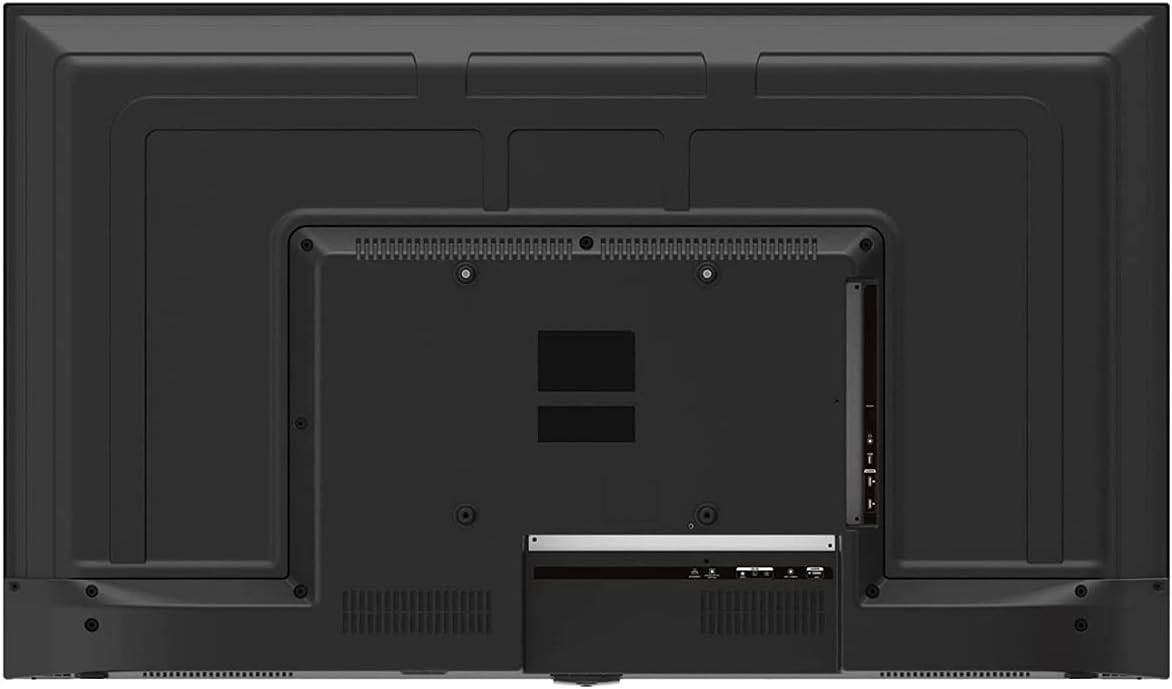
Image 3: Rear panel of the ONN 43-Inch Smart TV, highlighting the available connectivity ports.
4.3 Фаъолсозии ибтидоӣ ва танзими шабака
- Фаъол: Connect the power cord to the TV and a power outlet. Press the power button on the remote control.
- Интихоби забон: Барои интихоби забони дилхоҳатон, дастурҳои дар экран бударо иҷро кунед.
- Пайвасти шабакавӣ: Select your Wi-Fi network from the list and enter the password. Alternatively, connect an Ethernet cable for a wired connection.
- Танзимоти ҳисоби Roku: Follow the instructions to create or sign in to your Roku account. This is necessary to access streaming channels and features.
5. Корбарии телевизиони шумо
5.1 Идоракунии дурдаст
The included remote control provides easy access to all TV functions and streaming services. It features dedicated buttons for popular streaming apps like Netflix, Apple TV+, Paramount+, and HBO Max.
5.2 Smart TV Interface (Roku TV)
The Roku TV home screen provides a centralized hub for all your entertainment. You can easily navigate through streaming channels, live TV inputs, and device connections.

Image 4: The Roku TV home screen on the ONN 43-Inch Smart TV, showing available streaming applications.

Тасвири 5: кунҷӣ view of the ONN 43-Inch Smart TV, showcasing the user interface from a different perspective.
- хона: Access the main Roku TV interface.
- ТВ мустақим: Browse available live television channels.
- Мағозаи пахши мустақим: Discover and add new streaming channels.
- Apps & Inputs: Select connected devices (e.g., HDMI 1, HDMI 2) or launch installed applications.
5.3 Интегратсияи Voice Assistant
The TV is compatible with Alexa and Google Assistant. You can use a compatible voice assistant device (sold separately) or the Roku mobile app to control your TV with voice commands, such as turning it on/off, changing channels, or launching apps.
5.4 Танзимоти тасвир
To adjust picture quality, navigate to Settings > Picture Settings on the Roku TV menu. Options typically include Brightness, Contrast, Color, Tint, Sharpness, and various picture modes (e.g., Movie, Sports, Vivid, Standard).
5.5 Танзимоти садо
To adjust audio settings, navigate to Settings > Audio Settings. Options may include Volume Mode, Audio Delay, and various sound modes (e.g., Standard, Theater, Music).
6. Нигоҳдорӣ
6.1 Тоза кардани телевизор
- Пеш аз тоза кардан ҳамеша телевизорро аз розетка ҷудо кунед.
- Барои хушхӯю пок кардани экран ва шкаф аз матои мулоим ва беҳанг истифода баред.
- Барои аломатҳои якрав, сабук гampматоъро бо об ё тозакунандаи экрани ҳалим, ки абрешим надорад. Ҳеҷ гоҳ тозакунандаро мустақиман ба экран напошед.
6.2 Навсозии нармафзор
Your ONN Roku TV automatically receives software updates to improve performance and add new features. Ensure your TV is connected to the internet for these updates. You can manually check for updates via Танзимотҳо > Система > Навсозии система.
7. Баррасии мушкилот
Агар шумо бо телевизиони худ мушкилоте дошта бошед, ба роҳҳои ҳалли маъмулии зерин муроҷиат кунед:
| Мушкилот | Ҳалли |
|---|---|
| Не қудрат | Боварӣ ҳосил кунед, ки сими барқ ҳам ба телевизор ва ҳам ба васлаки барқии корӣ боэътимод пайваст карда шудааст. Васлаки дигарро санҷед. |
| Тасвир/Садо нест | Check all cable connections (HDMI, coaxial). Ensure the correct input source is selected on the TV. |
| Пули дурдаст кор намекунад | Батареяҳои пулти дурдастро иваз кунед. Боварӣ ҳосил кунед, ки байни пулти дурдаст ва сенсори IR-и телевизор ягон монеа вуҷуд надорад. |
| Ба Wi-Fi пайваст шуда наметавонад | Verify your Wi-Fi password. Restart your router and modem. Move the TV closer to the router if possible. |
| Сифати тасвири паст | Check the resolution settings of your connected device. Adjust picture settings on the TV. Ensure you are viewмундариҷаи 4K барои ҳалли беҳтарин. |
8. Мушаххасоти
| Хусусият | Тафсилот |
|---|---|
| Андозаи экран | 43 инч |
| Технологияи намоиш | НН - НУРНИШОН |
| Резолюция | 4K Ultra HD (2160p) |
| Мутобиқати HDR | Бале |
| Платформаи ТВ Smart | Року ТВ |
| Дастгирии ёрдамчии овозӣ | Alexa, Google Assistant |
| Пайвастшавӣ | 3 HDMI (1 eARC), 1 Composite, 1 USB, 1 LAN, 1 Optical, 1 Coaxial/Cable, 1 Headphone |
| Таносуби тараф | 16:9 |
| Андозаҳои маҳсулот (D x W x H) | 7" x 38" x 23" |
| Вазни ашё | 16.9 фунт |
| Ранги | Сиёҳ |

Тасвир 6: Профессионали тарафfile of the ONN 43-Inch Smart TV, illustrating its slim design.

Тасвири 7: Нишони Дастури Энергия, ки арзиши тахминии солона ва истеъмоли энергияро барои телевизор нишон медиҳад.
9. Кафолат ва дастгирӣ
For warranty information and technical support, please refer to the documentation included with your product or visit the official ONN support website. As this is a renewed product, specific warranty terms may vary. Please consult the seller or product listing for details regarding the renewed product warranty.


