Муқаддима
This manual provides essential information for the safe and effective operation of your Mackie Thump212XT 12-inch 1400W Enhanced Powered Loudspeaker. Please read this manual thoroughly before using the product to ensure proper setup, optimal performance, and to prevent damage.
Маълумоти муҳим оид ба бехатарӣ
Ҳангоми истифодаи ин маҳсулот ҳамеша чораҳои асосии бехатариро риоя кунед, то хатари сӯхтор, зарбаи барқӣ ва ҷароҳатро кам кунед. Ин дастурро барои истифода дар оянда нигоҳ доред.
- Ин асбобро ба борон ё намӣ нагузоред.
- Ин дастгоҳро дар наздикии об истифода набаред.
- Танҳо бо матои хушк тоза кунед.
- Ягон сӯрохиҳои вентилятсияро маҳкам накунед. Мувофиқи дастурҳои истеҳсолкунанда насб кунед.
- Дар наздикии ягон манбаъҳои гармӣ, аз қабили радиаторҳо, регистрҳои гармидиҳӣ, плитаҳо ё дигар дастгоҳҳо (аз ҷумла ampлифтҳо), ки гармӣ истеҳсол мекунанд.
- Сими барқро аз роҳ рафтан ё фишурдан, махсусан дар розеткаҳо, розеткаҳои қулай ва нуқтае, ки онҳо аз дастгоҳ мебароянд, муҳофизат кунед.
- Танҳо замимаҳо/ лавозимотҳои аз ҷониби истеҳсолкунанда муайяншударо истифода баред.
- Ҳангоми тӯфони барқӣ ё дар муддати тӯлонӣ истифода нашудани ин дастгоҳро аз розетка ҷудо кунед.
- Ҳама хидматрасониро ба кормандони соҳибихтисос муроҷиат кунед. Хизматрасонӣ ҳангоме лозим аст, ки дастгоҳ бо ягон роҳ осеб дида бошад, масалан, сими таъминкунандаи барқ ё васлаки вайроншуда, рехтани моеъ ё ба дохили дастгоҳ афтодани ашё, зери борон ё намӣ дучор шудани дастгоҳ, ба таври мӯътадил кор намекунад. , ё партофта шудааст.
Пешниҳоди 65 Огоҳӣ: Ин маҳсулот дорои кимиёвӣ мебошад, ки ба иёлати Калифорния маълум аст, ки боиси саратон ва нуқсонҳои таваллуд ё дигар зарари репродуктивӣ мегардад.
Маҳсулот ба охир расидview
The Mackie Thump212XT is a 12-inch 1400W enhanced powered loudspeaker designed for various audio applications. It features a robust Class-D amplifier, versatile input/output options, and advanced digital sound processing (DSP) for optimized performance.

Расми 1: Пеш view of the Mackie Thump212XT Powered Loudspeaker.
Хусусиятҳои асосӣ:
- 1400W ултра-самаранок Синфи-D ampлифер.
- Frequency response: 47 Hz – 20kHz.
- Max SPL: 128 dB.
- Application-specific voicing modes (Music, Live, Club, Monitor, Flat).
- Outdoor mode for enhanced performance in open environments.
- Built-in Feedback Eliminator to prevent unwanted audio feedback.
- Music Ducking mode for automatic music volume reduction during announcements.
- Bluetooth connectivity for audio streaming, speaker linking, and control via the Thump Connect 2 app.
- Durable, lightweight construction with multiple handles for easy transport.
Компонентҳои дохилшуда:
- Mackie Thump212XT Powered Loudspeaker
- Кабели барқ
- Thump Connect 2 app (downloadable)
- Note: 1/8'' input cable, XLR cables, and travel bag may vary depending on the seller.
Ташкил кардан
1. Physical Placement and Mounting:
The Thump212XT can be used in various configurations:
- Ошёна: Баландгӯякро мустақиман дар сатҳи ҳамвор ва устувор ҷойгир кунед.
- Монтажи сутун: Utilize the integrated pole mount at the bottom of the speaker for elevated placement on a standard speaker pole.
- Monitor Wedge: Position the speaker on its side for use as a floor monitor.
- Suspended Mounting: The speaker features integrated M10 fly points for professional suspension installations. Consult a qualified installer for this method.

Figure 2: Mackie Thump212XT configured as a floor monitor.

Figure 3: Mackie Thump212XT suspended using fly points.
2. Пайвасти барқ:
Connect the supplied power cable to the IEC power input on the rear panel of the speaker and then to a grounded AC power outlet. Ensure the power switch is in the OFF position before connecting power.
3. Пайвастҳои аудиоӣ:
The Thump212XT offers two input channels with combination XLR/1/4" jacks, allowing connection of microphones, line-level instruments, or mixers. An additional 1/8" AUX input is available for connecting portable media players.

Figure 4: Rear panel showing input jacks and controls.
- XLR/1/4" Inputs (Channels 1 & 2): Use these for microphones, mixers, or other audio sources. Adjust the GAIN knob for each channel to achieve an optimal signal level.
- 1/8" AUX Input: Connect smartphones, tablets, or other devices for audio playback.
- XLR Output (THRU): This output allows you to send the mixed signal from the Thump212XT to another powered speaker or audio device.
4. Ҷуфткунии Bluetooth:
The Thump212XT supports Bluetooth for audio streaming and speaker linking.
- Ensure Bluetooth is enabled on your audio device (e.g., smartphone, tablet).
- On the Thump212XT rear panel, press the BLUETOOTH PAIR button. The Bluetooth indicator will flash.
- Select "Thump212XT" from the list of available devices on your audio device.
- Once paired, the Bluetooth indicator on the speaker will glow solid.
- For stereo operation, you can link two Thump212XT speakers wirelessly via Bluetooth. Refer to the Thump Connect 2 app for detailed instructions on speaker linking.
Дастурҳои амалиётӣ
1. Фурӯзон/хомӯшкунӣ:
After all connections are made, turn on the Thump212XT using the power switch on the rear panel. Turn off the speaker when not in use.
2. Voicing Modes:
The Thump212XT features four application-specific voicing modes to optimize sound for different uses. Select the desired mode using the MODE button on the rear panel or via the Thump Connect 2 app.

Figure 5: Voicing Modes selection on the rear panel.
- Мусиқӣ: Optimized for general music playback.
- ЗИНДА: Suitable for live sound reinforcement with instruments and vocals.
- КЛУБ: Enhanced bass response for DJ applications and dance music.
- НАЗОРАТ: Tailored frequency response for use as a stagд монитор.
- ХАМВОР: Provides a neutral frequency response for custom equalization.
3. Хусусиятҳои махсус:
The Thump212XT includes several features to enhance your audio experience:
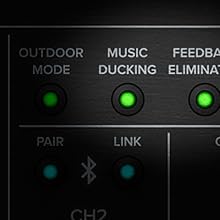
Figure 6: Controls for Outdoor Mode, Music Ducking, and Feedback Eliminator.
- Реҷаи берунӣ: Activates a special EQ curve for improved sound projection and clarity in outdoor environments.
- Кам кардани мусиқӣ: Automatically lowers the music volume when a signal is detected on the microphone inputs, making announcements clearer.
- Feedback Eliminator: Automatically detects and suppresses problematic frequencies that cause audio feedback.
4. Thump Connect 2 App:
Download the Thump Connect 2 app for iOS and Android devices to wirelessly control various functions of your Thump212XT loudspeaker, including:
- System EQ adjustments.
- Input levels and mutes.
- Voicing mode selection.
- Outdoor Mode, Music Ducking, and Feedback Eliminator activation.
- Speaker linking for stereo or zone setups.

Figure 7: Thump Connect 2 App for wireless control.
Нигоҳдорӣ
- Тозакунӣ: Clean the exterior of the speaker with a dry, lint-free cloth. Avoid using abrasive cleaners or solvents.
- Нигоҳдорӣ: When not in use, store the speaker in a cool, dry place, away from direct sunlight and extreme temperatures. Consider using a protective cover (if available) to prevent dust and scratches.
- Санҷиш: Periodically inspect power cables and audio connections for any signs of wear or damage.
Мушкилкушо
| Мушкилот | Сабаби эҳтимолӣ | Ҳалли |
|---|---|---|
| Баромади садо нест. | Power not connected, volume too low, incorrect input selected, faulty cable. | Check power connection and switch. Increase master volume and channel gain. Verify input source and cable integrity. |
| Овози вайроншуда. | Input signal too high, speaker overloaded, incorrect EQ settings. | Reduce input gain. Lower master volume. Adjust EQ settings or select a different voicing mode. |
| Хатогии пайвасткунии Bluetooth. | Speaker not in pairing mode, device too far, interference. | Ensure speaker is in pairing mode (flashing LED). Move device closer to speaker. Minimize other wireless devices. |
| Бознигарии аудио. | Microphone too close to speaker, high gain settings. | Activate Feedback Eliminator. Reposition microphone. Reduce microphone gain. |
Мушаххасоти
| Хусусият | Тафсилот |
|---|---|
| Навъи баландгӯяк | Баландгӯяки барқдор |
| Диаметри Вуфер | 12 инч (30.48 см) |
| AmpҲокимияти ҳаётбахш | 1400 Ватт (Қуллаи баланд) |
| Ҷавоби басомад | 47 Гц – 20 кГц |
| Макс SPL | 128 дБ |
| Пайвастшавӣ | Bluetooth, XLR, 1/4" TRS, 1/8" Aux |
| Диапазони бесим (Bluetooth) | То 10 метр (33 фут) |
| Усули назорат | On-board controls, Thump Connect 2 App |
| Андозаҳо (H x W x D) | 24.2 x 14.1 x 14 инч |
| Вазни ашё | 32.4 фунт |
| Материал | Metal (grille), Durable Composite (cabinet) |
Кафолат ва дастгирӣ
The Mackie Thump212XT is covered by a limited warranty. For specific warranty terms, registration, and technical support, please visit the official Mackie webсайт ё дилери ваколатдори худ тамос гиред. Барои даъвоҳои кафолат далели хариди худро нигоҳ доред.
Дастгирии онлайн: www.mackie.com/support


