1. Муқаддима
This manual provides essential information for the safe and efficient operation of your Powertech MB3904 8 Step Intelligent Lead Acid and Lithium Battery Charger. Please read this manual thoroughly before use and retain it for future reference.
2. Маълумот оид ба бехатарӣ
Ҳамеша чораҳои бехатарии зеринро риоя кунед:
- Ensure the charger is disconnected from the power supply before making or breaking connections to the battery.
- Пуркунандаи барқро танҳо дар ҷойҳои хуб шамолшаванда истифода баред.
- Аз пур кардани батареяҳои яхкардашуда худдорӣ намоед.
- Пуркунандаи барқро ба борон ва намии аз ҳад зиёд нагузоред.
- Аз дастрасии кӯдакон дур нигоҳ доред.
- This charger is designed for 6V or 12V Lead Acid or LiFePO4 batteries only. Do not use with other battery types.
3. Мундариҷаи баста
Боварӣ ҳосил кунед, ки ҳама ашё дар баста мавҷуд аст:
- Powertech MB3904 8 Step Intelligent Battery Charger Unit
- Батарея Clamp Connectors (Red and Black)
- Ring Terminal Connectors
- Сими барқи AC
- Дастури корбар (ин ҳуҷҷат)
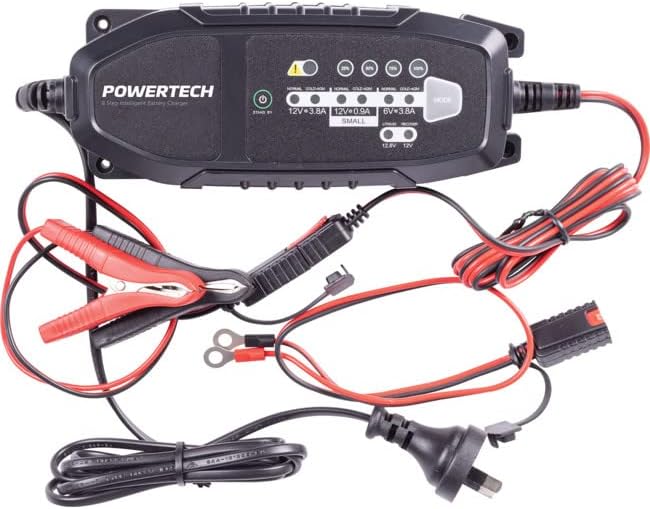
Image: The Powertech MB3904 battery charger unit shown with its various included accessories, including battery clamps, ring terminals, and the AC power cord.
4. Хусусиятҳои маҳсулот
The Powertech MB3904 charger offers advanced features for optimal battery maintenance:
- 8-Step Charging Process: Ensures thorough and efficient charging for various battery types.
- Мулти-ҷилдtage Мутобиқати: Suitable for both 6V and 12V lead acid and LiFePO4 batteries.
- Муҳофизати ҳамаҷониба: Includes overload, short circuit, reverse polarity, safety timer, and wrong battery protection.
- Нишондиҳандаҳои LED интуитивӣ: Clearly display charge status and selected mode.
- Тугмаи интихоби режим: Allows easy switching between charging modes.
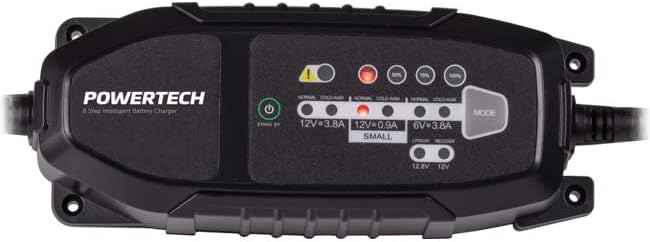
Тасвир: Аз боло ба поён view of the Powertech MB3904 charger, highlighting the LED indicators for charge status and the 'MODE' button for selecting charging programs.
5. Танзимот
- Ҷойгиршавӣ: Place the charger on a stable, flat surface in a well-ventilated area, away from direct sunlight or heat sources.
- Пайвастшавӣ ба батарея: Ensure the battery terminals are clean. Connect the red (+) clamp/ring terminal to the positive (+) battery terminal and the black (-) clamp/ring terminal to the negative (-) battery terminal. Ensure a secure connection.
- Пайвасти барқ: Plug the AC power cord into a suitable wall outlet. The charger will enter standby mode.
6. Дастурҳои истифодабарӣ
6.1. Интихоби ҳолати пуркунӣ
After connecting the battery and power, press the РЕЖИМ button to cycle through the available charging programs. The corresponding LED will illuminate to indicate the selected mode:
- 12V 3.8A (Normal): Standard charging for 12V lead acid batteries.
- 12V 3.8A (Cold/AGM): For charging 12V lead acid batteries in cold conditions or AGM batteries.
- 12V 0.9A (Small): For charging smaller 12V lead acid batteries.
- 6В 3.8А: For charging 6V lead acid batteries.
- Lithium (12.8V/12V): For charging 12V LiFePO4 batteries.
- Таъмир: A special mode for desulfation of deeply discharged lead acid batteries.
6.2. Раванди пуркунии барқ
Once a mode is selected, the charger will automatically begin the 8-step charging process. The progress LEDs (25%, 50%, 75%, 100%) will illuminate sequentially to indicate the battery's charge level. When the 100% LED is solid, the battery is fully charged.
6.3. Хомӯш кардани пуркунандаи барқ
- Сими барқи AC-ро аз васлаки деворӣ ҷудо кунед.
- Сиёҳро ҷудо кунед (-) clamp/ring terminal from the negative (-) battery terminal.
- cl сурх (+) ҷудо кунедamp/ring terminal from the positive (+) battery terminal.
7. Нигоҳдорӣ
- Тозакунӣ: Пуркунандаи барқро тоза кунед casing бо матои мулоими хушк. Тозакунанда ё ҳалкунандаҳои абразивиро истифода набаред.
- Нигоҳдорӣ: Пуркунандаи барқро дар ҷои хунук ва хушк нигоҳ доред, вақте ки истифода намебаред.
- Санҷиши кабелӣ: Periodically inspect the power cord and battery cables for any signs of damage. Do not use the charger if cables are damaged.
8. Баррасии мушкилот
| Мушкилот | Сабаби эҳтимолӣ | Ҳалли |
|---|---|---|
| Charger not turning on. | Не қувваи барқ аз васлаки; пайвасти суст. | Розеткаи барқро тафтиш кунед; боварӣ ҳосил кунед, ки сими барқӣ ба таври дуруст пайваст шудааст. |
| Error LED illuminated. | Reverse polarity; short circuit; wrong battery type. | Check battery connections for correct polarity; inspect cables for shorts; ensure battery type matches selected mode. |
| Батарея пур карда намешавад. | Battery deeply discharged/damaged; incorrect mode selected. | Try "Repair" mode for lead acid batteries; test battery with a multimeter; ensure correct charging mode is selected. |
9. Мушаххасоти
- Модели: MB3904
- Вуруди ҷилдиtage: 220-240В AC, 50/60Гц
- Натиҷаи ҳаҷtage: 6V / 12V DC
- Ҷараёни пуркунии барқ: 0.9А / 3.8А
- Намудҳои батарея: Lead Acid (WET, MF, CA, EFB, GEL, AGM), LiFePO4
- Муҳофизат: Overload, Short Circuit, Reverse Polarity, Safety Timer, Wrong Battery
- Андозаҳо: Тақрибан 20.4 x 7.4 x 4.8 см
- Вазн: Тақрибан 534 г
- Мутобиқат: CE
10. Кафолат ва дастгирӣ
This Powertech product is covered by a standard manufacturer's warranty. For specific warranty terms and conditions, please refer to the warranty card included with your purchase or contact your retailer.
For technical support or service inquiries, please contact Jaycar Electronics customer service or visit their official webсайт. Барои даъвоҳои кафолат далели хариди худро нигоҳ доред.
Jaycar Electronics Webсайт: www.jaycar.com.au


