1. Муқаддима
This manual provides essential instructions for the safe and efficient use of your Alcatel 3085 mobile phone. Please read this guide thoroughly before operating the device to ensure proper functionality and to prevent damage. Keep this manual for future reference.
2. Мундариҷаи баста
Боварӣ ҳосил кунед, ки бастаи шумо ҷузъҳои зеринро дар бар мегирад:
- Alcatel 3085 Mobile Phone
- Батарея
- Пуркунандаи барқ
- Дастури оғози зуд
- (Optional) Charging Cradle
Агар ягон ашё гум ё вайрон бошад, лутфан бо фурӯшандаи худ тамос гиред.
3. Танзимот
3.1. Ҷойгиркунии SIM корт ва батарея
- Сарпӯши қафоро хориҷ кунед: Gently pry open the back cover of the phone using the notch provided.
- SIM-кортро гузоред: Locate the SIM card slot(s). Align your SIM card with the cut corner and slide it into the slot until it clicks into place. Ensure the gold contacts face downwards.
- Батареяро гузоред: Place the battery into the battery compartment, ensuring the gold contacts on the battery align with the contacts in the phone.
- Replace back cover: Carefully align the back cover and press it firmly until it snaps into place.
3.2. Пуркунии батарея
Пеш аз истифодаи аввал, батареяи телефонро пурра пур кунед.
- Connect the charger to the charging port on the phone or place the phone in the charging cradle (if included).
- Пуркунандаи барқро ба васлаки барқ пайваст кунед.
- The charging indicator will appear on the screen. Disconnect the charger once the battery is fully charged.
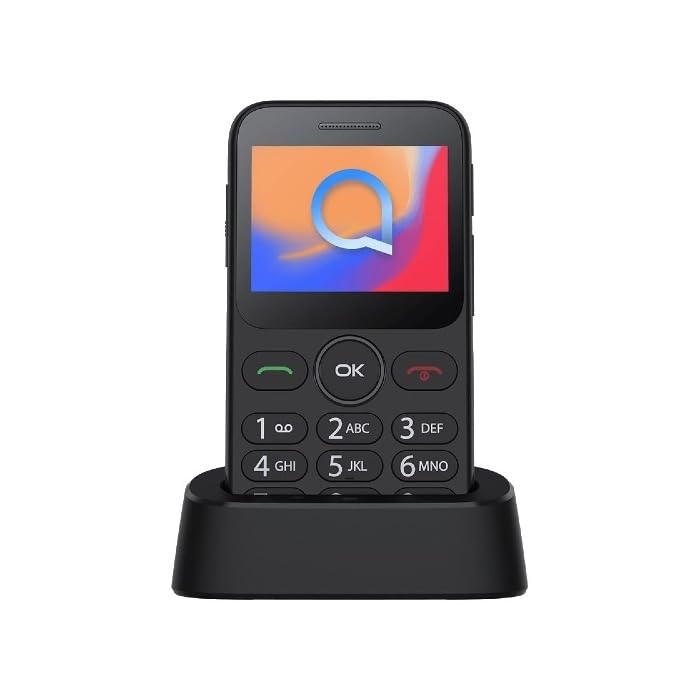
Image 1: Alcatel 3085 mobile phone placed in its charging cradle. The phone features a small color screen and a physical keypad with large, clearly labeled buttons.
4. Дастурҳои истифодабарӣ
4.1. Фурӯзон/хомӯшкунӣ
- Барои фаъол кардан: -ро пахш карда нигоҳ доред Барқ/Занги хотимавӣ тугмаро (тугмаи сурх) то равшан шудани экран пахш кунед.
- Барои хомӯш кардани барқ: -ро пахш карда нигоҳ доред Барқ/Занги хотимавӣ тугмаро то пайдо шудани имконоти хомӯшкунӣ пахш кунед ва сипас "Хомӯш кардан"-ро интихоб кунед.
4.2. Зангҳо ва қабули зангҳо
- Занг задан: Рақами телефонро бо истифода аз клавиатура ворид кунед ва тугмаи Занг занед тугма (тугмаи сабз).
- Қабули занг: Вақте ки телефон занг мезанад, -ро пахш кунед Занг занед тугмаи барои ҷавоб.
- Анҷом додани занг: -ро пахш кунед Зангро анҷом диҳед тугма.
4.3. Фиристодан ва қабул кардани паёмҳо
- Гузариш ба Паёмҳо menu from the main screen.
- Select "Create new message" or "New SMS".
- Рақами гирандаро ворид кунед ва паёми худро бо истифода аз клавиатура чоп кунед.
- Тугмаи "Фиристодан"-ро пахш кунед.
4.4. Навигатсияи асосӣ
- -ро истифода баред Тугмаҳои паймоиш (up, down, left, right) to scroll through menus.
- -ро пахш кунед Хуб/Интихоб button (center button) to confirm a selection.
- -ро пахш кунед Бозгашт/Тоза button (often the right soft key) to go back to the previous screen or delete characters.
5. Нигоҳдорӣ ва нигоҳубин
- Тозакунӣ: Use a soft, dry cloth to clean the phone's screen and body. Avoid liquid cleaners.
- Нигоҳдорӣ: Телефонро дар ҷои хунук ва хушк аз нури бевоситаи офтоб ва ҳарорати аз ҳад зиёд дур нигоҳ доред.
- Нигоҳубини батарея: Do not expose the battery to high temperatures or dispose of it in fire. Use only approved chargers.
- Муқовимат ба об: Ин телефон ба об тобовар нест. Аз таъсири моеъ худдорӣ намоед.
6. Баррасии мушкилот
| Мушкилот | Ҳалли имконпазир |
|---|---|
| Телефон фаъол нест | Ensure the battery is correctly inserted and charged. Try charging the phone for at least 30 minutes. |
| Занг задан ё қабул карда наметавонад | Check if the SIM card is properly inserted. Verify that you have network coverage. Contact your service provider if the issue persists. |
| Батарея зуд холӣ мешавад | Reduce screen brightness. Close unused applications. Ensure the phone is not in an area with poor network signal, which can increase battery consumption. |
| Клавиатура бе ҷавоб | Restart the phone. Ensure no physical obstruction is affecting the keys. |
7. Мушаххасоти
| Хусусият | Тафсилот |
|---|---|
| Бренд | Alcatel |
| Рақами модел | 3085 (HP02945) |
| Ранги | Сиёҳ металлӣ |
| ASIN | B0B8X482MH |
| Истеҳсолкунанда | Alcatel |
| Навсозии нармафзор кафолат дода мешавад, то | Маълумот дастрас нест |
| Мавҷудияти қисмҳои эҳтиётӣ | Маълумот дастрас нест |
8. Кафолат ва дастгирӣ
For warranty information, please refer to the warranty card included in your product packaging or visit the official Alcatel website. For technical support, please contact Alcatel customer service through their official channels.
You can find more information and support resources on the official Alcatel webсайт: www.alcatelmobile.com
9. Маълумот оид ба бехатарӣ
- Do not attempt to disassemble or modify the phone.
- Use only original or approved accessories.
- Avoid exposing the phone to extreme temperatures, direct sunlight, or moisture.
- Телефонро аз дастгоҳҳои тиббӣ дур нигоҳ доред, зеро ин метавонад ба кори онҳо халал расонад.
- Dispose of the phone and battery responsibly according to local regulations.