1. Муқаддима
Thank you for choosing the YENKEE YMS 3030BK RGB Gaming Mouse Ultra Light Shotgun. This manual provides detailed instructions for setting up, operating, and maintaining your new gaming mouse. Please read this manual carefully before use to ensure optimal performance and longevity of your device.
The YENKEE YMS 3030BK RGB Gaming Mouse features an ergonomic design for comfortable use. Its unique ultra-light perforated construction promotes airflow, helping to keep your palm cool during extended use. Equipped with an accurate IC 6651 sensor, it offers precise tracking with a resolution of up to 6400 DPI, and includes customizable RGB backlighting.
2. Мундариҷаи баста
Лутфан бастаро барои ҷузъҳои зерин тафтиш кунед:
- 1 x YENKEE YMS 3030BK RGB Gaming Mouse Ultra Light Shotgun
- Дастури корбар (ин ҳуҷҷат)
3. Маҳсулот ба охир расидview
3.1 Хусусиятҳои асосӣ
- Unique ultra-light perforated construction for improved airflow
- Ergonomic design for comfortable grip and to prevent palm sweat
- Customizable RGB backlight
- Accurate IC 6651 sensor with up to 6400 DPI resolution
- Wired USB connectivity
3.2 Mouse Components
The YMS 3030BK mouse typically includes the following components:
- Тугмаи чапро пахш кунед
- Тугмаи ростро пахш кунед
- Чархи ҳаракат / Тугмаи клики миёна
- Тугмаи танзими DPI (одатан дар паси чархи гардиш ҷойгир аст)
- Forward/Backward Side Buttons (typically on the left side)
- Optical Sensor (on the underside)
- Сими USB
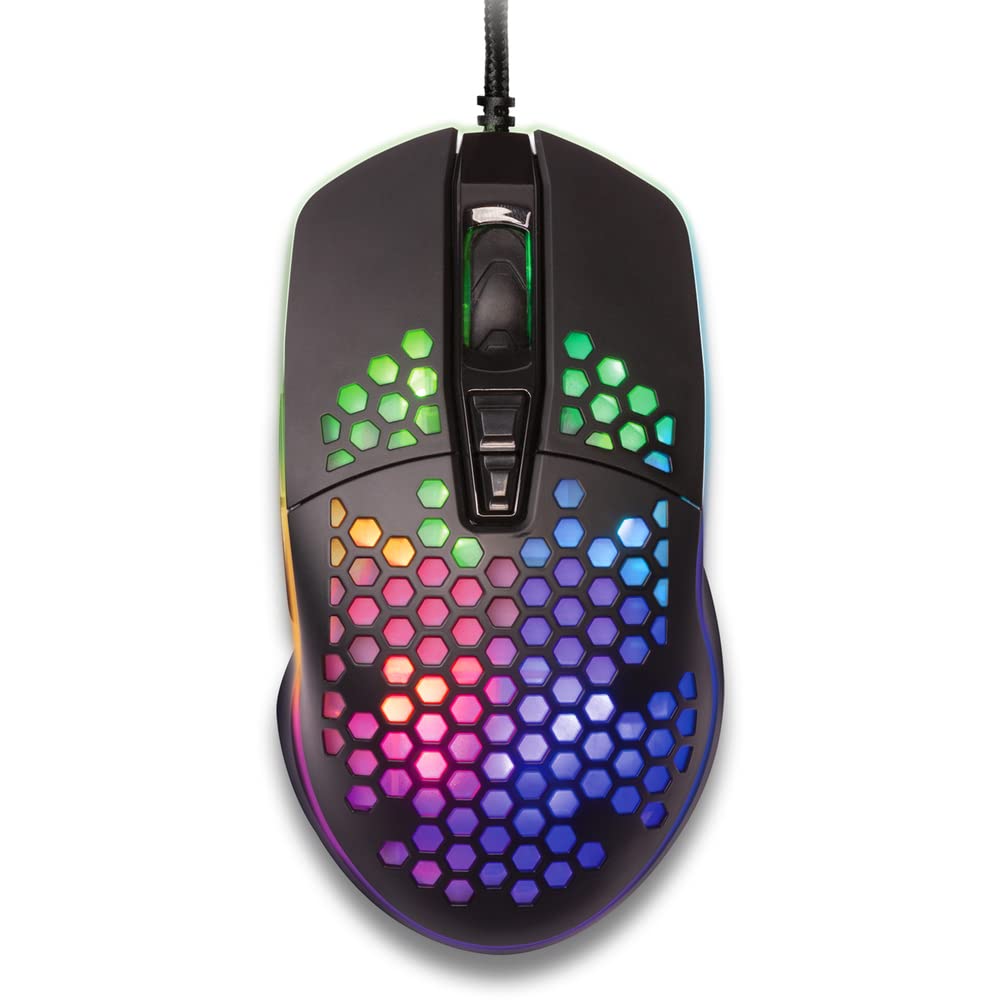
Расми 1: Аз боло ба поён view of the YENKEE YMS 3030BK RGB Gaming Mouse, highlighting its ultra-light perforated design and ergonomic contours.
4. Танзимот
Follow these steps to set up your YENKEE YMS 3030BK gaming mouse:
- Мушро пайваст кунед: Пайвасткунаки USB-и мушро ба порти USB дастраси компютери худ пайваст кунед.
- Насби драйвер: Your operating system (Windows 7, 8, Vista, XP) should automatically detect and install the necessary drivers. No additional software installation is typically required for basic functionality.
- Нармафзори ихтиёрӣ: For advanced customization of RGB lighting and button assignments, please visit the official YENKEE website to check for any dedicated software for the YMS 3030BK model.
5. Дастурҳои истифодабарӣ
5.1 Амалиёти асосӣ
- Клики чап: Амали ибтидоӣ, интихоб.
- Клики рост: Менюи контекстӣ, амали дуюмдараҷа.
- Чархи ҳаракат: Scroll up/down, middle click for specific functions (e.g., opening links in new tabs).
- Тугмаҳои тарафӣ: Default functions are typically 'Forward' and 'Backward' in web браузерҳо ё file explorers. These can often be customized via software.
5.2 Танзими DPI
The YMS 3030BK mouse features an IC 6651 sensor with a maximum resolution of 6400 DPI. You can adjust the DPI (Dots Per Inch) sensitivity on-the-fly using the dedicated DPI button, usually located behind the scroll wheel. Pressing this button will cycle through preset DPI levels, indicated by changes in the mouse's RGB lighting color or pattern. Refer to the optional software for precise DPI level configuration and customization.
5.3 Мутобиқсозии равшании RGB
The RGB backlight of your mouse can be customized to match your preferences. While some mice offer onboard controls for basic lighting effects, full customization of colors, patterns, and brightness is typically achieved through the dedicated YENKEE software (if available). Please download and install the software from the official YENKEE website for advanced lighting options.
6. Нигоҳдорӣ
Барои таъмини дарозумрӣ ва кори беҳтарини муши бозии худ, ин дастурҳои нигоҳдориро риоя кунед:
- Тозакунӣ: Use a soft, dry cloth to wipe the surface of the mouse. For perforated areas, a soft brush or compressed air can help remove dust. Avoid using harsh chemicals or abrasive materials.
- Тозакунии сенсор: Occasionally clean the optical sensor on the underside of the mouse with a cotton swab lightly dampened with isopropyl alcohol. Ensure it is completely dry before use.
- Нигоҳубини кабел: Барои пешгирӣ аз осеб дидан аз хамшавии тез ё кашидани аз ҳад зиёди сими USB худдорӣ кунед.
- Нигоҳдорӣ: Вақте ки муш истифода намешавад, онро дар муҳити тоза ва хушк нигоҳ доред.
7. Баррасии мушкилот
If you encounter issues with your YENKEE YMS 3030BK mouse, refer to the table below for common problems and solutions:
| Мушкилот | Сабаби эҳтимолӣ | Ҳалли |
|---|---|---|
| Муш ҷавоб намедиҳад | Пайвасти USB фуҷур, порти USB хато, мушкилоти ронанда. | Ensure USB cable is securely plugged in. Try a different USB port. Restart your computer. Check Device Manager for driver status. |
| Ҳаракати курсор номунтазам ё ҷаҳиш аст | Сенсори оптикии ифлос, сатҳи номувофиқи лавҳаи муш. | Clean the optical sensor. Use a clean, uniform mouse pad. |
| Танзими DPI кор намекунад | Низоъи нармафзор, корношоямии тугма. | Ensure no conflicting software is running. If using custom software, check its settings. |
| Равшании RGB кор намекунад ё банд аст | Software issue, power issue. | Check the YENKEE software settings. Unplug and replug the mouse. Restart your computer. |
8. Мушаххасоти
| Хусусият | Тафсилот |
|---|---|
| Бренд | ЙЕНКИ |
| Рақами модел | YMS 3030BK |
| Технологияи пайвастшавӣ | USB (Сими барқ) |
| Технологияи муайянкунии ҳаракат | Optical (IC 6651 Sensor) |
| Максимум DPI | 6400 DPI |
| Хусусиятҳои махсус | Ergonomic Design, Lightweight, Perforated Construction, RGB Backlight |
| Ранги | Сиёҳ |
| Вазни ашё | 4.2 унсия (тақрибан 119 грамм) |
| Андозаҳои маҳсулот (LxWxH) | 5.43 x 2.44 x 9.06 инч (тақрибан 13.8 x 6.2 x 23 см) |
| Платформаи сахтафзор | Бозӣ |
| Мутобиқати системаи оператсионӣ | Windows 7, Windows 8, Windows Vista, Windows XP |
9. Кафолат ва дастгирӣ
Маълумот дар бораи кафолат: For detailed warranty terms and conditions, please refer to the warranty card included with your product or visit the official YENKEE website. Warranty periods may vary by region and retailer.
Дастгирии муштариён: If you require technical assistance or have questions regarding your YENKEE YMS 3030BK gaming mouse, please contact your retailer or visit the support section of the official YENKEE webсайт барои маълумот барои тамос ва FAQ.


