Муқаддима
Thank you for choosing the Yenkee YMS 5030 Wireless Ergonomic Vertical Mouse. This manual provides detailed instructions for setting up, operating, and maintaining your new mouse. Designed for comfort and precision, this vertical mouse helps promote a natural wrist posture, reducing strain during extended use.
Please read this manual thoroughly before using the product to ensure proper function and longevity.
Мундариҷаи баста
Боварӣ ҳосил кунед, ки ҳама ашё дар баста мавҷуд аст:
- 1 x Yenkee 1000/1600 DPI Wireless Ergonomic Vertical Mouse
- 1 x USB Nano Қабулкунанда
- 1 x Дастури корбар (ин ҳуҷҷат)
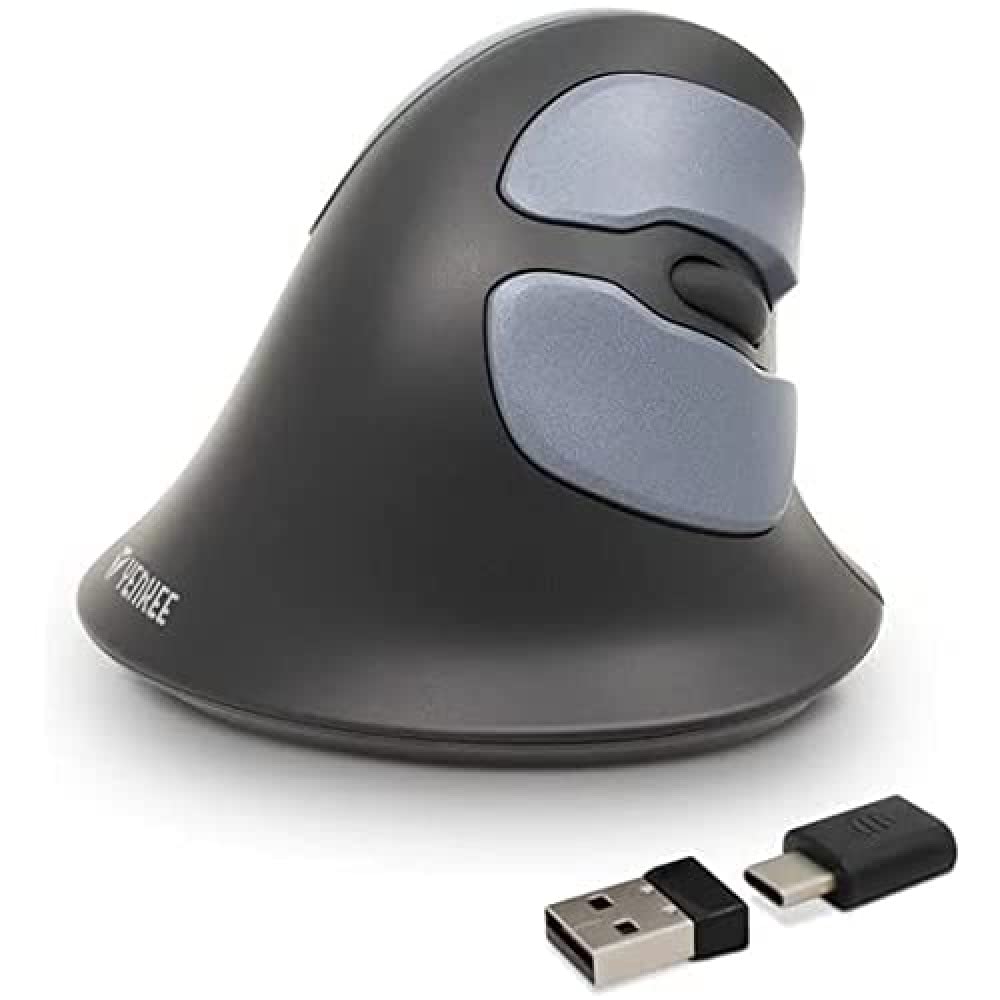
Image: Yenkee YMS 5030 Wireless Ergonomic Vertical Mouse with its USB nano receiver. The mouse is black, featuring a vertical design with multiple buttons.
Ташкил кардан
- Батареяҳоро насб кунед:
Locate the battery compartment on the underside of the mouse. Open the cover and insert the required batteries (not included), ensuring correct polarity (+/-). Close the battery compartment cover securely.
Тасвир: Дар поён view of the Yenkee YMS 5030 mouse, highlighting the battery compartment and the on/off switch.
- Қабулкунаки нано USB-ро пайваст кунед:
Plug the USB nano receiver into an available USB port on your computer. Your operating system should automatically detect and install the necessary drivers. This process may take a few moments.
- Фаъол кардани муш:
Slide the ON/OFF switch, located on the underside of the mouse, to the "ON" position. The mouse should now be active and ready for use.
Дастурҳои амалиётӣ
The Yenkee YMS 5030 mouse features 6 buttons and adjustable DPI settings for precise control.
- Тугмаи чапро пахш кунед: Функсияи стандартии клик.
- Тугмаи ростро пахш кунед: Функсияи клики дуюмдараҷаи стандартӣ.
- Чархи ҳаракат: Ҳуҷҷатҳоро ба боло ё поён ҳаракат кунед ва web саҳифаҳо. Инчунин барои функсияи клики миёна пахш кардан мумкин аст.
- Тугмаҳои пеш/қафо: Ин тугмаҳо дар паҳлӯ ҷойгиранд, барои паймоиши зуд ба дохили он имкон медиҳанд web браузерҳо ё file кашфкунандагон.
- Тугмаи танзими DPI: Located near the scroll wheel, press this button to cycle between DPI settings (1000 DPI and 1600 DPI). Adjust the sensitivity to suit your preference and task.
Тасвир: аз боло ба поён view of the Yenkee YMS 5030 mouse, indicating the positions of the left/right click, scroll wheel, forward/backward, and DPI adjustment buttons.
Тарҳрезии эргономикӣ
The vertical design of the YMS 5030 mouse positions your hand in a natural handshake posture, which can help alleviate wrist strain and discomfort often associated with traditional horizontal mice. This design is particularly beneficial for users seeking to reduce the risk of repetitive strain injuries like Carpal Tunnel Syndrome.
Нигоҳдорӣ
- Тозакунӣ: Use a soft, dry cloth to clean the surface of the mouse. For stubborn dirt, slightly dampдар матои об. Аз истифодаи кимиёвии сахт ё тозакунандаи абразив худдорӣ намоед.
- Иваз кардани батарея: When the mouse performance degrades or it stops responding, it's time to replace the batteries. Follow the "Install Batteries" steps in the Setup section. Dispose of old batteries responsibly according to local regulations.
- Нигоҳдорӣ: When not in use for extended periods, turn off the mouse using the ON/OFF switch to conserve battery life. Store the mouse and receiver in a dry, cool place.
Мушкилкушо
| Мушкилот | Сабаби эҳтимолӣ | Ҳалли |
|---|---|---|
| Муш ҷавоб намедиҳад. |
|
|
| Ҳаракати курсор номунтазам ё ҷаҳиш аст. |
|
|
| Танзимоти DPI тағйир намеёбад. | DPI button not pressed correctly or mouse not powered on. | Ensure the mouse is on and press the DPI button firmly. Observe if cursor speed changes. |
Мушаххасоти
| Хусусият | Тафсилот |
|---|---|
| Бренд | Yenkee |
| Рақами модел | YMS 5030 |
| Ранги | Сиёҳ |
| Технологияи пайвастшавӣ | Бесимӣ (Wi-Fi) |
| Технологияи муайянкунии ҳаракат | Оптикӣ |
| Танзимоти DPI | 1000 DPI / 1600 DPI |
| Шумораи тугмаҳо | 6 |
| Масофаи корӣ | То 10 метр |
| Манбаи нерӯ | Батарея бо батарея (батареяҳо дохил карда намешаванд) |
| Платформаи сахтафзор | PC |
| Мутобиқати системаи оператсионӣ | Windows 7, Windows 8, Windows Vista, Windows XP |
| Андозаҳои маҳсулот | 14.1 х 7.8 х 23 см |
| Вазни ашё | 125 гр |
Кафолат ва дастгирӣ
Yenkee products are manufactured to high-quality standards. For information regarding warranty terms and conditions, please refer to the warranty card included with your purchase or visit the official Yenkee website. For technical support or service inquiries, please contact your local retailer or the Yenkee customer support team.


