1. Муқаддима
Thank you for choosing the Gembird USB-C Gigabit Network Adapter with 3-Port USB 3.1 Hub. This device is designed to expand the connectivity of your USB-C enabled laptop, tablet, or computer, providing both high-speed Gigabit Ethernet and additional USB 3.1 ports. This manual provides essential information for setting up, operating, and maintaining your device.
2. Хусусиятҳои маҳсулот
- Пайвастагии USB-C: Connects to your host device via a reversible USB-C port.
- Порти Gigabit Ethernet: Provides a stable and fast wired network connection up to 1000 Mbps.
- 3-Port USB 3.1 Hub: Adds three USB 3.1 ports for connecting peripherals such as external hard drives, flash drives, keyboards, and mice.
- Интиқоли баландсуръати маълумот: USB 3.1 ports support data transfer rates up to 5 Gbps.
- Plug and Play: No driver installation required for most modern operating systems.
3. Мундариҷаи баста
Please ensure the following items are included in your package:
- Gembird USB-C Gigabit Network Adapter with 3-Port USB 3.1 Hub (Model A-CMU3-LAN-01)
4. Маҳсулот ба охир расидview
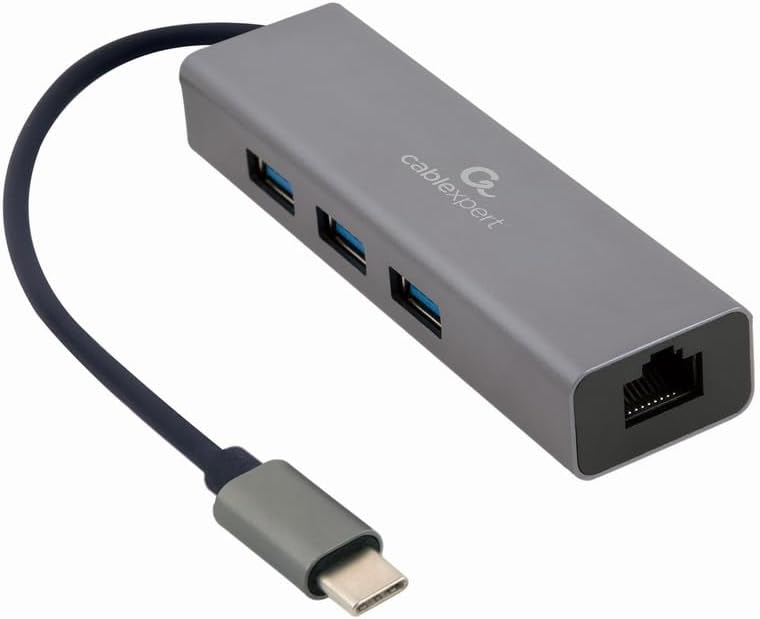
Расми 1: Пеш view of the Gembird USB-C Gigabit Network Adapter, showing the USB-C cable, three USB 3.1 ports, and the RJ45 Gigabit Ethernet port.

Расми 2: Retail packaging for the Gembird USB-C Gigabit Network Adapter, highlighting key features like USB Type-C, USB 3.1 x 3, RJ45, Gigabit, 1000 Mbps, and Plug & Play.
5. Танзимот
Follow these steps to set up your Gembird USB-C Gigabit Network Adapter:
- Ба дастгоҳи мизбон пайваст шавед: Plug the USB-C connector of the adapter into an available USB-C port on your laptop, tablet, or computer.
- Пайвастшавӣ ба шабака: Insert an Ethernet cable (RJ45) from your router or modem into the Gigabit Ethernet port on the adapter.
- Пайваст кардани дастгоҳҳои периферии USB: Plug your USB devices (e.g., flash drives, external hard drives, mouse, keyboard) into the three available USB 3.1 ports on the adapter.
- Насби драйвер: The adapter is typically plug-and-play. Your operating system (Windows, macOS, Linux, Chrome OS) should automatically detect and install the necessary drivers. If prompted, allow the system to install drivers.
6. Дастурҳои истифодабарӣ
Once connected, the adapter functions automatically:
- Дастрасии шабака: Your host device should now have a wired network connection. You can verify this in your operating system's network settings.
- USB Device Access: Connected USB peripherals will be recognized by your host device and function as if directly connected.
7. Баррасии мушкилот
Агар шумо бо мушкилот рӯ ба рӯ шавед, ба мушкилоти умумӣ ва роҳҳои ҳалли зерин муроҷиат кунед:
- Пайвасти шабака нест:
- Ensure the Ethernet cable is securely connected to both the adapter and your router/modem.
- Check your router/modem for proper operation.
- Танзимоти шабакаро дар дастгоҳи мизбони худ санҷед.
- Try connecting the adapter to a different USB-C port on your host device.
- Дастгоҳҳои USB эътироф карда намешаванд:
- Ensure USB devices are properly plugged into the adapter's USB 3.1 ports.
- Try connecting the USB device directly to your host computer to confirm it is functional.
- Some high-power USB devices may require an external power source if your host device's USB-C port does not provide sufficient power (this adapter does not have a dedicated power input).
- Суръати сусти шабака:
- Ensure your Ethernet cable is rated for Gigabit speeds (Cat5e or higher).
- Verify your internet service provider's speed and your router's capabilities.
- Ensure your host device's USB-C port supports USB 3.0/3.1 speeds.
8. Мушаххасоти
| Рақами модел | A-CMU3-LAN-01 |
| Интерфейси сахтафзор | USB-C (Host), USB 3.1 (Hub), RJ45 (Ethernet) |
| Ҳама портҳои USB | 3 (USB 3.1) |
| Портҳои Ethernet | 1 (Гигабит RJ45) |
| Data Transfer Rate (USB) | То 5 Гбит/с (USB 3.1) |
| Data Transfer Rate (Ethernet) | 10/100/1000 Мбит/с |
| Андозаҳои маҳсулот | 10 x 2 x 2.7 инч |
| Вазни ашё | 2.46 унция |
9. Нигоҳдорӣ
Барои таъмини дарозумрӣ ва кори беҳтарини адаптери шумо:
- Тозакунӣ: Use a soft, dry cloth to clean the exterior of the device. Avoid liquid cleaners or solvents.
- Нигоҳдорӣ: Адаптерро дар ҷои хунук ва хушк, дур аз нури бевоситаи офтоб ва ҳарорати аз ҳад зиёд ҳангоми истифода набаред, нигоҳ доред.
- Муносибат: Avoid dropping or subjecting the device to strong impacts. Do not attempt to disassemble the adapter.
10. Кафолат ва дастгирӣ
This Gembird product comes with a кафолати дусола бар зидди камбудиҳои заводӣ. Лутфан далели хариди худро барои даъвоҳои кафолат нигоҳ доред.
For technical support or warranty inquiries, please contact your retailer or visit the official Gembird webсайт барои маълумоти тамос.


