1. Муқаддима
Thank you for choosing the White Shark GK-2022 SHINOBI Mechanical Keyboard. This compact 61-key keyboard is designed for optimal performance and durability, featuring OUTEMU Red mechanical switches and vibrant RGB backlighting. This manual provides detailed instructions for setup, operation, maintenance, and troubleshooting to ensure you get the most out of your new keyboard.
2. Мундариҷаи баста
Лутфан бастаро барои ҷузъҳои зерин тафтиш кунед:
- White Shark GK-2022 SHINOBI Mechanical Keyboard
- USB-A ба кабели USB-C (1.8м)
- Дастури корбар (ин ҳуҷҷат)
3. Маҳсулот ба охир расидview
The White Shark GK-2022 SHINOBI is a 61-key compact mechanical keyboard, ideal for users seeking a minimalist design without compromising on functionality. It features durable mechanical switches and customizable backlighting.

Расми 3.1: боло view of the White Shark GK-2022 SHINOBI keyboard, showcasinТарҳбандии паймон бо 61 тугма ва равшании дурахшони RGB.

Расми 3.2: кунҷӣ view of the keyboard, highlighting its ergonomic profile ва тарроҳии клавиатура.
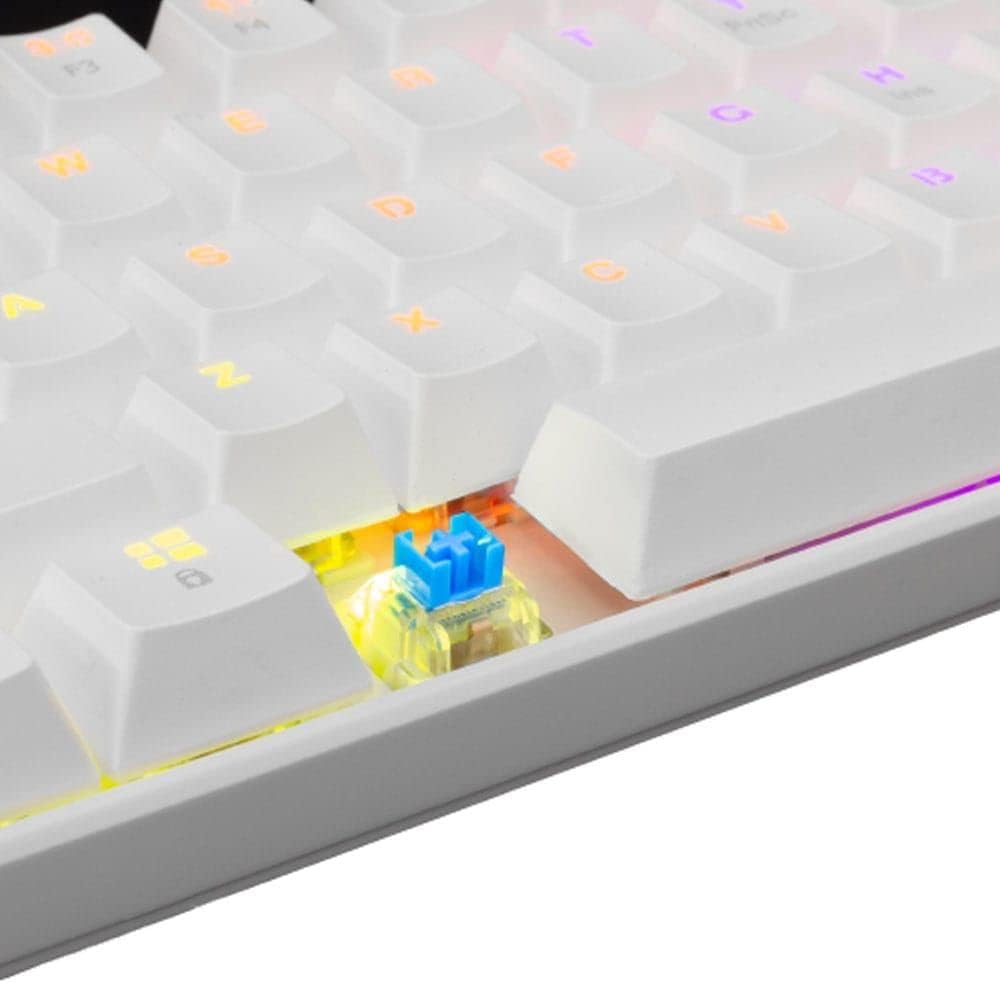
Расми 3.3: Нақшаи наздик view of an OUTEMU Red mechanical switch, known for its linear and quiet operation.
4. Танзимот
Follow these steps to set up your White Shark GK-2022 SHINOBI keyboard:
- Unpack the keyboard and the USB cable from the box.
- Порти USB-C-ро дар клавиатура ҷойгир кунед.
- Insert the USB-C end of the cable into the keyboard's port.
- Connect the USB-A end of the cable to an available USB 2.0 port on your computer (PC, Laptop, etc.).
- Клавиатура "васл ва бозӣ" аст ва бояд аз ҷониби системаи оператсионии шумо ба таври худкор шинохта шавад. Одатан ягон драйвери иловагӣ лозим нест.

Figure 4.1: Connecting the USB-C cable to the keyboard's port for power and data transmission.
5. Дастурҳои истифодабарӣ
5.1 Амалиёти асосӣ
Once connected, the keyboard is ready for immediate use. Type as you would on any standard keyboard.
5.2 Тугмаҳои функсионалӣ ва миёнбурҳо
Due to its compact 61-key layout, many standard functions are accessed via a combination of the Function (Fn) key and other keys. Refer to the keycaps for specific Fn layer markings.
- Fn + [Тугма]: Access secondary functions printed on the keycaps (e.g., F1-F12, multimedia controls, navigation keys).
- Назорати равшании паси: The keyboard features single-color backlighting. Use Fn key combinations to cycle through lighting modes or adjust brightness. Specific combinations are usually marked on the keys (e.g., Fn + \ for lighting modes, Fn + arrow keys for brightness/speed).
5.3 Муқовимат ба арвоҳ
The GK-2022 SHINOBI supports full 61-key anti-ghosting, ensuring that every key press is registered accurately, even during rapid, simultaneous keystrokes, which is beneficial for gaming and fast typing.
6. Нигоҳдорӣ
Proper maintenance will extend the lifespan of your keyboard:
- Тозакунӣ: Use a soft, dry cloth to wipe the surface of the keyboard. For deeper cleaning, you may use compressed air to remove dust and debris from between the keycaps.
- Резишҳо: In case of liquid spills, immediately unplug the keyboard from your computer. Turn it upside down to drain any liquid and allow it to dry completely before reconnecting. Do not use a hairdryer as excessive heat can damage components.
- НигоҳдорӣКлавиатура: Клавиатураро дар ҷои хунук ва хушк, дур аз нури бевоситаи офтоб ва ҳарорати аз ҳад зиёд нигоҳ доред.
7. Баррасии мушкилот
If you encounter issues with your keyboard, try the following solutions:
- Клавиатура ҷавоб намедиҳад:
- Боварӣ ҳосил кунед, ки сими USB ҳам ба клавиатура ва ҳам ба компютер боэътимод пайваст шудааст.
- Кӯшиш кунед, ки клавиатураро ба порти дигари USB дар компютери худ пайваст кунед.
- Компютери худро бозоғоз намоед.
- Клавиатураро дар компютери дигар санҷед, то муайян кунед, ки оё мушкилот бо клавиатура ё системаи шумост.
- Калидҳо ба қайд гирифта нашудаанд ё дукарата чоп мекунанд:
- Check for any debris or foreign objects under the affected keycap.
- Боварӣ ҳосил кунед, ки сарпӯши тугма дар тугма дуруст ҷойгир шудааст.
- Равшании пушти сар кор намекунад:
- Ensure the keyboard is properly powered.
- Try cycling through the lighting modes using the Fn key combinations.
- Танзимоти равшаниро танзим кунед.
If the problem persists after trying these steps, please contact White Shark customer support.
8. Мушаххасоти
| Хусусият | Тавсифи |
|---|---|
| Модели | GK-2022 SHINOBI |
| Бренд | Шарки сафед |
| Шумораи калидҳо | 61 |
| Навъи гузариш | Mechanical - OUTEMU (Red) |
| Фишори калидӣ | 60 г +/- 15 г |
| Бар зидди арвоҳ | 61 keys (Full Anti-Ghosting) |
| Ранги | Сафед |
| Интерфейс | USB 2.0 |
| Дарозии кабел | 1.8 метр |
| Дастгоҳҳои мувофиқ | PC, Laptop, Tablet, Smartphone (via USB) |
| Истифодаи тавсияшаванда | Gaming, Office Work, Multimedia Editing |
| Равшании паси клавиатура | Single Color (RGB effects) |
| Материал | Пластмасса |
| Вазни ашё | 556 гр |
| Андозаҳои бастаҳо | 31 х 13 х 5 см |
9. Кафолат ва дастгирӣ
White Shark products are manufactured to the highest quality standards. For information regarding warranty coverage, technical support, or service inquiries, please refer to the warranty card included with your product or visit the official White Shark webсайт. Лутфан далели хариди худро барои даъвоҳои кафолат нигоҳ доред.
For further assistance, you may contact White Shark customer support through their official channels.


