1. Муқаддима
This manual provides essential instructions for the setup, operation, maintenance, and troubleshooting of your White Shark GK-2102 LEGIONNAIRE-X RGB USB Keyboard. Please read this manual thoroughly before using the product to ensure proper functionality and longevity.

Тасвири 1.1: боло view of the White Shark GK-2102 LEGIONNAIRE-X RGB USB Keyboard, showcasinтарҳбандии пурраи он ва равшании RGB.
2. Танзимот
Follow these steps to connect your White Shark GK-2102 LEGIONNAIRE-X RGB USB Keyboard to your computer.
- Клавиатураро кушоед: Клавиатура ва сими USB-и онро аз баста боэҳтиёт хориҷ кунед.
- Сими USB-ро пайваст кунед: Insert the USB connector of the keyboard into an available USB port on your computer.

Image 2.1: Close-up of the USB connector, which is used to connect the keyboard to a computer.
- Насби драйвер: The keyboard is plug-and-play. Your operating system should automatically detect and install the necessary drivers. No additional software installation is typically required.
- Танзими пойҳои клавиатура: For ergonomic comfort, you may extend the adjustable feet located on the underside of the keyboard.

Тасвири 2.2: View of the adjustable feet on the keyboard's underside, allowing users to modify the typing angle.
3. Дастурҳои истифодабарӣ
The White Shark GK-2102 LEGIONNAIRE-X is a standard USB keyboard with RGB lighting features. Below are general operating guidelines.
3.1 Вазифаҳои асосии клавиатура
The keyboard functions as a standard QWERTY layout device. All keys perform their indicated character or function when pressed. Special function keys (F1-F12) may require the 'Fn' key to be held down simultaneously for their secondary functions, depending on your operating system and specific keyboard model configuration.
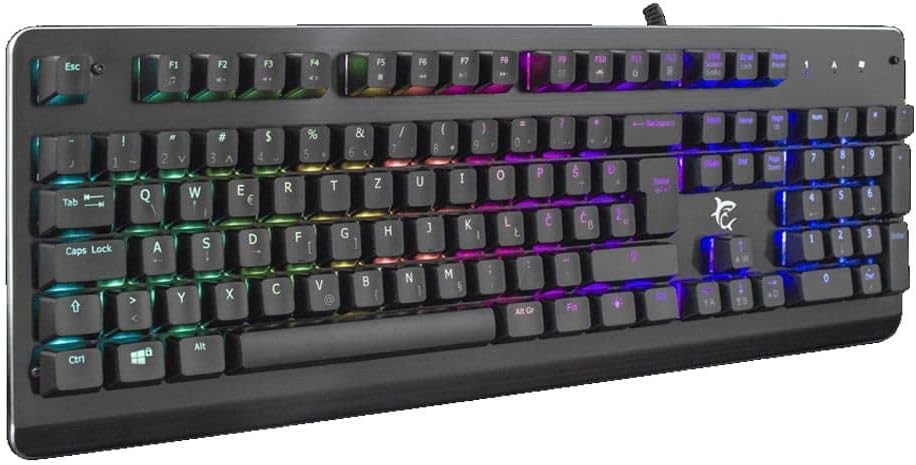
Тасвири 3.1: кунҷӣ view of the keyboard, highlighting the key layout and illuminated RGB backlighting.
3.2 Назорати равшании RGB
This keyboard features RGB lighting. Specific key combinations, often involving the 'Fn' key and other designated keys (e.g., arrow keys, Ins, Home, PgUp, Del, End, PgDn), are typically used to cycle through lighting modes, adjust brightness, or change colors. Refer to the quick start guide or manufacturer's website for detailed RGB control commands specific to this model.
4. Нигоҳдорӣ
Нигоҳубини дуруст кори дарозмуддат ва самаранокии клавиатураи шуморо кафолат медиҳад.
- Тозакунӣ: Disconnect the keyboard from your computer before cleaning. Use a soft, dry cloth to wipe the surface. For stubborn dirt, a slightly damp cloth with mild soap can be used, ensuring no liquid enters the keyboard. Compressed air can be used to remove dust and debris from between the keys.
- Аз моеъ худдорӣ кунед: Do not spill liquids on the keyboard. Liquid damage can cause permanent malfunction.
- Нигоҳдорӣ: Клавиатураро дар ҷои хунук ва хушк дур аз нури бевоситаи офтоб ва ҳарорати аз ҳад зиёд нигоҳ доред, вақте ки дар муддати тӯлонӣ истифода намешаванд.
5. Баррасии мушкилот
If you encounter issues with your keyboard, try the following solutions:
- Клавиатура ҷавоб намедиҳад:
- Боварӣ ҳосил кунед, ки сими USB ҳам ба клавиатура ва ҳам ба компютер боэътимод пайваст шудааст.
- Кӯшиш кунед, ки клавиатураро ба порти дигари USB дар компютери худ пайваст кунед.
- Test the keyboard on another computer to determine if the issue is with the keyboard or the computer's port/drivers.
- Компютери худро бозоғоз намоед.
- Калидҳо кор намекунанд:
- Дар зери тугмаҳои калидӣ ҳама гуна монеаҳои ҷисмониро тафтиш кунед.
- Клавиатураро тавре ки дар бахши Нигоҳдорӣ тавсиф шудааст, тоза кунед.
- Равшании RGB кор намекунад/нодуруст:
- Боварӣ ҳосил кунед, ки клавиатура дуруст пайваст шудааст ва барқро қабул мекунад.
- Refer to the manufacturer's specific instructions for RGB control key combinations.
6. Мушаххасоти
Below are the technical specifications for the White Shark GK-2102 LEGIONNAIRE-X RGB USB Keyboard:

Тасвир 6.1: Профессионали тарафfile of the keyboard, illustrating its physical dimensions and keycap height.
| Хусусият | Тафсилот |
|---|---|
| Бренд | Шарки сафед |
| Модели | GK-2102 LEGIONNAIRE-X |
| Пайвастшавӣ | USB |
| Андозаҳои маҳсулот | 50 х 50 х 28 см |
| Вазн | 1.06 кг |
| Материал | Пластмасса |
| Хусусиятҳои махсус | Равшании RGB |
| Батареяҳо лозиманд | Не |
7. Маълумот дар бораи кафолат
For detailed warranty information regarding your White Shark GK-2102 LEGIONNAIRE-X RGB USB Keyboard, please refer to the warranty card included with your product or visit the official White Shark webсайт. Шартҳо ва шартҳои кафолат вобаста ба минтақа ва фурӯшанда метавонанд фарқ кунанд.
8. Дастгирӣ
If you require further assistance or have questions not covered in this manual, please contact White Shark customer support through their official website or the contact information provided with your purchase. Please have your product model (GK-2102 LEGIONNAIRE-X) and purchase details ready when contacting support.


