Муқаддима
Thank you for choosing the Havit Gaming Mouse MS955. This optical gaming mouse features a USB interface, adjustable DPI settings, and RGB backlighting, designed to enhance your gaming experience. This manual provides essential information for setting up, operating, and maintaining your mouse.
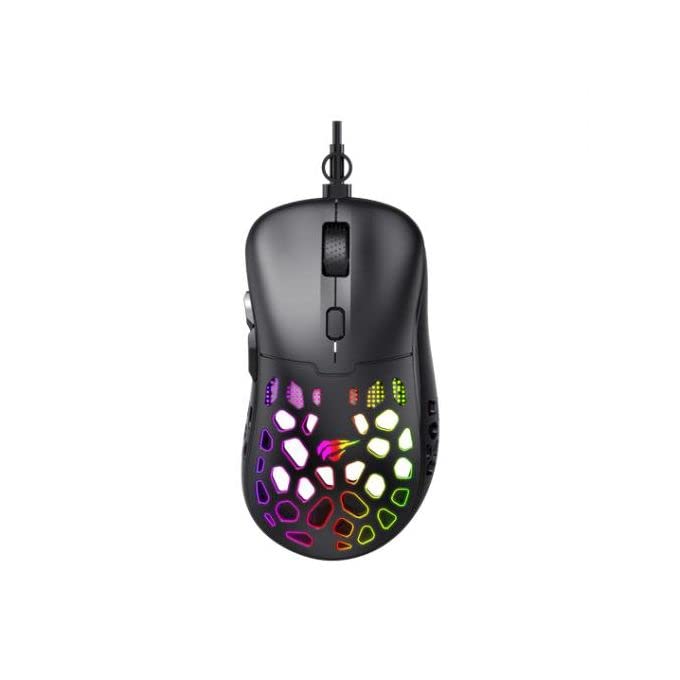
Тасвир: аз боло ба поён view of the Havit Gaming Mouse MS955, showcasing its ergonomic design and vibrant RGB lighting through the honeycomb shell.
Ташкил кардан
- Мушро кушоед: Carefully remove the Havit Gaming Mouse MS955 from its packaging.
- Ба компютер пайваст шавед: Locate an available USB port on your computer. Insert the USB connector of the mouse into the USB port.
- Насби драйвер: The mouse is plug-and-play. Your operating system (Windows XP, Windows 7, Linux, etc.) will automatically detect and install the necessary drivers. No additional software installation is typically required for basic functionality.
- Функсияи санҷиш: Once connected, move the mouse and click the buttons to ensure it is working correctly.
Дастурҳои амалиётӣ
The Havit Gaming Mouse MS955 features 6 programmable buttons and adjustable DPI settings for precise control.

Тасвир: тараф view of the Havit Gaming Mouse MS955, highlighting the left-side buttons and scroll wheel.
- Тугмаи чапро пахш кунед: Primary button for selection and interaction.
- Тугмаи ростро пахш кунед: Secondary button for context menus and alternative actions.
- Чархи ҳаракат: Барои ҳаракат дар байни ҳуҷҷатҳо истифода мешавад ва web pages. It also functions as a clickable middle button.
- Тугмаи танзими DPI: Located behind the scroll wheel. Press this button to cycle through different DPI sensitivity levels (800-1200-2400-3200 DPI). Each press changes the sensitivity, allowing you to adapt to various gaming or work scenarios.
- Тугмаҳои тарафӣ: Two buttons are located on the left side of the mouse. These are typically used for 'forward' and 'backward' navigation in web browsers or can be programmed for in-game actions.
Равшании RGB
The Havit Gaming Mouse MS955 features an integrated RGB backlight system. The lighting effects are typically automatic and may change with DPI settings or cycle through various colors. There are no dedicated buttons for controlling the RGB lighting directly on the mouse.
Нигоҳдорӣ
- Тозакунӣ: To clean the mouse, disconnect it from your computer. Use a soft, dry cloth to wipe the surface. For stubborn dirt, a slightly damp cloth can be used, ensuring no liquid enters the mouse. Do not use harsh chemicals or abrasive cleaners.
- Нигоҳдорӣ: Мушро дар муҳити тоза ва хушк, дур аз ҳарорати аз ҳад зиёд ва нури бевоситаи офтоб нигоҳ доред.
- Нигоҳубини кабел: Барои пешгирӣ аз осеб дидан аз хам кардан ё печондани сими USB аз ҳад зиёд худдорӣ кунед.
Мушкилкушо
- Муш ҷавоб намедиҳад:
- Боварӣ ҳосил кунед, ки сими USB ба порти USB коркунандаи компютери шумо боэътимод васл шудааст.
- Кӯшиш кунед, ки мушро ба порти дигари USB пайваст кунед.
- Компютери худро бозоғоз намоед.
- DPI тағйир намеёбад:
- Press the DPI button firmly. Ensure you are pressing the correct button.
- The mouse cycles through fixed DPI settings; there is no visual indicator other than cursor speed change.
- Чароғҳои RGB кор намекунанд:
- Verify the mouse is properly connected to your computer.
- The RGB lighting is automatic; if the mouse is functioning otherwise, the lighting should also be active.
Мушаххасоти
| Хусусият | Тафсилот |
|---|---|
| Бренд | Хавит |
| Модели | MS955 |
| Навъи интерфейс | USB |
| Андозаҳо | 115.2 x 63 x 37.6 мм |
| Шумораи калидҳо | 6 |
| Чипсет | NST5311 |
| Қарори DPI | 800-1200-2400-3200 DPI |
| Ҷилди амалиётӣtage | 5V |
| Ҳаёти асосии | 3,000,000 клик |
| Дарозии кабел | 1.5 м |
| Муайянкунии ҳаракат | Оптикӣ |
| Самти даст | Дуруст |
| Истифодаи тавсияшаванда | Бозӣ |
| Системаҳои оператсионӣ | Linux, Windows 7, Windows XP |
| Ранги | Сиёҳ |
Кафолат ва дастгирӣ
For warranty information or technical support, please refer to the documentation included with your purchase or visit the official Havit webсайт. Барои даъвоҳои кафолат далели хариди худро нигоҳ доред.


