1. Муқаддима
The INSTRUKART AI-DPI-2200 is an advanced pneumatic hand pump calibrator designed for precise pressure and vacuum generation and measurement. This versatile instrument is ideal for calibration laboratories, field calibration, and testing of pressure gauges and transmitters. It features a robust construction of aluminum and stainless steel, ensuring durability and reliability in demanding environments. This manual provides essential information for the safe and effective use of your calibrator.

Figure 1: INSTRUKART AI-DPI-2200 Hand Pump Calibrator with Pressure and Vacuum Gauge.
2. Маҳсулот ба охир расидview ва ҷузъҳо
The AI-DPI-2200 calibrator is engineered for dual functionality, allowing for both pressure and vacuum generation. It comes equipped with a master gauge and includes various reducers for broad compatibility.
2.1 Хусусиятҳои асосӣ
- Параметрҳои андозагирӣ: Pressure and Vacuum
- Диапазони вакуум: Ambient to -0.9 Kg/Cm²
- Диапазони фишор: Ambient to 30 Kg/Cm² (30 Bar / 430 PSI)
- Маводҳои сохтмонӣ: Алюминий ва аз пӯлоди зангногир
- Master Gauge Range: -1 то 25 Бар
- Дақиқӣ: ±0.5%
- Таъмини нерӯ: 2 x AAA battery (1.5V) for digital gauge
- Пайвастшавӣ: 1/4" NPT 304SS
2.2 Унсурҳои дохилшуда
Бастаи стандартӣ ҷузъҳои зеринро дар бар мегирад:
- 1 Unit of AI-DPI-2200 Pressure and Vacuum Calibrator
- 1 Unit of Master Gauge (Range: -1 to 25 Bar)
- 3 Nos Reducers (1/4", 1/2", 3/4")
- Дастури дастурӣ
- Hose Wire
- О-ҳалқаҳо
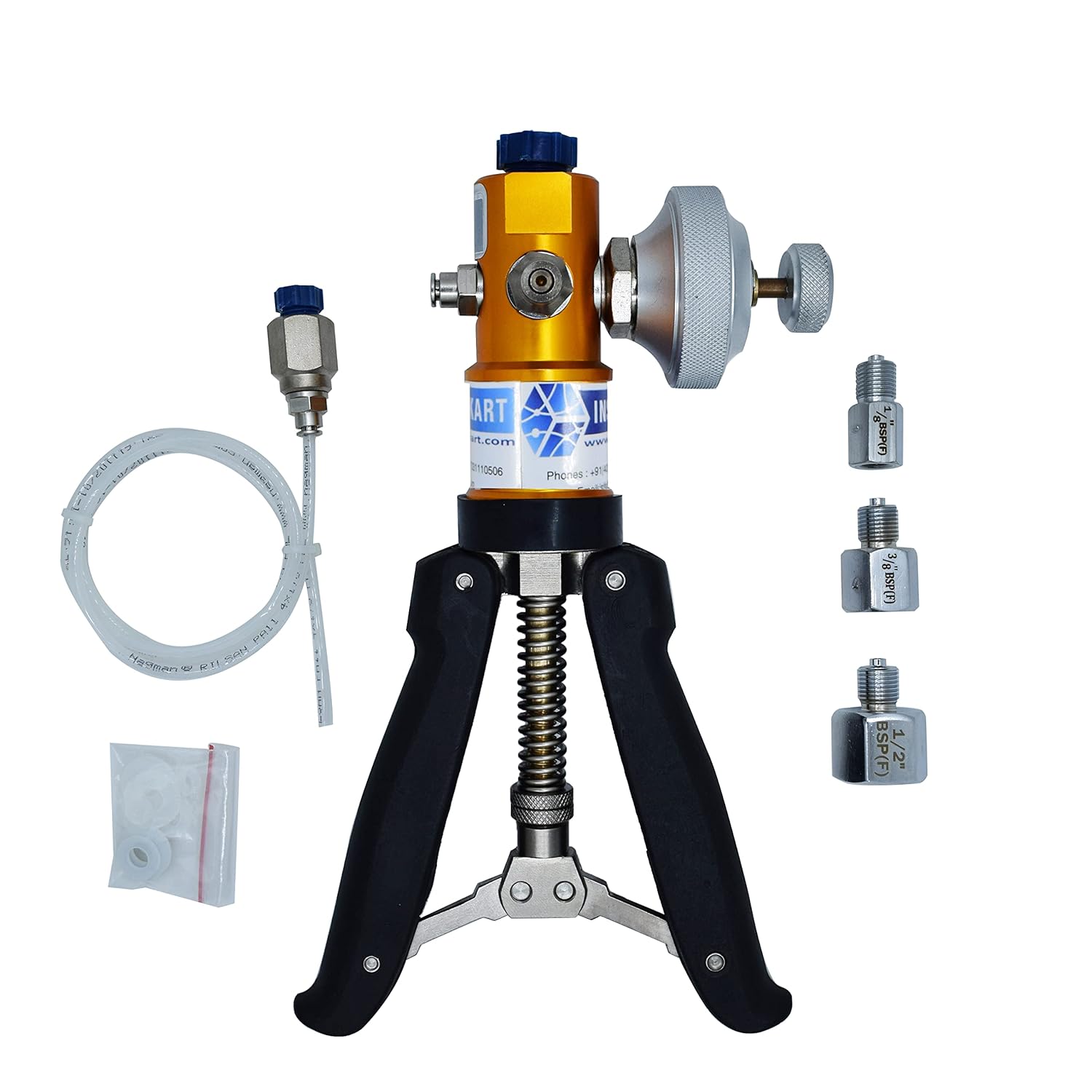
Figure 2: Calibrator with included accessories, including reducers, hose, and O-rings.

Figure 3: Calibrator with Dual Functionality, illustrating key connection points.
3. Танзимот
Follow these steps to set up your AI-DPI-2200 calibrator for operation:
- Кушодани: Ҳама ҷузъҳоро аз бастабандӣ бодиққат хориҷ кунед. Ҳангоми транзит ягон аломати зарарро тафтиш кунед.
- Attach Master Gauge: Screw the provided master gauge onto the designated port at the top of the calibrator. Ensure it is hand-tightened securely to prevent leaks.
- Connect Unit Under Calibration (UUC): Connect the device to be calibrated (UUC) to the appropriate port using the supplied hose and reducers if necessary. Select the reducer that matches the UUC's connection size (1/4", 1/2", or 3/4").
- Battery Installation (for digital master gauge): If your master gauge is digital, ensure 2 x AAA batteries are correctly installed. Refer to the gauge's specific manual for battery compartment location and polarity.

Figure 4: Connecting the Unit Under Calibration (UUC).
4. Дастурҳои истифодабарӣ
The AI-DPI-2200 allows for precise generation of both pressure and vacuum. Familiarize yourself with the controls before operation.
4.1 Pressure Generation
- Боварӣ ҳосил кунед, ки ҳама пайвастҳо бехатаранд.
- To generate pressure, repeatedly squeeze the hand pump handles. The master gauge will display the increasinг фишор.
- Use the fine adjustment knob (if present) to precisely set the desired pressure.
- To release pressure, slowly open the release valve.

Figure 5: Generating pressure by squeezing the handles.
4.2 Vacuum Generation
- To switch from pressure to vacuum mode, use the piston pin. This typically involves pulling out or rotating a pin located near the pump mechanism.
- Once in vacuum mode, repeatedly squeeze the hand pump handles to generate vacuum. The master gauge will display the decreasing pressure (negative values).
- To release vacuum, slowly open the release valve.

Figure 6: Toggling between pressure and vacuum modes using the piston pin.
4.3 Master Gauge Usage
The calibrator is compatible with various master gauges, allowing for flexibility in calibration tasks.

Figure 7: Compatibility with various master gauges for accurate results.
5. Нигоҳдорӣ
Proper maintenance ensures the longevity and accuracy of your AI-DPI-2200 calibrator.
- Тозакунӣ: Wipe the calibrator with a soft, dry cloth after each use. Avoid using abrasive cleaners or solvents that could damage the finish or internal components.
- Нигоҳдорӣ: Store the calibrator in a clean, dry environment, away from extreme temperatures and direct sunlight. Use the original packaging or a protective case for storage.
- Иваз кардани O-ring: Periodically inspect the O-rings for wear and tear. Replace them if they appear cracked, flattened, or damaged to maintain a proper seal. Spare O-rings are provided.
- Иваз кардани батарея: For digital master gauges, replace the 2 x AAA batteries when the low battery indicator appears or the display becomes dim. Ensure correct polarity during installation.
- Калибрченкунӣ: For optimal accuracy, it is recommended to have the calibrator and master gauge professionally calibrated at regular intervals, typically annually, or as required by your quality system.
6. Баррасии мушкилот
This section addresses common issues you might encounter with your calibrator.
| Мушкилот | Сабаби эҳтимолӣ | Ҳалли |
|---|---|---|
| Cannot generate pressure/vacuum | Loose connections; Damaged O-rings; Piston pin not correctly set for mode. | Check all connections for tightness. Inspect and replace O-rings if necessary. Ensure piston pin is fully engaged for the desired mode (pressure or vacuum). |
| Pressure/Vacuum leaks | Loose connections; Worn or damaged O-rings; Damaged hose. | Tighten all connections. Replace O-rings. Inspect hose for cracks or damage and replace if found. |
| Inaccurate readings on digital gauge | Low battery; Gauge needs calibration. | Replace batteries. Consider professional calibration of the master gauge. |
| Handles are stiff or difficult to pump | Lack of lubrication; Internal debris. | Consult with INSTRUKART support for guidance on lubrication or internal cleaning. Do not attempt to disassemble without proper knowledge. |
7. Мушаххасоти
| Параметр | Арзиш |
|---|---|
| Модели | AI-DPI-2200 |
| Параметрҳои андозагирӣ | Pressure and Vacuum |
| Диапазони чангкашак | Ambient to -0.9 Kg/Cm² |
| Диапазони фишор | Ambient to 30 Kg/Cm² (30 Bar / 430 PSI) |
| Material Of Construction | Алюминий ва аз пӯлоди зангногир |
| Вазн (тақрибан) | 1.5кг |
| Master Gauge Range | -1 то 25 Бар |
| Дақиқӣ | ±0.5% |
| Case Size (Master Gauge) | 2.5" (63мм) |
| Case Material (Master Gauge) | ABS (IP64) |
| Rubber Boot (Master Gauge) | Silicone rubber (IP65) |
| Режими амалиёт | Continuous pressure reading |
| Вақти ҷавоб | ±3 Hz display refresh rate |
| Proof / Burst Pressure | 200% / 300% FS |
| Ҳарорати корӣ | 14 ° F то 122 ° F / -10 ° C то 50 ° C |
| Ҳарорати нигоҳдорӣ | -4 ° F то 167 ° F / -20 ° C то 75 ° C |
| LCD Display (Digital Gauge) | 2" x 3/4" (48mm x 16mm) |
| Пайвастшавӣ | 1/4" NPT 304SS |
| Сенсор | 316L welded, Piezo |
| Амали ҳаёт | 1 миллион давра |
| Таъмини нерӯ | 2 x батареяи AAA (1.5V) |
| Муҳлати батарея | 2 years (auto shut-off mode) |
| Ҳолати барқ | Auto or manual shut-off |
| Намоиши рақамҳо | 4 digits to 5,000 psi |
| Интихоби воҳиди фишор | psi, bar, kg/cm², MPa |
8. Барномаҳо
The INSTRUKART AI-DPI-2200 Hand Pump Calibrator is suitable for a wide range of applications requiring accurate pressure and vacuum calibration:
- Calibration Laboratories
- Калибровкаи майдонҳо
- Pressure Gauge Calibration
- Калибрченкунии интиқолдиҳандаи фишор
- Oil and Gas Industries
- Системаҳои HVAC
- Industrial Process Control
- Aerospace and Aviation

Figure 8: Applications in Oil and Gas Industries and HVAC Systems.

Figure 9: Applications in Industrial Process Control and Aerospace and Aviation.
9. Кафолат ва дастгирӣ
For warranty information, technical support, or service inquiries, please contact INSTRUKART customer service. Keep your purchase receipt as proof of purchase for any warranty claims.
Истеҳсолкунанда: Асбобҳои Ас
Аввалин дастрас: 16 ноябри соли 2022
For further assistance, please visit the official INSTRUKART store or contact their support channels.