Муқаддима
The Edifier CX7 is an active 2.1 home entertainment system designed to deliver high-quality audio for various devices, including televisions, personal computers, and notebooks. This system features Bluetooth V5.0 connectivity, an 8-inch subwoofer, and an infrared remote control for convenient operation. This manual provides essential information for setting up, operating, and maintaining your CX7 system.
Мундариҷаи баста
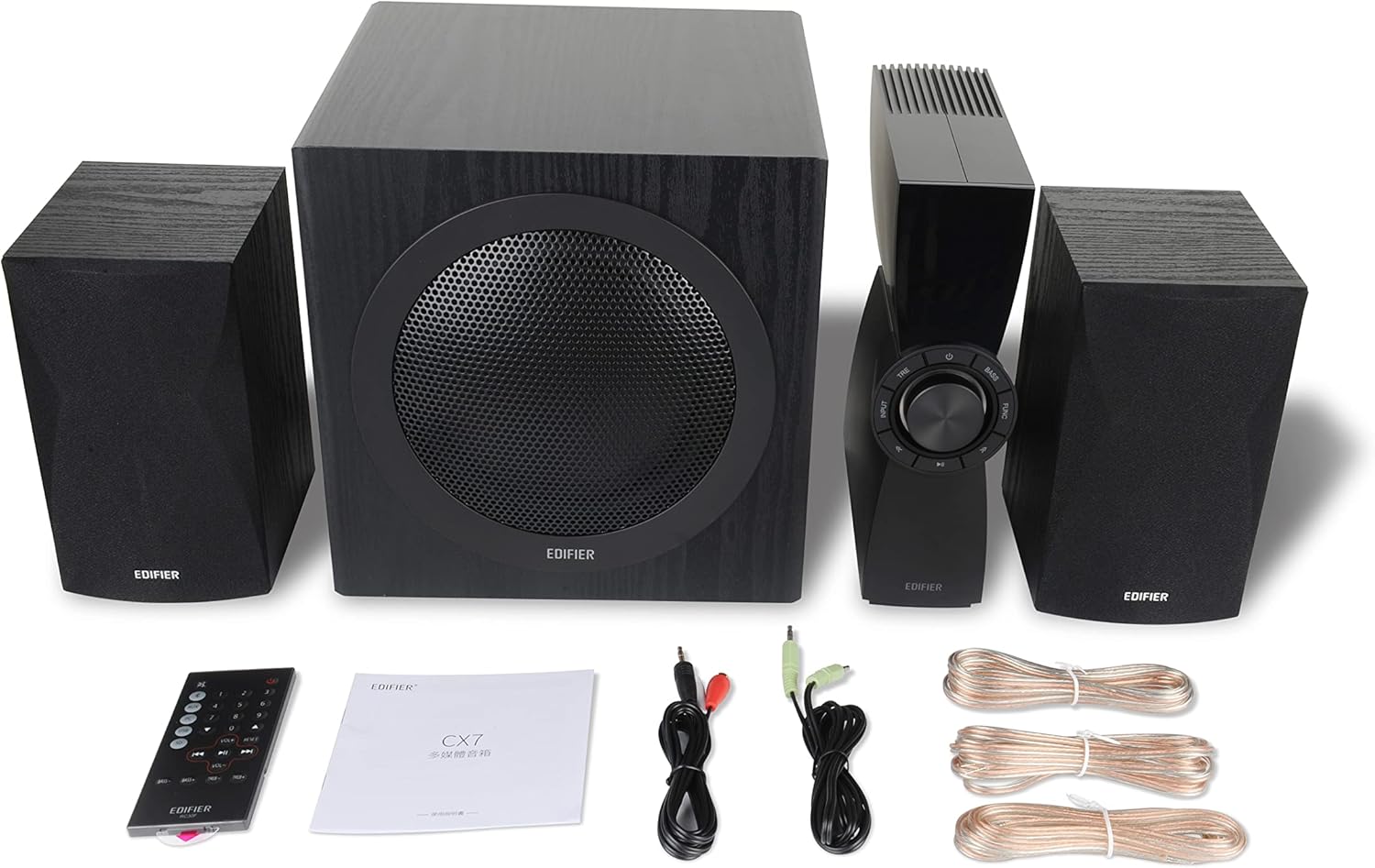
Figure 1: Edifier CX7 System Components
Лутфан тасдиқ кунед, ки ҳамаи ҷузъҳои дар поён овардашуда ба бастаи шумо дохил карда шудаанд:
- Сабвуфер (1)
- Баландгӯякҳои моҳвораӣ (2)
- Control Unit (1)
- Infrared Remote Control (1)
- 3.5mm to RCA Audio Cable (1)
- RCA to RCA Audio Cable (1)
- Speaker Connection Cables (2)
- Дастури корбар (1)
Дастури насб
1. Ҷойгиршавӣ
Position the subwoofer on the floor, preferably in a corner or near a wall for optimal bass response. Place the satellite speakers on either side of your listening area, equidistant from the listener, and at ear level if possible. Ensure the control unit is easily accessible.

Figure 2: Recommended System Placement
2. Пайваст кардани баландгӯякҳо
Connect the satellite speakers to the speaker output terminals on the rear of the control unit using the provided speaker cables. Ensure correct polarity (red to red, black to black) for each speaker.
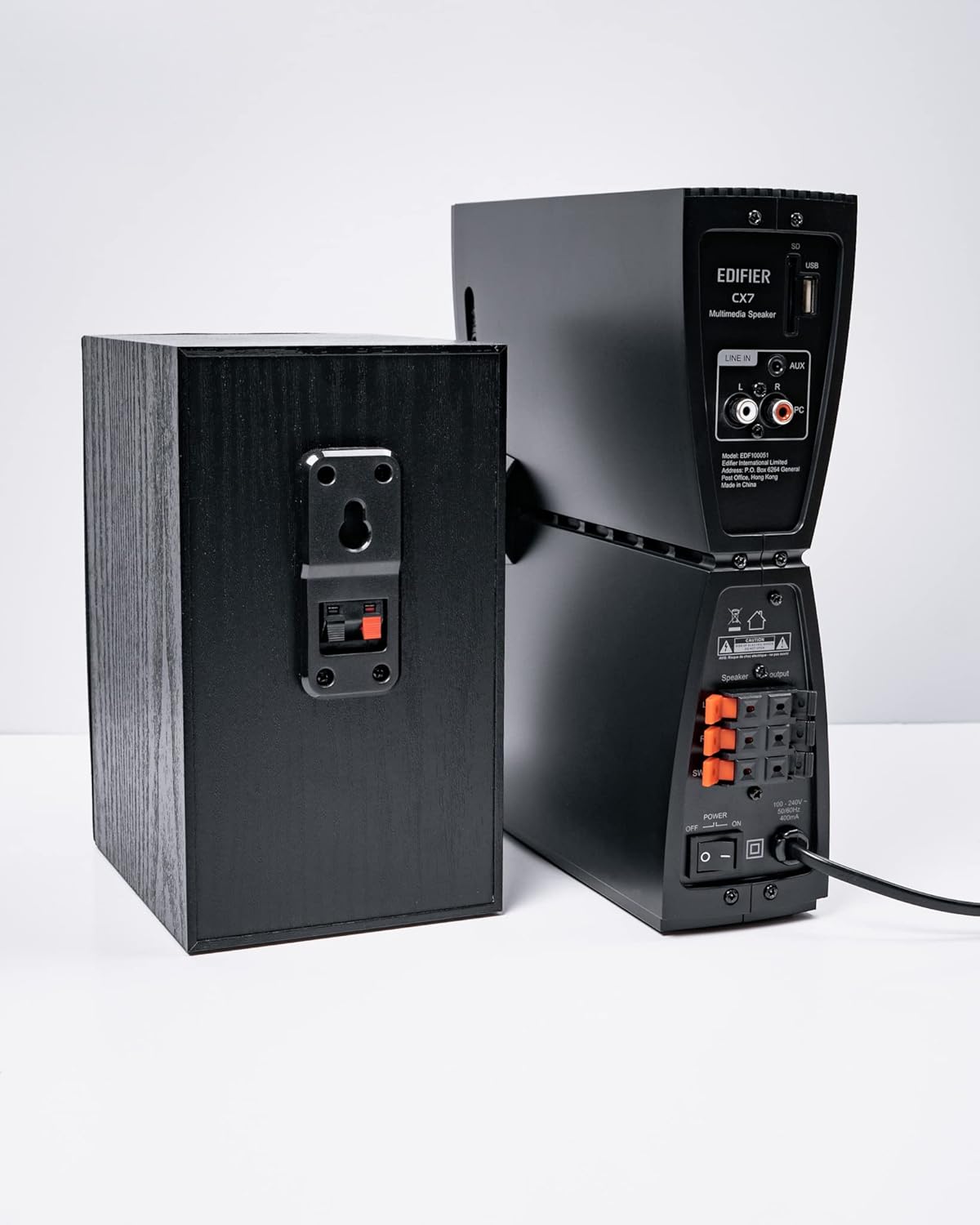
Расми 3: Пайвасткуниҳои баландгӯяк
3. Пайваст кардани манбаъҳои аудио
The CX7 system supports multiple audio input options:
- Вуруди AUX: Use the 3.5mm to RCA audio cable to connect devices like smartphones, tablets, or computers to the AUX input on the control unit.
- Вуруди компютер: Use the RCA to RCA audio cable to connect your PC's audio output to the PC input on the control unit.
- Блутуз: Барои пайвасти бесим, ба бахши "Ҷуфткунии Bluetooth" дар зери Дастурҳои корӣ муроҷиат кунед.
4. Пайвастшавии барқ
Connect the power cable to the control unit and then plug it into a standard wall outlet. Turn on the power switch located on the rear of the control unit.
Дастурҳои амалиётӣ
1. Фаъол/хомӯш
After connecting the power, press the power button on the control unit or the remote control to turn the system on or off. The display on the control unit will illuminate when powered on.

Figure 4: Control Unit Display
2. Интихоби вуруд
Press the "INPUT" button on the control unit or the remote control to cycle through available audio sources: AUX, PC, and Bluetooth. The selected input will be displayed on the control unit's screen.

Figure 5: Control Knob and Input Buttons
3. Назорати баландии овоз
Rotate the large knob on the control unit clockwise to increase volume and counter-clockwise to decrease it. Alternatively, use the "VOL+" and "VOL-" buttons on the remote control.
4. Танзими басс ва требл
Press the "BASS" or "TRE" (Treble) buttons on the control unit or remote control, then rotate the main knob to adjust the respective levels. The display will show the current bass/treble setting.
5. Ҷуфти Bluetooth
- Select the Bluetooth input on the CX7 system. The display will show "BT" and flash, indicating it's in pairing mode.
- Дар дастгоҳи худ (смартфон, планшет ва ғайра) Bluetooth-ро фаъол созед ва дастгоҳҳои дастрасро ҷустуҷӯ кунед.
- Select "EDIFIER CX7" from the list of found devices.
- Once paired, the "BT" indicator on the CX7 display will stop flashing and remain solid.
To disconnect a Bluetooth device, press and hold the "FUNC" button on the control unit or the Bluetooth button on the remote control for a few seconds.
6. Вазифаҳои идоракунии дурдаст

Figure 6: Infrared Remote Control
The remote control provides convenient access to all major functions:
- Қувва: Системаро фаъол / хомӯш мекунад.
- Интихоби вуруд: Cycles through AUX, PC, Bluetooth.
- Ҳаҷм: Ҳаҷми асосии овозро танзим мекунад.
- Бас/Требл: Сатҳи басс ва треблро танзим мекунад.
- Хомӯш кардан: Аудио хомӯш/кушода мешавад.
- Назорати бозикунии: Play/Pause, Previous/Next track (for Bluetooth mode).
Нигоҳдорӣ
- Тозакунӣ: Use a soft, dry cloth to clean the surfaces of the speakers and control unit. Do not use liquid cleaners or abrasive materials.
- Вентилятсия: Ensure adequate ventilation around the control unit and subwoofer to prevent overheating. Do not block ventilation openings.
- Муҳити зист: Аз таъсири ҳарорати аз ҳад зиёд, намӣ, чанг ё нури бевоситаи офтоб худдорӣ намоед.
- Хомӯш: If the system will not be used for an extended period, disconnect it from the power outlet.
Мушкилкушо
| Мушкилот | Сабаби эҳтимолӣ | Ҳалли |
|---|---|---|
| Садо нест |
|
|
| Пайвасти Bluetooth ноком шуд |
|
|
| Овози вайроншуда |
|
|
Мушаххасоти
| Хусусият | Тафсилот |
|---|---|
| Номи модел | CX7 |
| Навъи баландгӯяк | 2.1 Системаи баландгӯяк |
| Технологияи пайвастшавӣ | блутуз |
| Технологияи алоқаи бесим | Bluetooth V5.0 |
| Диапазони Bluetooth | 10 метр |
| Ҳолати баромади аудио | Гирифтан |
| Баландгӯяк Максимум қудрати баромади | 69 Ватт |
| Технологияи пайвасти сабвуфер | Бесимӣ |
| Диаметри Вуфер | 8 инч |
| Материал | Полипропилен |
| Ранги | Сиёҳ |
| Андозаҳои маҳсулот | 16.93"D x 17.72"W x 13.39"H |
| Вазни ашё | 29 фунт (13.2 килограмм) |
| Манбаи нерӯ | Электри симдор |
| Навъи назораткунанда | Назорати дурдаст |
| Истифодаи тавсияшаванда | Барои телевизорҳо, барои компютерҳо, смартфонҳо ё планшетҳо |
Кафолат ва дастгирӣ
For warranty information and technical support, please refer to the warranty card included with your product or visit the official Edifier webсайт. Квитансияи хариди худро ҳамчун далели харид барои даъвоҳои кафолат нигоҳ доред.
Эдификатори расмӣ Webсайт: www.edifier.com


