1. Муқаддима
This user manual provides essential information for the safe and efficient operation of your HYCHIKA 3.6V Cordless Electric Rechargeable Screwdriver Drill Set. Please read this manual thoroughly before first use and keep it for future reference.
The HYCHIKA 3.6V Cordless Electric Screwdriver is designed for various screwing and light drilling tasks around the home. It features a maximum torque of 6 N-m, a 6.35 mm quick-change chuck, and a versatile design that allows for both pistol and straight grip configurations.
2. Дастурамал оид ба бехатарӣ
Ҳангоми истифодаи асбобҳои барқӣ ҳамеша қоидаҳои асосии бехатариро риоя кунед, то хатари сӯхтор, зарбаи барқ ва осеби одамонро коҳиш диҳед.
- Бехатарии минтақаи корӣ: Майдони кори худро тоза ва равшан нигоҳ доред. Ҷойҳои бесарусомон ё торик ба садамаҳо даъват мекунанд. Асбобҳои барқиро дар муҳити тарканда, масалан, дар ҳузури моеъҳои оташгиранда, газҳо ё чанг истифода набаред.
- Бехатарии барқ: Аз тамос бо бадан бо сатҳҳои заминӣ ё заминӣ, ба монанди қубурҳо, радиаторҳо, плитаҳо ва яхдонҳо, худдорӣ кунед. Асбобҳои барқиро дар зери борон ё шароити тар қарор надиҳед.
- Бехатарии шахсӣ: Always wear eye protection. Use safety glasses, goggles, or a face shield. Wear hearing protection when operating noisy tools. Dress properly; avoid loose clothing or jewelry.
- Истифодаи асбоб ва нигоҳубин: Асбоби электрикиро маҷбур накунед. Барои барномаи худ асбоби дурусти барқро истифода баред. Пеш аз ворид кардани ягон ислоҳ, иваз кардани лавозимот ё нигоҳ доштани асбобҳои барқӣ симро аз манбаи барқ ҷудо кунед ва/ё батареяро хориҷ кунед.
- Истифода ва нигоҳубини бастаи батарея: Танҳо бо пуркунандаи барқе, ки истеҳсолкунанда нишон додааст, пур кунед. Қуттиҳои батареяро бо дигар асбобҳои барқӣ истифода набаред. Вақте ки бастаи батарея истифода намешавад, онро аз дигар ашёҳои металлӣ дур нигоҳ доред.
3. Мундариҷаи баста
Боварӣ ҳосил кунед, ки ҳамаи ҷузъҳои дар поён овардашуда ба бастаи шумо дохил карда шудаанд. Агар ягон ашё гум ё вайрон бошад, лутфан бо дастгирии мизоҷон тамос гиред.
- 1 x HYCHIKA 3.6V Cordless Screwdriver
- 19 x Лаҷомҳои буранда
- 1 x Бари васеъшавӣ
- 1 x адаптери пуркунандаи барқ
- 1 x Дастури корбар

Figure 3.1: Contents of the HYCHIKA 3.6V Cordless Screwdriver package, including the screwdriver, various bits, and charging adapter.
4. Хусусиятҳо ва ҷузъҳои маҳсулот
Familiarize yourself with the different parts of your cordless screwdriver.

Figure 4.1: Key components of the screwdriver, including the magnetic chuck, PUSH button, front LED light, On/Off switch, LED charger indicator, 3.5mm charger port, and forward & reverse button.
- Magnetic Chuck: 1/4 inch (6.35mm) quick-change chuck for easy bit installation and removal.
- Front LED Light: Illuminates the work area for improved visibility in dark environments.
- Гузариш / Хомӯш: Activates and deactivates the screwdriver.
- Forward & Reverse Button: Controls the rotation direction for screwing and unscrewing.
- LED Charger Indicator: Provides status of battery charging.
- 3.5mm Charger Port: Connection point for the charging adapter.
- Тугмаи PUSH: Used to adjust the grip configuration from pistol to straight.
5. Танзимот
5.1 Пур кардани батарея
The screwdriver is powered by a 3.6V 2000 mAh Lithium-Ion battery. Before first use, fully charge the battery.
- Connect the charging adapter to the 3.5mm charger port on the screwdriver.
- Plug the charging adapter into a standard electrical outlet.
- The LED charger indicator will illuminate during charging. Once fully charged, the indicator may change color or turn off depending on the model.
- Пас аз ба итмом расидани пуркунии барқ пуркунандаи барқро аз розетка ҷудо кунед.

Figure 5.1: The screwdriver connected to its charging adapter, indicating a full charge.
The screwdriver is designed to maintain full power output even when the battery is low, ensuring consistent performance until the battery is depleted.
5.2 Насби битҳои отвертка
The screwdriver features a 1/4 inch (6.35mm) magnetic quick-change chuck for easy bit installation.
- Барои вазифаи худ битчаи мурваттобаки мувофиқро интихоб кунед.
- Insert the bit into the magnetic chuck until it is securely seated. The magnetic chuck will hold the bit firmly in place.
- To remove a bit, simply pull it out of the chuck. Bits with grooves are designed for easier removal.

Figure 5.2: Visual guide for inserting a bit into the magnetic chuck and removing it.
6. Дастурҳои истифодабарӣ
6.1 Adjusting Grip Configuration
The screwdriver can be used in two grip configurations: pistol grip or straight grip, for enhanced versatility and comfort.
- To change the grip, press and hold the "PUSH" button located at the top of the screwdriver.
- While holding the button, rotate the handle ninety degrees to switch between pistol and straight configurations.
- Release the "PUSH" button once the desired configuration is achieved. The handle will lock into place.
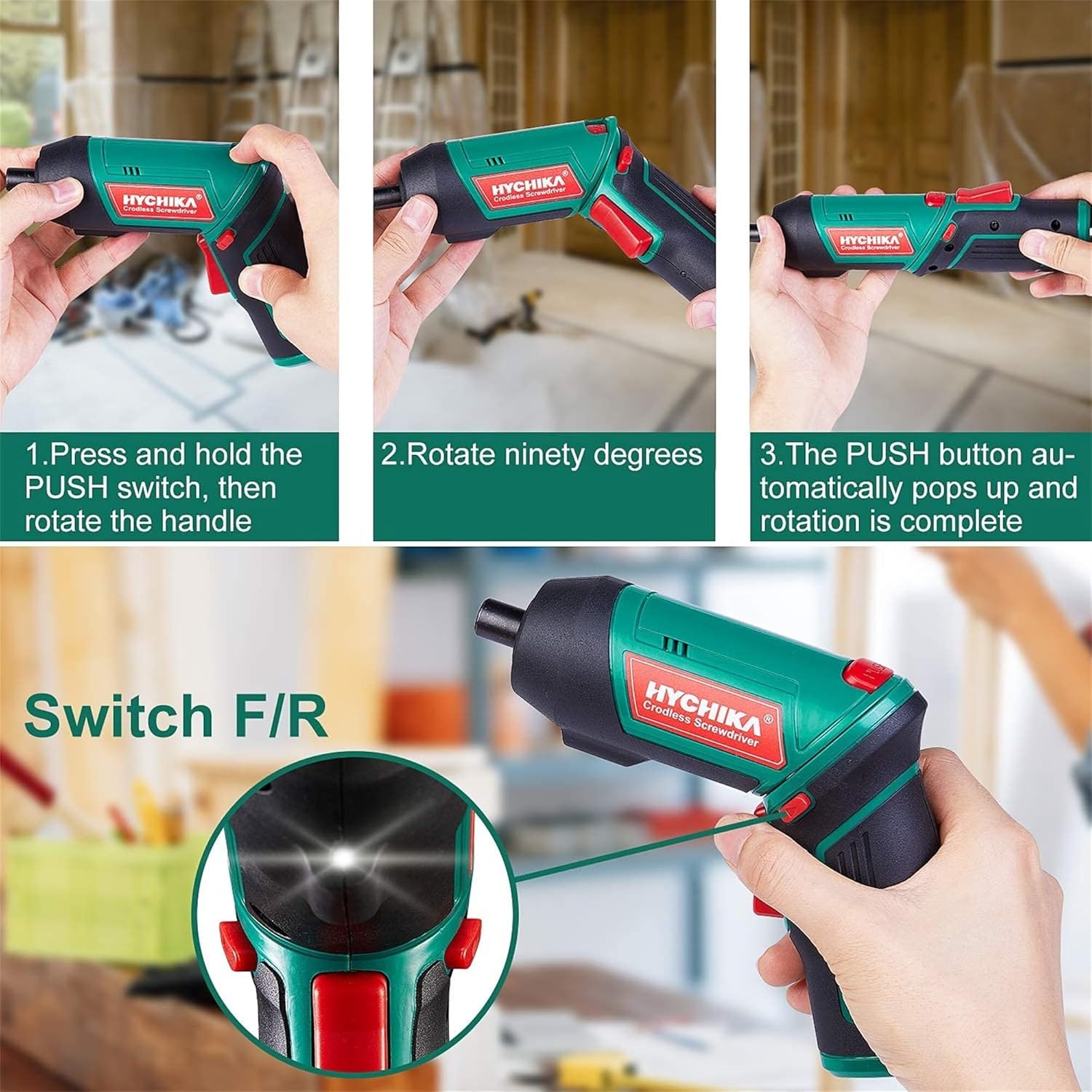
Figure 6.1: Demonstrates the process of transforming the screwdriver's grip by pressing the PUSH button and rotating the handle.
6.2 Амалиёт ба пеш ва баръакс
The forward/reverse button controls the direction of rotation for screwing and unscrewing.
- To drive screws (forward rotation), push the forward/reverse button to the left (when viewаз паси асбоб).
- To remove screws (reverse rotation), push the forward/reverse button to the right.
- When the button is in the center position, the tool is locked, preventing accidental activation.
6.3 Истифодаи чароғҳои кории LED
The built-in LED light automatically illuminates when the screwdriver is in operation, providing visibility in dimly lit areas.

Figure 6.2: The integrated LED light provides clear illumination for working in dark environments.
7. Нигоҳдорӣ
Regular maintenance ensures the longevity and optimal performance of your screwdriver.
- Тозакунӣ: Қуттиҳои вентилятсияро тоза ва аз чанг тоза нигоҳ доред. нармро истифода баред, гamp матои тоза кардани асбоб вasinг. Моддаҳои кимиёвии сахт ё тозакунандаи абразивиро истифода набаред.
- Нигоҳубини каме: Clean screwdriver bits after use. Store them in the provided case to prevent loss and damage.
- Нигоҳдории батарея: If storing the tool for an extended period, ensure the battery is partially charged (around 50%) and store it in a cool, dry place. Recharge the battery every 3-6 months to maintain its health.
- Санҷиши умумӣ: Periodically check for any loose screws, damaged cords, or worn parts. Do not use the tool if any damage is observed.
8. Баррасии мушкилот
This section addresses common issues you might encounter with your screwdriver.
| Мушкилот | Сабаби эҳтимолӣ | Ҳалли |
|---|---|---|
| Отвертка ба кор намеояд. | Батарея тамом шудааст. Forward/Reverse switch is in the center (locked) position. | Батареяро пурра пур кунед. Тугмаи пеш/қафоро ба чап ё рост тела диҳед. |
| Screwdriver loses power quickly. | Батарея пурра пур карда нашудааст. Муҳлати батарея хароб шудааст. | Пеш аз истифода боварӣ ҳосил кунед, ки батарея пурра пур карда шудааст. If battery life is significantly reduced, contact customer support for replacement options. |
| Bits are not held securely in the chuck. | Bit is not fully inserted. Chuck is dirty or damaged. | Push the bit firmly into the chuck until it clicks into place. Clean the chuck area. If damage is visible, contact customer support. |
Агар пас аз кӯшиши ин ҳалли мушкилот мушкилот боқӣ монад, лутфан бо дастгирии муштариён тамос гиред.
9. Мушаххасоти
| Хусусият | Мушаххасоти |
|---|---|
| Бренд | Overstock (HYCHIKA) |
| Рақами модел | c131a012-0da9-4306-aeab-b1d9ff5cd4b7 |
| Ҷилдиtage | 3.6 вольт |
| Манбаи нерӯ | Батареяе |
| Суръат | 180 чархзании |
| Моменти элемент | 6 Newton Meters (6 N-m) |
| Навъи батарея | Иони литий |
| Иқтидори батарея | 2000 мАч |
| Чак Андоза | 1/4 дюйм (6.35 мм) |
| Материал | Пластмасса, резина |
| Ранги | Сабз |
| UPC | 616859793583 |
10. Кафолат ва дастгирӣ
Overstock offers lifetime after-sales service for this product. For any questions, concerns, or technical assistance, please contact our customer support team.
Please have your model number (c131a012-0da9-4306-aeab-b1d9ff5cd4b7) and purchase information ready when contacting support.


