1. Муқаддима
This manual provides essential instructions for the safe and efficient operation of your Motorola Six-Pocket Multi-Unit Charger. This charger is designed to simultaneously charge up to six compatible Motorola radios or batteries, ensuring your communication devices are always ready for use. Please read this manual thoroughly before using the charger.
2. Маълумот оид ба бехатарӣ
Always observe the following safety precautions to prevent injury or damage to the charger or connected devices:
- Use only the power supply provided with the charger.
- Пуркунандаи барқро зери борон ё намӣ нагузоред.
- Пуркунандаи барқро ба кор набаред, агар он ягон роҳ осеб дида бошад.
- Ҳангоми кор вентилятсияи дурусти атрофи пуркунандаи барқро таъмин кунед.
- Кӯшиш накунед, ки пуркунандаи барқро ҷудо кунед ё тағир диҳед.
- Аз дастрасии кӯдакон дур нигоҳ доред.
3. Мундариҷаи баста
Боварӣ ҳосил кунед, ки бастаи шумо ҷузъҳои зеринро дар бар мегирад:
- Motorola Six-Pocket Multi-Unit Charger (PMLN7101A / PMLN7101 / PMLN8569)
- US/NA Power Supply
4. Танзимот
- Place the multi-unit charger on a flat, stable surface in a well-ventilated area.
- Connect the provided US/NA power supply to the charger's power input port.
- Plug the power supply into a standard electrical outlet. The charger is now ready for use.
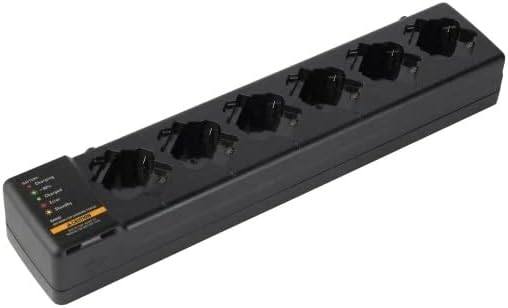
Расми 4.1: Сарбории болоӣ view of the Motorola Six-Pocket Multi-Unit Charger, showing six charging pockets and an indicator panel on the left side.
5. Дастурҳои истифодабарӣ
The charger is designed for use with compatible Motorola radios and batteries, including models SL300, TLK100, SL500, SL500E, and SLN1000.
5.1 Charging Radios or Batteries
- Боварӣ ҳосил кунед, ки пуркунандаи барқ фаъол аст.
- Insert a compatible radio or battery into one of the six charging pockets. Ensure it is seated correctly.
- Observe the LED indicator for the corresponding pocket to determine the charging status.
5.2 Ҳолати нишондиҳандаи LED
Each charging pocket features an LED indicator to provide real-time status:
- Сурх (сахт): Батарея пур карда мешавад.
- Сабз (сахт): Батарея пурра пур карда шудааст.
- Amber (Solid): Battery is charging to 90% capacity.
- Сурх (дурахш): Error condition (e.g., battery fault, temperature issue). Remove the battery and reinsert. If the error persists, refer to the Troubleshooting section.
- Нур нест: Standby mode or no battery/radio inserted.
The indicator panel on the left side of the charger provides a legend for these LED statuses.
6. Нигоҳдорӣ
To ensure optimal performance and longevity of your charger:
- Пуркунандаи барқро тоза ва аз чанг ва партовҳо холӣ нигоҳ доред. Барои тоза кардан аз матои нарм ва хушк истифода баред.
- Аз кимиёвии сахт ё тозакунандагони абразив истифода набаред.
- Пуркунандаи барқро дар ҷои хунук ва хушк нигоҳ доред, вақте ки истифода намебаред.
- Сими барқро барои ягон аломати осеб мунтазам тафтиш кунед.
7. Баррасии мушкилот
| Мушкилот | Сабаби эҳтимолӣ | Ҳалли |
|---|---|---|
| Пуркунандаи барқ фаъол нест. | No power to the outlet; power supply not connected; faulty power supply. | Check outlet with another device; ensure power supply is securely connected; try a different power supply if available. |
| Нишондиҳандаи LED сурх милт-милт мекунад. | Battery fault; incorrect battery type; temperature outside operating range. | Remove and reinsert the battery; ensure battery is compatible; move charger to a room temperature environment. |
| Батарея пур карда намешавад. | Battery not properly seated; dirty contacts; faulty battery. | Ensure battery is fully inserted; clean battery and charger contacts; try a different battery. |
8. Мушаххасоти
| Хусусият | Тафсилот |
|---|---|
| Рақамҳои намунавӣ | PMLN7101A, PMLN7101, PMLN8569 |
| Бренд | Моторола Solutions |
| Андозаҳои маҳсулот | 3 x 4 x 15 инч (7.62 x 10.16 x 38.1 см) |
| Вазни ашё | 3.29 фунт (1.49 кг) |
| Ранги | Сиёҳ |
| Вуруди ҷилдиtage | 240 вольт |
| Натиҷаи ҳаҷtage | 7.4 вольт |
| Радиоҳои мувофиқ | SL300, TLK100, SL500, SL500E, SLN1000 |
9. Кафолат ва дастгирӣ
Specific warranty information for this product was not provided in the available data. For detailed warranty terms and conditions, please refer to the documentation included with your purchase or visit the official Motorola Solutions website. For technical support or service inquiries, please contact Motorola Solutions customer service.


