1. Муқаддима
This manual provides essential information for the installation, operation, and maintenance of the Cisco Catalyst 9800-L Copper Uplink Wireless LAN Controller (Model C9800-L-C-K9). Please read this manual thoroughly before using the device to ensure proper functionality and safety.
2. Маълумоти муҳим оид ба бехатарӣ
Барои пешгирии осеб ва осеб дидани дастгоҳ чораҳои бехатарии зеринро риоя кунед:
- Боварӣ ҳосил кунед, ки дастгоҳ дар ҷои хуб вентилятсияшуда насб карда шудааст, то аз гармии аз ҳад зиёд пешгирӣ карда шавад.
- Танҳо манбаи барқи муайяншударо барои ин дастгоҳ истифода баред.
- Дастгоҳро ба намӣ ё ҳарорати аз ҳад зиёд нагузоред.
- Пеш аз анҷом додани ягон нигоҳдорӣ ё тозакунӣ барқро ҷудо кунед.
- Ҳама хидматрасониро ба кормандони соҳибихтисос муроҷиат кунед.
3. Мундариҷаи баста
Боварӣ ҳосил кунед, ки ҳама ашё дар баста мавҷуд аст:
- Cisco Catalyst 9800-L Wireless LAN Controller
- CD (containing documentation or software)
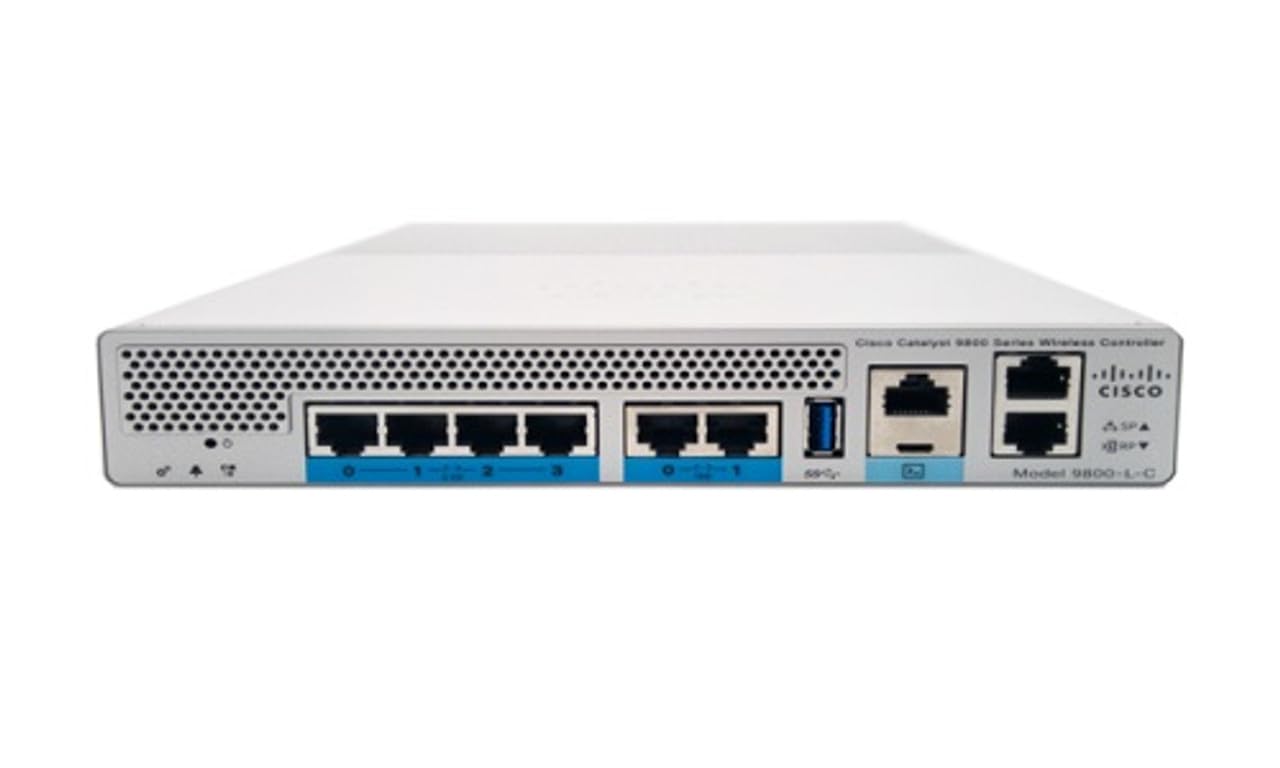
Расми 1: Пеш view of the Cisco Catalyst 9800-L Wireless LAN Controller. This image shows the compact design and port layout of the device.
4. Маҳсулот ба охир расидview
The Cisco Catalyst 9800-L is a compact, fixed-configuration wireless LAN controller designed for small to medium-sized deployments. It provides centralized control for Cisco Aironet access points, offering robust wireless network management capabilities.
Хусусиятҳои асосӣ:
- Managed, Layer 2.5 (Wireless Controller) functionality
- Copper uplink interfaces
- RJ45 interface type
- 11 ports for connectivity
- Designed for desktop environments
5. Танзимот
5.1 Кушодан ва тафтиш
- Carefully remove the controller from its packaging.
- Inspect the device for any signs of physical damage. If damage is found, contact your supplier immediately.
5.2 Насби ҷисмонӣ
- Place the controller on a stable, flat surface, such as a desktop.
- Ensure adequate clearance around the device for proper airflow and ventilation.
5.3 Пайвастшавии барқ
- Connect the power cord to the power input on the rear of the controller.
- Plug the other end of the power cord into a grounded electrical outlet (220 Volts).
5.4 Пайвастшавӣ ба шабака
- Connect Ethernet cables from your network infrastructure to the RJ45 uplink ports on the controller.
- Connect access points to the appropriate downlink ports as required by your network design.
5.5 Дастрасии ибтидоии конфигуратсия
- Refer to the included CD or Cisco's official documentation for detailed instructions on initial console access and software configuration.
- Typically, this involves connecting a console cable to the device and using a terminal emulator.
6. Истифодабарии контроллер
6.1 Амалиёти асосӣ
Once powered on and initially configured, the controller will begin managing connected access points. Monitor the status indicators on the device for operational status.
6.2 Идоракунии нуқтаҳои дастрасӣ
The Cisco Catalyst 9800-L automatically discovers and provisions Cisco Aironet access points. Use the controller's management interface (CLI or GUI) to configure wireless networks, security policies, and guest access.
6.3 Танзимоти шабака
Detailed network configuration, including VLANs, QoS, and routing, is performed through the controller's operating system. Consult Cisco's official documentation for advanced configuration guides.
7. Дастурҳои нигоҳдорӣ
- Навсозии нармафзор: Regularly check for and apply the latest firmware updates from Cisco to ensure optimal performance and security.
- Тозакунӣ: Keep the device clean and free of dust. Use a soft, dry cloth for cleaning. Do not use liquid or aerosol cleaners.
- Шароити экологӣ: Ensure the operating environment remains within specified temperature and humidity ranges to prevent hardware failure.
- Конфигуратсияи нусхабардорӣ: Periodically back up your controller's configuration to prevent data loss.
8. Баррасии мушкилот
Ин бахш масъалаҳои маъмулеро, ки шумо метавонед дучор ояд, баррасӣ мекунад:
| Мушкилот | Сабаби эҳтимолӣ | Ҳалли |
|---|---|---|
| Контроллер фаъол нест | Power cable disconnected; Power outlet failure | Check power cable connections; Test power outlet with another device. |
| Access points not connecting | Incorrect network configuration; APs not discovered | Verify network settings on the controller; Ensure APs are on the same network segment or reachable via IP. |
| Slow wireless performance | Interference; Overloaded channels; Outdated firmware | Perform a site survey to identify interference; Optimize channel selection; Update controller and AP firmware. |
9. Мушаххасоти техникӣ
| Мушаххасоти | Тафсилот |
|---|---|
| Бренд | Cisco |
| Рақами модел | C9800-L-C-K9 |
| Шумораи портҳо | 11 |
| Интерфейс | RJ45 |
| Навъи гузариш | Managed, Layer 2.5 (Wireless Controller) |
| Платформа | Зета |
| Case Material Type | Мис |
| Ҷилдиtage | 220 вольт |
| Дастгоҳҳои мувофиқ | Мизи кории |
| Ранги | Кабуд |
| Вазни ашё | 3.09 килограмм |
| UPC | 657768416101 |
| ASIN | B0C3FQPCY4 |
10. Маълумот дар бораи кафолат
This Cisco Catalyst 9800-L Wireless LAN Controller (Renewed) comes with a 90 рӯз кафолати маҳдуд. For specific terms and conditions, please refer to the warranty documentation provided with your purchase or contact your reseller.
11. Дастгирии муштариён
For technical assistance, troubleshooting, or further inquiries regarding your Cisco Catalyst 9800-L Wireless LAN Controller, please visit the official Cisco support website or contact your authorized Cisco reseller. Ensure you have your model number (C9800-L-C-K9) and serial number available when seeking support.


