1. Муқаддима
The MARKLIFE P50 Label Maker Machine is a mini portable Bluetooth thermal label printer designed for a wide range of labeling needs. It utilizes thermal printing technology, supporting black and white printing, and is ideal for creating labels for addresses, clothing, jewelry, retail barcodes, small businesses, home organization, and office use. This manual provides comprehensive instructions for setting up, operating, and maintaining your P50 label maker.

Image: The MARKLIFE P50 label maker shown with different types of labels, including a "Thank You" label, a "Grapefruit Juice" label, and rolls of white gap, circle gap, and clear gap labels. An example label shows "Wireless Printer Built-in firewall SUPPORT WDS,WPS 123456".
2. Дар қуттӣ чӣ мавҷуд аст
Upon unboxing your MARKLIFE P50 Label Maker, verify that all components are present:
- MARKLIFE P50 мошини тамғакоғазсоз
- Labels (typically includes 3 tapes: 1.57"x1.18" white gap, 2"x2" circle gap, and 1.57"x0.79" transparent gap labels)
- Сими пуркунандаи USB-C
3. Дастури насб
3.1 Пур кардани дастгоҳ
The P50 label maker features a built-in 1200mAh rechargeable battery for portable use. Before first use, ensure the device is fully charged.
- Connect the provided USB-C charging cable to the charging port on the label maker.
- Қисми дигари симро ба адаптери мувофиқи қувваи USB (дохил карда нашудааст) ё порти USB-и компютер пайваст кунед.
- The charging indicator light will show the charging status. Refer to the device's LED indicator guide for specific light behaviors (e.g., solid light for charging, off when fully charged).
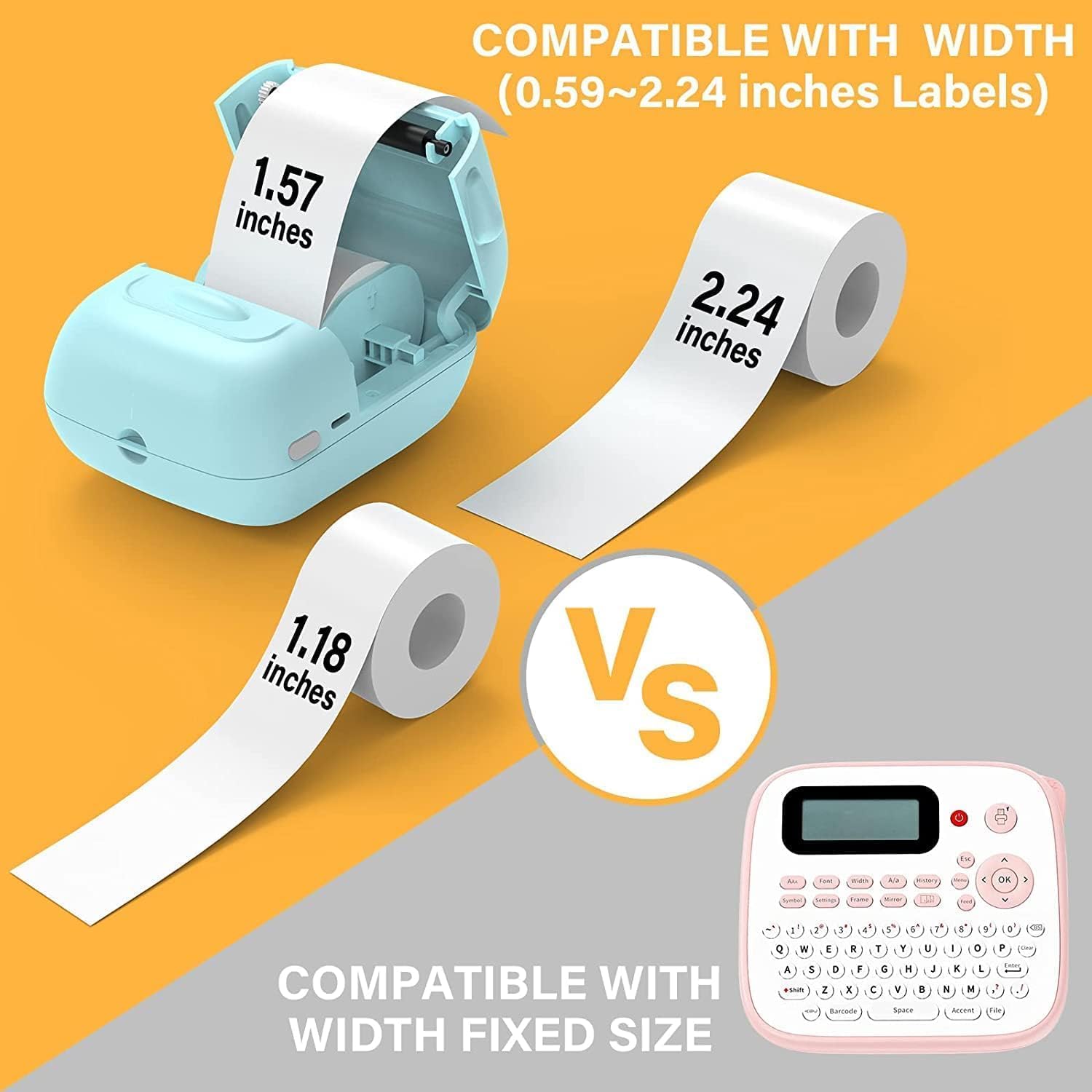
Image: A person placing the compact MARKLIFE P50 label maker into a handbag, highlighting its portability. Icons indicate "Portable", "Built-in 1200mAh Battery", and "Type-c Charging".
3.2 Боркунии нишонаҳо
The P50 label maker supports label widths ranging from 0.59 inches to 2.24 inches. Ensure you use compatible thermal labels.
- Open the label compartment cover on the device.
- Insert the label roll with the printing surface facing upwards, ensuring the roll is properly seated in the compartment.
- Pull a small portion of the label paper out of the slot, extending it slightly beyond the cutting edge.
- Close the label compartment cover firmly until it clicks into place. The printer will automatically detect the label size.

Image: Three rolls of labels are displayed, illustrating the different sizes available: 1.57"x0.78" (40x20mm) clear gap, 1.57"x1.18" (40x30mm) white gap, and 2"x2" (50x50mm) circle gap labels. The image emphasizes that these rolls "Meet More Needs".
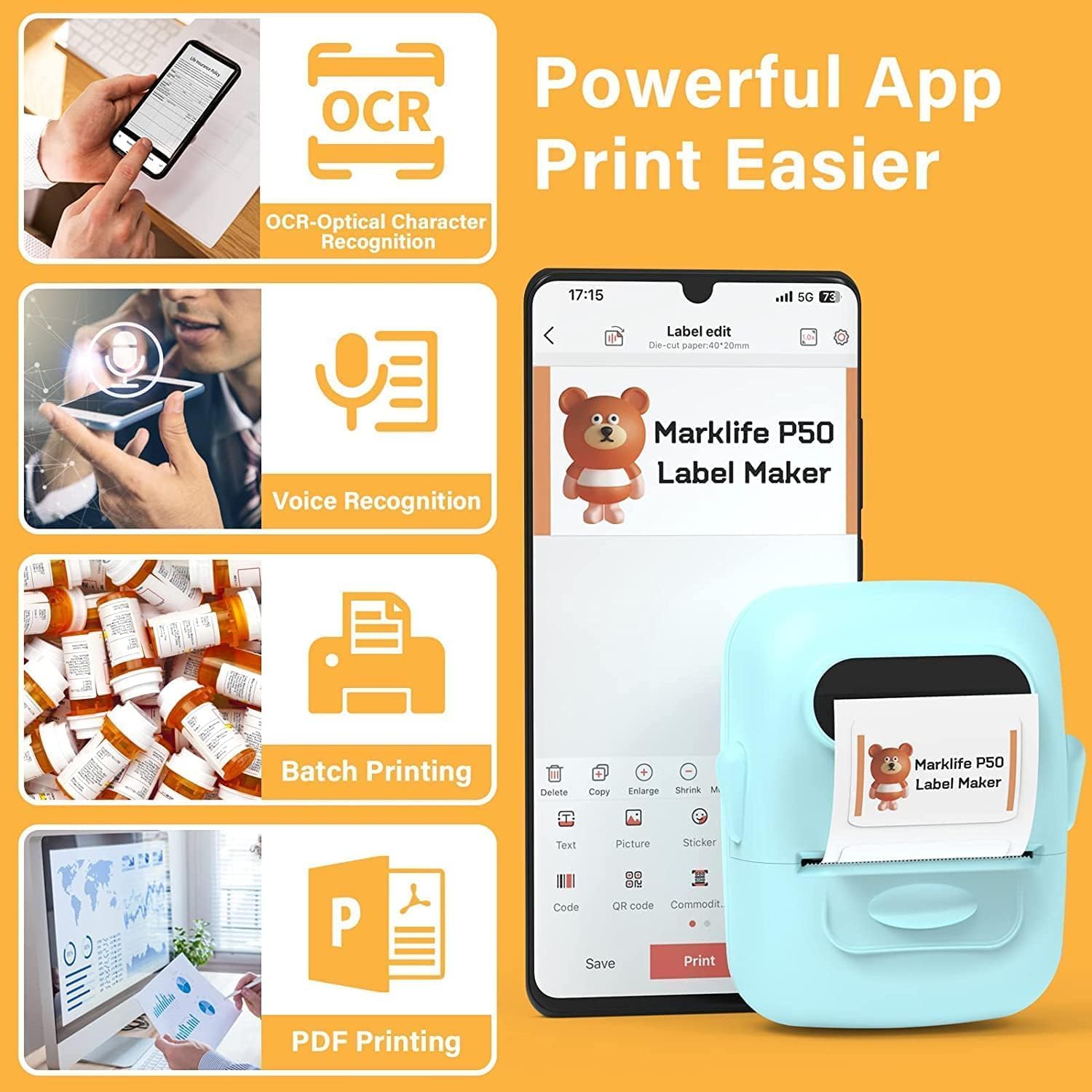
Image: The MARKLIFE P50 label maker is shown with a roll of labels, indicating compatibility with widths from 0.59 to 2.24 inches. It contrasts with a traditional label maker that has a fixed label size.
3.3 Connecting to Your Device (Smartphone/PC)
The P50 label maker offers wireless connectivity via Bluetooth for smartphones and USB connection for Windows PCs.
3.3.1 Smartphone Connection (Bluetooth)
- Download the "Marklife" application from your smartphone's app store (available for Android and iOS).
- Боварӣ ҳосил кунед, ки Bluetooth дар смартфони шумо фаъол аст.
- Turn on the P50 label maker.
- Open the Marklife app. The app will automatically search for and connect to the label maker via Bluetooth 4.0 within approximately 33 feet.
3.3.2 PC Connection (USB)
For Windows PC users, online software is available. Refer to the official MARKLIFE website or the app's help section for download and installation instructions for the PC software.
4. Дастурҳои истифодабарӣ
4.1 Marklife App Features
The Marklife app provides a powerful and user-friendly interface for label creation:
- OCR (шинохти оптикии аломатҳо): Scan text from images to convert it into editable text for your labels.
- Шинохти овоз: Convert spoken words into text for quick label input.
- Чопи дастаҷамъӣ: Print multiple copies of the same label efficiently.
- PDF Printing: Print labels directly from PDF documents.
- Image Insertion: Insert your own photos or images onto labels.
- Тавлиди рамзи штрих-код/QR: Scan existing barcodes to generate new ones or create custom QR codes.
- Шаблонҳо: Access a variety of pre-designed templates for different label types (clothing, price, cable, jewelry, address, ingredients, etc.).

Image: The MARKLIFE P50 label maker is shown printing a long strip of barcode labels, demonstrating its "Batch Printing" capability. An example barcode shown is "123456".

Image: A smartphone screen displays the Marklife app interface, highlighting features such as OCR (Optical Character Recognition), Voice Recognition, Batch Printing, and PDF Printing. The P50 label maker is shown next to the phone, printing a label.
4.2 Creating and Printing Labels
- Нишони худро тарҳрезӣ кунед: Open the Marklife app and select a template or start a new design. Use the various editing tools to add text, images, barcodes, and other elements.
- Танзимотро танзим кунед: Before printing, you can adjust print density and photo quality settings within the app to enhance the print job.
- Чоп кардан: Once your design is complete, tap the "Print" button in the app. The label maker will quickly print your label.
- Нишони бурида: Manually tear or cut the printed label from the printer's output slot.

Image: The MARKLIFE P50 label maker is shown printing a clothing tag with "NAME DRESS SIZE:16S/64A PRICE: $7.00" and a barcode "0123456789005". Other examples include labels on handmade soap and bakery items, demonstrating diverse applications.
5. Нигоҳдорӣ
Proper maintenance ensures the longevity and optimal performance of your MARKLIFE P50 Label Maker.
- Тоза кардани сари чоп: Сари чопи термопластикиро мунтазам бо матои нарм ва бепахта тоза кунедampened with isopropyl alcohol. Ensure the device is off and cool before cleaning.
- Тоза кардани берун: Wipe the exterior of the device with a soft, dry cloth. Avoid using abrasive cleaners or solvents.
- Нигоҳдории тамғакоғаз: Store thermal labels in a cool, dry place away from direct sunlight and heat to prevent premature fading or damage.
- Нигоҳубини батарея: For long-term storage, charge the battery to about 50% and store in a cool, dry place. Recharge every few months to maintain battery health.
6. Баррасии мушкилот
If you encounter issues with your P50 label maker, refer to the following common problems and solutions:
| Мушкилот | Сабаби эҳтимолӣ | Ҳалли |
|---|---|---|
| Принтер фурӯзон намешавад. | Батареяи кам ё бе заряд. | Connect the device to a power source using the USB-C cable and charge it. |
| Тавассути Bluetooth пайваст шуда наметавонад. | Bluetooth is off on phone, app not open, or printer is too far. | Ensure Bluetooth is enabled on your phone, the Marklife app is open, and the printer is within 33 feet. Restart both devices if necessary. |
| Labels are blank or faded. | Label roll inserted incorrectly (upside down) or print head is dirty. | Re-insert the label roll with the printing surface facing up. Clean the thermal print head as described in the Maintenance section. |
| Labels are misaligned or partially printed. | Label roll not properly seated or sliding within the compartment. | Open the label compartment, ensure the roll is pushed to the right and seated firmly. Close the cover. The printer should auto-calibrate. If issues persist, try re-calibrating via the app if available. |
| App crashes or requires frequent restarts for printing. | Software glitch or app cache issue. | Force close the Marklife app and reopen it. Clear the app's cache or reinstall the app if the problem persists. Ensure your phone's operating system is up to date. |
7. Мушаххасоти
| Хусусият | Тафсилот |
|---|---|
| Бренд | МАРКЛИФ |
| Номи модел | P50 LABEL PRINTER |
| Технологияи чоп | Гармӣ |
| Технологияи пайвастшавӣ | Bluetooth, USB |
| Андозаи максималии медиа | 2 inches (compatible with 0.59" - 2.24" width labels) |
| Ҳаҷми ҳадди аксар чопи сиёҳ ва сафед | 300 dpi |
| Натиҷаи чопгар | Monochrome (Black and White) |
| Усули назорат | App (Android, iOS) |
| Хусусияти махсус | Lightweight, Portable, Scan function via app |
| Вазни ашё | 1.39 фунт |
| Андозаҳои маҳсулот | 4"D x 3"W x 2"H |
| Батарея | Built-in 1200mAh (rechargeable via USB-C) |
8. Кафолат ва дастгирӣ
MARKLIFE products are manufactured to high-quality standards. For warranty information, technical support, or service inquiries, please contact MARKLIFE customer support directly. Details can typically be found on the official MARKLIFE website or within the Marklife application's help section.
Лутфан далели хариди худро барои ҳама даъвоҳои кафолат нигоҳ доред.


