1. Муқаддима
This manual provides detailed instructions for the installation, operation, and maintenance of your ZENEC Z-E3776 multimedia system. Please read this manual thoroughly before using the device to ensure proper operation and to maximize its features. The Z-E3776 is designed to integrate seamlessly into compatible vehicle cockpits, offering advanced infotainment and connectivity options.
2. Хусусиятҳои асосӣ
- 9-inch (22.9 cm) capacitive touchscreen display.
- Wireless Android Auto and Apple CarPlay support.
- Integrated DAB+ dual tuner and FM radio.
- Two USB ports for audio and video playback.
- Вуруди HDMI.
- Three camera inputs with audio mic.
- Bluetooth system for hands-free calling and music streaming (A2DP).
- BT-SRC mode for wireless audio streaming to external Bluetooth speakers.
- Expandable navigation system (optional navigation packages required).
- Direct steering wheel remote control support.
3. Мутобиқати мошин
The ZENEC Z-E3776 is compatible with the following vehicle models:
- Fiat Ducato III (Type 250, 2006-2021; Series 8/9*, 2021-2024; Series 2*, from 2024)
- Citroën Jumper II (Type 250, 2006-2024; Series 2*, from 2024)
- Peugeot Boxer II (Type 250, 2006-2024; Series 2*, from 2024)
- Opel Movano C (2021-2024; Series 2*, from 2024)
- Toyota Proace Max* (from 2024)
*Note: For models marked with an asterisk, the N-XFDUC8 mounting kit may be required for proper installation.
4. Мундариҷаи баста
Ҳангоми кушодан, лутфан боварӣ ҳосил кунед, ки ҳама чизҳои зерин мавҷуданд:
- Системаи мултимедиявии ZENEC Z-E3776
- External Hands-Free Microphone
- GPS + Bluetooth Antenna
- 2 x кабелҳои USB
- LFB Adapter (Steering Wheel Remote Control Adapter)
- Connection Cable (with LIN bus support)
- 2 x Remote Controls (including Maxi-Remote)
- Таҷҳизоти васлкунӣ
5. Танзим ва насб
Installation of the Z-E3776 should ideally be performed by a qualified professional to ensure correct wiring and integration with your vehicle's systems. Incorrect installation can lead to damage to the device or vehicle electronics.
5.1. Санҷишҳои пеш аз насб
- Пеш аз оғози насб боварӣ ҳосил кунед, ки оташгирии мошин хомӯш аст ва батарея ҷудо карда шудааст.
- Боварӣ ҳосил кунед, ки ҳама мундариҷаи баста мавҷуд аст.
- Consult your vehicle's specific wiring diagrams if necessary.
5.2. Васл кардани дастгоҳ
The Z-E3776 is designed for a precise fit in compatible vehicle dashboards. Use the provided mounting hardware to secure the unit. Ensure proper ventilation around the unit.

Расми 5.1: The ZENEC Z-E3776 multimedia system seamlessly integrated into a compatible vehicle's dashboard, showcasing its large display and control buttons.
5.3. Пайвастҳои ноқилӣ
Connect the power, speaker, antenna, USB, HDMI, and camera cables as per the wiring diagram provided in the separate installation guide (not included in this user manual). Pay close attention to the steering wheel remote control adapter (LFB) and LIN bus connections for full functionality.
5.4. Ёвари насби ибтидоӣ
Upon first power-on, the unit will guide you through an initial setup wizard. This includes language selection and basic system configurations.

Расми 5.2: The initial setup wizard screen, prompting the user to select a language for the system interface.
6. Дастурҳои истифодабарӣ
The Z-E3776 features an intuitive interface controllable via its capacitive touchscreen, tactile buttons, and a volume knob.

Расми 6.1: The main interface of the Z-E3776, displaying multiple active sources simultaneously, including navigation, Bluetooth, and USB audio.
6.1. Амалиёти асосӣ
- Фаъол / Хомӯш: Тугмаи баландии овозро пахш карда нигоҳ доред.
- Назорати овоз: Тугмаи баландии овозро гардонед.
- Интихоби манбаъ: Use the touch buttons on the left side of the screen or the physical buttons below the screen (HOME, TUN, NAV, CAM, VOICE, FAV, BT) to switch between audio/video sources and functions.
- Ишораҳои экрани сенсорӣ: Swipe, tap, and pinch-to-zoom (where applicable, e.g., navigation) are supported.
6.2. Wireless Android Auto / Apple CarPlay
The Z-E3776 supports wireless connectivity for both Android Auto and Apple CarPlay, allowing seamless integration of your smartphone's features.
- Боварӣ ҳосил кунед, ки Wi-Fi ва Bluetooth дар смартфони шумо фаъоланд.
- On the Z-E3776, navigate to the "Smartphone" or "CarPlay/Android Auto" section.
- Follow the on-screen prompts to pair your device. Once paired, your phone's compatible apps will appear on the Z-E3776 display.
- Control functions via the touchscreen, Apple Siri, or Google Assistant.

Расми 6.2: The Z-E3776 displaying both Android Auto and Apple CarPlay interfaces, highlighting its smartphone integration capabilities.
6.3. Audio Features (DAB+, FM, USB, Bluetooth)
The system offers a variety of audio playback options:
- Радиои DAB+: Access digital radio stations with superior sound quality. Use the "TUN" button to select the tuner and switch to DAB+.
- Радиои FM: Пахшҳои анъанавии FM-ро гӯш кунед.
- Навозиши USB: Connect USB storage devices to the two USB ports for audio and video file playback. The system supports various formats.
- Пахши аудиоии Bluetooth (A2DP): Pair your smartphone or other Bluetooth-enabled devices to stream music wirelessly.
- BT-SRC Mode: This unique feature allows you to stream audio from the Z-E3776 to external Bluetooth speakers, useful for outdoor listening. Control via the ZENEC SP-REM smartphone app.
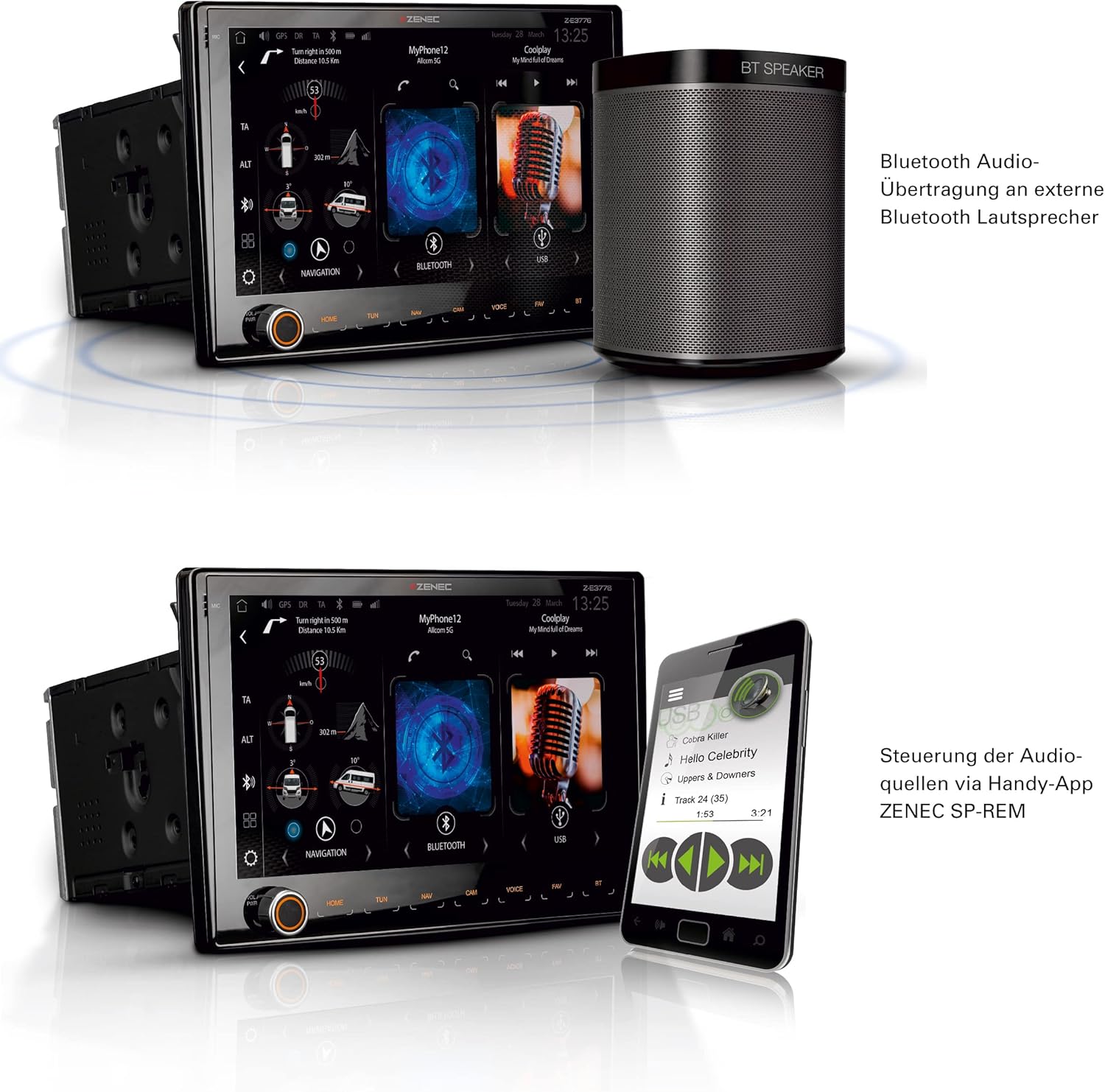
Расми 6.3: The Z-E3776 showcasing its BT-SRC mode, allowing audio to be wirelessly transmitted to an external Bluetooth speaker, along with smartphone app control.
6.4. Camera Inputs
The Z-E3776 supports up to three camera inputs, which can be configured for various views (e.g., rear, front, side). Use the "CAM" button to switch between camera views.

Расми 6.4: The Z-E3776's multi-view camera interface, offering various display modes for connected cameras, such as wide view and split screen options.
6.5. Navigation (Expandable)
The Z-E3776 can be expanded into a full-fledged navigation system by purchasing optional navigation packages:
- Z-EMAP76PC-NNG3: Car navigation version (ASIN B0D5Y8974L).
- Z-EMAP76MH-TT3: Motorhome/RV navigation version (ASIN B0C6QTQBCF). This version includes a comprehensive Camping P.O.I. database, FREEONTOUR/Send-To-Car function, and vehicle-specific profile settings (e.g., height, weight) for optimized routing.
Both packages include maps for over 40 EU countries and extensive Points of Interest (P.O.I.) databases.

Расми 6.5: Барview of the navigation expansion options for the Z-E3776, detailing features like selectable map color schemes, 3D building representation, and RV-specific routing profiles.
7. Нигоҳдорӣ
Proper maintenance ensures the longevity and optimal performance of your Z-E3776 multimedia system.
- Тоза кардани экран: Аз матои нарм ва бепахта, ки махсус барои экранҳои электронӣ тарҳрезӣ шудааст, истифода баред. Аз тозакунандаҳо ё ҳалкунандаҳои абразивӣ истифода набаред. Барои тоза кардани чанг ва изи ангушт, экранро бо нармӣ пок кунед.
- Тозакунии умумӣ: берунии агрегатро бо нарм пок кунед, гamp cloth. Avoid getting liquids inside the unit.
- Навсозии нармафзор: Periodically check the Zenec website for available firmware updates. Keeping your software up-to-date ensures the best performance, new features, and bug fixes.
- Шароити экологӣ: Нагузоред, ки дастгоҳро ба ҳарорати аз ҳад зиёд, нурҳои бевоситаи офтоб барои муддати тӯлонӣ ё намии аз ҳад зиёд дучор кунед.
8. Баррасии мушкилот
This section addresses common issues you might encounter with your Z-E3776. For more complex problems, please contact Zenec support or a qualified service technician.
| Мушкилот | Сабаби эҳтимолӣ | Ҳалли |
|---|---|---|
| Не қудрат | Пайвасти фуҷурии барқ, сӯхтани сӯзишворӣ, мушкилоти батареяи мошин. | Check power cables and fuses. Ensure vehicle battery is charged. |
| Садо нест | Volume too low, mute activated, speaker wiring issue, incorrect source selected. | Increase volume. Check mute status. Verify speaker connections. Select correct audio source. |
| Пайвасти Bluetooth ноком шуд | Bluetooth off on phone/unit, device not in pairing mode, interference. | Ensure Bluetooth is on. Put device in pairing mode. Move closer to unit. Restart both devices. |
| Android Auto/CarPlay Not Working | Wi-Fi/Bluetooth issues, phone not compatible, app not updated. | Check Wi-Fi/Bluetooth. Ensure phone OS and apps are updated. Try reconnecting. |
| Poor Radio Reception (DAB+/FM) | Antenna not properly connected, weak signal area, damaged antenna. | Check antenna connection. Try tuning to different stations. Consider a stronger antenna if in a poor signal area. |
9. Мушаххасоти
| Хусусият | Тафсилот |
|---|---|
| Намоиш | 9-inch (22.9 cm) Capacitive Touchscreen |
| Пайвастшавӣ | Wireless Android Auto, Wireless Apple CarPlay, Wi-Fi, Bluetooth, 2x USB, HDMI |
| Танзимкунанда | DAB+ Dual Tuner, FM Radio (RDS) |
| Вурудҳои камера | 3 (with audio mic support) |
| Ҳолати баромади аудио | Bluetooth (BT-SRC), 2.0 Surround Sound Channel Configuration |
| Навъи назорат | Touchscreen, Buttons, Android App, iOS App |
| Истеҳсолкунанда | Зенек |
| Рақами модел | Z-E3776 (ASIN: B0C6QFD1FP) |
10. Кафолат ва дастгирӣ
The ZENEC Z-E3776 comes with a Кафолати 2-солаи истеҳсолкунанда. Лутфан далели хариди худро барои даъвоҳои кафолат нигоҳ доред.
For technical support, service, or further inquiries, please contact your authorized Zenec dealer or visit the official Zenec website. Information regarding spare parts availability and software updates can also be found on the manufacturer's official channels.
Шарҳ: Software updates are guaranteed until information becomes available. Spare parts availability information is currently unavailable.


