1. Маҳсулот ба охир расидview
The GANA HDMI Switch 3 in 1 Out is designed to connect up to three HDMI source devices to a single HDMI display, such as a TV or monitor. This device eliminates the need for frequent plugging and unplugging of HDMI cables, providing a convenient solution for managing multiple media sources. It supports high-resolution video up to 4K@60Hz, including 3D, UHD, and HDCP2.2 signals, ensuring a high-quality visual experience. The switch can be operated via a manual button on the unit or with the included IR remote control.

Image: The GANA HDMI Switch unit shown with its accompanying remote control. The switch is a compact black box with three input ports and one output port, designed for efficient cable management.

Image: A detailed diagram of the GANA HDMI Switch, highlighting its input ports (Input 1, Input 2, Input 3), output port, IR receiver, power indicator, input signal indicators, and Micro USB power port. This visual aid helps in identifying each component of the device.
2. Мундариҷаи баста
Лутфан боварӣ ҳосил кунед, ки ҳама ҷузъҳо дар баста мавҷуданд:
- 1 x GANA HDMI Switch (3 in 1 Out)
- 1 x IR Remote Control (Note: Battery not included)
- 1 x Сими барқии Micro USB
- 1 x Дастури корбар
3. Мушаххасоти
| Хусусият | Мушаххасоти |
|---|---|
| Рақами модел | 3jin1-hei |
| Версияи HDMI | HDMI 2.0 |
| Ҳалномаи Макс | 4K@60Hz (Backward compatible with 4K@30Hz, 2560x1440@120Hz, 1920x1080@240Hz) |
| Технологияҳои дастгирӣшаванда | 3D, UHD, HDCP2.2, HDR |
| Маҷрои маҷрои | 18 Гб/с |
| Таъмини нерӯ | USB Powered (5V 1A, adapter not included) |
| Вазни ашё | 6.7 унция |
| Андозаҳои бастаҳо | 6.61 x 4.96 x 0.94 инч |
| Ранги | Сиёҳ |
| Навъи пайвасткунанда | HDMI |
4. Дастури насб
4.1 Пайваст кардани дастгоҳҳо
Follow these steps to connect your HDMI devices to the GANA HDMI Switch:
- Connect up to three HDMI source devices (e.g., gaming console, TV box, DVD player) to the Input 1, Input 2, ва Вуруди 3 ports on the HDMI switch using HDMI cables (not included).
- Connect one HDMI display (e.g., TV, monitor, projector) to the Натиҷа port on the HDMI switch using an HDMI cable (not included).

Image: A visual representation of the GANA HDMI Switch connecting three input devices (Apple TV, Xbox, PS5) to a single output display (TV). Blue arrows indicate the flow of signals from input to output.
4.2 Таъмини барқ
The HDMI switch requires external power for stable operation:
- Connect the provided Micro USB Power Cable to the Порти барқии Micro USB on the HDMI switch.
- Connect the other end of the Micro USB Power Cable to a 5V 1A USB power adapter (not included) or a USB port on your display device. Ensure the switch is always connected to a power source when in use to guarantee stable video transmission and optimal performance.

Image: The GANA HDMI Switch connected to a power source via its Micro USB port, illustrating the required 5V 1A power input for stable operation. The remote control is also visible in the foreground.
5. Дастурҳои истифодабарӣ
5.1 Гузаришҳои воридотӣ
You can switch between the connected HDMI source devices using two methods:
- Назорати дурдаст: Use the included IR remote control to select the desired input (1, 2, or 3) from a distance of up to 33 feet. This allows for convenient switching without needing to approach the switch unit.
- Тугмаи дастӣ: Press the 'Select' button on the front of the HDMI switch unit to cycle through the inputs (Input 1 → Input 2 → Input 3 → Input 1...).

Image: This image illustrates the two methods for switching inputs: using the IR remote control and pressing the manual button on the HDMI switch. The display shows various gaming and media applications, indicating seamless transitions between sources.

Тасвир: Аз боло ба поён view demonstrating the effective remote sensing distance of up to 33 feet for the GANA HDMI Switch, allowing control from various positions within a room.
5.2 Фаҳмидани нишондиҳандаҳои LED
The front panel of the HDMI switch features LED indicators to provide status information:
- LED барқ: Ҳангоми фурӯзон кардани дастгоҳ равшан мешавад.
- Input 1/2/3 LEDs: The corresponding LED will illuminate to indicate which HDMI input port is currently active and selected.
6. Хусусиятҳо ва имкониятҳо
6.1 4K@60Hz High Resolution Display
The GANA HDMI Switch supports resolutions up to 4K@60Hz, providing a clear and detailed visual experience. It is backward compatible with lower resolutions such as 4K@30Hz, 2560x1440@120Hz, and 1920x1080@240Hz. The switch also supports 3D, UHD, and HDCP2.2 signals, ensuring compatibility with a wide range of modern display technologies.

Image: A side-by-side comparison illustrating the visual difference between 30Hz and 60Hz refresh rates at 4K resolution, emphasizing the clearer and more realistic picture quality achieved with 4K@60Hz.

Image: A visual comparison demonstrating the enhanced color and contrast provided by HDR (High Dynamic Range) technology, supported by the HDMI switch, compared to a non-HDR image.
6.2 Мутобиқати васеъ
The GANA HDMI Switch is compatible with most devices that feature a standard HDMI interface. This includes a broad range of input and output devices:
- Дастгоҳҳои воридотӣ: PC, Computer, Macbook, Xbox 360, Xbox One, PS4/5, Blu-Ray DVD players, Chromecast, Nintendo Switch, TV Box Stick, and more.
- Дастгоҳҳои баромад: HD-Ready or Full HD TVs, projectors, monitors, and other HDMI-enabled displays.
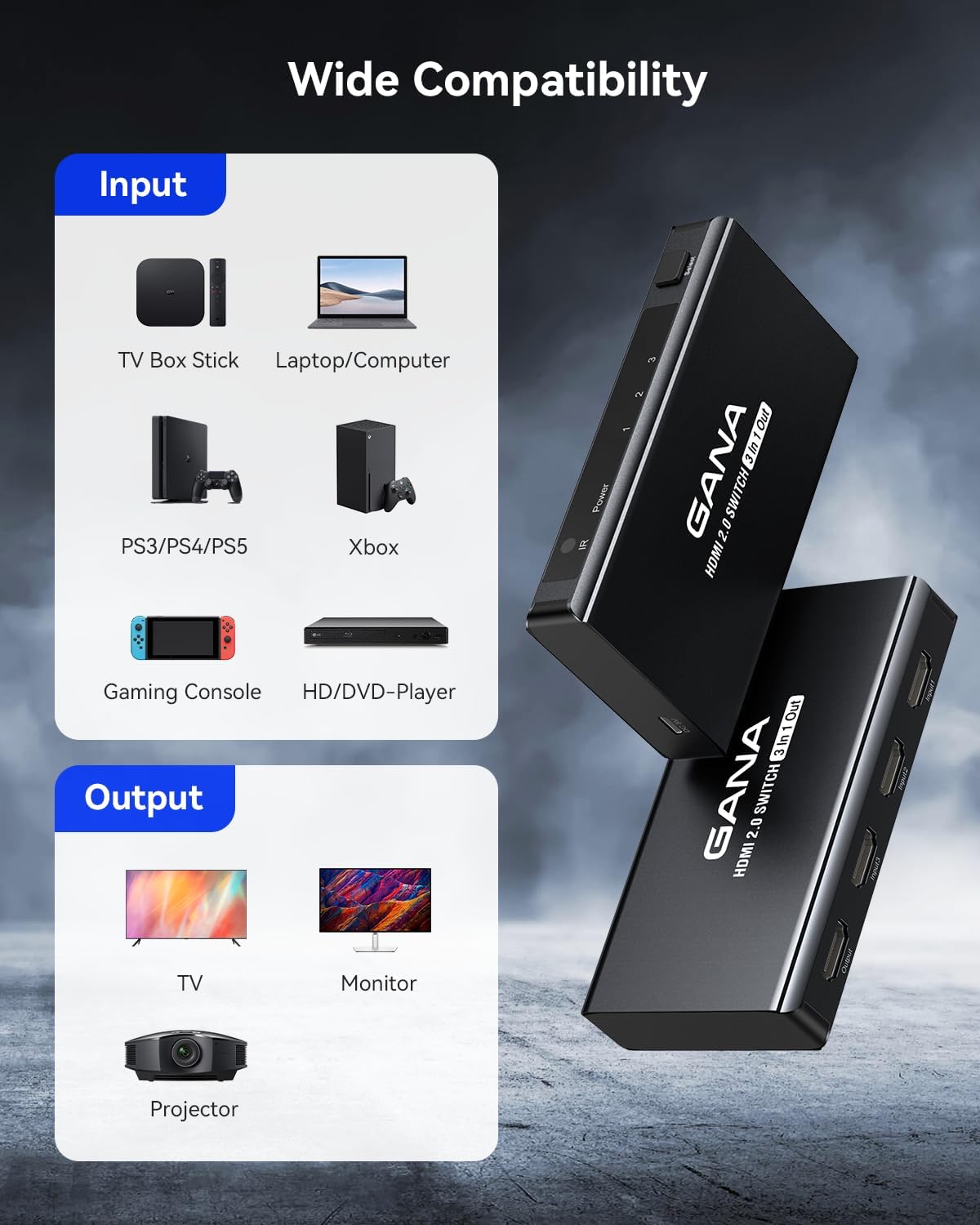
Image: A graphic illustrating the wide range of compatible input devices (TV Box Stick, Laptop/Computer, PS3/PS4/PS5, Xbox, Gaming Console, HD/DVD-Player) and output devices (TV, Monitor, Projector) for the GANA HDMI Switch.
6.3 Fast and Stable Transmission
Equipped with an industry-leading IC chip, the switch provides a high bandwidth of 18Gbps, ensuring fast and stable data transmission. The USB-powered design contributes to consistent video transmission and improved performance, minimizing frame loss or image degradation for a smooth viewтаҷрибаи бозӣ ва бозӣ.
7. Нигоҳдорӣ
To ensure the longevity and optimal performance of your GANA HDMI Switch, follow these simple maintenance guidelines:
- Тозакунӣ: Use a soft, dry cloth to gently wipe the exterior of the switch. Avoid using liquid cleaners, aerosols, or abrasive materials, as these can damage the device.
- Нигоҳдорӣ: When not in use for extended periods, store the switch in a cool, dry place away from direct sunlight and extreme temperatures.
- Идоракунии кабелӣ: Ensure HDMI cables are not excessively bent or strained, as this can lead to signal issues or damage to the cables and ports.
- Таъмини нерӯ: Always use the recommended 5V 1A power supply to prevent damage from incorrect voltage.
8. Баррасии мушкилот
If you encounter issues with your GANA HDMI Switch, please refer to the following table for common problems and their solutions:
| Мушкилот | Сабаби эҳтимолӣ | Ҳалли |
|---|---|---|
| No signal or black screen on display. | Пайвастҳои кабелии фуҷур. Вуруди нодуруст интихобшуда. Таъмини қувваи барқ нокифоя. Суръати навсозӣ/қарорнокии номувофиқ. | Боварӣ ҳосил кунед, ки ҳамаи кабелҳои HDMI боэътимод пайваст шудаанд. Verify the correct input is selected on the switch (check LED indicator). Confirm the switch is powered by a stable 5V 1A source. Try a lower resolution on the source device. |
| Flickering or unstable image. | Poor quality HDMI cables. Long HDMI cable length. Масъалаҳои таъмини нерӯи барқ. | Use high-quality HDMI 2.0 certified cables. Агар имконпазир бошад, кабелҳои кӯтоҳтари HDMI-ро санҷед. Ensure stable 5V 1A power supply is connected. Restart all connected devices. |
| Правленияи дурдаст кор намекунад. | No battery or low battery. Монеа байни дурдаст ва коммутатор. Пульти дурдаст ба қабулкунаки IR нигаронида нашудааст. | Insert a new CR2025 battery (not included) into the remote. Remove any objects blocking the line of sight to the switch's IR receiver. Point the remote directly at the IR receiver on the switch. |
| Audio issues (no sound or distorted sound). | Audio settings on source/display. HDMI cable issue. | Check audio output settings on your source device and input settings on your display. Ensure HDMI cables are fully inserted and not damaged. Сими дигари HDMI-ро санҷед. |
9. Кафолат ва дастгирӣ
GANA offers lifetime technical support and friendly customer service for this product. If you encounter any problems or have questions regarding your HDMI switch, please do not hesitate to contact GANA customer support. They aim to resolve your issues within 24 hours.
For more information or to explore other GANA products, please visit the official GANA Store on Amazon: GANA Store


