1. Муқаддима
This instruction manual provides essential information for the installation, maintenance, and safe use of your Segway Navimow Blade Assembly Plus. These blades are designed to ensure effective and precise cutting for your robotic lawnmower. Please read this manual thoroughly before use.
2. Маҳсулот ба охир расидview
The Segway Navimow Blade Assembly Plus includes durable carbon steel blades with cutting edges on both sides, designed for powerful and sturdy mowing. This package contains 12 blades and 12 screws for replacement.

Figure 2.1: Segway Navimow Blade Assembly Plus packaging, illustrating the included 12 blades and 12 screws.
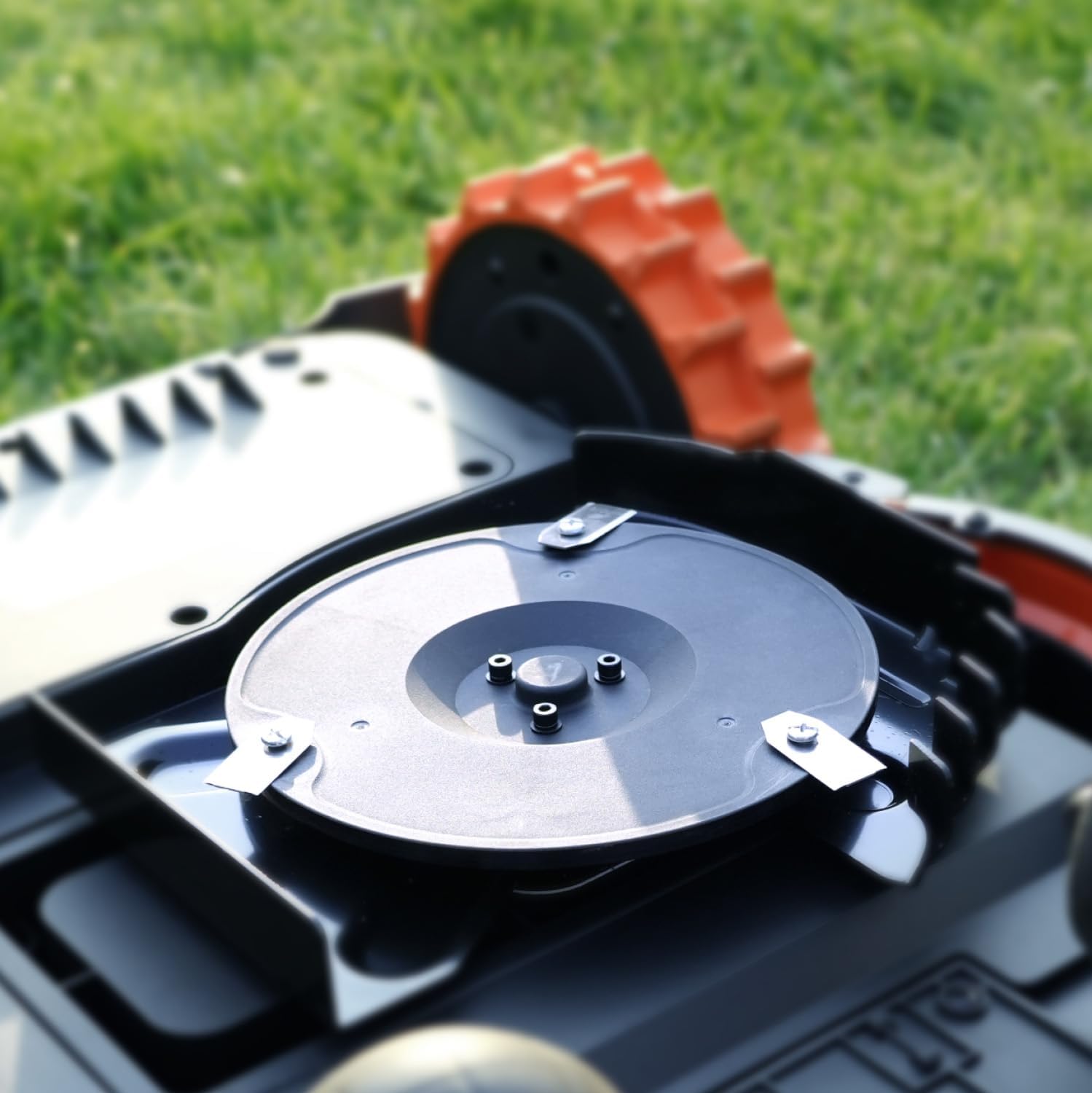
Figure 2.2: Close-up of a robotic lawnmower's cutting disc with blades installed, demonstrating their position for mowing.
3. Мутобиқат
These blades are fully compatible with the following Segway Navimow robotic mower series:
- Segway Navimow X3 Series
- Segway Navimow i Series (i105N, i110N)
- Segway Navimow H Series (H800N-VF, H1500N-VF, H3000N-VF)
4. Маълумот оид ба бехатарӣ
Огоҳӣ: The blades are extremely sharp. Always wear heavy-duty protective gloves when handling or replacing the blades to prevent injury. Refer to your main Navimow User Manual for additional safety guidelines.
5. Мундариҷаи баста
The Segway Navimow Blade Assembly Plus package includes:
- 12 x Replacement Blades (carbon steel)
- 12 x винтҳо
6. Setup & Installation (Blade Replacement)
Regular blade replacement is crucial for maintaining optimal cutting performance and lawn health. Follow these steps to replace the blades:
- Хомӯш: Ensure your Navimow robotic mower is completely powered off and disconnected from its charging station before beginning any maintenance.
- Дастпӯшакҳо пӯшед: Put on heavy-duty protective gloves to handle the sharp blades.
- Access Cutting Deck: Carefully turn the mower over to access the cutting deck and existing blades.
- Баргҳои кӯҳнаро хориҷ кунед: Use a screwdriver to remove the screws holding the old blades in place. Discard the old blades and screws safely.
- Лавҳаҳои навро насб кунед: Place a new blade onto the cutting disc, aligning the holes. Secure it with a new screw. Ensure the blade can pivot freely after installation.
- Такрор кунед: Repeat the process for all blades on the cutting disc. It is recommended to replace all blades simultaneously for balanced cutting.
- Тафтиш: After replacing all blades, ensure they are securely fastened and can move freely.
- Return to Service: Turn the mower upright and return it to its charging station or designated mowing area.
Video: How to Replace the Blades
This video demonstrates the step-by-step process of replacing the blades on your Segway Navimow robotic mower, ensuring proper installation for optimal performance.
Video: Replacement 6-Blade Disc Overview
Як барview of a 6-blade disc, showing the components and how blades are attached, providing context for blade replacement.
7. Operating Instructions (Mower)
For detailed operating instructions of your Segway Navimow robotic mower, including initial setup, boundary mapping, and scheduling, please refer to your main Navimow User Manual. The new blades will enhance the cutting quality during operation.
Video: How to Start Manual Mowing
This video guides you through the process of initiating manual mowing with your Navimow robotic mower, including options for starting via the app or directly on the device.
Video: How to Enable and Use the Anti-theft Feature
Learn how to activate and utilize the anti-theft feature on your Navimow robotic mower, including setting up geofence boundaries and responding to alarms.
8. Нигоҳдорӣ
To maintain optimal cutting performance, inspect the blades regularly for wear and tear. Replace blades as needed, typically when you notice a decrease in cutting quality or frayed grass tips. Always use genuine Segway Navimow replacement blades for best results.
9. Баррасии мушкилот
If your mower's cutting performance declines:
- Poor Cut Quality: Replace all blades with new ones. Dull or damaged blades are the most common cause of poor cutting.
- Садои ғайриоддӣ: Check if blades are properly secured and not bent or damaged. Replace if necessary.
- Вибрация: Ensure all blades are correctly installed and balanced. Replace any bent or damaged blades.
For other issues related to the robotic mower itself, consult the comprehensive troubleshooting section in your main Segway Navimow User Manual or contact customer support.
10. Мушаххасоти
| Аттрибут | Тафсилот |
|---|---|
| Бренд | Сегвей |
| Рақами модел | HA002E |
| Материал | Carbon Steel (Blades) |
| Ранги | Silver (Blades) |
| Мундариҷаи баста | 12 Blades, 12 Screws |
| Item Weight (per blade) | Тақрибан 9.07 г (0.32 унсия) |
| Product Dimensions (per blade) | 0.02"D x 0.73"W x 1.39"H |
11. Маълумот дар бораи кафолат
For specific warranty details regarding the Segway Navimow Blade Assembly Plus, please refer to the product packaging or the official Segway Navimow website. General warranty information for Navimow robotic mowers typically includes:
- Mower: 3 Years
- Battery: 2 Years
Лутфан далели хариди худро барои даъвоҳои кафолат нигоҳ доред.
12. Дастгирӣ
If you have any questions, require further assistance, or need to troubleshoot issues not covered in this manual, please utilize the following resources:
- расмӣ Webсайт: Visit the Segway Navimow official website for comprehensive FAQs and support documentation.
- Navimow App: Access Live Chat support directly through the Navimow mobile application for real-time assistance.


