1. Маҳсулот ба охир расидview
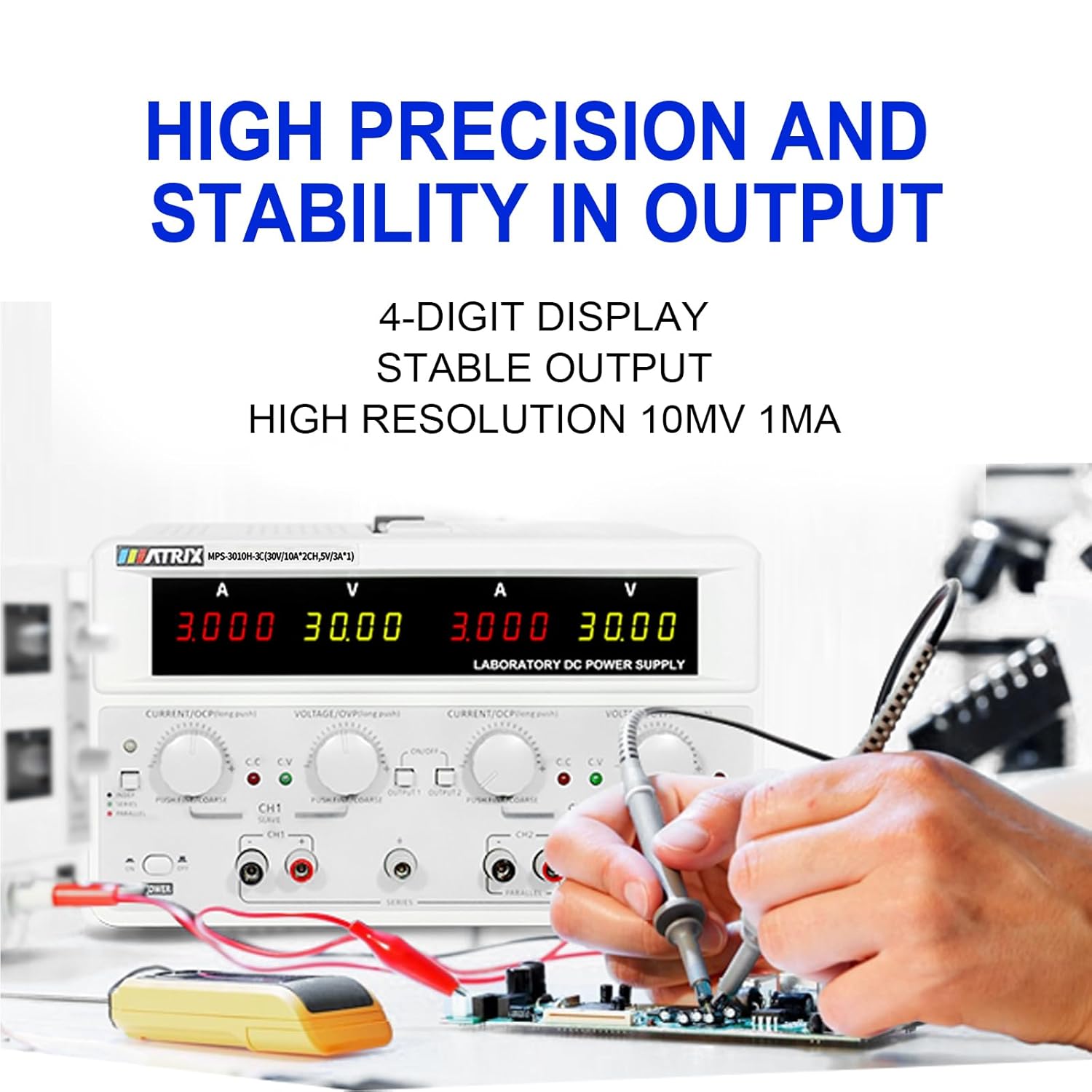
The MATRIX MPS-3010H-3C is a high-precision, 3-channel adjustable DC power supply designed for various applications including laboratory work, electronic repair, and DIY projects. It features two adjustable channels (CH1 and CH2) providing 0-30V / 0-10A each, and one fixed 5V / 3A channel (CH3), with a total power output of up to 615W. The unit offers a 4-digit bright screen display for voltage and current, independent control for CH1 and CH2, and supports 110V/220V input voltage гузариш.
Key features include high precision (0.03% + 10 mV, 0.1% + 5 mA) and stability with 10 mV, 1 mA resolution and low ripple (2 mVrms, 5 mArms). It incorporates a power-on slow-start circuit for stable and accurate DC output. The power supply allows for easy switching between independent, series, and parallel modes with a single button, eliminating the need for manual wire reconnection. It also supports presetting current and voltage without short circuits. User-friendly features include precision encoder adjustment knobs for accurate value changes, OCP/OVP/OTP protection, an intelligent fan system, and USB, RS-232, and RS-485 interfaces for computer or automated device connectivity.

2. Дастурамал оид ба бехатарӣ
Лутфан, пеш аз истифодаи дастгоҳ ҳамаи дастурҳои бехатариро хонед ва дарк кунед. Риоя накардани ин дастурҳо метавонад боиси зарбаи барқ, сӯхтор ё вайрон шудани маҳсулот гардад.
- Ҳамеша манбаи барқро ба розеткаи заминӣ пайваст кунед.
- Дастгоҳро дар тар ва ё дamp шароит.
- Барои пешгирӣ кардани гармии аз ҳад зиёд вентилятсияи дурустро таъмин кунед. Кушодани вентилятсияро манъ накунед.
- в-ро кушоедasing of the power supply. There are no user-serviceable parts inside. Refer servicing to qualified personnel.
- Ҳаҷми воридшударо тасдиқ кунедtage selector (110V/220V) is set correctly for your region before connecting to AC power.
- Use only the provided power cord and test leads, or equivalent replacements that meet safety standards.
- Avoid touching output terminals when the device is powered on.
- Disconnect power before making or changing connections to the output terminals.
3. Мундариҷаи баста
Carefully unpack the power supply and check for any damage. Retain the packaging for future transport or storage. Verify that all items listed below are included:
- MATRIX MPS-3010H-3C DC Power Supply Unit
- Сими барқи AC
- Рақамҳои санҷишӣ (сурх ва сиёҳ)
- Дастури корбар (ин ҳуҷҷат)
4. Хусусиятҳои маҳсулот
- Натиҷаи 3-канал: Two adjustable channels (0-30V/0-10A) and one fixed channel (5V/3A).
- High Precision & Resolution: 10mV / 1mA resolution with 0.03% + 10mV voltage accuracy and 0.1% + 5mA current accuracy.
- Low Ripple & Noise: ≤2mVrms and ≤5mArms for stable output.
- Намоиши 4-рақама: Clear and bright display for voltagд ва хонишҳои ҷорӣ.
- Series/Parallel Mode: One-button switching for series or parallel operation without manual rewiring.
- Функсияи пешакӣ: Ability to preset current and voltage without short-circuiting the output.
- Механизмҳои муҳофизатӣ: Over Current Protection (OCP), Over Voltage Protection (OVP), and Over Temperature Protection (OTP).
- Intelligent Cooling: Fan system adjusts speed based on temperature to maintain optimal performance.
- Пайвастшавӣ: Equipped with USB, RS-232, and RS-485 interfaces for remote control and automation.
- Функсияи хотира: Saves output status and values before shutdown.
- Назорати садо: Buzzer sound can be turned on or off.


5. Дастури насб
5.1 Кушодан ва ҷойгиркунӣ
Remove the power supply from its packaging. Place the unit on a stable, level surface with adequate space around it for ventilation. Ensure that the front and rear panels are easily accessible.
5.2 Пайваст кардани қувваи AC
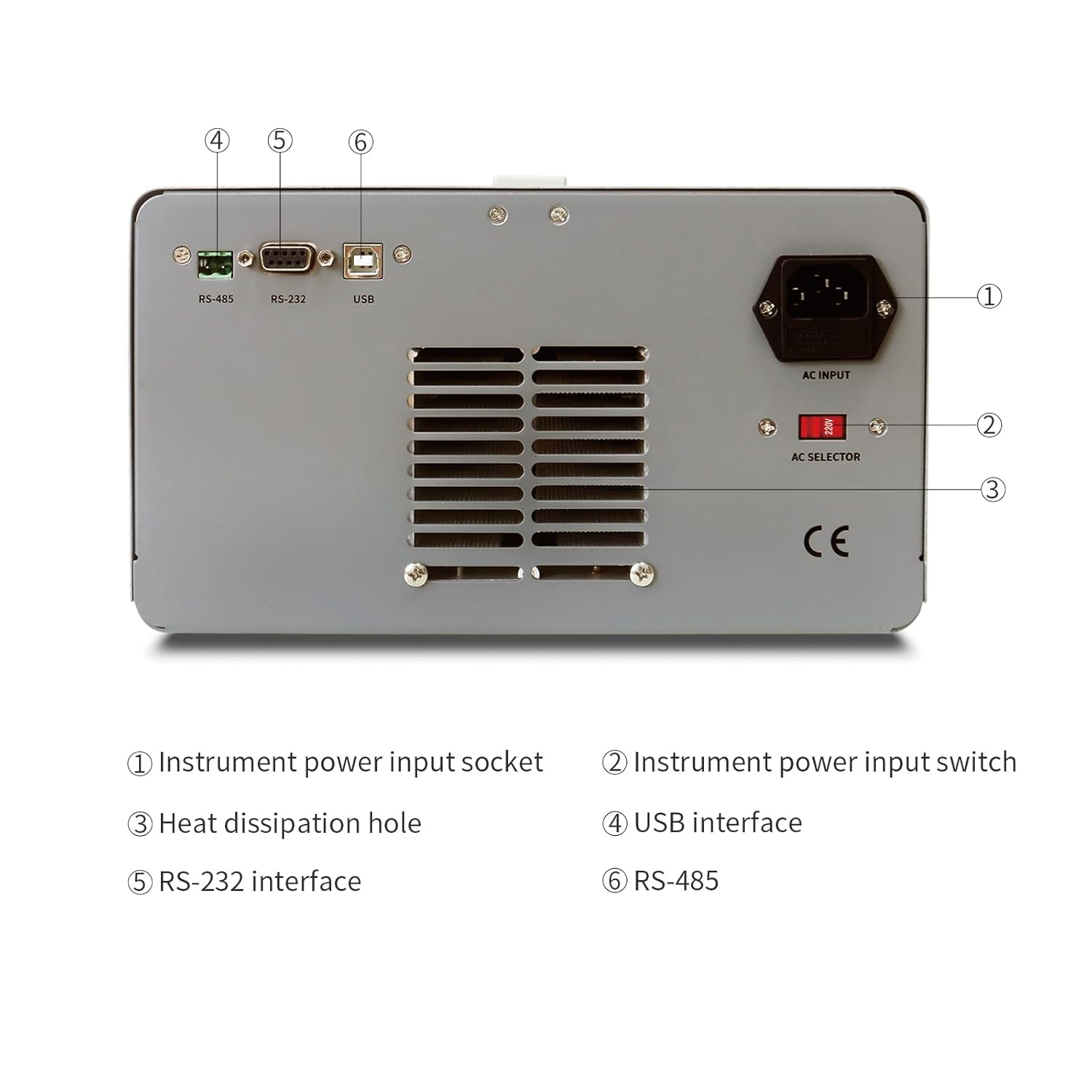
- Locate the AC input socket and the AC selector switch on the rear panel of the power supply.
- Муҳим: Before connecting the power cord, ensure the AC selector switch is set to the correct voltage (110V or 220V) for your local power grid. Incorrect setting can damage the unit.
- Connect the provided AC power cord to the AC input socket on the rear panel.
- Нӯги дигари сими барқро ба васлаки барқии заминӣ пайваст кунед.
5.3 Connecting Load
Use the provided test leads to connect your load to the output terminals. Ensure correct polarity (red for positive, black for negative). For CH1 and CH2, use the corresponding output terminals. CH3 (fixed 5V) also has dedicated output terminals.
6. Дастурҳои истифодабарӣ
6.1 Панели пеши болоиview
The front panel provides all necessary controls and displays for operating the power supply.

- CH1 V, A display: Digital displays for Voltage and Current of Channel 1.
- CH2 V, A display: Digital displays for Voltage and Current of Channel 2.
- CH1 Adjustment knob: Encoder knob for setting Voltage and Current for Channel 1. Push to switch between coarse/fine adjustment.
- CH2 Adjustment knob: Encoder knob for setting Voltage and Current for Channel 2. Push to switch between coarse/fine adjustment.
- Нишондиҳандаи режим: Lights indicating CC (Constant Current) or CV (Constant Voltage) mode.
- Меню: Button for accessing menu options.
- CH1, CH2 Output switch: Buttons to enable/disable output for Channel 1 and Channel 2 independently.
- Терминали баромад: Binding posts for connecting test leads (Red for positive, Black for negative).
- Калиди барқ: Тугмаи асосии фурӯзон/хомӯш кардани дастгоҳ.
6.2 Basic Operation (Independent Mode)
- Ensure the power supply is connected to AC power and the AC selector is correct.
- Тугмаи асосиро пахш кунед КУВВА switch to turn on the unit. The displays will illuminate.
- For CH1 or CH2, rotate the respective ҶИЛДTAGE knob to set the desired output voltage. Push the knob to toggle between coarse and fine adjustment.
- Rotate the respective ХОЗИР knob to set the desired current limit. This acts as a maximum current the channel will supply.
- Connect your load to the corresponding output terminals (CH1, CH2, or CH3).
- -ро пахш кунед БАРОР 1 or БАРОР 2 switch to enable the output for the selected channel. The output indicator will light up.
- The display will show the actual output voltagд ва ҷорӣ.
- To disable an output, press its respective БАРОМАД боз иваз кунед.
6.3 Series and Parallel Mode
The MPS-3010H-3C allows for easy configuration of CH1 and CH2 in series or parallel mode.
- Реҷаи силсила: Connect the positive terminal of CH1 to the negative terminal of CH2 using a short wire. Then, use the negative terminal of CH1 and the positive terminal of CH2 as the combined output. Press the СИЛСИЯ button. The voltage will be the sum of CH1 and CH2 voltages, while the current limit will be that of the lower-set channel.
- Ҳолати параллелӣ: Connect the positive terminals of CH1 and CH2 together, and the negative terminals of CH1 and CH2 together. Press the ПАРАЛЕЛЬ button. The current will be the sum of CH1 and CH2 currents, while the voltage will be that of the lower-set channel.
In both series and parallel modes, the display will show the combined current and voltage values, providing intuitive readings.
6.4 Fixed 5V Output (CH3)
The CH3 output provides a fixed 5V at 3A. This channel is always active when the power supply is on and does not have independent ON/OFF control or adjustable settings.
6.5 Хусусиятҳои муҳофизатӣ
- OCP (Ҳифзи аз ҳад зиёд): If the output current exceeds the set limit, the power supply will enter constant current mode (CC) or shut down the output, depending on the setting.
- OVP (Зиёда аз ҷилдtage Муҳофизат): Агар ҳаҷми баромадtage exceeds a preset limit, the output will be shut down to protect the connected load.
- OTP (Ҳифзи ҳарорат): The unit will automatically shut down if its internal temperature exceeds a safe operating limit.
7. Connectivity and Remote Control
The MPS-3010H-3C offers multiple interfaces for remote control and integration into automated systems.
7.1 Интерфейс тамом шудview

- Интерфейси USB: For direct connection to a personal computer.
- Интерфейси RS-232: A standard serial communication port.
- Интерфейси RS-485: A robust serial communication standard suitable for longer distances and multi-drop networks.
7.2 Пайвастшавӣ ба компютер
To control the power supply remotely, connect the appropriate cable (USB, RS-232, or RS-485) from the power supply to your computer. You will need to install the necessary drivers and control software, typically available from the MATRIX product support website. Refer to the software documentation for detailed instructions on remote operation and programming.
8. Нигоҳдорӣ
Нигоҳубини дуруст кори устувор ва дарозмуддати манбаи барқи шуморо таъмин мекунад.
- Тозакунӣ: Disconnect the power supply from all power sources and loads before cleaning. Use a soft, dry cloth to wipe the exterior. Do not use abrasive cleaners or solvents.
- Вентилятсия: Regularly check that the ventilation openings on the sides and rear of the unit are clear of dust and obstructions.
- Нигоҳдорӣ: When not in use for extended periods, store the power supply in a dry, dust-free environment.
- Калибрченкунӣ: For applications requiring high accuracy, periodic calibration by a qualified service center is recommended.
9. Баррасии мушкилот
Ин бахш мушкилоти умумиеро, ки шумо метавонед дучор ояд, баррасӣ мекунад. Агар мушкилот боқӣ монад, бо дастгирии муштариён тамос гиред.
| Мушкилот | Сабаби эҳтимолӣ | Ҳалли |
|---|---|---|
| Ҳангоми фурӯзон қувва нест | Power cord not connected; AC selector incorrect; Blown fuse | Check power cord connection; Verify AC selector setting; Replace fuse (refer to service manual or contact support). |
| Ҳаҷми баромад нестtagд/ҷорӣ | Output switch OFF; OVP/OCP triggered; Load disconnected or faulty | Press output switch ON; Check OVP/OCP settings and reset if necessary; Verify load connection and functionality. |
| Ҷилди нодурустtage/current reading | Poor connection; Device malfunction | Check test lead connections; Contact customer support for calibration or repair. |
| Агрегат аз ҳад зиёд гарм мешавад | вентилятсияи басташуда; Сарбории аз ҳад зиёд | Ensure ventilation openings are clear; Reduce load or operate within specified limits. |
10. Мушаххасоти техникӣ
The following table details the technical specifications of the MATRIX MPS-3010H-3C DC Power Supply.

| Параметр | Мушаххасоти |
|---|---|
| Модели | MPS-3010H-3C |
| Воридоти номиналӣtage | AC220V/110V ±10% |
| Натиҷаи канали 1 | 0-30В / 0-10А |
| Натиҷаи канали 2 | 0-30В / 0-10А |
| Натиҷаи канали 3 | 5В / 3А |
| Қувваи умумӣ | 615 Вт |
| Ҷилдиtage Set Resolution | 10мВ |
| Current Set Resolution | 1мА |
| Ҷилдиtage Set Accuracy | ≤0.03% + 10мВ |
| Current Set Accuracy | ≤0.1% + 5мА |
| Ripple & Noise (Voltage) | ≤2mVrms |
| Ripple & Noise (Current) | ≤5мЯроқ |
| Ҳарорати корӣ | 0-40°C, ≤80%RH |
| Андозаҳои маҳсулот (L x W x H) | 9.8 x 5.9 x 13 инч |
| Вазни ашё | 26.4 фунт (12 кг) |
| Интерфейсҳо | RS-232, RS-485, USB |
11. Кафолат ва дастгирии муштариён
MATRIX TECHNOLOGY INC. provides a 3-year after-sales service for all MATRIX-branded products. For technical assistance, warranty claims, or general inquiries, please contact MATRIX customer support through the official website or your point of purchase. Please have your model number (MPS-3010H-3C) and purchase date available when contacting support.


