1. Муқаддима
This manual provides detailed instructions for the setup, operation, and maintenance of your BOXPUT X88 PRO 13 Smart TV Box. Please read this manual thoroughly before using the device to ensure proper functionality and to maximize your user experience. Keep this manual for future reference.
2. Мундариҷаи баста
Verify that all items listed below are included in your product package. If any items are missing or damaged, please contact your retailer.
- BOXPUT X88 PRO 13 Smart TV Box
- Назорати дурдаст
- Кабели HDMI
- Адаптери барқ (DC 5V/2A)
- Дастури корбар
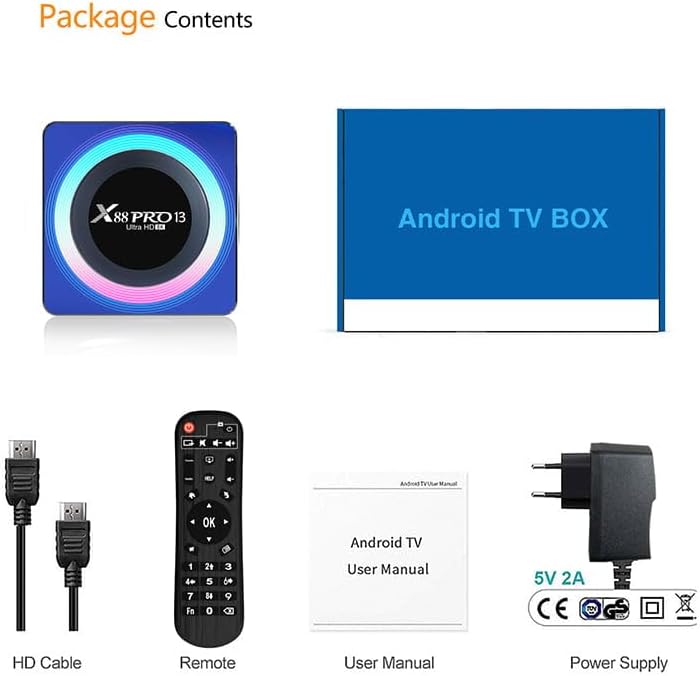
Image: Contents of the product package, including the TV box, HDMI cable, remote control, user manual, and power adapter.
3. Маҳсулот ба охир расидview
The BOXPUT X88 PRO 13 is a high-performance Smart TV Box designed to deliver an enhanced media experience. It features the Android 13.0 operating system and a powerful RK3528 Quad-Core processor.

Image: The BOXPUT X88 PRO 13 Smart TV Box and its accompanying remote control.
Хусусиятҳои асосӣ
- Системаи оператсионии Android 13.0
- RK3528 Quad-Core 64bit Cortex-A53 Chipset
- Mali 450 MP2 GPU
- Support for 8K HD Video Decoding
- Dual-band Wi-Fi (2.4G/5G) with Wi-Fi 6
- Bluetooth V5.0
- Screen Cast Functionality

Image: Visual representation of key features including Android 13.0, 8K video support, RK3528 processor, WiFi 6, and Screen Cast.
4. Дастури насб
Follow these steps to set up your BOXPUT X88 PRO 13 Smart TV Box.
- Ба телевизор пайваст шавед: Connect one end of the HDMI cable to the HDMI port on the TV Box and the other end to an available HDMI input on your television.
- Пайваст кардани барқ: Plug the power adapter into the DC 5V/2A port on the TV Box, then plug the adapter into a wall outlet.
- Фаъол: The device should power on automatically or can be turned on using the power button on the remote control.
- Воридро интихоб кунед: On your television, select the correct HDMI input source using your TV's remote control.
- Танзимоти ибтидоӣ: Барои анҷом додани танзимоти ибтидоӣ, аз ҷумла интихоби забон ва танзимоти шабака, дастурҳои дар экран бударо иҷро кунед.
5. Дастурҳои истифодабарӣ
5.1 Навигатсияи асосӣ
Use the provided remote control to navigate the Android interface. The directional buttons (up, down, left, right) are used to move the cursor, and the 'OK' button confirms selections. The 'Back' button returns to the previous screen, and the 'Home' button returns to the main menu.
5.2 Пайвастшавӣ ба шабака
The TV Box supports both wired and wireless network connections.
- Пайвасти симӣ (Ethernet): Connect an Ethernet cable from your router to the LAN port on the TV Box.
- Пайвасти бесим (Wi-Fi): Ба Танзимотҳо > Шабака ва Интернет > Wi-Fi, select your network, and enter the password. The device supports 2.4GHz and 5GHz dual-band Wi-Fi 6 for faster and more stable connections.

Image: An illustration demonstrating the improved speed and stability offered by WiFi 6 technology.
5.3 Пайвасти Bluetooth
The TV Box features Bluetooth V5.0, allowing connection to various external devices.
- Ба Settings > Connected Devices > Pair new device.
- Put your Bluetooth device (e.g., speaker, headphones, game controller) into pairing mode.
- Select the device from the list on your TV screen to pair.

Image: The TV box demonstrating Bluetooth 5.0 connectivity with a speaker, headphones, and a game controller.
5.4 Бозии медиа
The BOXPUT X88 PRO 13 supports advanced media formats, including 8K H.265 ultra-high-definition content and 3D video playback.
- Рамзкушоии видеои 8K: Enjoy crystal-clear visuals with support for 8K resolution.
- Дастгирии 3D: Experience immersive 3D content when connected to a compatible 3D television.

Тасвир: Намоиши телевизионӣasing a high-resolution winter scene, illustrating the 8K video decoding capability of the device.
5.5 Multi-screen Interaction
The device supports various multi-screen interaction protocols, allowing you to cast content from your mobile devices to your TV.
- Навозиши ҳавоӣ: Барои дастгоҳҳои Apple.
- DLNA: For compatible devices across various platforms.
- Miracast: Барои дастгоҳҳои Android.
To use these features, ensure your mobile device and the TV Box are connected to the same Wi-Fi network. Activate the casting feature on your mobile device and select the TV Box from the available devices.

Image: A television screen displaying a racing car, demonstrating multi-screen interaction capabilities such as Airplay, DLNA, and Miracast.
6. Нигоҳдорӣ
To ensure the longevity and optimal performance of your TV Box, follow these maintenance guidelines:
- Тозакунӣ: Барои тоза кардани дастгоҳ матои мулоими хушкро истифода баред. Моеъҳои тозакунанда ё аэрозолҳоро истифода набаред.
- Вентилятсия: Барои пешгирӣ аз гармшавии аз ҳад зиёд, боварӣ ҳосил кунед, ки дастгоҳ дар ҷои хуб вентилятсияшуда ҷойгир карда шудааст. Сӯрохиҳои вентилятсияро набандед.
- Навсозии нармафзор: Ба таври даврӣ навсозиҳои системаро тавассути Settings > About > System update to ensure you have the latest features and security patches.
- Нигоҳдорӣ: Avoid placing heavy objects on the device. Store in a cool, dry place away from direct sunlight and extreme temperatures.
7. Баррасии мушкилот
If you encounter issues with your BOXPUT X88 PRO 13, refer to the following common problems and solutions:
- Не қудрат:
- Боварӣ ҳосил кунед, ки адаптери барқ ба дастгоҳ ва розеткаи барқии корӣ боэътимод пайваст аст.
- Боварӣ ҳосил кунед, ки васлаки барқ фаъол аст.
- Дар телевизион сигнал нест:
- Check that the HDMI cable is properly connected to both the TV Box and the TV.
- Боварӣ ҳосил кунед, ки телевизиони шумо ба манбаи дурусти вуруди HDMI танзим шудааст.
- Try a different HDMI cable or HDMI port on your TV.
- Пайвасти Wi-Fi нест:
- Confirm your Wi-Fi router is powered on and functioning.
- Check Wi-Fi settings on the TV Box (Танзимотҳо > Шабака ва Интернет > Wi-Fi) and ensure the correct network is selected and password entered.
- Restart the TV Box and your Wi-Fi router.
- Идоракунии дурдаст ҷавоб намедиҳад:
- Батареяҳои пулти дурдастро иваз кунед.
- Боварӣ ҳосил кунед, ки байни пульти дурдаст ва қуттии телевизор ягон монеа вуҷуд надорад.
- Applications Crashing or Freezing:
- Барномаро пӯшед ва аз нав оғоз кунед.
- Clear the cache of the problematic application via Танзимотҳо > Барномаҳо > [Номи барнома] > Захира ва кэш > Тозакунии кэш.
- Ensure the device has sufficient free storage space.
- Perform a system update if available.
8. Мушаххасоти
| Хусусият | Мушаххасоти |
|---|---|
| Модели | X88 PRO 13 |
| Низоми амал | Android 13.0 |
| Чипсет | RK3528 Quad-Core 64bit Cortex-A53 |
| GPU | Mali 450 MP2 |
| RAM | 4 ГБ |
| ROM (Нигоҳдории дохилӣ) | 64 ГБ EMMC |
| Хост USB | 1 * USB 3.0; 1 * USB 2.0 |
| LAN/Ethernet | 10/100M Standard RJ-45 |
| Wireless/Wi-Fi | 2.4G / 5G Dual-band Wi-Fi 802.11 a/b/g/n/ac/ax (Wi-Fi 6) |
| блутуз | V5.0 |
| Таъмини нерӯ | DC 5V/2A |
| Рамзи рамзгузории видео | 8K H.265, 3D Support |
| Андозаҳои маҳсулот | 107 x 107 x 21 мм |
9. Кафолат ва дастгирӣ
Барои гирифтани маълумот дар бораи кафолат ва дастгирии техникӣ, лутфан ба ҳуҷҷатҳои пешниҳодшуда бо хариди худ муроҷиат кунед ё бо фурӯшандаи худ тамос гиред. Барои даъвоҳои кафолат далели хариди худро нигоҳ доред.


