1. Муқаддима
This manual provides detailed instructions for the safe and efficient operation of your MARKLIFE P50 Portable Bluetooth Thermal Label Maker Machine. Please read this manual thoroughly before using the device and retain it for future reference. The P50 is designed for creating various labels using thermal printing technology, connecting wirelessly via Bluetooth to mobile devices or via USB to Windows PCs.
2. Мундариҷаи баста
Боварӣ ҳосил кунед, ки ҳамаи ҷузъҳои дар поён овардашуда ба бастаи шумо дохил карда шудаанд. Агар ягон ашё гум ё вайрон бошад, лутфан бо дастгирии мизоҷон тамос гиред.
- MARKLIFE P50 мошини тамғакоғазсоз
- 3 Label Tapes (2 rolls of 1.57" x 1.18" white gap labels, 1 roll of 2" x 2" circle gap labels)
- Сими пуркунандаи USB-C
- Дастури корбар (ин ҳуҷҷат)
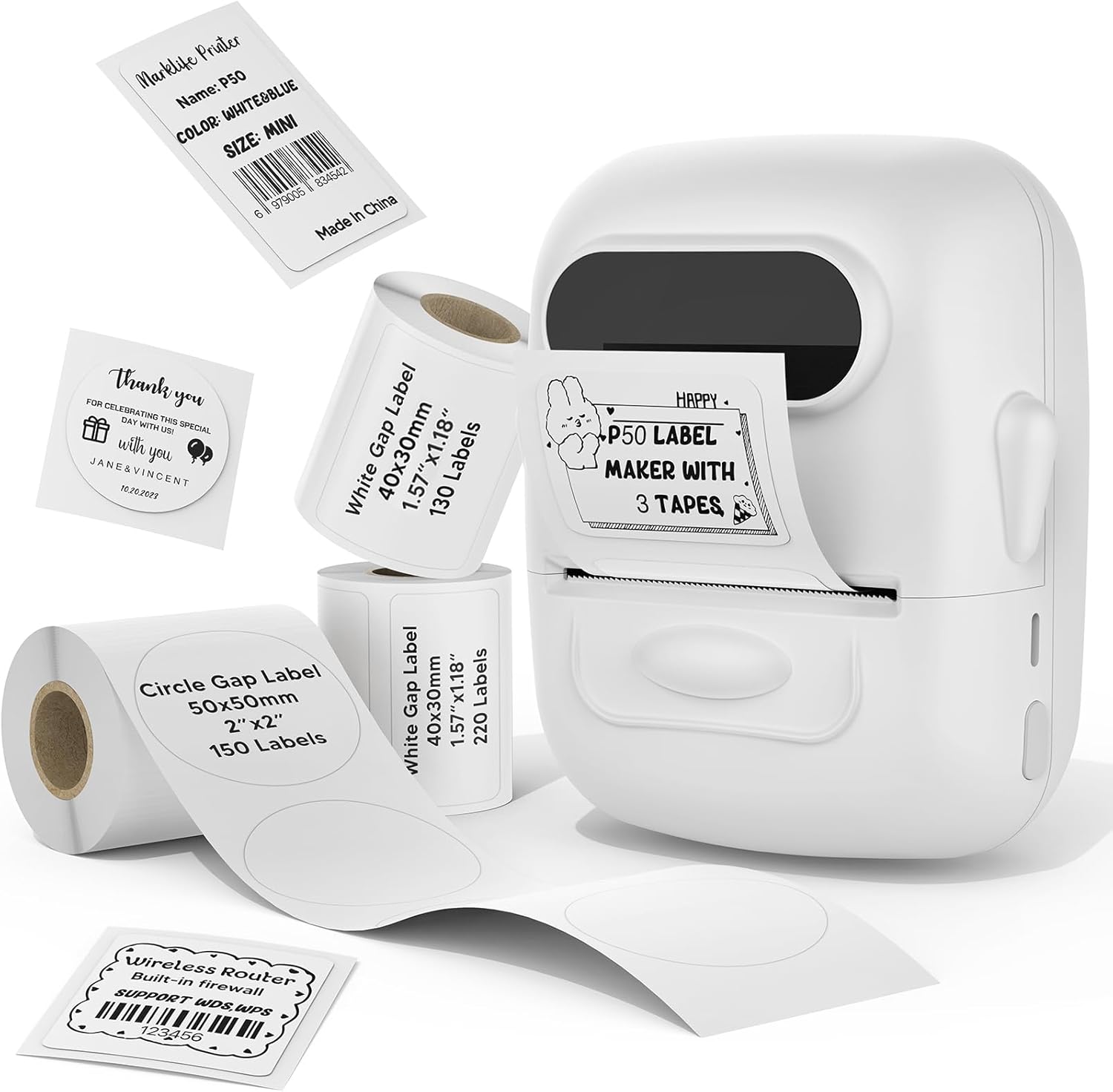
Image: The MARKLIFE P50 label maker machine shown with various label rolls and printed labels, including a barcode label (example: 6979005834542) and a "Thank You" label. This illustrates the device and its primary function of printing labels.
3. Маҳсулот ба охир расидview
The MARKLIFE P50 is a compact and portable thermal label printer designed for various labeling needs. It connects wirelessly via Bluetooth to your smartphone or tablet, and also supports USB connection to Windows PCs. The device utilizes thermal printing technology, meaning it does not require ink cartridges, only thermal label paper.
Хусусиятҳои асосӣ:
- Чопи термикӣ: No ink required, prints in black and white.
- Пайвасти бесим: Bluetooth 4.0 for mobile devices (Android & iOS).
- Мутобиқати компютер: USB connection and online software for Windows PCs.
- Мутобиқати тамғаи васеъ: Supports label widths from 0.59 inches to 2.24 inches.
- Тарҳрезии сайёр: Lightweight and equipped with a built-in 1200mAh rechargeable battery for on-the-go use.
- Smart App Functions: Features voice and image recognition, barcode scanning, PDF batch printing, and photo printing on labels.

Image: A hand placing the compact MARKLIFE P50 label maker into a small handbag, emphasizing its portable design. Icons indicate its portability, built-in 1200mAh battery, and Type-C charging capability.
4. Танзимот
4.1 Пур кардани дастгоҳ
Before initial use, fully charge the P50 label maker. Connect the provided USB-C cable to the charging port on the device and the other end to a compatible USB power adapter (not included) or a computer USB port. The charging indicator light will provide status feedback.
4.2 Боркунии лӯлаҳои тамғакоғазӣ
- Сарпӯши қисмати нишонаро кушоед.
- Insert the label roll with the printing surface facing upwards, ensuring it is aligned correctly within the guides.
- Pull a small portion of the label paper out past the printing slot.
- Close the label compartment cover firmly.
- Press the power button twice quickly to initiate automatic label calibration. The printer will feed a small amount of label paper to detect the label size.

Image: A visual guide demonstrating the process of loading label rolls into the P50 label maker. It also illustrates the compatible label widths, ranging from 0.59 inches to 2.24 inches, and contrasts it with fixed-size label makers.
4.3 Насби барнома ва пайваст кардани Bluetooth
- Барномаро зеркашӣ кунед: Ҷустуҷӯ "MARKLIFE" in your mobile device's app store (iOS App Store or Google Play Store) and install the official application.
- Фаъол: Press and hold the power button on the P50 label maker until the indicator light turns on.
- Bluetooth-ро фаъол созед: Боварӣ ҳосил кунед, ки Bluetooth дар дастгоҳи мобилии шумо фаъол аст.
- Ҷуфт кардан: Open the MARKLIFE app. The app should automatically detect the P50 printer. Follow the on-screen prompts to connect. No Wi-Fi connection is required for mobile pairing.
5. Дастурҳои истифодабарӣ
5.1 Basic Label Creation and Printing (Mobile App)
- Ensure the P50 is powered on and connected to the MARKLIFE app via Bluetooth.
- Within the app, select a template or create a new label design. The app offers various templates for clothing labels, price labels, cable labels, jewelry labels, address labels, and ingredient labels.
- Customize your label with text, images, barcodes, or QR codes.
- Adjust print density and photo quality settings as needed.
- Пешview the label to ensure accuracy.
- Tap the "Print" button in the app to send the design to the P50 label maker.

Image: The P50 label printer positioned next to a laptop and a smartphone, demonstrating its connectivity with both mobile and PC devices. The laptop screen displays label design software, and the smartphone shows the MARKLIFE app interface.
5.2 Хусусиятҳои пешрафтаи барнома
- Voice and Image Recognition: Convert spoken words or images into editable text for your labels.
- Сканкунии штрих-код: Scan existing barcodes (e.g., 0123456789005) to generate new ones or integrate them into your designs.
- PDF Batch Printing: Print multiple labels from a PDF document.
- Чопи акс: Insert and print photos directly onto labels.
- OCR Scanner: Use your phone's camera as an OCR scanner within the app to extract text from documents for labeling.
- Нигоҳдории абрӣ: Save your label designs to the cloud for easy access and reprinting.
5.3 PC Connection (Windows)
For Windows PC users, connect the P50 label maker via the USB-C cable. Download and install the dedicated software from the official MARKLIFE website. This software allows for label design and printing directly from your computer.
5.4 Чопи дастаҷамъӣ
The P50 supports batch printing, allowing you to print multiple copies of the same label or a series of different labels efficiently. This feature is managed through the MARKLIFE app or PC software.

Image: The P50 label maker actively printing a continuous roll of labels, demonstrating its batch printing capability. The labels shown are price tags with barcodes (example: 123456), indicating efficient production for business use.
6. Нигоҳдорӣ
- Тоза кардани сари чоп: Сари чопи термопластикиро мунтазам бо матои нарм ва бепахта тоза кунедampened with isopropyl alcohol. Ensure the device is powered off and cool before cleaning.
- Тозакунии берунӣ: Қисми берунии дастгоҳро бо матои нарм ва хушк пок кунед. Аз истифодаи тозакунандаҳои абразивӣ ё ҳалкунандаҳо худдорӣ намоед.
- Нигоҳдорӣ: Истеҳсолкунандаи тамғакоғазро дар ҷои хунук ва хушк, дур аз нури бевоситаи офтоб ва ҳарорати аз ҳад зиёд нигоҳ доред.
- Нигоҳубини батарея: Барои дароз кардани мӯҳлати хизмати батарея, аз пурра холӣ кардани батарея зуд-зуд худдорӣ намоед. Дастгоҳро мунтазам пур кунед, ҳатто агар муддати тӯлонӣ истифода нашавед.
- Нигоҳдории тамғакоғаз: Store thermal labels in a cool, dark place to prevent premature fading or degradation.
7. Баррасии мушкилот
7.1 Масъалаҳои умумӣ ва роҳҳои ҳалли
| Мушкилот | Сабаби эҳтимолӣ | Ҳалли |
|---|---|---|
| Принтер фаъол нест | Мушкилоти ками батарея ё қувваи барқ. | Charge the device using the provided USB-C cable. Ensure the charging cable and adapter are functioning correctly. |
| Тавассути Bluetooth пайваст шудан ғайриимкон аст | Bluetooth is off, device is out of range, or app issue. |
|
| Poor print quality or blank labels | Incorrect label loading, dirty print head, or low-quality labels. |
|
| Labels not feeding correctly or jamming | Improper label loading or foreign objects in the paper path. |
|
8. Мушаххасоти
| Хусусият | Тафсилот |
|---|---|
| Номи модел | ЧОПНАМОИ НИШОНАИ P50 |
| Бренд | МАРКЛИФ |
| Технологияи чоп | Гармӣ |
| Натиҷаи чопгар | Монохром (сиёҳ ва сафед) |
| Технологияи пайвастшавӣ | Bluetooth, USB |
| Дастгоҳҳои мувофиқ | Android, iOS mobile devices, Windows PC |
| Усули назорат | Барнома |
| Андозаи максималии медиа | 2.24 инч (57мм) |
| Supported Label Widths | 0.59 inches - 2.24 inches (15mm - 57mm) |
| Батарея | Батареяи дарунсохт 1200 мАч барқгиранда |
| Порти пуркунандаи барқ | USB Type-C |
| Андозаҳои маҳсулот | 4 x 3 x 2 дюйм (тақрибан) |
| Вазни ашё | 6 унсия (тақрибан) |
9. Кафолат ва дастгирӣ
9.1 Кафолати маҳдуд
The MARKLIFE P50 Label Maker Machine comes with a limited warranty. Please refer to the warranty card included in your package or contact MARKLIFE customer support for specific terms and conditions. This warranty typically covers manufacturing defects under normal use.
9.2 Дастгирии муштариён
For technical assistance, troubleshooting, or warranty claims, please contact MARKLIFE customer support through the official website or the contact information provided in your product packaging. Please have your model number (P50) and purchase details ready when contacting support.


