1. Муқаддима
The GOYOJO UV-759 UV Visible Double Beam Spectrophotometer is an advanced instrument designed for precise laboratory testing and scientific research. This new generation intelligent instrument features a dual beam optical system, ensuring high stability and a strong signal-to-noise ratio. It offers high resolution and low stray light, making it suitable for daily analysis and various scientific applications.
This manual provides essential information for the safe and efficient operation of your spectrophotometer, including setup, operational procedures, maintenance, and troubleshooting.

Тасвири 1.1: Ба охир расидview of the GOYOJO UV-759 Spectrophotometer highlighting its scanning capabilities and product introduction.
2. Маълумот оид ба бехатарӣ
Барои пешгирӣ аз ҷароҳат ва вайроншавии дастгоҳ, ҳамеша чораҳои бехатарии зеринро риоя кунед:
- Ensure the instrument is connected to a grounded power outlet with the correct voltage (220 V ± 10% 50 Hz ± 1 Hz).
- Do not operate the instrument in environments with excessive humidity, dust, or corrosive gases.
- Аз таъсири бевоситаи манбаи нури ултрабунафш худдорӣ намоед.
- Асбобро накушоед casing unless instructed by qualified service personnel.
- Handle cuvettes and samples with care, especially when dealing with hazardous chemicals.
3. Мундариҷаи баста
Боварӣ ҳосил кунед, ки ҳамаи ҷузъҳо ҳангоми кушодан мавҷуд ва осеб надидаанд:
- GOYOJO UV-759 Spectrophotometer Unit
- Кабели барқ
- USB Communication Cable (for RS232 interface)
- Cuvettes (quantity may vary)
- Дастури дастурӣ
- CD нармафзор (агар лозим бошад)
4. Танзимот
4.1 Кушодан ва ҷойгиркунӣ
Carefully remove the spectrophotometer from its packaging. Place the instrument on a stable, level surface away from direct sunlight, vibrations, and strong electromagnetic fields. Ensure adequate ventilation around the unit.
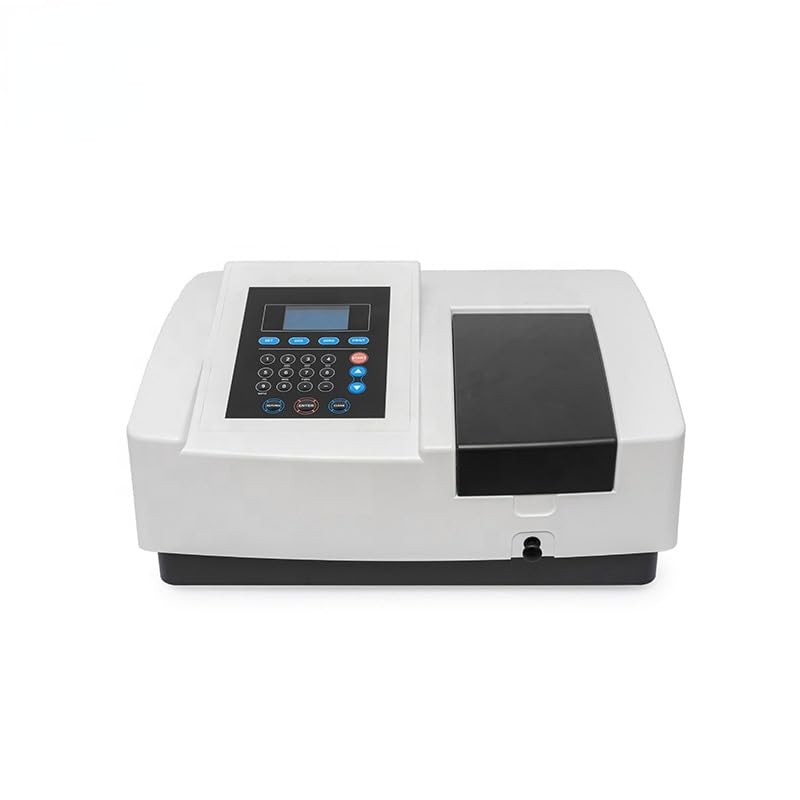
Тасвири 4.1: Пеш view of the GOYOJO UV-759 Spectrophotometer, showing the main unit and control panel.
4.2 Пайвастшавии барқ
Connect the provided power cable to the power inlet on the rear of the instrument and then to a suitable grounded electrical outlet. Ensure the power switch is in the OFF position before connecting.
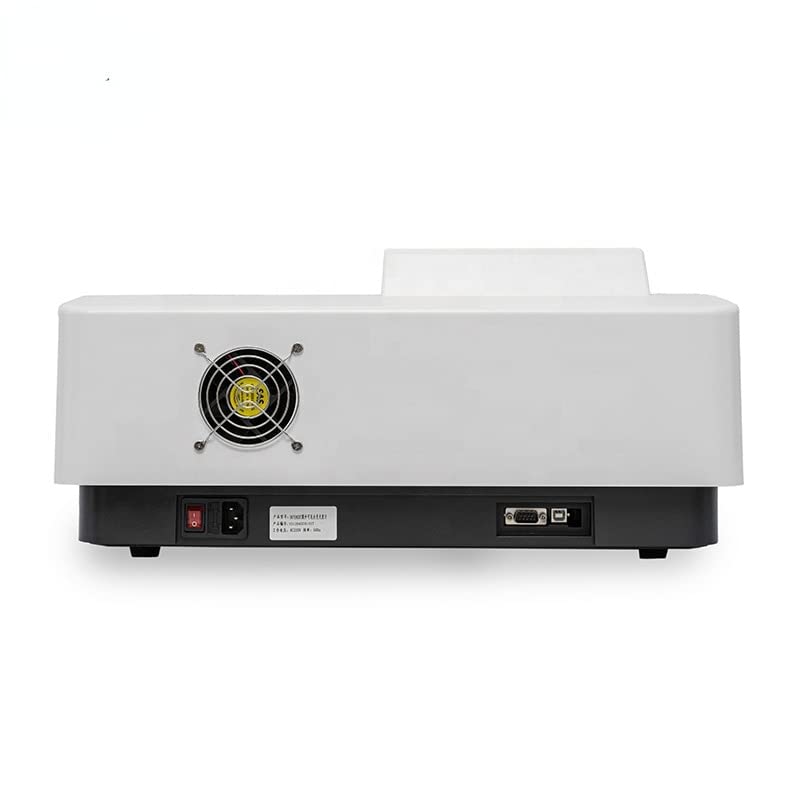
Image 4.2: Rear panel of the spectrophotometer, illustrating the power input and RS232 communication port.
4.3 Communication Setup (Optional)
If connecting to a computer for data acquisition or control, use the provided USB cable to connect the RS232 communication port on the instrument to your computer. Install any necessary drivers or software as per the instructions provided with the software package.
5. Дастурҳои истифодабарӣ
5.1 Powering On and Initial Warm-up
- Flip the power switch on the rear of the instrument to the ON position.
- The instrument will perform a self-test. Allow approximately 15-30 minutes for the lamps to warm up and stabilize for accurate measurements.
- The display will show the main menu or a ready state once warm-up is complete.
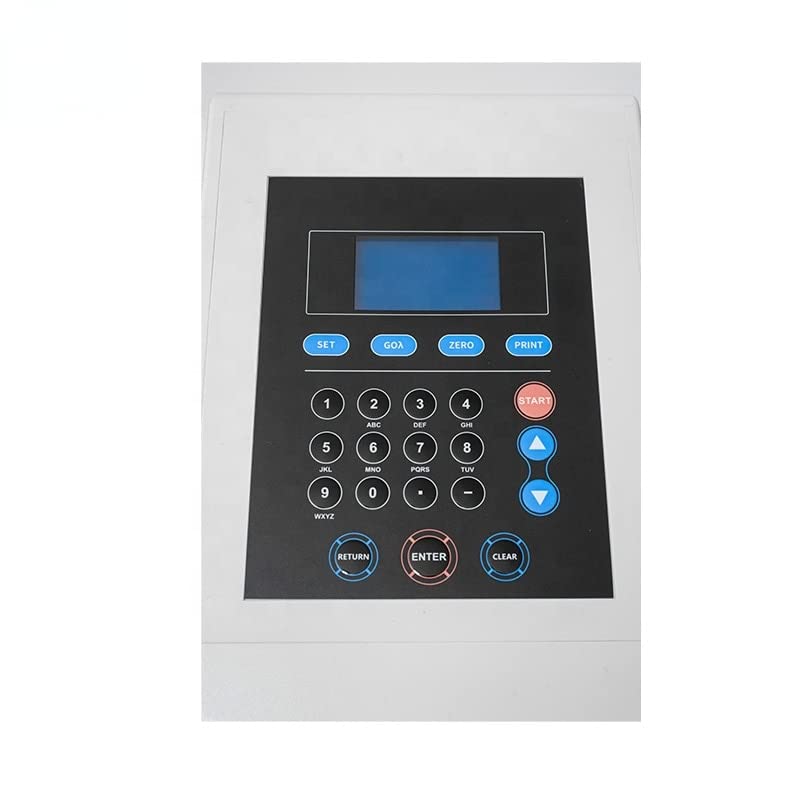
Тасвири 5.1: Муфассал view of the control panel, including the LCD screen and function keys.
5.2 Тартиби асосии андозагирӣ
- Интихоби режим: From the main menu, select the desired measurement mode (e.g., Absorbance, Transmittance, Concentration, or Quantitative).
- Set Wavelength: Use the keypad to enter the desired wavelength for your measurement. Press ENTER.
- Prepare Blank: Fill a clean cuvette with your blank solution (e.g., solvent). Insert it into the sample купе.
- Zero/Calibrate: Press the "ZERO" or "CAL" button to set the baseline or zero the instrument with the blank.
- Тайёр кардани Сampле: Remove the blank and insert a cuvette containing your sample ҳалли ба сample купе.
- Андоза: Press the "START" or "MEASURE" button to initiate the measurement. The result will be displayed on the screen.
- Такрор кунед: Барои якчанд сamples, repeat steps 5 and 6.
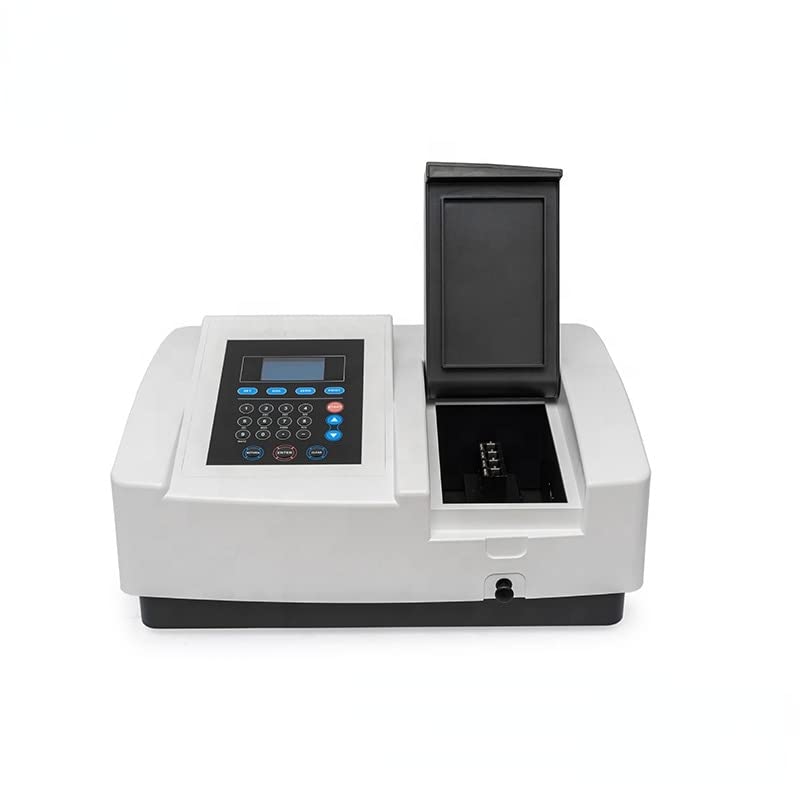
Image 5.2: The sample compartment opened, revealing the cuvette holder for sample insertion.
5.3 Функсияҳои пешрафта
Refer to the detailed software manual (if applicable) for instructions on advanced functions such as spectral scanning, kinetics, and multi-wavelength analysis. These functions typically require connection to a computer and specialized software.
6. Нигоҳдорӣ
6.1 Тозакунӣ
- берунӣ: Сатҳи беруниро бо нарм пок кунед, гamp матоъ. Тозакунанда ё ҳалкунандаҳои абразивиро истифода набаред.
- Sample Compartment: сро нигоҳ доредample compartment clean and dry. Use a lint-free cloth to remove any spills.
- Cuvettes: Always use clean cuvettes. Rinse them thoroughly with appropriate solvent and dry them before use.
6.2 Лamp Иваз кардан
The UV and Visible lamps have a finite lifespan. When lamp performance degrades (e.g., unstable readings, low energy), they may need replacement. This procedure should ideally be performed by qualified service personnel or by following specific instructions in a service manual, as it involves sensitive optical components.
6.3 Нигоҳдорӣ
When not in use for extended periods, power off the instrument, disconnect it from the power supply, and cover it with a dust cover to protect it from dust and environmental contaminants.
7. Баррасии мушкилот
| Мушкилот | Сабаби эҳтимолӣ | Ҳалли |
|---|---|---|
| Асбоб фаъол намешавад | Power cable disconnected; Power switch off; No power from outlet | Check power cable connection; Ensure power switch is ON; Verify power outlet functionality |
| Хонишҳои ноустувор | Instrument not warmed up; Dirty cuvettes; Air bubbles in sample; Lamp ба поёни умр наздик мешавад | Allow adequate warm-up time; Clean cuvettes thoroughly; Remove air bubbles; Consider lamp иваз кардан |
| No light detected / Error message | Lamp failure; Sample compartment lid open; Optical path blocked | Санҷед лamp status; Ensure sample compartment lid is closed; Verify no obstructions in optical path |
| Communication error with PC | Incorrect cable; Driver not installed; Software settings incorrect | Use correct USB/RS232 cable; Install necessary drivers; Configure software communication settings |
8. Мушаххасоти
The following table outlines the key technical specifications for the GOYOJO UV-759 UV Visible Double Beam Spectrophotometer:

Image 8.1: Key technical specifications of the spectrophotometer.
| Параметр | Арзиш |
|---|---|
| Номи маҳсулот | UV Visible Double Beam Spectrophotometer |
| Модели | UV-759 (MAKIT-82530) |
| Диапазони дарозии мавҷ | 190-1100 нм |
| Аниқии дарозии мавҷ | ± 0.3 нм |
| Wavelength Repeatability | 0.1 нм |
| Spectral Bandwidth | 1.8 нм |
| Transmittance Accuracy | ± 0.3% T |
| Диапазони фотометрӣ | -3 ~ 3a, 0-200% T, 0 ~ 9999c |
| Baseline Straightness | ± 0.001 A/h |
| Ray Light | 0.05% T@220nm, 360nm |
| Субот | ± 0.001 A/h @ 500nm |
| Коммуникатсионии RS232 | Интерфейси USB |
| Таъмини нерӯ | 220 V ± 10% 50 Hz ± 1 Hz, 70 W |
| Вазн | 18 кг |
9. Кафолат ва дастгирӣ
9.1 Маълумот дар бораи кафолат
GOYOJO products are manufactured to high-quality standards. For specific warranty terms and conditions, please refer to the warranty card included with your product or contact GOYOJO customer service. Keep your purchase receipt as proof of purchase.
9.2 Дастгирии муштариён
If you encounter any issues not covered in this manual or require technical assistance, please contact GOYOJO customer support. Provide your product model (UV-759) and serial number (if applicable) when contacting support for faster service.
For contact information, please visit the official GOYOJO webсайт ё ба бастаи маҳсулоти худ муроҷиат кунед.


