1. Муқаддима
The SHX SHXA700 Infrared Heating Panel is designed to provide efficient and comfortable heating for your living spaces. Featuring a modern, frameless design with a white carbon crystal surface, it seamlessly integrates into any room. This 700W panel offers WiFi connectivity, remote control operation, and a programmable thermostat for optimal energy saving and comfort. This manual provides essential information for the safe and effective use of your heating panel.

Figure 1: SHX SHXA700 700W WiFi Infrared Heating Panel, front view. A clean, white rectangular infrared heating panel, showcasinтарҳи минималистии он.
2. Дастурамал оид ба бехатарӣ
Лутфан, пеш аз насб ва истифода ҳамаи дастурҳои бехатариро бодиққат хонед. Риоя накардани ин дастурҳо метавонад боиси зарбаи барқ, сӯхтор ё ҷароҳати ҷисмонӣ гардад.
- Таъмини таъминоти барқ voltage ба нишони рейтинги дастгоҳ мувофиқат мекунад.
- Do not operate the heater with a damaged cord or plug. If the cord is damaged, it must be replaced by the manufacturer, its service agent, or similarly qualified persons to avoid a hazard.
- Гармкунакро напӯшонед. Пӯшидани гармкунак метавонад боиси аз ҳад зиёд гарм шудани он гардад.
- Maintain a minimum distance of 100 cm from the front of the heater to any objects, and 20 cm from the sides and top to walls or other surfaces.
- This appliance is rated IP44, making it suitable for use in bathrooms. However, it must not be installed directly above a bath, shower, or swimming pool.
- Do not insert any objects into the heater openings.
- The heater is equipped with overheating protection. If the heater overheats, it will automatically shut off. Unplug the heater and allow it to cool down before restarting.
- Ҳангоми кор кӯдакон ва ҳайвонотро аз гармкунак дур нигоҳ доред.
- Always unplug the heater before cleaning or maintenance.
3. Мундариҷаи баста
Carefully unpack the box and ensure all items are present and undamaged. If any items are missing or damaged, contact your retailer.
- Панели гармидиҳии инфрасурх
- Дастури корбар
- Назорати дурдаст
- Screws and Dowels for wall mounting
- Optional Feet for freestanding placement
4. Хусусиятҳои маҳсулот
The SHX SHXA700 Infrared Heating Panel offers a range of features designed for convenience and efficiency:
- Баромади пуриқтидори 700 Вт: Provides effective heating for rooms up to 14 m².
- Integrated WiFi Functionality: Control your heater remotely via a smartphone app.
- Назорати дурдаст: Convenient operation with the included remote.
- Вақтсанҷи 24 соат: Program specific operating times for energy saving.
- Термостат танзимшаванда: Maintain your desired room temperature.
- Муҳофизати аз ҳад зиёд гармӣ: Хусусияти бехатарии такмилёфта.
- Рейтинги IP44: Муносиб барои истифода дар гamp муҳитҳо ба монанди ҳаммом.
- Тарҳрезии замонавӣ: Frameless white carbon crystal surface for aesthetic integration.
- Намоиши LCD: Clear display for settings and status.

Figure 2: SHX Infrared Heating Panel features. An infographic highlighting the main features of the SHX SHXA700 infrared heating panel, including WiFi connectivity, remote control, 24-hour timer, adjustable thermostat, and overheating protection. It also indicates suitability for up to 14m² rooms.
5. Танзим ва насб
The SHX SHXA700 heating panel can be installed either wall-mounted or freestanding using the optional feet.
5.1 Васлкунии девор
- Choose a suitable location on a wall, ensuring sufficient clearance from other objects (refer to Safety Instructions).
- Mark the drilling points on the wall using the provided template or by measuring the panel's mounting holes.
- Drill holes and insert the provided dowels.
- Қавсҳои васлкуниро ба девор бо истифода аз винтҳои додашуда мустаҳкам кунед.
- Carefully hang the heating panel onto the mounting brackets, ensuring it is securely seated.
- Сими барқро ба васлаки барқии мувофиқ пайваст кунед.
5.2 Ҷойгиркунии мустақил
- Attach the optional feet to the bottom of the heating panel using the provided screws.
- Place the panel on a stable, level surface, ensuring it is not easily tipped over.
- Ensure sufficient clearance from other objects (refer to Safety Instructions).
- Сими барқро ба васлаки барқии мувофиқ пайваст кунед.

Figure 3: SHX Infrared Heating Panel in various room settings. A collage of four images demonstrating the SHX infrared heating panel's versatile placement options in different rooms: a living room, a bedroom, a bathroom, and an office, illustrating its modern design integration.

Figure 4: SHX SHXA700 Infrared Heating Panel dimensions. A diagram illustrating the physical dimensions of the SHX SHXA700 infrared heating panel, showing its width (1200mm), height (500mm), and depth (45mm), along with its weight (2.9 kg).
6. Дастурҳои истифодабарӣ
The heating panel can be operated using the integrated control panel on the back or the included remote control.
6.1 Панели идоракунӣview
The control panel is located on the back of the unit and includes buttons for power, WiFi, temperature adjustment, timer, and an LCD display.
6.2 Амалиёти асосӣ
- Фаъол / Хомӯш: Press the power button on the control panel or remote control to turn the heater on or off.
- Танзими ҳарорат: Use the '+' and '-' buttons to set your desired temperature. The LCD display will show the current and target temperatures.
- Функсияи таймер: Press the timer button to activate and set the 24-hour timer. Follow the on-screen prompts to program the desired operating duration.

Figure 5: SHX Infrared Heating Panel control panel and remote control. A close-up view of the heating panel's integrated control unit on the side, featuring power, WiFi, LCD display, 24-hour timer, and indicator light buttons, alongside the included remote control for easy operation.
7. WiFi Connectivity & App Control
The SHX SHXA700 heating panel features integrated WiFi, allowing for smart control via your smartphone.
- Барномаро зеркашӣ кунед: Download the "Tuya Smart" app from your smartphone's app store (available for iOS and Android).
- Бақайдгирӣ / Вуруд: Ҳисоб эҷод кунед ё ба ҳисоби мавҷудаи Tuya Smart-и худ ворид шавед.
- Илова кардани дастгоҳ: Follow the in-app instructions to add your SHX heating panel. This typically involves putting the heater into pairing mode (refer to the app's guide for specific steps, usually by holding the WiFi button on the control panel).
- Ба WiFi пайваст шавед: Select your home WiFi network and enter the password.
- Назорат: Once connected, you can control the heater's power, temperature, timer, and other settings directly from the app.
- Интегратсияи Smart Home: The Tuya Smart app supports integration with voice assistants like Amazon Alexa and Google Home, allowing for voice control of your heating panel.

Figure 6: SHX Infrared Heating Panel WiFi and integrated timer features. An image showing the heating panel's WiFi symbol and a smartphone displaying the "Tuya Smart" app interface, along with logos for Alexa and Google Home, indicating smart home compatibility and a 24-hour timer function.
8. Нигоҳдорӣ
Regular cleaning and maintenance will ensure the longevity and optimal performance of your heating panel.
- Тозакунӣ: Always unplug the heater and allow it to cool completely before cleaning. Wipe the surface with a soft, damp матоъ. Тозакунакҳои абразивӣ, ҳалкунандаҳо ё моддаҳои кимиёвии сахтро истифода набаред, зеро онҳо метавонанд ба сатҳи зарар расонанд.
- Нигоҳдорӣ: Агар гармкунакро барои муддати тӯлонӣ нигоҳ доред, онро тоза ва хушк кунед. Онро дар ҷои хунук ва хушк нигоҳ доред, беҳтараш дар бастаи аслии худ.
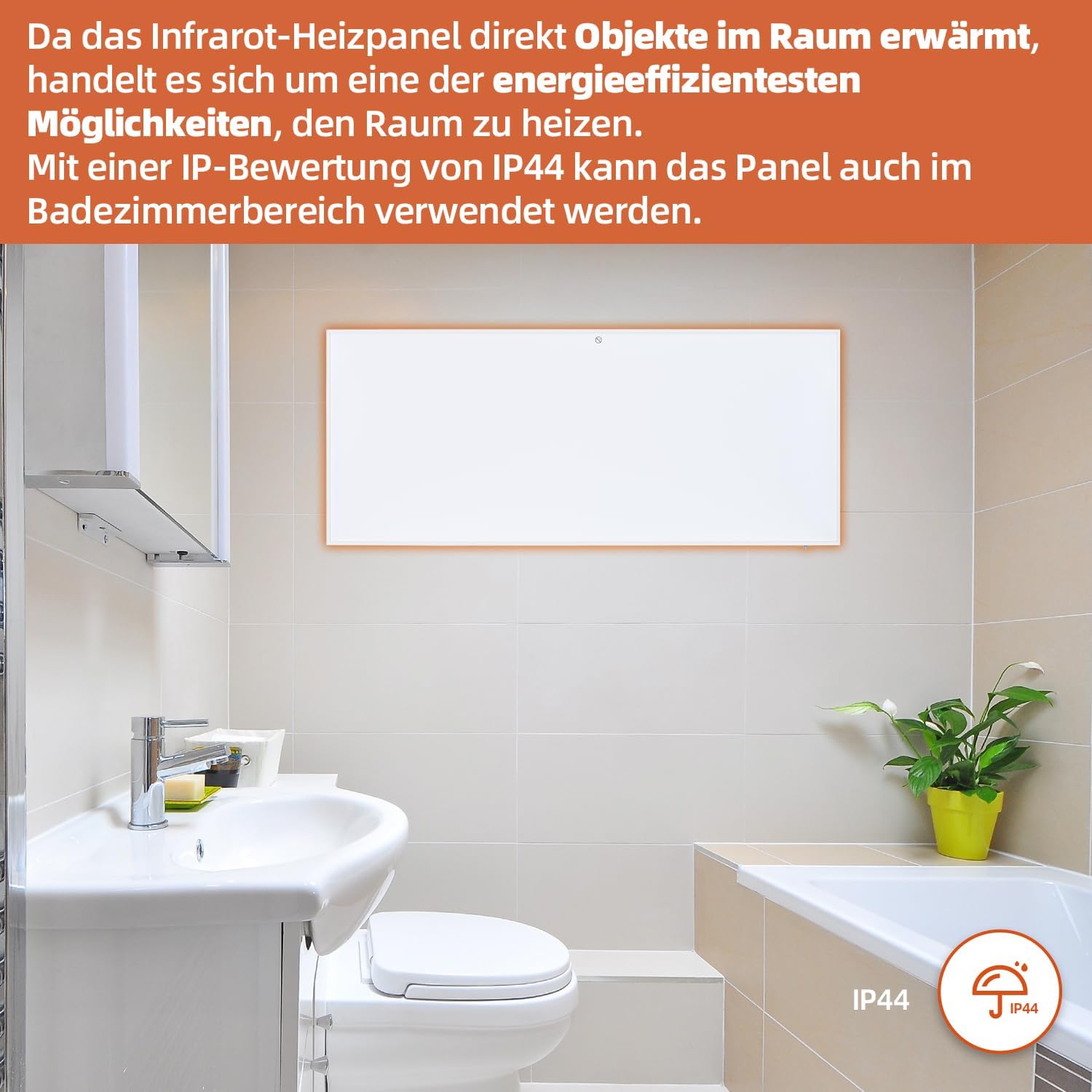
Figure 7: SHX Infrared Heating Panel with IP44 rating. The infrared heating panel mounted in a modern bathroom setting, emphasizing its IP44 water resistance rating, making it safe for use in damp муҳитҳо.
9. Баррасии мушкилот
If you encounter any issues with your SHX heating panel, refer to the following common problems and solutions:
| Мушкилот | Сабаби эҳтимолӣ | Ҳалли |
|---|---|---|
| Гармкунак ба кор намеояд. | No power supply. Overheating protection activated. | Check if the power cord is securely plugged in and the outlet is functional. Unplug the heater, allow it to cool for 30 minutes, then plug it back in. |
| WiFi connection fails. | Incorrect WiFi password. Heater not in pairing mode. Router issues. | Ensure correct WiFi password. Put the heater into WiFi pairing mode (refer to app instructions). Restart your WiFi router. Ensure the heater is within WiFi range. |
| Правленияи дурдаст кор намекунад. | Batteries are dead or incorrectly inserted. Obstruction between remote and heater. | Replace the batteries in the remote control (requires 2 AAA batteries). Ensure there is a clear line of sight between the remote and the heater's receiver. |
| Гармкунак самаранок гарм намекунад. | Temperature setting too low. Room size exceeds heater capacity. Drafts. | Increase the target temperature. Ensure the room size is within the recommended range (up to 14 m²). Seal any drafts in the room. |
10. Мушаххасоти
| Мушаххасоти | Арзиш |
|---|---|
| Бренд | SHX |
| Рақами модел | SHXA700-WiFi |
| Ранги | Сафед |
| Андозаҳои маҳсулот (L x W x H) | 120 х 50 х 4.5 см |
| Вазн | 2.9 килограмм |
| Қувва | 700 Ватт |
| Ҷилдиtage | 220 вольт (AC) |
| Синфи самаранокии энергия | А ба Г |
| Сатҳи садо | 1 децибел |
| Хусусиятҳои махсус | WiFi Compatible, Overheating Protection, Programmable Thermostat, Remote Control, Energy Efficient |
| Манбаи нерӯ | Электри симдор |
| Усули гармидиҳӣ | Радиан |
| Истифодаи тавсияшаванда | Дарунӣ, хона |
| Навъи васлкунӣ | Wall Mount, Floor Mount (with optional feet) |
| Батареяҳое, ки барои дурдаст лозиманд | 2 батареяи ААА |
| Кишвари аслӣ | Хитой |
11. Кафолат ва дастгирӣ
The SHX SHXA700 Infrared Heating Panel comes with a Кафолати 2 сол аз рӯзи харид. Лутфан далели хариди худро барои даъвоҳои кафолат нигоҳ доред.
For technical support, warranty claims, or any questions regarding your product, please contact your retailer or the manufacturer's customer service. Contact information can typically be found on the product packaging or the manufacturer's official webсайт.


