Муқаддима
This manual provides detailed instructions for the installation, operation, and maintenance of your WONDOM ADAU1701 DSP Preamp. This unit is designed for advanced audio signal processing, offering a 2-input, 4-output configuration with digital crossover capabilities and support for SigmaStudio programming.
Хусусиятҳои асосӣ инҳоянд:
- Powered by ADAU1701 DSP, a 28/56bit Digital Signal Processor Engine.
- 24bit ADC/DAC Resolution Ratio with a 48kHz SampМеъёри линг.
- Unbalanced 2-Input, 4-Output Preamp Воҳиди.
- USB Type-C Port for DC 5V Power.
- Four Potentiometers for High-Pass Filter (HPF), Low-Pass Filter (LPF), and Volume Control.
- Integrated Mute & Phase Switches.
- Supports SigmaStudio Programming when connected with an ICP5 programmer.
- Open-sourced Demo Program & HEX Files are provided for restoring factory settings.
Мундариҷаи баста
Лутфан боварӣ ҳосил кунед, ки ҳама ҷузъҳо дар баста мавҷуданд:
- WONDOM ADAU1701 DSP Preamp Воҳиди
- USB Type-C Cable (for power)
- Дастури корбар (ин ҳуҷҷат)
- (Optional: ICP5 Programmer, sold separately for advanced programming)
Маълумот оид ба бехатарӣ
- Ensure the power supply matches the device's requirements (DC 5V, 1A via USB Type-C).
- Дастгоҳро ба намӣ ё ҳарорати аз ҳад зиёд нагузоред.
- Avoid opening the enclosure unless you are a qualified technician.
- Аз дастрасии кӯдакон дур нигоҳ доред.
Ташкил кардан
1. Пайвастҳои ҷисмонӣ
Refer to the diagrams below for proper connection of audio inputs, outputs, and power.

Тасвири 1: Пайвасткунакҳои панели пушти сар. This image shows the rear panel of the ADAU1701 DSP Preamp, highlighting the DC Input (5V, 1A), ICP Port, Line In (ADC0 Left, ADC1 Right), and Line Out (DAC0 Right, DAC1 Left, DAC2 Right, DAC3 Left) RCA jacks.
- Пайвасти барқ: Connect a DC 5V, 1A power supply to the USB Type-C port labeled "DC INPUT 5V, 1A" on the rear panel.
- Вуруди аудио: Connect your audio source (e.g., media player, pre-amplifier) to the "LINE IN" RCA jacks (ADC0 Left, ADC1 Right).
- Натиҷаи аудио: Шуморо пайваст кунед amplifiers or powered speakers to the "LINE OUT" RCA jacks. The default configuration provides 2-channel mid-range output (DAC2 Right, DAC3 Left) and 2-channel bass output (DAC0 Right, DAC1 Left) for a 2-way digital crossover setup.
- ICP Port: This port is used for connecting an ICP5 programmer (sold separately) for advanced SigmaStudio programming.
2. Фаъолсозии ибтидоӣ
Once all connections are secure, apply power to the unit. The "POWER" LED on the front panel should illuminate, indicating the device is operational.
Дастурҳои амалиётӣ
The WONDOM ADAU1701 DSP Preamp features several controls on its front panel for direct adjustment, as well as advanced programming capabilities via SigmaStudio.

Figure 2: Front Panel Controls. This image displays the front panel, showing the Power LED, Busy LED, SW1 (Mute) and SW2 (Phase) switches, and four potentiometers (POT1, POT2, POT3, POT4) for various audio adjustments.
Назорати панели пеши:
- Қудрати LED: Нишон медиҳад, ки дастгоҳ фаъол аст.
- BUSY LED: Indicates DSP activity.
- SW1 (Mute Switch): Toggles audio output mute on/off.
- SW2 (Phase Switch): Adjusts the phase of the audio output.
- POT1 (MP3 / ADC2): Controls the High-Pass Filter (HPF) for Bank B (3kHz-20kHz).
- POT2 (MP8 / ADC3): Controls the Low-Pass Filter (LPF) for Bank A (210Hz-3kHz).
- POT3 (MP9 / ADC0): Controls the High-Pass Filter (HPF) for Bank A (10Hz-310Hz).
- POT4 (VOL): Ҳаҷми умумиро назорат мекунад.
Digital Crossover Configuration:
The unit's default output is configured as a 2-way digital crossover, providing dedicated outputs for bass and mid-range frequencies.
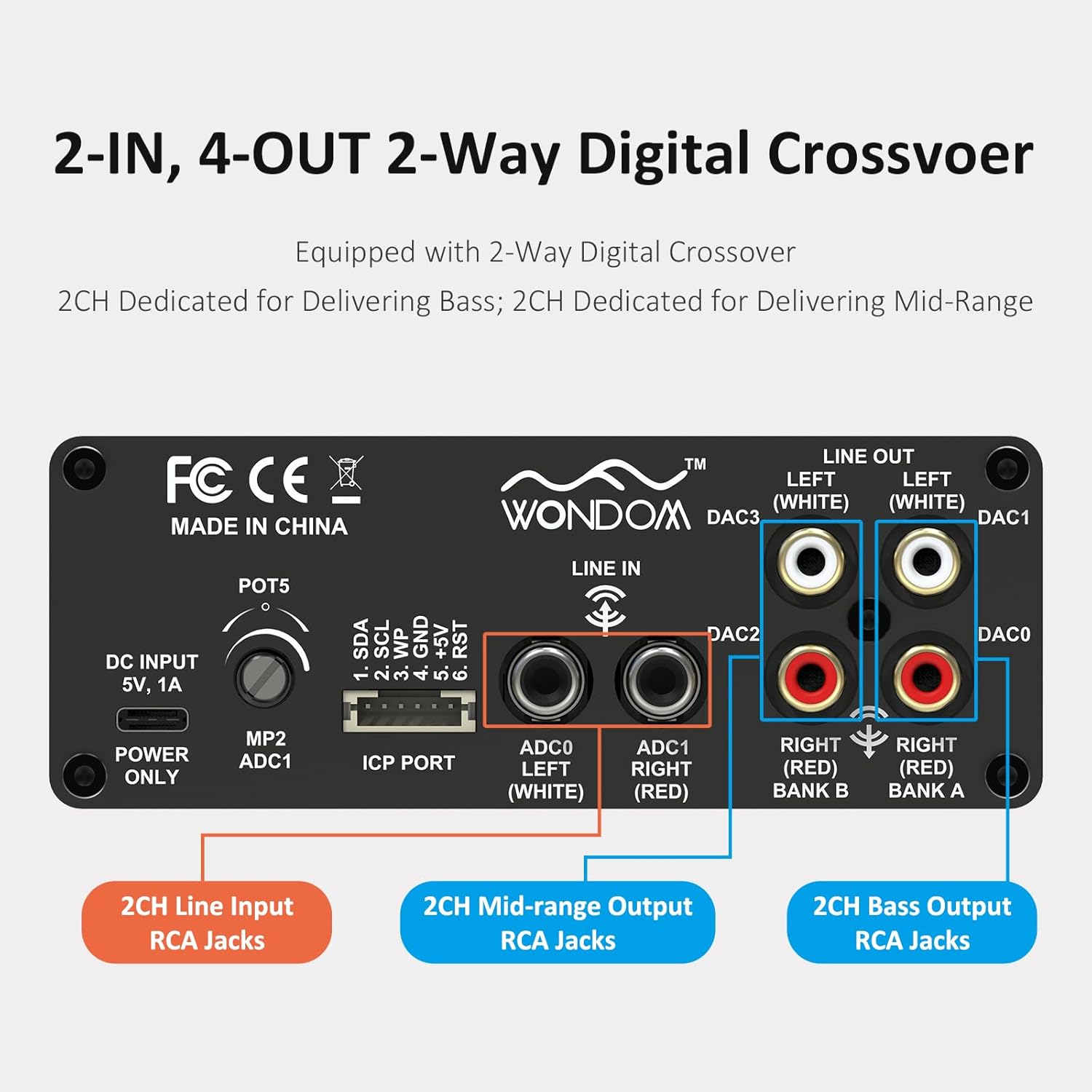
Figure 3: 2-In, 4-Out Digital Crossover. This diagram shows the RCA jack assignments for 2-channel Line Input, 2-channel Mid-range Output, and 2-channel Bass Output, facilitating a 2-way digital crossover setup.
- 2CH Line Input: ADC0 Left (White), ADC1 Right (Red).
- 2CH Mid-range Output: DAC2 Right (Red), DAC3 Left (White).
- 2CH Bass Output: DAC0 Right (Red), DAC1 Left (White).
SigmaStudio Programming:
For advanced customization and fine-tuning of the DSP functions, the unit supports programming via Analog Devices' SigmaStudio software. An ICP5 programmer (sold separately) is required to connect the DSP unit to your computer.

Figure 4: SigmaStudio Programming Setup. This image illustrates the connection between the DSP unit and an ICP5 programmer, along with a visual representation of the SigmaStudio graphical programming interface.
- Нармафзор: Download and install SigmaStudio from the Analog Devices webсайт.
- Таҷҳизоти: Connect the ICP5 programmer to the ICP Port on the DSP unit and to your computer via USB.
- Барномасозӣ: Utilize the open-sourced demo program and HEX files provided by WONDOM to get started or to restore factory settings. All terminal functions can be tailored to specific needs using SigmaStudio.
Нигоҳдорӣ
- Дастгоҳро бо матои мулоим ва хушк пок кунед.
- Аз истифодаи кимиёвии сахт ё тозакунандаи абразив худдорӣ намоед.
- Барои пешгирӣ кардани гармии аз ҳад зиёд дар атрофи дастгоҳ вентилятсияи мувофиқро таъмин кунед.
- Regularly check all cable connections for secure fit.
Мушкилкушо
| Мушкилот | Сабаби эҳтимолӣ | Ҳалли |
|---|---|---|
| Не барқ / LED барқ хомӯш | Incorrect power supply, loose connection, faulty cable. | Verify DC 5V, 1A power supply. Check USB Type-C cable connection. Try a different power source or cable. |
| Не баромади аудио | Incorrect input/output connections, Mute switch engaged, volume too low, faulty audio cables. | Check all RCA connections. Ensure SW1 (Mute) is disengaged. Increase POT4 (Volume). Test with different audio cables. |
| Audible hiss or noise | Ground loop, interference, power supply noise, high gain settings. | Ensure all components are properly grounded. Use a high-quality, stable 5V power supply (a separate USB power bank/battery can help reduce noise from PC USB). Reduce gain settings if applicable. |
| Cannot connect to SigmaStudio | ICP5 programmer not connected or faulty, DSP not powered, incorrect software drivers. | Ensure ICP5 programmer is correctly connected to the DSP and computer. Verify DSP unit is powered on. Install SigmaStudio drivers in administrator mode (as suggested by user reviewс). |
Мушаххасоти
| Хусусият | Тафсилот |
|---|---|
| Чипи DSP | ADAU1701 (28/56bit Digital Signal Processor) |
| ADC/DAC Resolution | 24-бит |
| SampLing Rate | 48 кГц |
| Конфигуратсияи вуруд | 2-Input (Unbalanced RCA) |
| Конфигуратсияи баромад | 4-Output (Unbalanced RCA, default 2-way digital crossover) |
| Таъмини нерӯ | DC 5V, 1A (via USB Type-C) |
| Назоратҳо | 4 Potentiometers (HPF/LPF/Volume), Mute Switch, Phase Switch |
| Programming Support | SigmaStudio (requires ICP5 programmer, sold separately) |
| Андозаҳо (L x W x H) | 4.72 x 4.72 x 1.77 инч |
| Вазн | 1.23 фунт |
| Манзил | Sleek Aluminum Enclosure |
Кафолат ва дастгирӣ
WONDOM products are manufactured by Sure Electronics. For warranty information, technical support, and further assistance, please refer to the official Sure Electronics webсайт ё бевосита бо хадамоти муштариёни худ тамос гиред. Квитансияи хариди худро ҳамчун далели харид барои даъвоҳои кафолат нигоҳ доред.
Manufacturer: Sure Electronics
For additional resources and community support regarding SigmaStudio programming, online forums and tutorials can be a valuable resource.


