Муқаддима
The COMETX FJ3373 Multifunction Digital Weather Station is designed to provide comprehensive weather information for both indoor and outdoor environments. It features an LCD display for clear readability and includes functions such as weather forecasting, moon phase display, digital clock, calendar, and alarm. The system utilizes a wireless outdoor sensor to transmit temperature and humidity data, along with barometric pressure trends.
This manual provides detailed instructions for setting up, operating, and maintaining your weather station to ensure optimal performance and longevity.
Мундариҷаи баста
Лутфан тасдиқ кунед, ки ҳамаи ҷузъҳои дар поён овардашуда ба бастаи шумо дохил карда шудаанд:
- 1 x FJ3373 Weather Station (Main Unit)
- 1 x Сенсори бесими берунӣ
- 1 x Сими барқи USB
- 1 x User Manual (English, German, French, Italian, Spanish)
Шарҳ: AA batteries for both the main unit and the outdoor sensor are not included and must be purchased separately.
Маҳсулот ба охир расидview
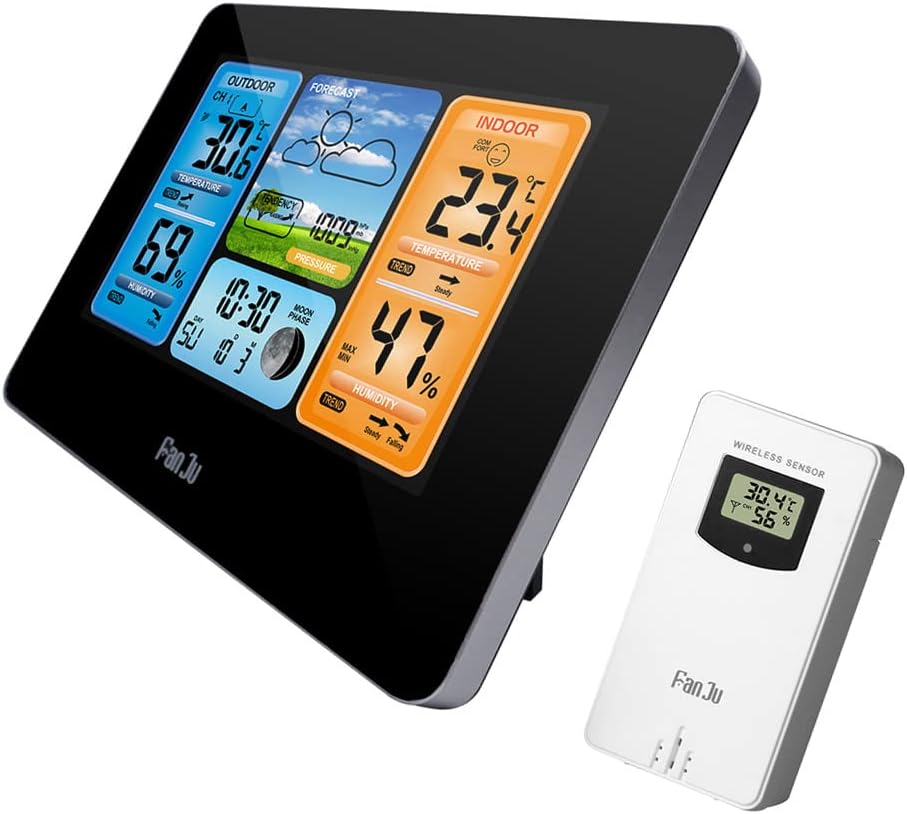
Расми 1: Main Weather Station Unit and Wireless Outdoor Sensor. The main unit displays indoor and outdoor conditions, while the smaller white unit is the wireless outdoor sensor.

Расми 2: Detailed diagram illustrating the main components of the weather station and its wireless sensor. This includes the LCD display sections, back panel buttons, battery compartments, and power input.
Part A: Positive LCD Display
- A1: Пешгӯии обу ҳаво
- A2: Фишори барометрӣ
- A3: Ҳарорати берунӣ
- A4: Ҳарорат дар дохили бино
- A5: Намии беруна
- A6: Рутубати дарунӣ
- A7: Time/Calendar or Alarm Time
- A8: Time Moon Phase
Part B: Back Button and Power
- B1: Майдони ламсии "NOOZE/LIGHT"
- B2: Клавиатура
- B3: Бахши батарея
- B4: Чаҳорчӯбаи дастгирӣ
- B5: Васлаки барқ
Part C: Wireless Outdoor Sensor
- C1: LCD display - Temperature
- C2: LCD display - Humidity
- C3: Интиқоли сигнал LED
- C4: "C/F" button
- C5: Тугмаи "TX"
- C6: Бахши батарея

Расми 3: Барview of the main unit's display sections and their corresponding functions, including outdoor temperature, humidity, weather forecast, air pressure, indoor temperature, indoor humidity, comfort display, date, week, and moon phase.

Расми 4: Dimensions of the main weather station unit (167mm x 129mm x 30mm) and a view of the back panel. The product is available in both black and wood-grain finishes.
Ташкил кардан
1. Таъмини қувваи барқ ба агрегати асосӣ
The main unit can be powered by either 2 x LR6 AA batteries (not included) or the included DC 5V USB power adapter.
- Open the battery compartment (B3) on the back of the main unit.
- 2 батареяи LR6 AA-ро ворид кунед ва қутби дурустро таъмин намоед (+/-).
- Alternatively, connect the USB power cord to the power supply socket (B5) and plug it into a compatible USB power source (e.g., wall adapter, computer USB port).
- Дисплей фурӯзон мешавад, ки ин нишон медиҳад, ки дастгоҳ фаъол аст.
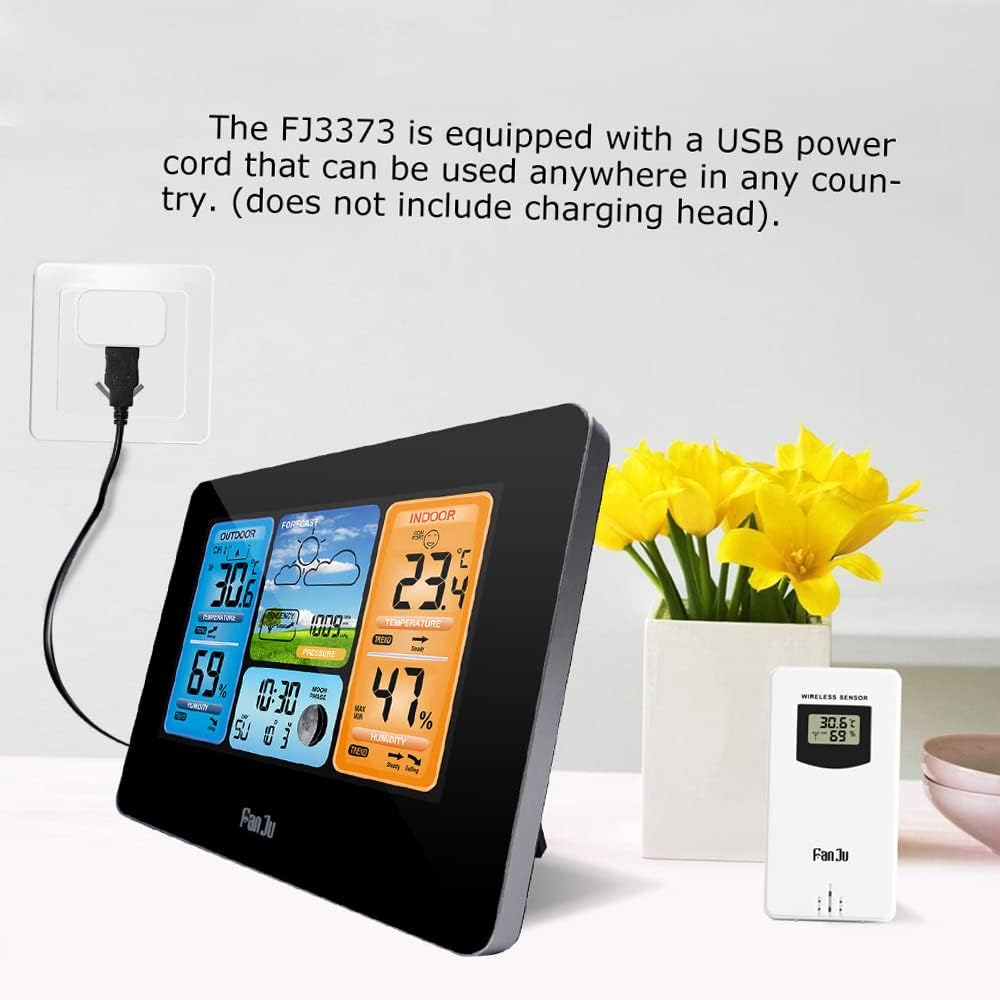
Расми 5: The FJ3373 weather station connected to a power outlet via its USB power cord. The USB power cord allows for flexible power options.
2. Setting up the Wireless Outdoor Sensor
The wireless outdoor sensor requires 2 x LR6 AA batteries (not included).
- Open the battery compartment (C6) on the back of the outdoor sensor.
- 2 батареяи LR6 AA-ро ворид кунед ва қутби дурустро таъмин намоед (+/-).
- Қисмати батареяро пӯшед.
- Place the outdoor sensor in a shaded, dry location outdoors, away from direct sunlight and precipitation, to ensure accurate readings. It can be wall-mounted or placed on a flat surface.
3. Ҳамоҳангсозии ибтидоӣ
After powering on both units, the main weather station will automatically attempt to connect with the wireless outdoor sensor. This process may take a few minutes. Once connected, the outdoor temperature and humidity readings will appear on the main unit's display.
- Ensure the outdoor sensor is within the 60-meter transmission range (in an open area) of the main unit.
- If synchronization fails, press the "TX" button (C5) on the outdoor sensor to manually send a signal, and ensure the main unit is in receiving mode (refer to operating instructions for specific pairing steps if needed).
Дастурҳои амалиётӣ
The main unit features a keypad (B2) for various settings and adjustments. Specific button functions may vary depending on the mode.
1. Танзимоти вақт ва сана
To set the time, date, and language:
- Press and hold the "MODE" button (refer to keypad diagram for exact button, typically labeled "SET" or "MODE") to enter time setting mode.
- Use the "UP" and "DOWN" buttons to adjust the values.
- Press "MODE" again to confirm and move to the next setting (e.g., 12/24 hour format, hour, minute, year, month, day, day of week language).
- Day of week is selectable in 7 languages: English, German, Italian, French, Spanish, Netherlands, and Danish.
- Press "MODE" to exit setting mode.
2. Функсияи ҳушдор
To set and activate the alarm:
- Press the "ALARM" button (refer to keypad diagram) to view вақти ҳушдор.
- Press and hold "ALARM" to enter alarm setting mode.
- Use "UP" and "DOWN" to adjust the alarm hour and minute.
- Press "ALARM" to confirm.
- To activate/deactivate the alarm, press the "ALARM" button repeatedly until the alarm icon appears/disappears on the display.
- When the alarm sounds, touch the "SNOOZE/LIGHT" field (B1) to activate snooze (alarm will sound again after 5 minutes) or press any other button to stop the alarm for 24 hours.
3. Weather Forecast Display (A1)
The weather station predicts weather conditions for the next 12-24 hours based on barometric pressure changes. The display shows icons for Sunny, Partly Cloudy, Cloudy, Rainy, and Snowy. The accuracy is approximately 70-75%.
4. Temperature and Humidity Display (A3, A4, A5, A6)
The main unit displays both indoor and outdoor temperature and humidity. Temperature can be switched between Celsius (℃) and Fahrenheit (℉) using the "C/F" button on the main unit or outdoor sensor (C4).
- Диапазони ҳарорати дарунӣ: -10℃ то +50℃ (14℉ то 122℉)
- Диапазони ҳарорати берунӣ: -20℃ to +60℃ (-4℉ to 140℉)
- Диапазони намӣ: 20% RH то 95% RH
- The display also shows temperature and humidity trends (rising, steady, falling).
- Outdoor high/low temperature and frost alerts are indicated on the display.
5. Barometric Pressure (A2)
The weather station measures barometric pressure in hPa/mb. It displays the current pressure and its trend, which is used for weather forecasting.
- Barometric Pressure Range: 600hPa/mb to 1100hPa/mb
6. Нишондиҳандаи сатҳи бароҳат
The indoor comfort level is calculated based on indoor temperature and humidity, displayed in 5 levels to indicate whether the environment is too dry, comfortable, or too humid.
7. Moon Phase Display (A8)
The display shows the current moon phase, which updates automatically based on the set date.
8. Нури паси
Touch the "SNOOZE/LIGHT" field (B1) to activate the backlight for a few seconds, improving visibility in low-light conditions.
Нигоҳдорӣ
1. Иваз кардани батарея
When the battery indicator appears on the display, replace the batteries in the respective unit (main unit or outdoor sensor). Always replace all batteries at the same time with new ones of the same type.
- Воҳиди асосӣ: 2 x батареяҳои LR6 AA
- Сенсори беруна: 2 x батареяҳои LR6 AA
Батареяҳои истифодашударо мувофиқи қоидаҳои маҳаллӣ ба таври масъулиятнок партоянд.
2. Тозакунӣ
Истгоҳи обу ҳаво ва сенсорро бо матои нарм тоза кунедamp матоъ. Тозакунанда ё маҳлулҳои абразивиро истифода набаред, зеро онҳо метавонанд дисплейро вайрон кунанд ё вasinж) Боварӣ ҳосил кунед, ки моеъ ба дастгоҳ ворид намешавад.
Мушкилкушо
| Мушкилот | Сабаби эҳтимолӣ | Ҳалли |
|---|---|---|
| Дар воҳиди асосӣ намоиш нест. | Batteries are dead or incorrectly inserted; USB power not connected or faulty. | Check battery polarity and replace if necessary. Ensure USB power cord is securely connected and power source is active. |
| Outdoor temperature/humidity not displayed or inaccurate. | Outdoor sensor not synchronized; sensor out of range; sensor batteries low; interference. | Ensure sensor batteries are fresh. Move sensor closer to the main unit. Press "TX" button on sensor. Avoid placing near large metal objects or electronic devices. |
| Пешгӯии обу ҳаво нодуруст ба назар мерасад. | Forecast is based on barometric pressure trends, not real-time satellite data; local microclimates. | Understand that the forecast is a prediction based on pressure changes and may not always match actual conditions perfectly. It's a general trend indicator. |
| Огоҳӣ садо намедиҳад. | Alarm not activated; alarm volume too low (if adjustable); incorrect alarm time set. | Verify alarm is activated (alarm icon visible). Check alarm time settings. |
Мушаххасоти
| Модели | FJ3373 |
| Бренд | COMETX |
| Навъи экран | Positives LCD |
| Диапазони ҳарорати дарунӣ | -10℃ то +50℃ (14℉ то 122℉) |
| Диапазони ҳарорати беруна | -20℃ to +60℃ (-4℉ to 140℉) |
| Дурустии ҳарорат | 0.1℃ |
| Диапазони намӣ | 20% RH то 95% RH |
| Дурустии намӣ | 1% RH |
| Диапазони фишори барометрӣ | 600hPa/mb to 1100hPa/mb |
| Аниқии фишори барометрӣ | 1hPa/mb |
| Басомади интиқоли бесим | 433.92 МГс РФ |
| Диапазони интиқоли бесим | То 60 метр (майдони кушод) |
| Таъминоти барқ (Воҳиди асосӣ) | 2 x LR6 AA batteries / DC 5V USB Power Adapter |
| Таъмини барқ (сенсори беруна) | 2 x батареяҳои LR6 AA |
| Андозаҳои воҳиди асосӣ | 16.7 x 12.9 x 3 см (6.6 x 5.1 x 1.2 инч) |
| Андозаҳои сенсори беруна | 9.6 x 5 x 3.4 см (3.8 x 2 x 1.3 инч) |
| Вазни ашё | 460г (16.2 унция) |
Кафолат ва дастгирӣ
For warranty information and technical support, please refer to the contact details provided by your retailer or visit the official COMETX webсайт. Квитансияи хариди худро ҳамчун далели харид барои даъвоҳои кафолат нигоҳ доред.

