1. Муқаддима
Thank you for choosing the Havit H2038U RGB Wired Gaming Headset. This manual provides essential information for setting up, operating, and maintaining your headset. Please read it carefully to ensure optimal performance and longevity of your product.
Маълумоти муҳим оид ба бехатарӣ:
- Барои пешгирӣ аз зарари шунавоӣ, гӯш кардани тӯлонӣ бо садои баланд худдорӣ кунед.
- Гӯшмонакро дар зери таъсири ҳарорати аз ҳад зиёд, намӣ ё моддаҳои зангзананда қарор надиҳед.
- Гӯшмонакро аз об ва моеъҳо дур нигоҳ доред.
- Гӯшмонакро ба қисмҳо ҷудо накунед ё тағир надиҳед. Ин кафолатро бекор мекунад.
2. Маҳсулот ба охир расидview
2.1 Мундариҷаи баста
- Havit H2038U RGB Wired Gaming Headset
- Микрофони ҷудошаванда
- Дастури корбар (ин ҳуҷҷат)
2.2 Қисмҳои гӯшмонак
The Havit H2038U headset features a comfortable over-ear design with soft earcups and an adjustable headband. It includes a detachable microphone for clear communication and integrated RGB lighting for an enhanced gaming experience.

Расми 2.1: Пеш view of the Havit H2038U RGB Wired Gaming Headset. This image displays the white over-ear headphones with RGB lighting elements on the earcups and the adjustable headband.
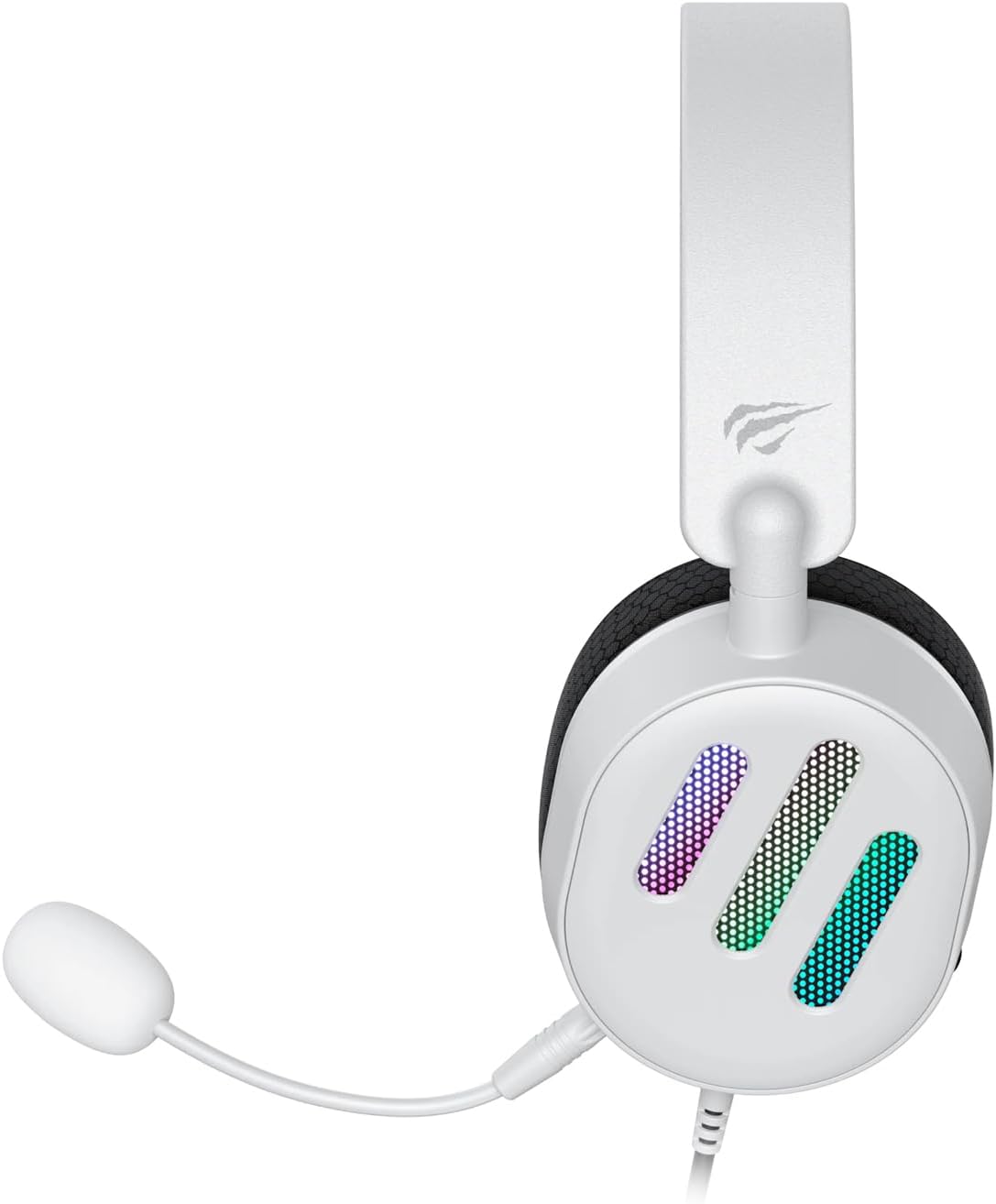
Расми 2.2: Тараф view of the Havit H2038U RGB Wired Gaming Headset, showing the detachable microphone connected to the left earcup. The volume control wheel is also visible on the earcup.

Расми 2.3: боло view of the Havit H2038U RGB Wired Gaming Headset, highlighting the adjustable headband and the soft, breathable earcups.
3. Танзимот
The Havit H2038U headset utilizes a dual-connection system for full functionality: a 3.5mm jack for audio and a USB connection for RGB lighting and virtual 7.1 surround sound.

Расми 3.1: Аз наздики view illustrating the detachable microphone connection (3.5mm jack) and the USB connection for the Havit H2038U headset. This image also indicates 360-degree sound direction and 7.1 USB connectivity.
- Микрофонро пайваст кунед: Insert the detachable microphone into the 3.5mm microphone jack located on the left earcup until it clicks into place. Ensure it is securely connected.
- Connect for Audio: Plug the 3.5mm audio jack from the headset into the corresponding audio output port on your computer, gaming console, or mobile device.
- Connect for RGB Lighting and 7.1 Surround Sound: Plug the USB connector from the headset into an available USB port on your computer or gaming console. This connection powers the RGB lighting and enables the virtual 7.1 surround sound feature.
- Танзими гӯшмонак мувофиқ: Adjust the headband to ensure a comfortable and secure fit over your ears. The earcups should fully enclose your ears for optimal sound isolation.
- System Configuration (for PC):
- Натиҷаи аудио: Go to your operating system's sound settings and ensure the Havit H2038U is selected as the default playback device.
- Вуруди микрофон: In the sound settings, select the Havit H2038U as the default recording device.
- 7.1 Овози атроф: If applicable, install any necessary drivers from the Havit official website to enable and configure the virtual 7.1 surround sound feature.
4. Дастурҳои истифодабарӣ
4.1 Назорати баландии овоз
The headset features an integrated volume control wheel, typically located on the left earcup or inline on the cable. Rotate the wheel to increase or decrease the audio volume.
4.2 Истифодаи микрофон
The detachable microphone can be positioned for optimal voice pickup. Adjust its flexible arm to bring the microphone close to your mouth, ensuring clear communication. For privacy, you may mute the microphone using software settings on your device if no physical mute button is present on the headset.
Равшании 4.3 RGB
The RGB lighting on the earcups is powered via the USB connection. Once connected, the lighting will activate automatically. Specific control options for lighting patterns or colors may be available through dedicated software, if provided by Havit.

Расми 4.1: The Havit H2038U RGB Wired Gaming Headset displayed with its active RGB lighting feature, showcasing the illuminated earcups.
4.4 Виртуалӣ 7.1 Овози атроф
When connected via USB, the headset supports virtual 7.1 surround sound. This feature enhances spatial audio awareness in games and media. Ensure relevant drivers are installed and configured through your system's sound settings or Havit's software for optimal experience.

Расми 4.2: An illustrative image demonstrating the virtual 7.1 surround sound capability of the Havit H2038U headset, enhancing immersive audio experiences.
5. Нигоҳдорӣ
5.1 Тозакунӣ
- Use a soft, dry cloth to wipe the exterior surfaces of the headset.
- Барои гӯшмонакҳо, каме бо нарм тоза кунед damp матоъ пӯшед ва пеш аз истифода дар ҳаво комилан хушк кунед.
- Моддаҳои кимиёвии сахт, ҳалкунанда ё тозакунандаи абразивиро истифода набаред.
5.2 Нигоҳдорӣ
When not in use, store the headset in a clean, dry place, away from direct sunlight and extreme temperatures. Avoid tangling the cables to prevent damage.
6. Баррасии мушкилот
| Мушкилот | Сабаби эҳтимолӣ | Ҳалли |
|---|---|---|
| Аз гӯшмонак аудио нест | 3.5mm jack not fully inserted; incorrect audio output selected; volume too low. | Ensure 3.5mm jack is fully connected. Check system sound settings to select Havit H2038U as default playback device. Increase volume using the headset's control wheel and system volume. |
| Микрофон кор намекунад | Microphone not fully inserted; incorrect input device selected; microphone muted. | Ensure microphone is securely attached. Check system sound settings to select Havit H2038U as default recording device. Unmute microphone in software settings. |
| Равшании RGB кор намекунад | USB cable not connected; faulty USB port. | Боварӣ ҳосил кунед, ки сими USB ба порти USB-и коршоям боэътимод пайваст шудааст. Порти дигари USB-ро санҷед. |
| 7.1 Surround Sound not active | USB cable not connected; drivers not installed/configured. | Ensure the USB cable is connected. Install and configure necessary drivers from the Havit official webсайт. |
7. Мушаххасоти
| Хусусият | Мушаххасоти |
|---|---|
| Модели | H2038U |
| Технологияи пайвастшавӣ | Wired (3.5mm Jack + USB) |
| Гӯшмонакҳо омили форм | Дар болои гӯш |
| Импеданс | 24 Ом |
| Ҷавоби басомад | 20 Гц - 20 КГц |
| Ҳассосият | 114 дБ |
| Навъи назорат | Volume Control, Push Button |
| Материал | Пластмасса |
| Вазни ашё | 550 гр |
| Андозаҳои маҳсулот | 11.2 х 21.9 х 28.5 см |
| Ранги | Сафед |
| Хусусиятҳои махсус | RGB Lighting, Detachable Microphone, Virtual 7.1 Surround Sound |
8. Кафолат ва дастгирӣ
Havit products are designed for reliability and performance. For information regarding warranty coverage, technical support, or service, please refer to the warranty card included with your product or visit the official Havit webсайт. Квитансияи хариди худро ҳамчун далели харид барои даъвоҳои кафолат нигоҳ доред.
Маълумот барои тамос:
- Official Havit Webсайт: www.havit.com (Лутфан барои минтақавӣ тафтиш кунед websites for specific support)


