1. Муқаддима
Thank you for choosing the Takstar MS-189 Table Conference Microphone. This manual provides detailed instructions for the proper setup, operation, and maintenance of your microphone. The MS-189 is a unidirectional condenser microphone designed for clear vocal pickup in conference settings, computer use, and other desktop applications. Please read this manual thoroughly before use to ensure optimal performance and longevity of the product.
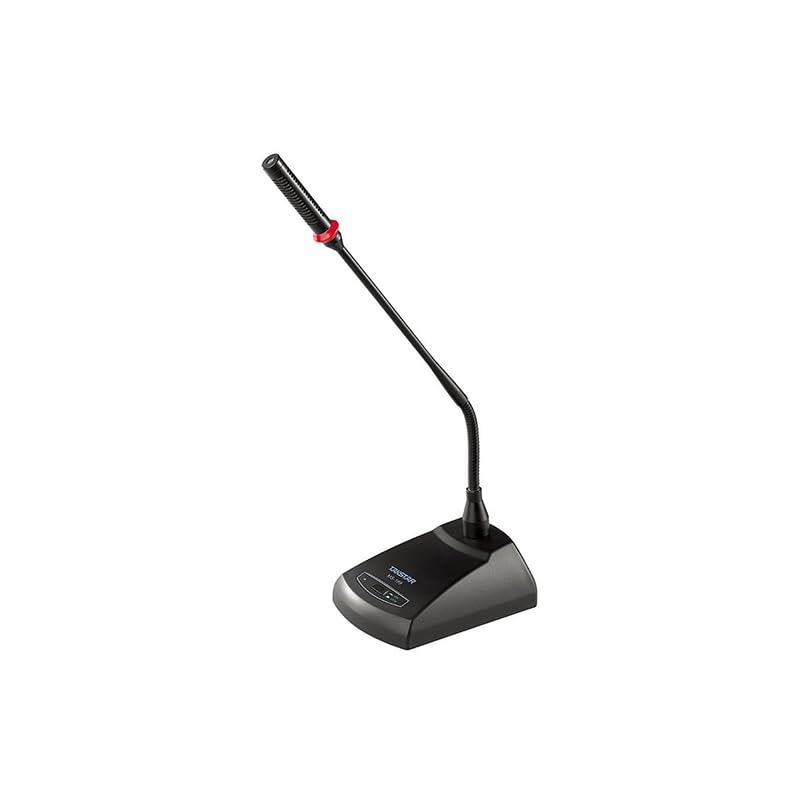
Тасвири 1.1: The Takstar MS-189 Table Conference Microphone. This image displays the microphone with its gooseneck design and base unit, ready for desktop placement.
2. Хусусиятҳои маҳсулот
- Back Electret Condenser Transducer: Ensures high-quality audio capture.
- High Sensitivity and Low Noise: Delivers clear and crisp sound reproduction.
- Clear and Bright Vocal Pick-up: Optimized for speech and vocal applications.
- On/Off Button with LED Indicator: Located on both the base and gooseneck for easy control and status indication.
- Имконоти нерӯи чандир: Can be powered by 9-52V phantom power or two 1.5V AA batteries.
- Намунаи қутбӣ яктарафа: Ба садо аз пеш тамаркуз карда, садои заминаро кам мекунад.
- Durable Gooseneck Design: Allows for flexible positioning and adjustment.
3. Мундариҷаи баста
Лутфан ҳангоми кушодани қуттӣ мундариҷаи бастаро тафтиш кунед, то боварӣ ҳосил кунед, ки ҳама ашё мавҷуд аст:
- Takstar MS-189 Table Conference Microphone (Gooseneck and Base Unit)
- Дастури корбар (ин ҳуҷҷат)
Note: XLR cable and AA batteries are typically sold separately and may not be included.
4. Дастурамал оид ба насб
4.1 Фаъолсозии микрофон
The MS-189 microphone offers two power options:
- Phantom Power (9-52V): If your audio mixer, interface, or computer sound card provides phantom power, connect the microphone using an XLR cable. The microphone will draw power directly from the connected device. Ensure phantom power is enabled on your device.
- AA Batteries (2 x 1.5V): If phantom power is not available, insert two 1.5V AA batteries into the battery compartment located on the underside of the microphone base. Ensure correct polarity (+/-) when inserting batteries.
Note: Do not use both phantom power and batteries simultaneously. The microphone will prioritize phantom power if both are connected.
4.2 Пайвастшавӣ ба дастгоҳ
The MS-189 connects via an XLR connector.
- Locate the XLR output port on the microphone base.
- Connect one end of a standard XLR cable (not included) to the microphone's XLR output.
- Connect the other end of the XLR cable to an available XLR input on your audio mixer, audio interface, or computer sound card. Ensure the input is compatible with a condenser microphone.
4.3 Ҷойгиркунии микрофон
Place the microphone on a stable, flat surface. Position the gooseneck so the microphone head is approximately 15-30 cm (6-12 inches) from the speaker's mouth, pointing directly towards them for optimal sound capture.
5. Дастурҳои истифодабарӣ
5.1 Фаъол кардан/хомӯш кардан
Press the ON/OFF button located on the microphone base. The LED indicator will illuminate when the microphone is active. Press the button again to turn off the microphone.
5.2 Adjusting the Gooseneck
Gently bend the flexible gooseneck to adjust the microphone's position and angle. Avoid excessive force to prevent damage.
5.3 Истифодаи беҳтарин
- For best results, speak directly into the microphone from a consistent distance.
- Minimize background noise in the environment to enhance clarity.
- Monitor audio levels on your connected device to prevent clipping or distortion.
6. Нигоҳдорӣ
- Тозакунӣ: Барои тоза кардани берунии микрофон аз матои мулоим ва хушк истифода баред. Аз тозакунандаҳои моеъ ё ҳалкунандаҳо истифода набаред.
- Нигоҳдорӣ: When not in use, store the microphone in a dry, dust-free environment. Avoid extreme temperatures and humidity.
- Иваз кардани батарея: If using battery power, replace AA batteries when the LED indicator dims or audio quality degrades. Remove batteries if the microphone will not be used for an extended period to prevent leakage.
7. Баррасии мушкилот
| Мушкилот | Сабаби эҳтимолӣ | Ҳалли |
|---|---|---|
| Баромади садо нест |
|
|
| Poor sound quality (low volume, distortion) |
|
|
| Нишондиҳандаи LED фурӯзон нест |
|
|
8. Мушаххасоти
| Модели | MS-189 |
| Принсипи табдилдиҳанда | Конденсатори барқӣ |
| Directivity Characteristic (Polar Pattern) | Якҷониба |
| Ҷавоби басомад | 100Гц-16кГц |
| Ҳассосият | -33дБ±3дБ (0дБ=1В/Па дар 1кГц) |
| Импеданси баромад | 340Ω±30% (дар 1kHz) |
| Талаботи қувваи барқ | 9-52V phantom power or 2 x 1.5V AA battery |
| Технологияи пайвастшавӣ | XLR |
| Навъи пайвасткунанда | XLR |
| Дастгоҳҳои мувофиқ | Ноутбук, Компютери шахсӣ |
| Омили шакли микрофон | Gooseneck, Table Array |
| Андозаҳои ашё (L x W x H) | 15 х 15 х 15 см |
| Вазни холис | 500г |
| Ранги | Сиёҳ |
9. Кафолат ва дастгирӣ
For warranty information and technical support, please refer to the warranty card included with your product or visit the official Takstar webсомона. Шумо инчунин метавонед барои гирифтани кӯмак бо дистрибютор ё фурӯшандаи маҳаллии худ тамос гиред.
Ба мағозаи Takstar дар Amazon ташриф оред барои маълумоти бештари маҳсулот ва захираҳои дастгирӣ.


