1. Муқаддима
Welcome to your new Powtree Wireless Controller. This manual provides detailed instructions for setting up, operating, and maintaining your controller. Please read this manual carefully before use to ensure optimal performance and longevity of your device.
2. Мундариҷаи баста
- 2 x Powtree Wireless Controllers
- 2 x кабелҳои пуркунандаи USB Type-C
- 2 x Дастурҳои корбар (ин ҳуҷҷат)
3. Маҳсулот ба охир расидview
Familiarize yourself with the various components and controls of your Powtree Wireless Controller.

Тасвир: Боло ва поён view of the Powtree Wireless Controller, highlighting key components such as the D-Pad, Action Buttons, Joysticks, Touch Pad, Share button, Options button, Home button, Speaker, 3.5mm stereo port, EXT charging port, Light Bar, and USB Charging Jack.
- D-Pad: Directional Pad for navigation.
- Тугмаҳои амал: Triangle, Circle, Cross, Square buttons for in-game actions.
- Ҷойстикҳои чап/рост: Analog sticks for precise movement and camera control.
- Панели сенсорӣ: Multi-touch pad for interactive gameplay.
- Тугмаи мубодила: Барои мубодилаи мундариҷаи бозӣ.
- Тугмаи Имконот: For accessing in-game menus and options.
- Тугмаи хонагӣ: For returning to the system menu.
- Маърузачй: Built-in speaker for enhanced audio feedback.
- Порти стереои 3.5 мм: Барои пайваст кардани гӯшмонакҳо ё гарнитураҳо.
- EXT Charging Port: Барои пур кардани контроллер.
- Бари нур: Indicates player number and provides in-game visual cues.
- Қуттии пуркунандаи USB: For connecting the Type-C charging cable.
- Тугмаҳои L1/L2/R1/R2: Shoulder and trigger buttons for various in-game functions.
4. Танзимот
4.1 Пайвастагии ибтидоӣ
- For the first connection, you must activate the device using the provided USB Type-C cable. Connect one end of the cable to the controller and the other end to your console (PS4/PS5) or PC.
- Once connected, press the Home button on the controller to pair it with your device.
- After successful pairing, you can disconnect the USB cable for wireless use.
Шарҳ: If the controller fails to connect, it is recommended to try a high-power USB Type-C data cable.
4.2 Пур кардани контроллер
The controller has a built-in 800mAh lithium battery. To charge:
- Connect the provided USB Type-C charging cable to the controller's USB Charging Jack.
- Connect the other end of the cable to a USB power source (e.g., console, PC, USB wall adapter).
- The controller will fully charge in approximately 2.5 hours. The light bar will indicate charging status.
5. Дастурҳои истифодабарӣ
5.1 Пайвасти Bluetooth
The controller uses Bluetooth 4.2 technology, providing a stable connection with a receiving distance of up to 10 meters (390 inches). After initial wired activation, the controller should automatically connect wirelessly to your paired device when powered on.
5.2 Функсияи турбо
The Turbo function allows for rapid, repeated input of a button press, useful in certain games.
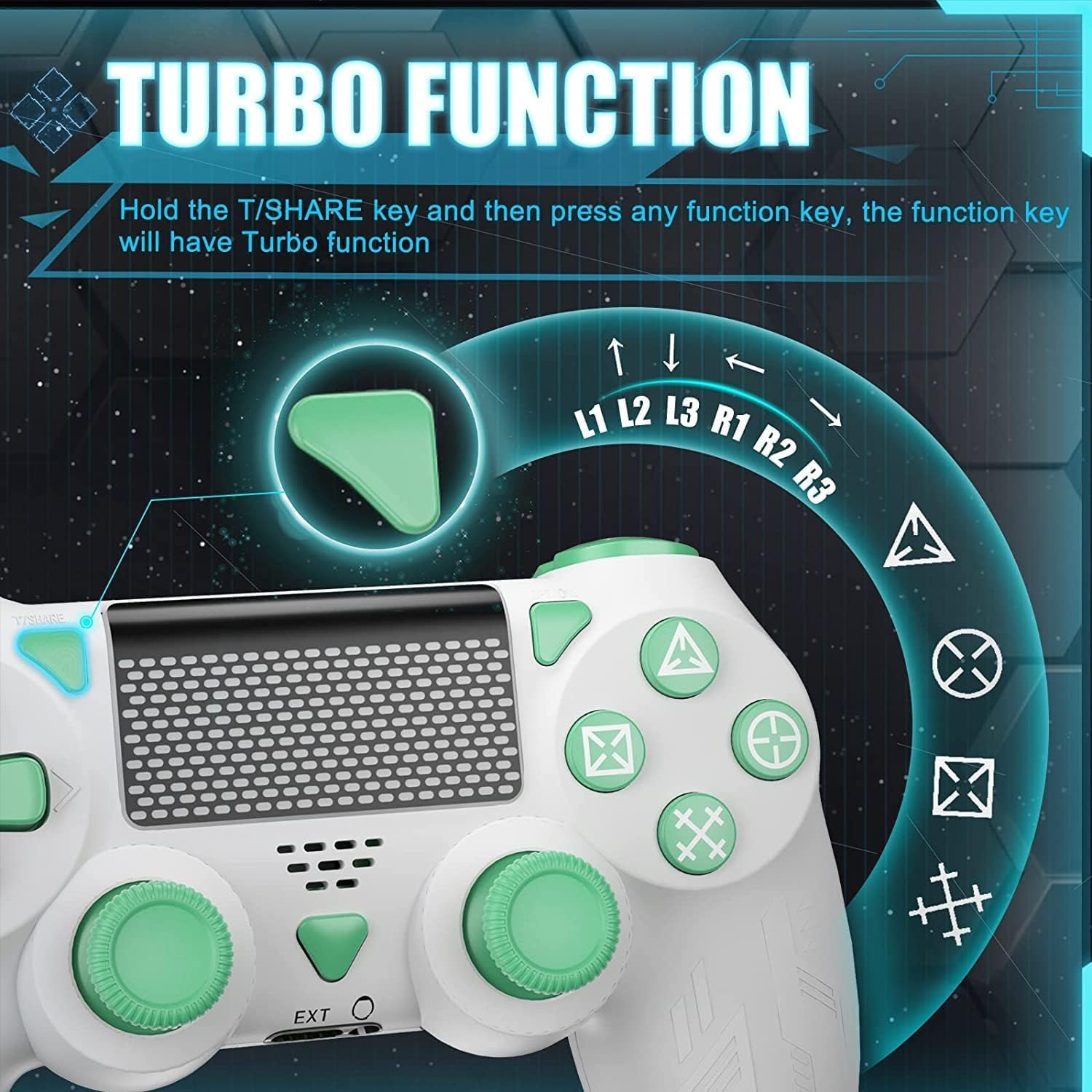
Image: A close-up of the controller showing the 'T/SHARE' button and an arrow pointing to a function button, illustrating the activation of the Turbo function.
To activate the Turbo function: Hold the T/SHARE key, then press any desired function key (e.g., X, O, Triangle, Square, L1, R1, L2, R2). The selected function key will now have Turbo functionality.
5.3 6-Axis Gyro Sensor
The built-in 6-axis motion control system enhances gameplay by allowing for intuitive control through movement and rotation.

Image: A controller with arrows indicating motion, alongside icons representing in-game actions like 'Throw Off', 'Rotation of Direction', and 'Shift of Vision', demonstrating how the 6-axis gyro sensor improves accuracy and speed.
This sensor improves accuracy and speed in games that support motion control, allowing for actions like shifting vision, rotating objects, or throwing items by physically moving the controller.
5.4 Dual Vibration
The controller is equipped with dual vibration motors to provide immersive haptic feedback during gameplay.

Тасвир: шаффоф view of the controller's grips, showing the internal dual vibration motors emitting blue light, indicating their function in providing haptic feedback.
Experience realistic feedback for in-game events such as collisions, explosions, or weapon recoil, enhancing your gaming immersion.
5.5 Хусусиятҳои аудио
The controller includes a 3.5mm stereo audio jack for connecting your headset and a built-in speaker for direct audio output from the controller.
5.6 Бари нур
The front light bar changes color according to game content, providing visual cues and indicating player status.
6. Мутобиқат
The Powtree Wireless Controller offers broad compatibility across multiple gaming platforms.

Image: A controller displayed alongside icons for various compatible platforms including PS4/PS4 Pro/PS4 Slim, Steam, iPad/Phone/Android/iOS, and PC.
Он бо мувофиқ аст:
- PS4 (P4, P4 Pro, P4 Slim)
- Компютер (Windows)
- Дастгоҳҳои Android
- дастгоҳҳои iOS
- Some PS4 games on PS5
7. Нигоҳдорӣ
7.1 Идоракунии мӯҳлати хизмати батарея
The 800mAh battery provides approximately 12-15 hours of continuous use on a full charge. To prolong battery life:
- Always shut down the controller when not in use for extended periods.
- Аз пурра холӣ кардани батарея зуд-зуд худдорӣ намоед.
- Charge the controller using the provided Type-C cable and a suitable power source.
7.2 Тоза кардан ва нигоҳдорӣ
- Контроллерро бо матои нарм ва хушк тоза кунед. Аз маводи кимиёвии сахт ё маводҳои абразивӣ истифода набаред.
- Контроллерро дар ҷои хунук ва хушк аз нури бевоситаи офтоб ва ҳарорати аз ҳад зиёд дур нигоҳ доред.
- Аз афтидани контроллер ё дучор шудан ба қувваи аз ҳад зиёд худдорӣ кунед.
8. Баррасии мушкилот
- Контроллер пайваст намешавад: Ensure the controller is charged. For the first connection, use the USB cable to activate it. If issues persist, try a different high-power USB Type-C data cable.
- Таъхири вуруд ё қатъи пайвастшавӣ: Ensure the controller is within the 10-meter Bluetooth range. Check for potential interference from other wireless devices.
- Тугмаҳо ҷавоб намедиҳанд: Try resetting the controller (refer to the device's specific reset procedure, usually a small pinhole button on the back). Ensure the controller is fully charged.
- Масъалаҳои пуркунии барқ: Verify the USB Type-C cable and power source are working correctly.
9. Мушаххасоти
| Иқтидори батарея | Батареяи литий 800 мАч |
| Вақти пуркунии барқ | тахминан. 2.5 соат |
| Вақти истифода | тахминан. 12-15 соат |
| Пайвастшавӣ | Bluetooth 4.2 |
| Диапазони бесим | То 10 метр (390 дюйм) |
| Андозаҳо | 17.2 х 14.2 х 12.3 см |
| Вазн | 560 grams (for the package) |
| Вижагиҳо | Dual Motor Shock, 6-Axis Sensor, Turbo Function, Touchpad, 3.5mm Audio Jack, Built-in Speaker, Light Bar |
10. Кафолат ва дастгирӣ
For information regarding product returns within 30 days of receipt due to a change of mind, please consult the relevant help page on the retailer's website. If you have received a defective or damaged product, please refer to the retailer's help page on product defects and damages. For specific information on purchases made through a marketplace, consult the marketplace's help page.
If you have any questions or require further assistance with your Powtree Wireless Controller, please contact our customer support team through the retailer's platform or the contact information provided with your purchase.


