1. Муқаддима
This user manual provides comprehensive instructions for the Thermalright 5V 3PIN A-RGB Fan Controller. This device is designed to manage the lighting effects of 5V A-RGB fans, particularly useful for motherboards with insufficient or absent 5V lighting interfaces. It operates via SATA power, eliminating the need for a direct motherboard connection for lighting control.

2. Маълумот оид ба бехатарӣ
- Ensure your power supply unit (PSU) is turned off and unplugged before installation to prevent electrical shock or damage to components.
- Handle all components with care to avoid physical damage.
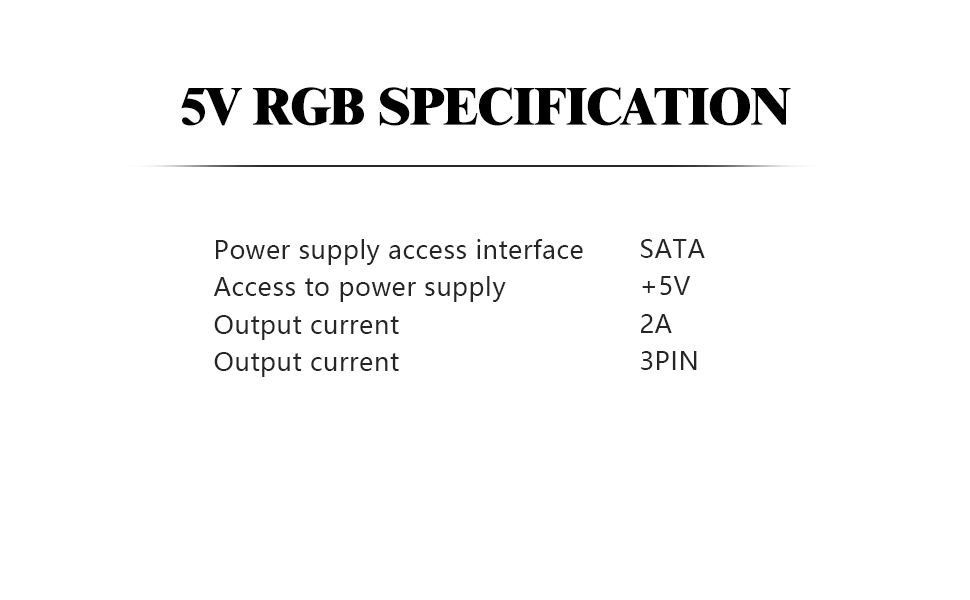
- Do not exceed the current limit of 6 A-RGB fans in series when using SATA power. The maximum output current is 2A.
- Connect only 5V 3PIN A-RGB devices to the controller. Connecting incompatible devices may cause damage.
- Keep the controller away from moisture and extreme temperatures.
3. Мундариҷаи баста
Боварӣ ҳосил кунед, ки ҳама ашё дар бастаи шумо мавҷуданд:
- Thermalright 5V 3PIN A-RGB Fan Controller (1x)

4. Мушаххасоти
| Андозаҳои маҳсулот | 0.3 x 0.25 x 0.2 инч |
| Рақами модели ашё | 5V 3PIN controller |
| Истеҳсолкунанда | Ҳуқуқи гармидиҳӣ |
| Намуди пайвасткунандаи барқ | SATA (Input), 3-Pin (Output for ARGB) |
| Ҷилдиtage | 5V (for ARGB lighting) |
| Ҷараёни баромад (максимум) | 2A |
| Дастгоҳҳои мувофиқ | Desktop PCs with 5V 3PIN A-RGB devices |
| Материал | Пластмасса |
5. Насб ва насб
Follow these steps to install your Thermalright 5V 3PIN A-RGB Fan Controller:
- Connect to SATA Power: Connect the controller's SATA power connector to an available SATA power cable from your power supply unit (PSU). Ensure a secure connection. This provides power to the controller and connected A-RGB devices.
- Connect A-RGB Devices: Connect your 5V 3PIN A-RGB fans or other compatible lighting devices to the 3-pin ARGB output on the controller. The controller can support up to 6 A-RGB fans in series.
- Фаъол: Once all connections are secure, you can power on your PC. The A-RGB devices connected to the controller will illuminate.


Дастури видеоии насб:
6. Дастурҳои истифодабарӣ
The controller features three buttons for managing your A-RGB lighting effects:
- "S" Button (Light Effect Frequency): Press the "S" button to cycle through 5 different light effect frequencies. This button is active only when the lighting mode is dynamic.
- "M" Button (Lighting Modes): Use the "M" button to switch between various lighting modes. Options include static colors, dynamic rainbow effects, and color unidirectional modes, offering over a dozen different color cycles.
- "B" Button (Brightness): The "B" button allows you to adjust the brightness of the A-RGB lighting. There are 5 brightness levels to cycle through.

7. Нигоҳдорӣ
Барои таъмини мӯҳлати хизмати дарозмуддат ва кори беҳтарини контроллери шумо:
- Дастгоҳро тоза ва аз чанг тоза нигоҳ доред. Барои тоза кардан матои мулоим ва хушкро истифода баред.
- Avoid exposing the controller to direct sunlight or high humidity.
- Кӯшиш накунед, ки контроллерро қисм-қисм кунед ё тағир диҳед, зеро ин кафолатро бекор мекунад ва метавонад боиси вайроншавӣ гардад.
8. Баррасии мушкилот
Агар шумо бо нозири худ ба мушкилот дучор шавед, ба мушкилот ва роҳҳои ҳалли зерин муроҷиат кунед:
- No lighting/power:
- Ensure the SATA power cable is securely connected to both the controller and the PSU.
- Verify that the PSU is powered on.
- Check if the A-RGB devices are correctly connected to the controller's 3-pin interface.
- Lights not changing modes/brightness:
- Press the "M" button to cycle through different modes. Some modes may be static.
- Press the "S" button to adjust effect frequency for dynamic modes.
- Press the "B" button to adjust brightness.
- Inconsistent lighting:
- Ensure that the total number of connected A-RGB fans does not exceed the recommended limit of 6 in series to avoid power issues.
- Check for loose connections on any of the A-RGB devices.
9. Кафолат ва дастгирӣ
Thermalright products are manufactured to the highest quality standards. For specific warranty details and technical support, please refer to the official Thermalright webсайт ё бевосита бо хадамоти муштариёни худ тамос гиред. Барои даъвоҳои кафолат далели хариди худро нигоҳ доред.


