1. Муқаддима
Ташаккур ба шумо барои харидasing the Zenwire A10 Mini Portable Projector. This device is designed to provide a versatile and convenient projection experience, allowing you to display content from various sources, including smartphones, tablets, and computers. Please read this manual carefully before using the projector to ensure proper operation and to maximize its lifespan.
2. Дастурҳои муҳим оид ба бехатарӣ
- Оё бевосита ба линзаи проектор нигоҳ накунед, вақте ки лamp фаъол аст.
- Барои пешгирӣ аз гармшавии аз ҳад зиёд, вентилятсияи дурусти атрофи проекторро таъмин кунед. Сӯрохиҳои вентилятсияро набандед.
- Танҳо адаптери барқи бо проектор додашударо истифода баред.
- Проекторро аз об, намӣ ва маводҳои оташгиранда дур нигоҳ доред.
- Проекторро худатон ба қисмҳо ҷудо кунед ё таъмир накунед. Барои кӯмак ба кормандони соҳибихтисос дар тамос шавед.
- Проекторро дар сатҳи устувор ва ҳамвор ҷойгир кунед.
- Ҳангоми тӯфони барқӣ ё дар муддати тӯлонӣ истифода нашудани проекторро аз розетка ҷудо кунед.
3. Мундариҷаи баста
Лутфан мундариҷаи бастаро ҳангоми кушодани қуттӣ тафтиш кунед. Агар ягон ашё гум ё вайрон бошад, ба фурӯшандаи худ муроҷиат кунед.
- Zenwire A10 Mini Portable Projector
- Назорати дурдаст
- Адаптери барқ
- Дастури корбар
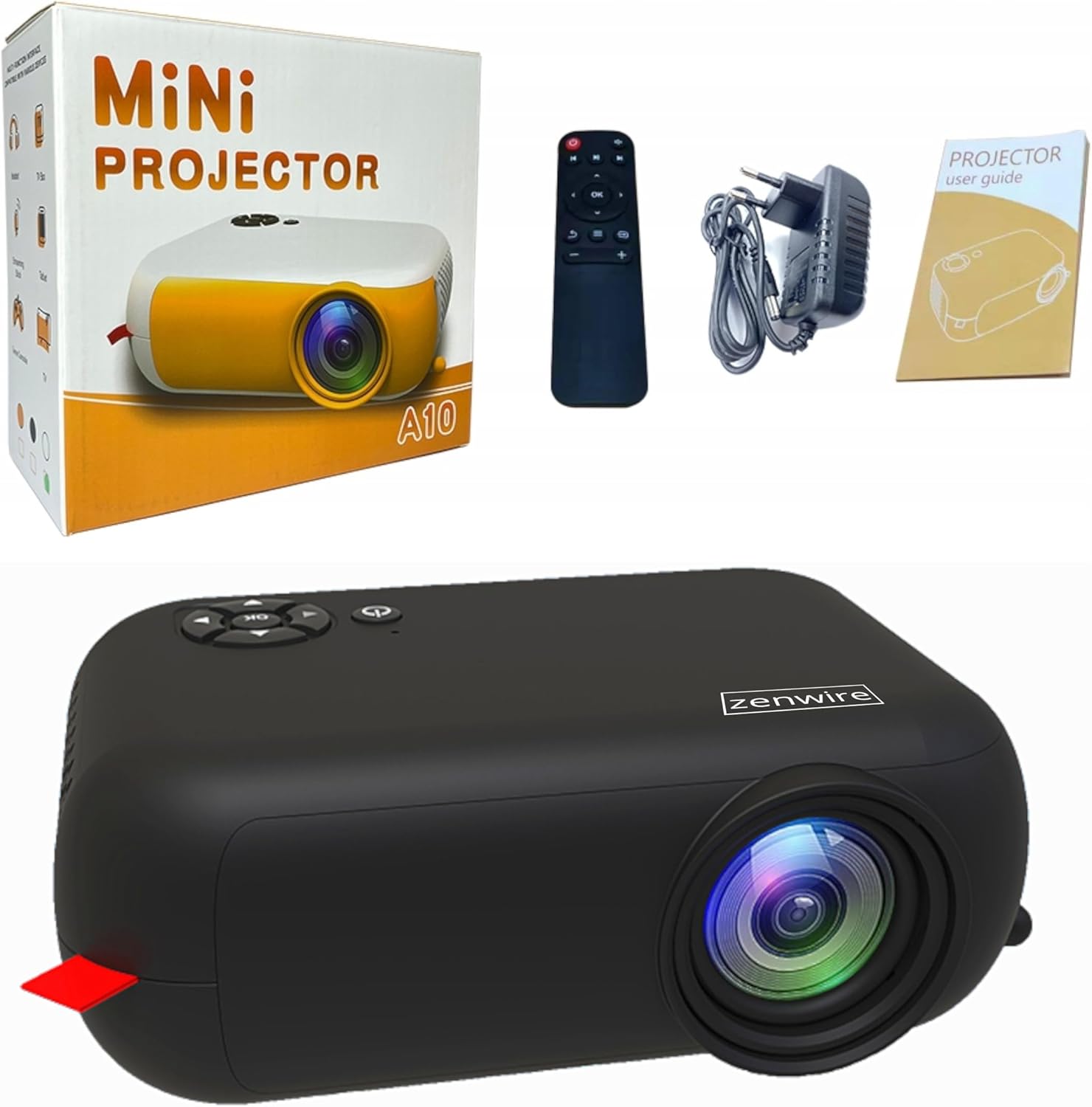
Image: Contents of the Zenwire A10 Mini Projector package, including the projector, remote control, power adapter, and user manual.
4. Маҳсулот ба охир расидview
4.1 Projector Dimensions and Design
The Zenwire A10 is designed for portability, featuring a compact and lightweight form factor. Its dimensions are approximately 14cm x 10cm x 5.5cm, making it easy to carry and set up in various locations.

Image: The Zenwire A10 Mini Projector held in a hand, illustrating its compact size and portability.
4.2 Портҳо ва идоракунӣ
The projector features a range of input and output ports for versatile connectivity, along with intuitive controls.

Image: Rear panel of the Zenwire A10 Mini Projector, showing the 5V-IN DC power input, IR receiver, USB port, 3.5mm audio jack, HDMI port, and SD card slot.
- 5V-IN DC: Вуруди барқ барои проектор.
- IR: Қабули инфрасурх барои идоракунии дурдаст.
- USB: Дастгоҳҳои нигаҳдории USB-ро барои бозикунии медиа пайваст кунед.
- Ҷойи гӯшмонак (3.5 мм): Баландгӯякҳо ё гӯшмонакҳоро пайваст кунед.
- HDMI: Connect devices such as laptops, gaming consoles, or streaming sticks.
- SD: Кортҳои Micro SD-ро барои бозикунии медиа гузоред.
- Чархи фокус: Adjust image sharpness (located on the side).
- Сафҳаи идоракунӣ: Buttons on top for navigation and selection.
5. Танзимот
5.1 Пайвастшавии барқ
- Адаптери барқии додашударо ба 5V-IN DC порт дар проектор.
- Адаптери барқро ба васлаки деворӣ пайваст кунед.
- Барои фаъол кардани он тугмаи барқро дар проектор ё пулти дурдаст пахш кунед.
5.2 Ҷойгиркунӣ ва танзими фокус
- Place the projector on a stable surface or mount it according to your preference. Ensure the projector lens is facing the projection surface (wall or screen).
- Adjust the distance between the projector and the screen to achieve your desired image size. The projector supports screen sizes up to 100 inches.
- Rotate the focus wheel (typically located near the lens) until the projected image appears clear and sharp.

Image: Diagram illustrating the Zenwire A10 Mini Projector's capability to project various screen sizes, from 13 inches up to 100 inches, depending on the projection distance.
6. Истифода бурдани проектор
6.1 Wireless Connection (Miracast & Airplay)
The Zenwire A10 supports wireless screen mirroring via 2.4/5GHz WiFi, compatible with Android (Miracast) and iOS (Airplay) devices.
- Боварӣ ҳосил кунед, ки проектор ва дастгоҳи мобилии шумо ба як шабакаи Wi-Fi пайвастанд.
- On the projector's main menu, select the 'Screen Mirroring' or 'Wireless Display' option.
- Барои Android: On your Android phone/tablet, enable 'Wireless Display', 'Screen Mirroring', 'Smart View', or similar function (names may vary by device). Select the projector from the list of available devices.
- Барои iOS: On your iPhone/iPad, open Control Center and tap 'Screen Mirroring'. Select the projector from the list of available devices.
- The content from your mobile device should now be mirrored on the projector screen.
6.2 Пайвастҳои симӣ
The projector offers multiple wired input options for various devices.

Image: The Zenwire A10 Mini Projector connected to various devices such as smartphones, tablets, laptops, desktop computers, gaming consoles, and media players, highlighting its versatile connectivity.
- HDMI: Connect a laptop, PC, gaming console (e.g., Xbox, PlayStation), or streaming device (e.g., Amazon Fire TV Stick, Google Chromecast) using an HDMI cable. Select the HDMI input source on the projector.
- USB: Insert a USB flash drive or external hard drive into the USB port. The projector's media player will allow you to browse and play supported video, audio, and image files.
- Micro SD: Insert a Micro SD card into the SD card slot. Similar to USB, you can access media files through the projector's interface.
- Баромади аудио (Ҷеки 3.5 мм): Connect external speakers or headphones to enhance the audio experience.
6.3 Навигатсияи меню
Use the remote control or the buttons on the projector to navigate through the on-screen menu. Select input sources, adjust picture settings (brightness, contrast, color), sound settings, and other system preferences.
7. Нигоҳдорӣ
- Тоза кардани линза: Use a soft, lint-free cloth specifically designed for optical lenses to gently wipe the projector lens. Avoid using abrasive cleaners or excessive force.
- Тоза кардани чанг: Regularly clean the projector's exterior with a soft, dry cloth. Use a small brush or compressed air to clear dust from the ventilation openings to ensure proper airflow.
- Нигоҳдорӣ: When not in use, store the projector in a cool, dry place, away from direct sunlight and extreme temperatures. Use the original packaging or a protective case to prevent dust accumulation and damage.
8. Баррасии мушкилот
If you encounter issues with your Zenwire A10 projector, refer to the following common problems and solutions:
| Мушкилот | Сабаби эҳтимолӣ | Ҳалли |
|---|---|---|
| Ягон тасвир дар экран нест | Нерӯи барқ пайваст нашудааст; Манбаи нодурусти вуруд; Дастгоҳ дуруст пайваст нашудааст. | Check power cable; Select correct input source (HDMI, USB, etc.); Reconnect source device. |
| Тасвир норавшан аст | Фокус танзим карда нашудааст; Проектор аз экран хеле наздик/дур. | Adjust the focus wheel; Adjust projection distance. |
| Садо нест | Садои баланд хеле паст аст; Хомӯш карда шудааст; Дастгоҳи аудиоии беруна пайваст/интихоб нашудааст. | Increase volume; Unmute; Check external speaker connection or select internal speaker. |
| Масъалаҳои пайвасти бесим | Not on same Wi-Fi network; Device not compatible; Interference. | Ensure both devices are on the same Wi-Fi; Verify device compatibility; Try moving closer to Wi-Fi router. |
9. Мушаххасоти
| Хусусият | Тафсилот |
|---|---|
| Бренд | Zenwire |
| Рақами модел | A10 |
| Навъи маҳсулот | Compact and Portable Projector |
| Қарори ватанӣ | 480 x 360p |
| Ҳаҷми максималии намоиш | 1920 x 1080 (HD Full) |
| Равшанӣ | 1800lm / 60 ANSI |
| Таносуби контраст | 2000:1 |
| Навъи намоиш | НН - НУРНИШОН |
| Технологияи пайвастшавӣ | Wi-Fi (2.4/5GHz), HDMI, USB, Micro SD, 3.5mm Audio Jack |
| Хусусиятҳои бесим | Miracast, Airplay |
| Дастгоҳҳои мувофиқ | Smartphones (Android, iOS), Tablets, Laptops, PCs, Gaming Consoles |
| Истифодаи тавсияшаванда | Кинотеатри хонагй |
| Андозаҳо (тақрибан) | 14см х 10см х 5.5см |
10. Кафолат ва дастгирӣ
The Zenwire A10 Mini Portable Projector comes with a standard manufacturer's warranty. For specific warranty terms and conditions, please refer to the documentation provided at the time of purchase or contact your retailer. For technical support or service inquiries, please reach out to Zenwire customer service through their official webсайт ё маълумоти тамос, ки бо маҳсулоти шумо дода шудааст.


