Муқаддима
Thank you for choosing the Rohnson Genius 16 Dehumidifier. This appliance is designed to efficiently remove excess moisture from your indoor environment, improve air quality, and create a healthier living space. With its advanced features, including Wi-Fi control, a powerful dehumidification capacity of up to 16 liters per day, and an ultra-quiet operation, the Genius 16 is an ideal solution for rooms up to 100 square meters. Please read this manual thoroughly before operating the unit to ensure safe and optimal performance.
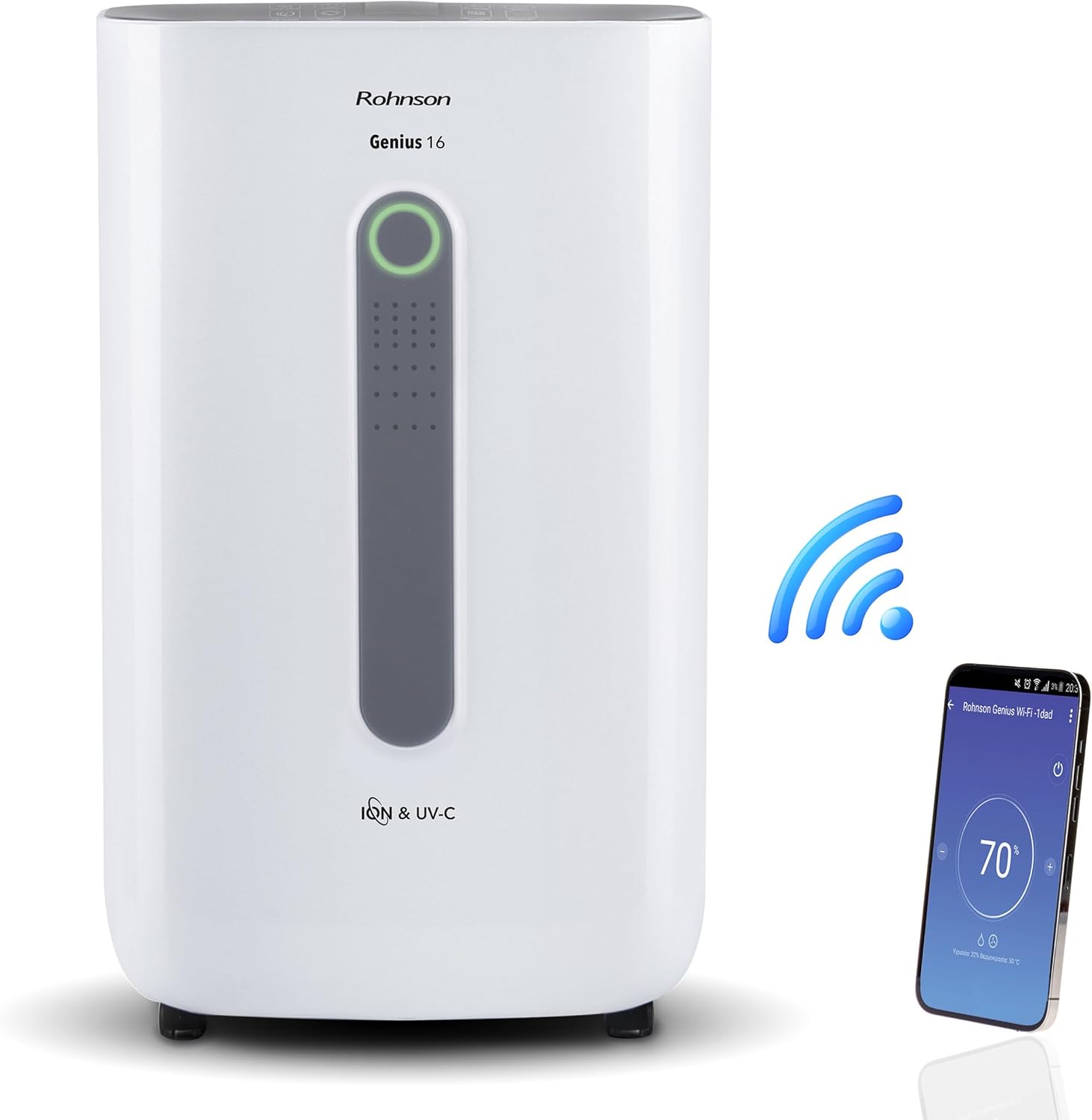
Image: The Rohnson Genius 16 Dehumidifier, a white rectangular unit with a central display, shown alongside a Wi-Fi symbol and a smartphone displaying the control app. This illustrates the unit's smart connectivity.
Дастурҳои бехатарӣ
Ҳангоми истифода бурдани асбобҳои барқӣ ҳамеша қоидаҳои асосии бехатариро риоя кунед, то хатари сӯхтор, зарбаи барқ ва осебро коҳиш диҳед.
- Боварӣ ҳосил кунед, ки таъминоти барқ ба ҳаҷм мувофиқ астtage дар тамғаи рейтингии дастгоҳ нишон дода шудааст.
- Дастгоҳро бо сим ё сими вайроншуда кор накунед.
- Дастгоҳро аз манбаъҳои гармӣ ва нури офтоб дур нигоҳ доред.
- Дохилшавӣ ё баромади ҳаворо маҳкам накунед.
- Пеш аз тоза кардан ё анҷом додани таъмир ҳамеша дастгоҳро аз сими барқ ҷудо кунед.
- Аз дастрасии кӯдакон дур нигоҳ доред.
Маҳсулот ба охир расидview
The Rohnson Genius 16 Dehumidifier is equipped with several features to enhance your indoor air quality and comfort.
- Наму тозакунии самаранок: Removes up to 16 liters of moisture per day, suitable for areas up to 100 m².
- Advanced Air Purification: Features UV-C light and a dual ionizer to eliminate bacteria and odors. An optional HEPA 13 + Activated Carbon filter can remove 99.7% of particles, smoke, chemicals, and allergens.
- Амали ултра ором: Operates at a low noise level of 36 dB(A) in low fan mode, ideal for bedrooms and living areas.
- Назорати Smart: Wi-Fi enabled for remote control via the Rohnson App (Android and iOS compatible). Includes a touch control panel, 1-24 hour timer, and automatic restart after power failure.
- Energy Saving Design: Powerful yet energy-efficient with only 240W power consumption. Features a Turbo-Boost mode for fast clothes drying and automatic shut-off when the water tank is full.
- Digital Humidity Display: A color indicator (Blue, Green, Red) shows current humidity levels for easy monitoring.

Image: The Rohnson Genius 16 Dehumidifier positioned in a living room, illustrating its compact size. Key features are overlaid, including its 16L/day dehumidification capacity, anti-frost system, digital humidity display, smart Wi-Fi control, UV-C light and ionizer, silent 36dB operation, and 6.5L water tank.
Ташкил кардан
1. Кушодан
Carefully remove the dehumidifier from its packaging. Inspect the unit for any signs of damage. Retain the packaging for future storage or transport.
2. Ҷойгиршавӣ
Place the dehumidifier on a firm, level surface in the area where dehumidification is desired. For optimal performance, ensure there is at least 20 cm (8 inches) of space around all sides of the unit to allow for proper airflow. The unit is effective for rooms up to 100 m². For best air circulation, consider placing it centrally within the room.

Image: A diagram illustrating the optimal placement of the dehumidifier in different household areas such as a laundry room, bedroom, living room, office, and basement, emphasizing central positioning for maximum effectiveness in rooms up to 100 m².
3. Пайвастшавии барқ
Plug the power cord into a grounded electrical outlet. Ensure the outlet meets the electrical requirements of the unit (230 Volts AC).
4. Filter Installation (Optional HEPA 13 + Activated Carbon Filter)
The Rohnson Genius 16 comes with an optional HEPA 13 + Activated Carbon filter for enhanced air purification.
- Қисми филтрро одатан дар қафо ё паҳлӯи дастгоҳ ҷойгир кунед.
- Сарпӯши филтрро кушоед.
- Insert the HEPA 13 + Activated Carbon filter, ensuring it is correctly oriented.
- Сарпӯши филтрро бехатар пӯшед.
5. Имкониятҳои дренажии об
The unit offers two drainage methods:
- Зарфи об: The unit has a 6.5-liter water tank. When the tank is full, the unit will automatically shut off and an indicator will light up. Empty the tank and reinsert it to resume operation.
- Дренажи доимӣ: For continuous operation without needing to empty the tank, connect a drainage hose (not included) to the continuous drainage port on the unit. Route the hose to a suitable drain or larger container.
Дастурҳои амалиётӣ
1. Панели идоракунӣ
The Rohnson Genius 16 features an intuitive touch control panel and a digital display.
- Тугмаи барқ: Дастгоҳро фурӯзон ё хомӯш мекунад.
- Интихоби режим: Cycle through different operating modes (e.g., Dehumidification, Turbo-Boost, Night Mode).
- Суръати мухлиси: Adjust fan speed (low, medium, high).
- Танзими намӣ: Set your desired humidity level. The unit will operate until this level is reached.
- Тугмаи вақтсанҷ: Set a timer for automatic shut-off (1-24 hours).
- UV-C/Ionizer Button: Activates or deactivates the UV-C light and dual ionizer.
- Намоиши рақамӣ: Shows current humidity, temperature, and selected settings.

Image: A visual representation of the digital humidity control feature, showing the dehumidifier and its color-coded humidity indicators. Blue indicates humidity below 55%, Green for 55-70%, and Red for above 70%, providing an easy visual cue for air moisture levels.
2. Идоракунии барномаи Wi-Fi
Control your Rohnson Genius 16 from anywhere using the Rohnson App.
- Download the "Rohnson" app from the App Store (iOS) or Google Play Store (Android).
- Ҳисобро сабт кунед ва ворид шавед.
- Follow the in-app instructions to add your Rohnson Genius 16 dehumidifier. This typically involves putting the unit into pairing mode and connecting it to your home Wi-Fi network.
- Once connected, you can remotely monitor humidity, adjust settings, set schedules (hourly, daily, weekly), and control all functions of the dehumidifier.

Image: A banner illustrating the smart connectivity of the dehumidifier, showing the unit and a smartphone displaying the Rohnson app. This highlights the ability to control the room climate remotely, schedule operations, and monitor humidity via a smartphone, compatible with both Android and iOS.
3. Ҳолатҳои махсус
- Turbo-Boost Mode (Laundry Drying): This mode provides a powerful airflow to quickly dry clothes indoors. Position the unit near the laundry for efficient drying.
- Реҷаи шабона: Суръати вентиляторро кам мекунад ва чароғҳои дисплейро барои кори ором ҳангоми хоб хира мекунад.

Image: The Rohnson Genius 16 Dehumidifier positioned in a room with a clothes drying rack, illustrating its effectiveness in drying laundry indoors, especially useful during rainy weather or in apartments without balconies.
Нигоҳдорӣ
Regular maintenance ensures the longevity and efficient operation of your dehumidifier. Always unplug the unit before cleaning.
1. Тозакунии берун
берунии агрегатро бо нарм пок кунед, гamp матоъ. Моддаҳои кимиёвӣ, абразивӣ ё ҳалкунандаҳои сахтро истифода набаред, зеро онҳо метавонанд ба сатҳи зарар расонанд.
2. Тозакунӣ/иваз кардани филтрҳо
The air filter should be cleaned regularly (e.g., every two weeks or as needed) to maintain optimal performance. If using the optional HEPA 13 + Activated Carbon filter, refer to its specific replacement schedule.
- хушккунакро хомӯш ва аз сими барқ ҷудо кунед.
- Remove the filter cover and carefully take out the filter(s).
- For washable filters, rinse with lukewarm water and mild detergent. Allow to air dry completely before reinserting.
- For HEPA/Activated Carbon filters, these are typically not washable and should be replaced according to manufacturer recommendations or when visibly dirty.
- Reinsert the clean/new filter(s) and close the cover.
3. Хол кардани зарфи об
Вақте ки зарфи об пур мешавад, дастгоҳ кор карданро қатъ мекунад.
- Зарфи обро аз дастгоҳ оҳиста берун кашед.
- Carefully empty the collected water.
- Clean the tank with mild soap and water if necessary, then rinse thoroughly.
- Reinsert the empty tank firmly into the unit until it clicks into place. The unit will resume operation.
Мушкилкушо
Пеш аз тамос бо дастгирии муштариён, лутфан ба масъалаҳои умумӣ ва роҳҳои ҳалли зерин муроҷиат кунед.
| Мушкилот | Сабаби эҳтимолӣ | Ҳалли |
|---|---|---|
| Дастгоҳ фурӯзон намешавад. | Қувваи барқ надорад, сими барқ канда шудааст, зарфи об пур аст ё дуруст ҷойгир карда нашудааст. | Check power connection. Empty and reinsert water tank securely. |
| No water collected / Low dehumidification. | Room humidity too low, air filter clogged, temperature too low, unit size too small for room. | Check current humidity setting. Clean or replace air filter. Ensure room temperature is above 5°C (41°F). |
| Агрегат ғавғо дорад. | Дастгоҳ дар сатҳи ҳамвор нест, вентилятор монеъ мешавад, филтри ифлос. | Place unit on a flat, stable surface. Check for obstructions in fan area. Clean filter. |
| Масъалаҳои пайвасти Wi-Fi. | Incorrect Wi-Fi password, unit too far from router, app not updated. | Ensure correct Wi-Fi password. Move unit closer to router. Update Rohnson App. Refer to app's troubleshooting guide. |
Мушаххасоти
| Хусусият | Тафсилот |
|---|---|
| Бренд | Ронсон |
| Рақами модел | R-9916W |
| Иқтидори намӣ | То 16 литр дар як рӯз |
| Масоҳати ҳуҷраи тавсияшаванда | То 100 м² |
| Иқтидори зарфи об | 6.5 литр |
| Сатҳи садо | 36 dB(A) (low fan mode) |
| Истеъмоли қувваи барқ | 240 В |
| Ҷилдиtage | 230 вольт (AC) |
| Андозаҳои маҳсулот (L x W x H) | 28 х 38 х 64 см |
| Вазни ашё | 16 килограмм |
| Хусусиятҳои махсус | Digital Display, Wi-Fi Control, UV-C Light, Dual Ionizer, Optional HEPA 13 Filter, Turbo-Boost Mode, Auto Shut-off, Auto Restart |
| Ранги | Сафед |
Кафолат ва дастгирӣ
For information regarding warranty coverage and customer support, please refer to the warranty card included with your product or visit the official Rohnson webсайт. Квитансияи хариди худро ҳамчун далели харид нигоҳ доред.
If you encounter issues not covered in this manual, please contact Rohnson customer service for assistance.