Муқаддима
Ташаккур ба шумо барои харидasing the Diyeeni Projection Alarm Clock. This device combines multiple functions including time projection, alarm, thermometer, and hygrometer. Please read this manual carefully to ensure proper use and optimal performance.

Тасвир: The Diyeeni Projection Alarm Clock displaying its multi-functional interface, including current time, date, temperature, humidity, and weather forecast icons. The image highlights the device's capabilities such as alarm, snooze, time projection, weather monitoring, date display, temperature and humidity monitoring, and backlight.
Мундариҷаи баста
- 1 x Diyeeni Projection Alarm Clock
- 1 x кабели USB
- 1 х Дастури чинӣ ва англисӣ
Ташкил кардан
Таъмин кардани дастгоҳ
The alarm clock can be powered in two ways:
- Сими USB: Plug the provided USB cable into the clock's power port and connect it to a compatible USB power source (e.g., USB adapter, power bank, PC).
- Батареяҳо: Insert 2 x AAA batteries (not included) into the battery compartment.
Эзоҳ дар бораи батарея: Do not use high-capacity batteries (such as for Nanfu batteries) as they can easily burn circuit boards. Use ordinary carbon batteries. The screen brightness may be higher when using battery power compared to USB power. Avoid frequently turning the alarm clock on/off (in either power or battery mode) as this may cause temporary malfunction. If this occurs, stop using the alarm clock for more than 30 minutes before reconnecting power or batteries.
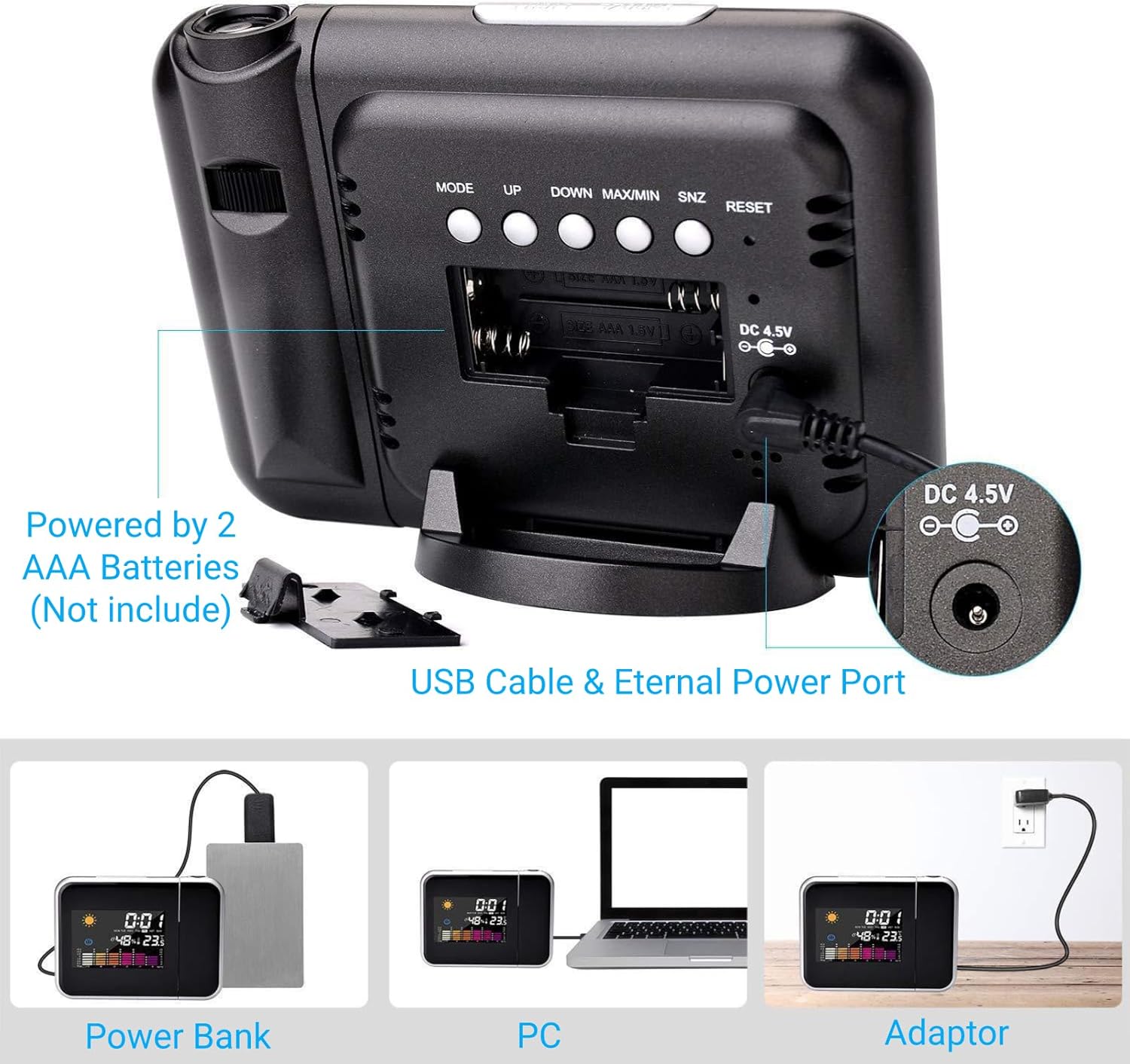
Тасвир: The back of the alarm clock, illustrating the battery compartment for 2 AAA batteries and the USB power input port. This image clarifies the power options for the device.
Дастурҳои амалиётӣ
Пешгӯии вақт
The clock features a 180-degree rotatable projector that displays the time on your wall or ceiling. Use the focusing knob to adjust the clarity and size of the projected numbers for easy reading.

Тасвир: The projection feature of the alarm clock in action, showing the time clearly displayed on a ceiling. An arrow indicates the 180-degree rotation capability of the projector lens.
Функсияи ҳушдор ва боздорӣ
Set your desired alarm time. When the alarm sounds, press the top button to activate the snooze mode. The alarm will sound again after 8 minutes.
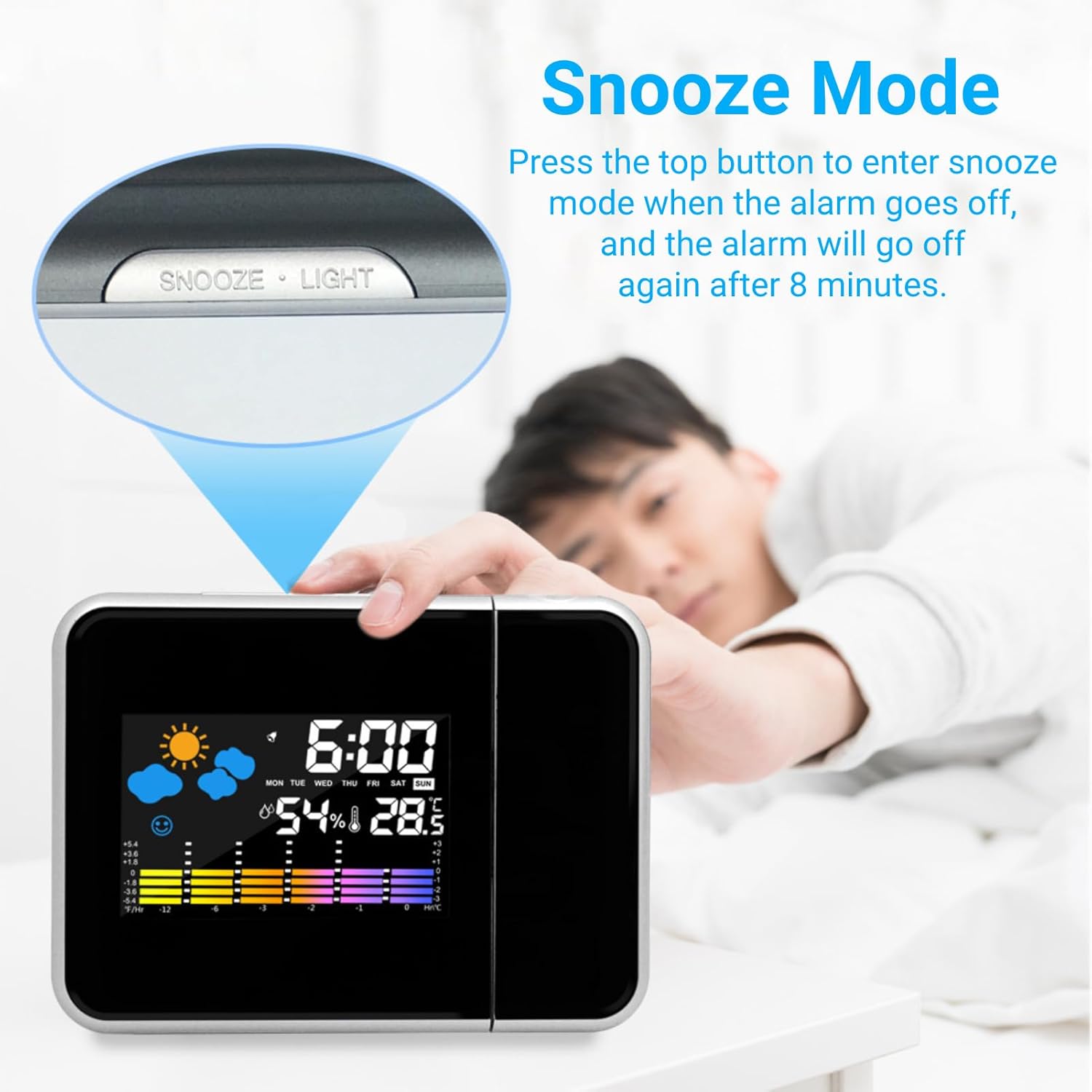
Тасвир: A close-up of the alarm clock with the 'SNOOZE LIGHT' button prominently displayed on top. A hand is shown reaching to press the button, illustrating the snooze function.
Мониторинги ҳарорат ва намӣ
The clock includes a built-in thermometer and hygrometer to monitor real-time indoor temperature and humidity. This feature provides useful environmental information.

Тасвир: The alarm clock's display showing current temperature and humidity levels, along with maximum and minimum recorded values. This highlights its environmental monitoring capabilities.
Пешгӯии обу ҳаво
The device can forecast current weather conditions based on temperature and humidity data.

Тасвир: The alarm clock's screen showing various weather forecast icons, such as sunny, cloudy to sunny, rainy, and cloudy, indicating its weather prediction function.
Равшании намоиш
The display brightness can be adjusted to suit your preference, ensuring comfortable viewдар шароити гуногуни рӯшноӣ.
Нигоҳдорӣ
- Дастгоҳро бо матои хушк ва мулоим тоза кунед. Тозакунанда ё ҳалкунандаҳои абразивиро истифода набаред.
- Keep the device away from water and direct sunlight.
- Ensure proper battery installation and replacement as noted in the Setup section.
Мушкилкушо
Device Not Functioning / Chaotic Display
If the alarm clock exhibits a chaotic display or stops working temporarily, it may be due to using high-capacity batteries or frequent power cycling. Refer to the Таъмин кардани дастгоҳ section for battery recommendations and power cycling warnings. Disconnect power/batteries for at least 30 minutes before attempting to restart.
Мушаххасоти
| Хусусият | Тафсилот |
|---|---|
| Навъи ашё | Соати зангдор проекционй |
| Материал | Пластмасса |
| Рақами модел | Diyeeni8sc4h6wogq |
| Ротатсияи проексия | 180 дарача |
| Функсияҳо | Alarm, Snooze, Time Projection, Thermometer, Hygrometer, Date Display |
| Манбаи нерӯ | USB Cable (included), 2 x AAA Batteries (not included) |
| Андозаҳои бастаҳо | 6.3 x 4.8 x 2.52 инч |
| Вазни ашё | 8.1 унция |
Кафолат ва дастгирӣ
For any questions or support needs regarding your Diyeeni Projection Alarm Clock, please refer to the contact information provided in the product packaging or the official Diyeeni website. Please retain your purchase receipt for warranty purposes.
Видеоҳои маҳсулот
Digital Projection Alarm Clock Overview
Тавсифи видео: Ин видео бартарият медиҳадview of the Digital Projection Alarm Clock, demonstrating its key features and functionality. It showcases the time display, projection capabilities, and general design of the device.
Projection Alarm Clock Features
Тавсифи видео: A detailed video highlighting various features of the Projection Alarm Clock, including how to operate its different modes and settings. It offers a closer look at the user interface and practical applications.