1. Муқаддима
Ташаккур ба шумо барои харидasing the Skyworth SS531 510W Wireless Subwoofer Soundbar. This manual provides essential information for the safe and efficient use of your new sound system. Please read it thoroughly before operating the device and retain it for future reference.
The Skyworth SS531 is designed to enhance your audio experience with powerful sound, deep bass from its 510W wireless subwoofer, and a 3.1-channel sound array for an immersive soundstage. It offers versatile connectivity options including HDMI ARC, optical, and Bluetooth.
2. Маълумот оид ба бехатарӣ
- Пеш аз истифода ҳама дастурҳоро бодиққат хонед.
- Дастгоҳро ба борон, намӣ ё ҳарорати аз ҳад зиёд нагузоред.
- Дар атрофи саундбар ва сабвуфер вентилятсияи дурустро таъмин кунед.
- Ягон сӯрохиҳои вентилятсияро маҳкам накунед.
- Танҳо замимаҳо/ҷисмҳои муайянкардаи истеҳсолкунандаро истифода баред.
- Дар вақти тӯфони барқ ва дар муддати тӯлонӣ истифода нашудани сими барқро ҷудо кунед.
- Ҳама хидматрасониро ба кормандони соҳибихтисос муроҷиат кунед.
3. Мундариҷаи баста
Боварӣ ҳосил кунед, ки ҳама ашё дар баста мавҷуд аст:
- 1 x Skyworth SS531 Soundbar
- 1 x Сабвуфери бесим
- Кабели барқ
- Идоракунии дурдаст (бо батареяҳо)
- Дастури корбар (ин ҳуҷҷат)
- Маҷмӯаи васлкунии девор (агар лозим бошад)
4. Маҳсулот ба охир расидview
Саундбар ва сабвуфер
The Skyworth SS531 system consists of a main soundbar unit and a wireless subwoofer. The soundbar houses the main speakers and control interface, while the subwoofer provides deep bass frequencies wirelessly.

Тасвир: Пеш view of the Skyworth SS531 Soundbar and Wireless Subwoofer. The soundbar is a long, slender black unit, and the subwoofer is a rectangular black tower.

Тасвир: кунҷӣ view of the Skyworth SS531 Soundbar and Wireless Subwoofer, showing the sleek design of both components.
Сафҳаи идоракунӣ
The control panel is located on the side of the soundbar, providing easy access to essential functions.
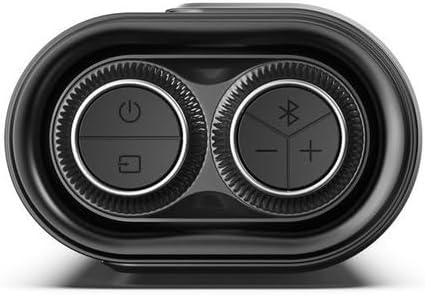
Image: Close-up of the Skyworth SS531 Soundbar control panel. It features circular buttons for Power, Input Selection, Bluetooth pairing, Volume Up, and Volume Down.
- Тугмаи барқ: Саундбарро фаъол ё хомӯш мекунад.
- Тугмаи вуруд/манбаъ: Cycles through available input sources (HDMI ARC, Optical, Bluetooth, AUX, USB).
- Тугмаи Bluetooth: Ҳолати пайвасткунии Bluetooth-ро оғоз мекунад.
- Тугмачаҳои баланд / поён Сатҳи баландии овозро танзим мекунад.
5. Танзимот
5.1 Positioning the Soundbar and Subwoofer
- Place the soundbar centrally below your TV. Ensure it is on a stable, flat surface or securely wall-mounted.
- Position the wireless subwoofer on the floor, preferably in the front corner of the room or near the soundbar, for optimal bass performance.
5.2 Пайваст кардани қувваи барқ
- Сими барқро ба порти AC IN дар саундбар пайваст кунед.
- Connect the other end of the power cable to a wall outlet.
- Connect the power cable to the AC IN port on the wireless subwoofer.
- Connect the other end of the subwoofer power cable to a wall outlet.
- The soundbar and subwoofer will automatically pair when both are powered on. An indicator light on the subwoofer will confirm successful pairing.
5.3 Пайвастшавӣ ба телевизиони худ
Яке аз усулҳои зерини пайвастшавиро интихоб кунед:
HDMI ARC (Тавсия дода мешавад)
- Connect one end of an HDMI cable (not included) to the HDMI ARC port on your TV.
- Connect the other end of the HDMI cable to the HDMI ARC port on the soundbar.
- Ensure your TV's HDMI ARC function is enabled in its audio settings.
Пайвастагии оптикӣ
- Connect an optical cable (not included) to the OPTICAL OUT port on your TV.
- Connect the other end of the optical cable to the OPTICAL IN port on the soundbar.
- Боварӣ ҳосил кунед, ки баромади аудиои телевизиони шумо ба "Оптикӣ" ё "PCM" муқаррар шудааст.
Пайвастшавӣ AUX
- Connect a 3.5mm audio cable (not included) from your TV's headphone or AUX OUT port to the AUX IN port on the soundbar.
6. Дастурҳои истифодабарӣ
6.1 Фаъол кардан/хомӯш кардан
- Барои фаъол ё хомӯш кардани дастгоҳ тугмаи барқро дар панели садо ё пулти дурдаст пахш кунед.
6.2 Интихоби манбаи вуруд
- Press the Input/Source button on the soundbar or remote control repeatedly to cycle through available input sources: HDMI ARC, OPTICAL, BLUETOOTH, AUX, USB.
- The display on the soundbar will indicate the currently selected input.
6.3 Пайвасткунии Bluetooth
- Press the Bluetooth button on the soundbar or remote control to enter Bluetooth pairing mode. The Bluetooth indicator will flash.
- Bluetooth-ро дар дастгоҳи мобилии худ (смартфон, планшет ва ғайра) фаъол созед ва дастгоҳҳои дастрасро ҷустуҷӯ кунед.
- Select "Skyworth SS531" from the list of devices.
- Once paired, the Bluetooth indicator will stop flashing and remain solid. You can now play audio from your device through the soundbar.
6.4 Adjusting Volume and Sound Modes
- Use the Volume Up/Down buttons on the soundbar or remote control to adjust the overall volume.
- The remote control may offer dedicated buttons for different sound modes (e.g., Movie, Music, News) to optimize audio for various content types.
- Use the Bass Boost feature (if available on remote) to enhance low frequencies.
7. Нигоҳубин ва нигоҳдорӣ
- Тозакунӣ: Барои тоза кардани сатҳи садобар ва сабвуфер аз матои мулоим ва хушк истифода баред. Моеъҳои тозакунанда ё маводи абразивиро истифода набаред.
- Нигоҳдорӣ: Агар дастгоҳ барои муддати тӯлонӣ нигоҳ дошта шавад, онро аз барқ ҷудо кунед ва дар ҷои хунук ва хушк нигоҳ доред.
- Вентилятсия: Боварӣ ҳосил кунед, ки сӯрохиҳои вентилятсия баста нашудаанд, то аз ҳад зиёд гармшавиро пешгирӣ кунанд.
8. Баррасии мушкилот
| Мушкилот | Сабаби эҳтимолӣ | Ҳалли |
|---|---|---|
| Не қудрат | Сими барқ пайваст нашудааст; Васлаки барқ фаъол нест | Боварӣ ҳосил кунед, ки кабелҳои барқӣ ба саундбар/сабвуфер ва розеткаи барқии корӣ боэътимод пайваст карда шудаанд. |
| Садо нест | Incorrect input source; Volume too low; Mute activated; Incorrect TV audio settings | Select the correct input source. Increase volume. Deactivate mute. Check TV audio output settings (e.g., set to HDMI ARC, Optical, or PCM). |
| Сабвуфер басс истеҳсол намекунад | Subwoofer not paired; Subwoofer power off | Ensure the subwoofer is powered on. Check the pairing indicator light. If not paired, power cycle both the soundbar and subwoofer. |
| Мушкилоти пайвасти Bluetooth | Device too far; Not in pairing mode; Interference | Ensure your device is within range (approx. 10 meters). Put the soundbar into Bluetooth pairing mode. Disconnect other Bluetooth devices. |
9. Мушаххасоти
| Хусусият | Мушаххасоти |
|---|---|
| Рақами модел | SS531 |
| Қувваи умумии баромад | 510 Ватт |
| Навъи сабвуфер | Бесимӣ |
| Диаметри сабвуфер | 7.87 Сантиметр |
| Каналҳои аудио | 3.1 Канал |
| Пайвастшавӣ | Bluetooth, HDMI ARC, оптикӣ, AUX, USB |
| Версияи Bluetooth | 5.0 |
| Ҳолати баромади аудио | Гирифтан |
| Хусусиятҳои махсус | Баста пурзӯр |
| Андозаҳои маҳсулот (Саундбар) | Approx. 83W x 12H x 20D cm (Dimensions for soundbar and subwoofer combined are 20D x 83W x 12H cm, assuming 83W is soundbar width) |
| Ранги | Сиёҳ |
| Материал | Пластмасса |
10. Кафолат ва дастгирӣ
This Skyworth SS531 Soundbar comes with a Кафолати 1-солаи истеҳсолкунанда аз рӯзи харид. Ин кафолат нуқсонҳои истеҳсолӣ ва коркардро дар ҳолати истифодаи муқаррарӣ фаро мегирад.
For warranty claims, technical support, or service inquiries, please contact your local Skyworth customer service or the retailer from whom you purchased the product. Please retain your proof of purchase for warranty validation.
Note: The warranty does not cover damage caused by misuse, accident, unauthorized modification, or normal wear and tear.


