1. Муқаддима
This manual provides comprehensive instructions for the installation, operation, and maintenance of your Seventour P10-3 Wireless Car Stereo. This portable car stereo system offers advanced features including wireless Apple CarPlay and Android Auto, a built-in 4K front dash camera, a 1080P backup camera, mirror link functionality, GPS navigation support, Bluetooth connectivity, AUX, and FM radio audio output. Please read this manual thoroughly before using the device to ensure proper functionality and safety.
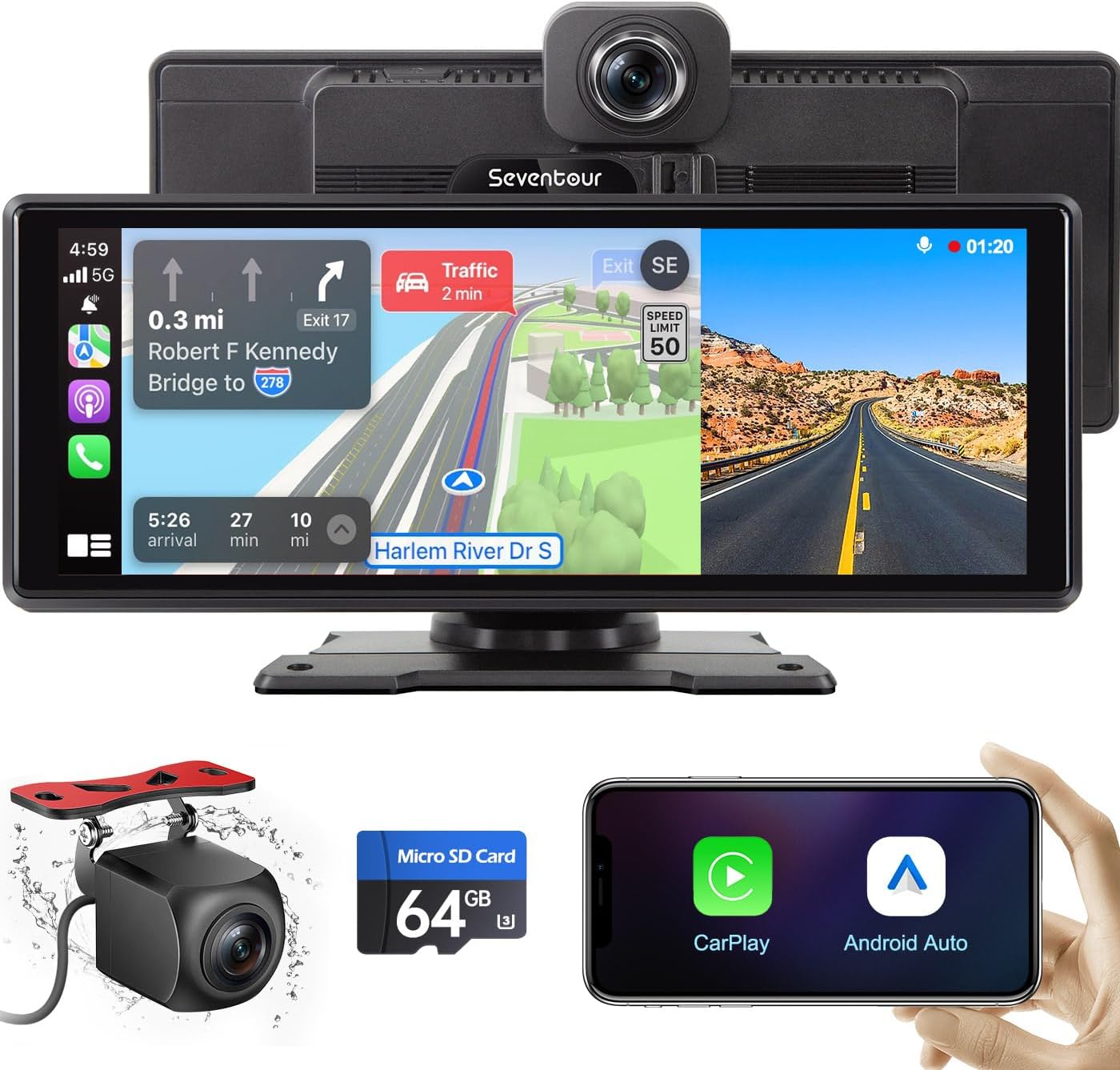
Image: The Seventour P10-3 Wireless Car Stereo system, showcasing the main display unit with integrated front camera, a separate backup camera, and a smartphone illustrating Apple CarPlay and Android Auto compatibility.
2. Хусусиятҳои маҳсулот
- бесими Apple CarPlay ва Android Auto: Seamlessly integrate your smartphone for navigation, music, and voice control via Bluetooth and Wi-Fi. Supports both wireless and wired connections.
- Назорати овоз: Utilize Siri or Google Assistant for hands-free operation, enhancing driving safety.
- Integrated Dual Dash Cam: Features a built-in 4K front camera and a 1080P backup camera. Supports loop recording, gravity sensing, and real-time video playback on the 10.26-inch screen. Includes Forward Collision Warning and Lane Departure Warning functions.
- HD Touch Screen & Mirror Link: A responsive 10.26-inch high-definition touch screen. Supports AirPlay for iOS and Miracast for Android, allowing screen mirroring from your phone.
- Имконоти гуногуни баромади аудио: Transmit audio to your car's speakers via Bluetooth, FM radio transmission, or AUX wired output. The unit also has built-in speakers.
- Real-time GPS Navigation: Shares real-time map data from your mobile phone, providing access to destinations, nearby maps, and current road conditions.

Image: Illustration of the integrated 4K front and 1080P rear dash cam system, demonstrating video capture quality and the split-screen display capability for simultaneous navigation and dash cam monitoring.

Image: The car stereo screen displaying the Apple CarPlay interface, highlighting its compatibility with iPhone devices for seamless integration of apps and features.

Image: The car stereo screen displaying the Android Auto interface, highlighting its compatibility with Android devices for seamless integration of apps and features.
3. Дар қуттӣ чӣ мавҷуд аст
The Seventour P10-3 package includes the following components:
- 1 x Seventour P10-3 Car Stereo Unit (10.26-inch display with integrated front camera)
- 1 x Кронштейн васлкунӣ
- 1 х сими барқи сабуктар сигор
- 1 x Backup Camera (Length: 11.5 ft)
- 1 x Кабели Type-C
- 1 x кабели аудио AUX
- 1 x Micro SD Card (64GB)
- 1 x корти хонандаи SD
- 1 x Дастурҳои корбар
- 1 x Bracket Adhesive Sticker

Image: A visual representation of all items included in the product packaging, detailing the main unit dimensions and accessories.
4. Танзим ва насб
The Seventour P10-3 is designed for simple installation, adapting to various vehicle types.
4.1 Ҷойгиркунии дастгоҳ
- Ҷойгирро интихоб кунед: Select a suitable flat surface on your dashboard for mounting the unit. Ensure the location does not obstruct your view аз рох ё ба идоракунии наклиёт халал мерасонад.
- Attach Mount Bracket: Secure the mount bracket to the chosen location using the provided adhesive sticker. Ensure the surface is clean and dry before applying the adhesive for optimal adhesion. The mount is adjustable for optimal viewкунҷҳо.
- Attach Stereo Unit: Slide the P10-3 stereo unit onto the mount bracket until it clicks securely into place.

Image: The adjustable mount bracket, demonstrating its flexibility for positioning the unit.
4.2 Пайвастшавии барқ
- Connect the cigarette lighter power cable to the P10-3 unit.
- Insert the other end of the cigarette lighter power cable into your vehicle's 12V-24V cigarette lighter socket. The unit will power on automatically.

Image: The cigarette lighter power adapter connected to a vehicle's power outlet.

Image: The P10-3 unit is suitable for various vehicle types, including sedans, SUVs, trucks, and RVs.
4.3 Насби камераи эҳтиётӣ (ихтиёрӣ)
For optimal functionality, professional installation of the backup camera is recommended. Ensure sufficient cable slack, especially for hatchbacks, to prevent damage when opening the trunk.

Image: The AHD 1080P backup camera view displayed on the screen, featuring parking assistance lines.
5. Дастурҳои истифодабарӣ
5.1 Connecting to Apple CarPlay / Android Auto
The P10-3 supports both wireless and wired connections for Apple CarPlay and Android Auto.
- Пайвасти бесим:
- Боварӣ ҳосил кунед, ки Bluetooth ва Wi-Fi дар смартфони шумо фаъол аст.
- On the P10-3 unit, navigate to the CarPlay or Android Auto icon.
- Ҷустуҷӯ the P10-3's Bluetooth signal on your phone and pair. Follow any on-screen prompts to complete the connection.
- Пайвасти симӣ:
- Connect your smartphone to the P10-3 unit using a compatible USB cable (Type-C cable provided).
- The unit should automatically detect your phone and launch CarPlay or Android Auto.
5.2 Voice Control (Siri / Google Assistant)
Once connected to Apple CarPlay or Android Auto, you can activate your phone's voice assistant for hands-free control.
- To activate Siri (for Apple CarPlay) or Google Assistant (for Android Auto), use the designated voice command (e.g., "Hey Siri" or "Hey Google") or press the voice control button on the P10-3 screen if available.
- You can then issue commands for navigation, playing music, making calls, sending messages, and more.

Тасвир: Мисamples of voice commands for Siri and Google Assistant, demonstrating hands-free operation.
5.3 Audio Output Methods
The P10-3 offers several ways to output audio to your car's speakers:
- Method I: Bluetooth Transmission (Recommended)
Connect the P10-3 to your car's original stereo system via Bluetooth. This method generally provides the best sound quality and allows for steering wheel control of volume.
- Method II: AUX Cable Connection
Use the provided AUX audio cable to connect the P10-3's AUX output to your car's AUX input. Select AUX as the audio source on your car's stereo.
- Method III: FM Radio Transmission
Tune the P10-3 to an unused FM frequency. Then, tune your car's FM radio to the same frequency to receive audio wirelessly.
- Баландгӯякҳои дарунсохт
The P10-3 has built-in speakers for direct audio playback, suitable for situations where external car speakers are not desired or available.

Image: Illustration of the various audio output methods available for connecting the P10-3 to your vehicle's sound system.
5.4 Фаъолияти камераи тире
- The built-in 4K front camera and 1080P backup camera automatically begin recording when the device is powered on.
- Recordings are saved to the included 64GB Micro SD card. The system supports loop recording, overwriting the oldest fileс вақте ки корт пур аст.
- Gravity sensing (G-sensor) automatically locks video files in case of sudden impacts or collisions, preventing them from being overwritten.
- View and play recorded videos directly on the 10.26-inch screen.
- The unit also features Forward Collision Warning (FCW) and Lane Departure Warning (LDW) functions to assist with driving safety.

Image: Various display modes, including full-screen dash cam view and split-screen options for simultaneous navigation and camera monitoring.

Тасвир: Нақшаи наздик view of the dash cam interface on the P10-3 screen.

Image: The included 64GB Micro SD card for video storage.

Image: The system supports 24-hour parking monitoring, providing continuous surveillance.
5.5 Функсияи Зеркало
The Mirror Link function allows you to mirror your smartphone's screen onto the P10-3 display.
- For iOS devices, use AirPlay. For Android devices, use Miracast.
- Ensure your phone and the P10-3 are connected to the same Wi-Fi network or directly connected via USB.
- Activate the Mirror Link function on the P10-3 and follow the instructions on your smartphone to cast its screen.
5.6 Навигатсияи GPS
When connected to Apple CarPlay or Android Auto, the P10-3 utilizes your smartphone's GPS capabilities.
- Access navigation applications (e.g., Apple Maps, Google Maps, Waze) directly from the CarPlay or Android Auto interface.
- The system provides real-time positioning, turn-by-turn directions, and traffic updates, ensuring smooth travel.
6. Нигоҳдорӣ
Proper maintenance ensures the longevity and optimal performance of your Seventour P10-3 unit.
- Тозакунӣ: Use a soft, dry cloth to clean the screen and exterior of the unit. For stubborn smudges, slightly dampматоъро бо об ё тозакунандаи барои экран бехатар. Аз маводи абразивӣ ё кимиёвии сахт худдорӣ намоед.
- Ҳарорат: Аз таъсири ҳарорати аз ҳад зиёд, ҳам гарм ва ҳам хунук, барои муддати тӯлонӣ худдорӣ кунед.
- Идоракунии кабелӣ: Боварӣ ҳосил кунед, ки ҳамаи кабелҳо бодиққат ҷойгир ва мустаҳкам карда шудаанд, то аз осеб ё халалрасонӣ ҳангоми ронандагӣ пешгирӣ карда шавад.
- Навсозии нармафзор: Давра ба давра аз ҷониби истеҳсолкунанда тафтиш кунед website for any available firmware or software updates to ensure the best performance and compatibility.
- Нигоҳубини корти SD: Regularly back up important dash cam footage from the Micro SD card. Format the SD card periodically (e.g., once a month) to maintain optimal recording performance and prevent data corruption.
7. Баррасии мушкилот
This section addresses common issues you might encounter with your P10-3 unit.
| Мушкилот | Сабаби эҳтимолӣ / Ҳалли |
|---|---|
| Дастгоҳ фаъол нест. |
|
| Cannot connect to Apple CarPlay / Android Auto wirelessly. |
|
| Microphone not working well / Call audio choppy. |
|
| Дастгоҳ аз ҳад зиёд гарм мешавад. |
|
| FM transmission has static. |
|
| Unit does not turn off automatically. |
|
8. Мушаххасоти
| Хусусият | Тафсилот |
|---|---|
| Рақами модел | Р10-3 |
| Бренд | Seventour |
| Андозаи намоиш | 10.26 дюйм (Диагонали экрани намоён: 11 дюйм / 27 см) |
| Қарори камераи пеши | 4K |
| Backup Camera Resolution | 1080Р |
| Технологияи пайвастшавӣ | Bluetooth, Wi-Fi (for CarPlay/Android Auto), AUX, FM |
| Хусусиятҳои махсус | GPS Navigation, Apple CarPlay, Android Auto, Mirror Link, Voice Control, Loop Recording, Gravity Sensing, Forward Collision Warning, Lane Departure Warning |
| Усули назорат | Ламс, Овоз |
| Навъи васлкунӣ | Mount Bracket (Adhesive Sticker) |
| Ранги | СИЁХ |
| Вазни ашё | 2.53 фунт |
| Андозаҳои бастаҳо | 10.91 x 5.63 x 5.04 инч |
| Компонентҳои дохилшуда | 1 radio unit, Mount Bracket, Cigarette Lighter Power Cable, Backup Camera, Type-C Cable, AUX Audio Cable, 64GB Micro SD Card, SD Card Reader, User Manuals, Bracket Adhesive Sticker |
9. Кафолат ва дастгирӣ
Seventour is committed to providing excellent customer service and product support.
- Иваз кардани маҳсулот: If there is any product quality issue within 6 months of purchase, Seventour promises to replace the product with a new one.
- Таъмири маҳсулот: The product can be repaired without any charge within 1 year of purchase.
- Хидмат ба муштари: Seventour provides professional after-sales support. Customer emails are typically replied to within 12 hours.
Маълумот барои тамос:
- Телефон: +1 833 853 8881
- Почтаи электронӣ: help@seventour.vip

Image: Seventour Service Support details, including return, replacement, repair policies, and contact information.


