Муқаддима
Thank you for choosing the arVin D8 Pro Wireless Gamepad Controller. This manual provides detailed instructions for setting up, operating, and maintaining your controller to ensure an optimal gaming experience across various platforms including iOS, Android, PC, and Xbox consoles. Please read this manual thoroughly before use.
Ташкил кардан
1. Пур кардани контроллер
Before first use, fully charge the controller using the provided USB-C cable. Connect the cable to the controller's charging port and a compatible USB power source. The indicator lights will show charging status.
2. Фаъол/хомӯш
To power on, press and hold the 'HOME' button for 2 seconds until the indicator lights flash. To power off, press and hold the 'HOME' button for 5 seconds until the lights turn off.
3. Device Mounting
The arVin D8 Pro features a stretched design that supports tablets and phones from 128-289mm in length and up to 13mm thick. This allows for use with various devices, including iPad Pro (M4) 13 inch, without needing to remove most phone cases.

Image: The arVin D8 Pro controller demonstrating its compatibility with various devices, including a Nintendo Switch, an iPhone, and an iPad, highlighting its adjustable length from 128-289mm.
4. Bluetooth Connection (iOS/iPad)
Follow these steps to connect your controller to an iOS device or iPad:
- Ensure the controller is off.
- Hold down the 'RB' key, then press the 'HOME' key for 2 seconds. The indicator lights will flash quickly.
- On your iOS/iPad device, go to Танзимотҳо > блутуз.
- Ҷустуҷӯ and select 'Xbox Wireless Controller' from the available devices.
- Пас аз пайвастшавӣ, чароғи нишондиҳанда дар контроллер доимӣ боқӣ мемонад.
Video: Instructions for connecting the arVin D8 Pro controller to an iPad or iPhone via Bluetooth, demonstrating the button presses and device pairing process.
5. Bluetooth Connection (Android Phone/Tablet)
There are two modes for Android connection:
Mode 1: Standard Android Connection
- Ensure the controller is off.
- Hold down the 'RB' key, then press the 'HOME' key for 2 seconds. The indicator lights will flash quickly.
- Дар дастгоҳи Android-и худ, ба Танзимотҳо > блутуз.
- Ҷустуҷӯ and select 'Xbox Wireless Controller' from the available devices.
- Пас аз пайвастшавӣ, чароғи нишондиҳанда дар контроллер доимӣ боқӣ мемонад.
Mode 2: Direct Play Android Connection (for specific games)
- Ensure the controller is off.
- Hold down the 'X' key, then press the 'HOME' key for 2 seconds. The indicator lights will flash quickly.
- Дар дастгоҳи Android-и худ, ба Танзимотҳо > блутуз.
- Ҷустуҷӯ and select 'BSP-D8Pro' from the available devices.
- Пас аз пайвастшавӣ, чароғи нишондиҳанда дар контроллер доимӣ боқӣ мемонад.
Video: A guide on how to connect the arVin D8 Pro controller to an Android phone or tablet, detailing the pairing process for different connection modes.
6. Bluetooth Connection (PC)
To connect your controller to a PC via Bluetooth:
- Ensure the controller is off.
- Hold down the 'RB' key, then press the 'HOME' key for 2 seconds. The indicator lights will flash quickly.
- On your PC, enable Bluetooth and go to Танзимотҳо > Дастгоҳҳо > Bluetooth ва дигар дастгоҳҳо.
- Select 'Add Bluetooth or other device' and choose 'Bluetooth'.
- Ҷустуҷӯ and select 'Xbox Wireless Controller'.
- Пас аз пайвастшавӣ, чароғи нишондиҳанда дар контроллер доимӣ боқӣ мемонад.
- For Steam games, ensure 'Xbox Configuration Support' is enabled in Steam's controller settings.
Video: Demonstrates how to connect the arVin D8 Pro controller to a PC via Bluetooth and set it up for Steam streaming, including enabling Xbox Configuration Support.
Фаъолияти контроллер
1. Хусусиятҳои асосӣ
- Ҷойстикҳо ва триггерҳои эффекти Холл: Designed for precise control with accuracy up to 0.1mm, minimizing drift and dead zones.
- Macro Programming (M1/M2): Two programmable buttons (M1/M2) support single or multiple programming modes to customize your gameplay.
- Функсияи турбо: Three adjustable turbo speeds (8, 15, 25 shoots/s) can be set for A/B/X/Y/LT/LB/RT/RB/cross keys.
- Adjustable RGB Lights: Customize the controller's lighting with various modes (Breathing, Fixed 7 colors, Off) by pressing the 'Programming key + L3 key'.
- Three Joystick Modes: Switch between FPS Mode, Normal Mode, and Racing Mode for optimized control in different game genres.
- ABXY Key-value Interchange: Allows swapping the functions of the ABXY buttons.
- Axis Calibration Function: For maintaining joystick accuracy.
- Controller Sleep/Wake Up/Off Function: For power management.
- Dual Vibration Function: Provides haptic feedback (Note: Not supported on iOS and Android devices).
- 6-Axis Gyroscope Function: Enhances motion control (Note: Not supported on iOS and Android devices).

Тасвир: Барview of the arVin D8 Pro controller's key features, including six-axis gyro, dual vibration, macro buttons, and turbo function.

Тасвир: Муфассал view of the Hall Effect Joysticks and Triggers, emphasizing their precision and durability.
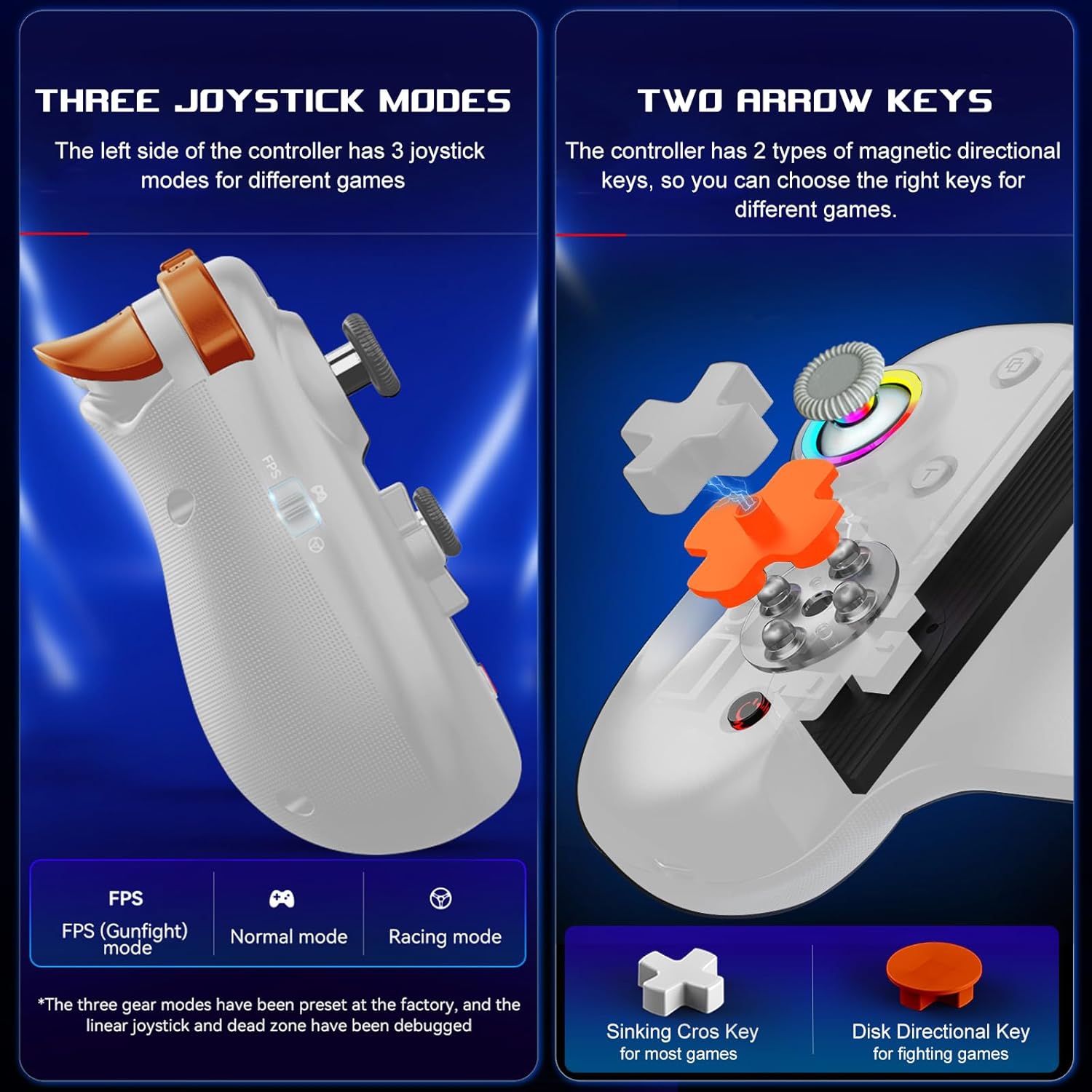
Image: Illustration of the three distinct joystick modes and the interchangeable magnetic arrow keys for varied gameplay.
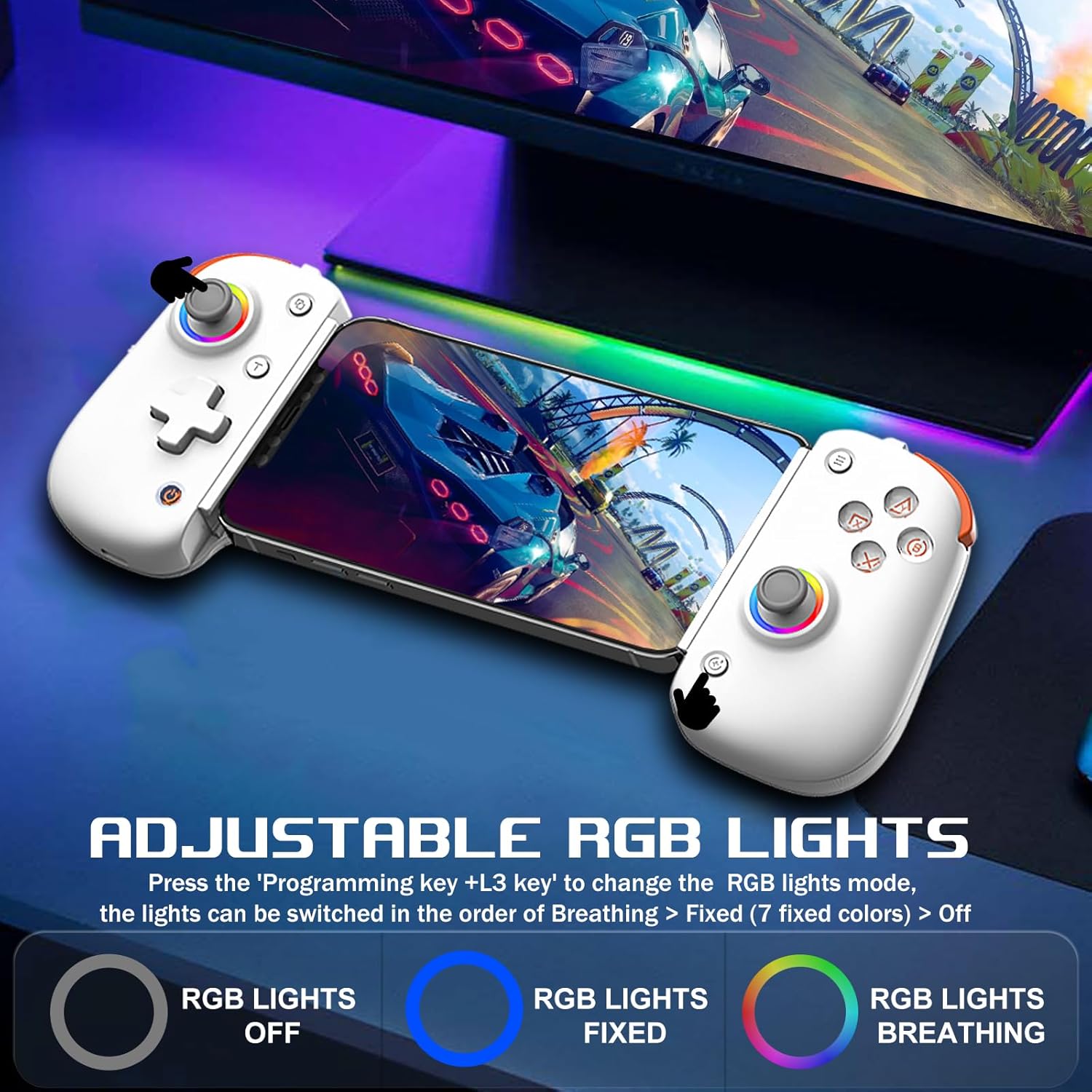
Image: Demonstrates the adjustable RGB lighting features of the controller, including different light modes.
Мутобиқати
The arVin D8 Pro Wireless Gamepad Controller offers broad compatibility:
- Системаҳои оператсионӣ: iOS 13.0+, Android 6.0+, Windows 7/8/10/11.
- Дастгоҳҳо: iPad/iPad mini/Air/Pro/iPhone/Macbook, Android phones/tablets (Galaxy Tab, Lenovo Tab, HUAWEI MatePad, Yoga Tab), PC/Laptop/Desktop, Nintendo Switch/Switch Lite/Switch OLED, PS3/PS4.
- Note on PS5: Compatible with PS5 for playing PS4 games only; does not support PS5 games.
- Истисноҳо: Not compatible with Apple TV, iPod, Fire TV/TV Box.
1. Cloud Gaming Support
The controller is compatible with most cloud gaming services and platforms:
- Xbox Game Pass
- Nvidia GeForce Now
- Амазон Луна
- Google Stadia
- Rainway
- Apple Arcade and MFi games
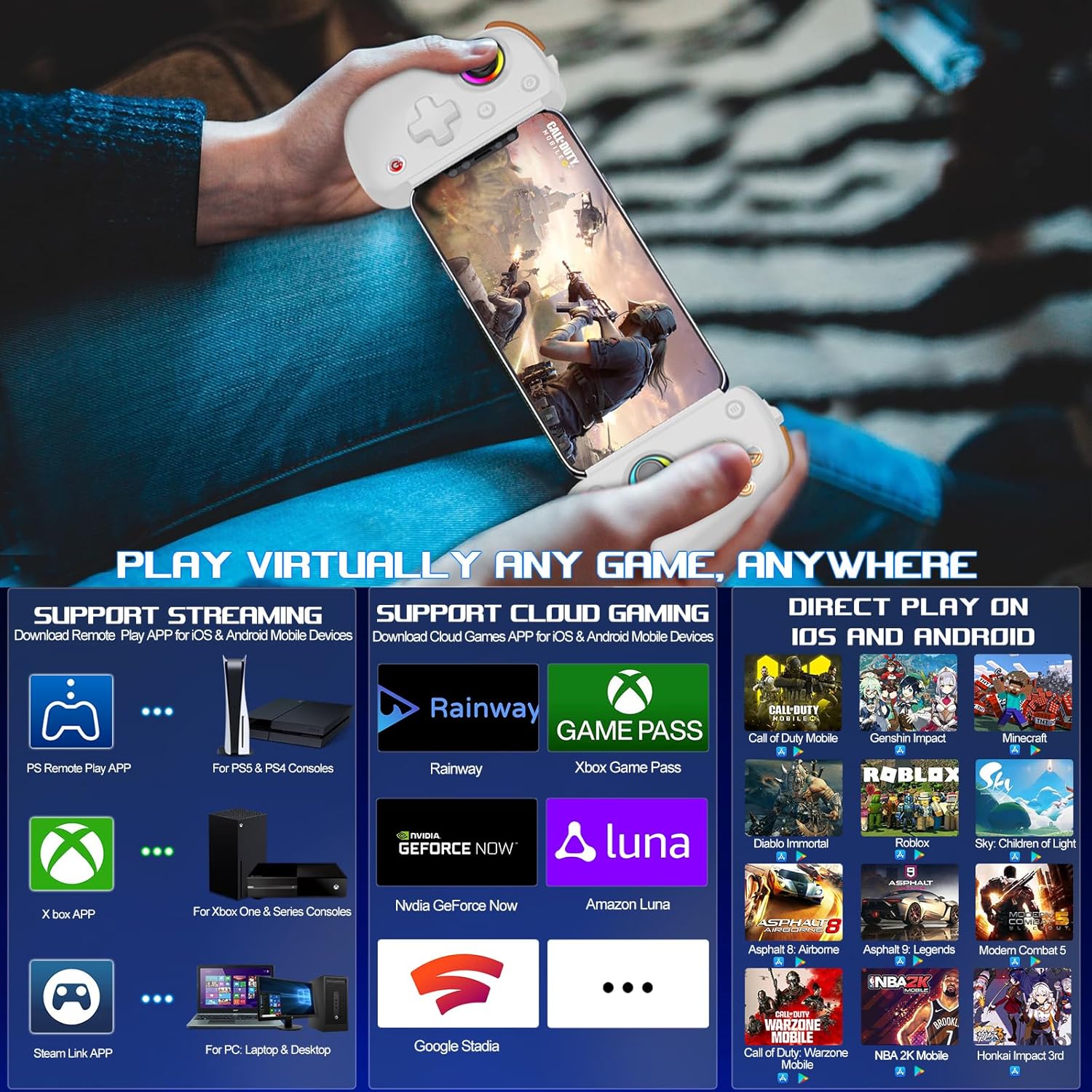
Image: Visual representation of the controller's support for popular cloud gaming platforms and direct play mobile titles.
2. Remote Play Support
Stream console games to your mobile device or tablet:
- PS Remote Play App: For PS5 and PS4 consoles.
- Xbox App: For Xbox One, Xbox Series S, and Xbox Series X consoles.
- Steam Link App: For PC/Laptop/Desktop.
Video: A demonstration of connecting the arVin D8 Pro controller for Xbox Remote Play, showing the setup process and gameplay.
3. Direct Play Games
The controller supports direct play for many popular mobile games, including:
- Call of Duty Mobile (CODM)
- Call of Duty: Warzone Mobile
- Таъсири Геншин
- Sky: Children of Light
- Minecraft
- Диабло намиранда
- Combat Modern 5
- Asphalt 9: Legends
- Asphalt 8: Airborne
- And many more controller-supported titles.
Нигоҳдорӣ
To ensure the longevity and optimal performance of your arVin D8 Pro controller, follow these maintenance guidelines:
- Тозакунӣ: Use a soft, dry cloth to wipe the controller. Avoid using harsh chemicals, solvents, or abrasive cleaners.
- Нигоҳдорӣ: Контроллерро дар ҷои хунук ва хушк аз нури бевоситаи офтоб ва ҳарорати аз ҳад зиёд дур нигоҳ доред.
- Нигоҳубини батарея: Do not expose the battery to high temperatures or attempt to disassemble it. Charge the controller regularly, even if not in use, to maintain battery health.
- Муносибат: Аз афтидани контроллер ё дучор шудан ба зарбаҳои сахт худдорӣ кунед.
Мушкилкушо
If you encounter issues with your arVin D8 Pro controller, please refer to the following common solutions:
- Контроллер фаъол нест: Ensure the controller is fully charged. Connect it to a power source and try again.
- Бо Bluetooth пайваст шудан ғайриимкон аст:
- Ensure the controller is in the correct pairing mode for your device (e.g., 'RB' + 'HOME' for iOS/PC, 'X' + 'HOME' for Android Mode 2).
- Боварӣ ҳосил кунед, ки Bluetooth дар дастгоҳи шумо фаъол аст.
- Дастгоҳро аз танзимоти Bluetooth-и дастгоҳи худ фаромӯш кунед ва кӯшиш кунед, ки дубора ҷуфт кунед.
- Ҳам контроллер ва ҳам дастгоҳи худро аз нав фаъол созед.
- Тугмаҳо/Ҷойстикҳо ҷавоб намедиҳанд:
- Боварӣ ҳосил кунед, ки контроллер дуруст пайваст шудааст.
- Try calibrating the joysticks (refer to the full manual for specific calibration steps if needed).
- Test the controller with a different game or application to determine if the issue is game-specific.
- Қафомонӣ ё ҷудошавӣ:
- Ensure your device is within range of the controller.
- Дахолати дигар дастгоҳҳои бесимро кам кунед.
- For streaming, ensure a stable and strong Wi-Fi connection for both your device and the host PC/console.
- Vibration/Gyro Not Working on iOS/Android: These functions are not supported on iOS and Android devices due to system limitations.
Мушаххасоти
| Хусусият | Тафсилот |
|---|---|
| Модели | D8 Pro |
| Пайвастшавӣ | Бесимӣ (Bluetooth) |
| OS мувофиқ | iOS 13.0+, Android 6.0+, Windows 7/8/10/11 |
| Дарозии дастгоҳи дастгиришаванда | 128-289мм |
| Supported Device Thickness | То 13мм |
| Иқтидори батарея | 600 мАч |
| Playtime (Full Charge) | То 15 соат |
| Навъи джойстик | Hall Effect Sensing Joystick |
| Навъи триггер | Hall Linear Trigger |
| Тугмаҳои макрос | M1/M2 (Programmable) |
| Turbo Speeds | 8, 15, 25 shoots/s |
| Хусусиятҳои махсус | RGB Light, Dual Vibration (not iOS/Android), 6-Axis Gyroscope (not iOS/Android), ABXY Key-value Interchange, Axis Calibration |
| Вазни ашё | 12.8 унция |
| Андозаҳои бастаҳо | 10.43 x 5.12 x 2.44 инч |
Кафолат ва дастгирӣ
arVin products are designed and manufactured to the highest quality standards. This product is covered by a limited warranty from the date of purchase. Please retain your proof of purchase for warranty claims.
For technical support, troubleshooting assistance, or warranty inquiries, please contact arVin customer service through the retailer's platform or visit the official arVin webсайт барои маълумоти тамос.


