1. Маҳсулот ба охир расидview
The Keyscaper Star Wars Darth Vader Wireless Mouse is designed for comfort and precision, featuring a distinctive Darth Vader color block design. This wireless mouse connects via a USB nano-receiver and is powered by two AAA batteries. It offers laser-optical precision and an auto-sleep function to maximize battery life.

Figure 1: Keyscaper Star Wars Darth Vader Wireless Mouse
Хусусиятҳои асосӣ:
- Officially licensed Star Wars product.
- Easy plug & play functionality via included USB nano-receiver.
- Laser-optical precision for accurate and responsive tracking.
- Auto-sleep feature to conserve battery power.
- Durable full-color printed logo.
2. Дастурамал оид ба насб
2.1 Дар қуттӣ чӣ мавҷуд аст
- Keyscaper Star Wars Darth Vader Wireless Mouse
- USB нано-қабулкунанда
- 2 батареяи AAA (қаблан насбшуда ё алоҳида дохил карда шудааст)
2.2 Насби батарея
- Сарпӯши қисмати батареяро дар тарафи поёни муш ҷойгир кунед.
- Барои кушодани қисм сарпӯшро оҳиста лағжонед ё бардоред.
- Ду батареяи AAA-ро ҷойгир кунед, ки қутбияти дурусти (+/-) -ро тавре ки дар дохили қисм нишон дода шудааст, таъмин кунед.
- Сарпӯши қисмати батареяро то он даме, ки он ба таври мӯътадил дар ҷои худ клик кунад, иваз кунед.

Figure 2: Mouse components and battery installation
2.3 Connecting the USB Nano-Receiver
- Locate the USB nano-receiver, typically stored within a slot in the battery compartment for convenience.
- Remove the nano-receiver from its storage slot.
- Plug the USB nano-receiver into an available USB-A port on your computer or laptop.
- Компютери шумо бояд ба таври худкор драйверҳои заруриро муайян ва насб кунад. Ин метавонад чанд дақиқа вақт гирад.

Figure 3: USB nano-receiver storage
2.4 Фурӯзон/хомӯш кардан
- On the underside of the mouse, locate the ON/OFF switch.
- Slide the switch to the "ON" position to activate the mouse.
- To conserve battery life when not in use, slide the switch to the "OFF" position.
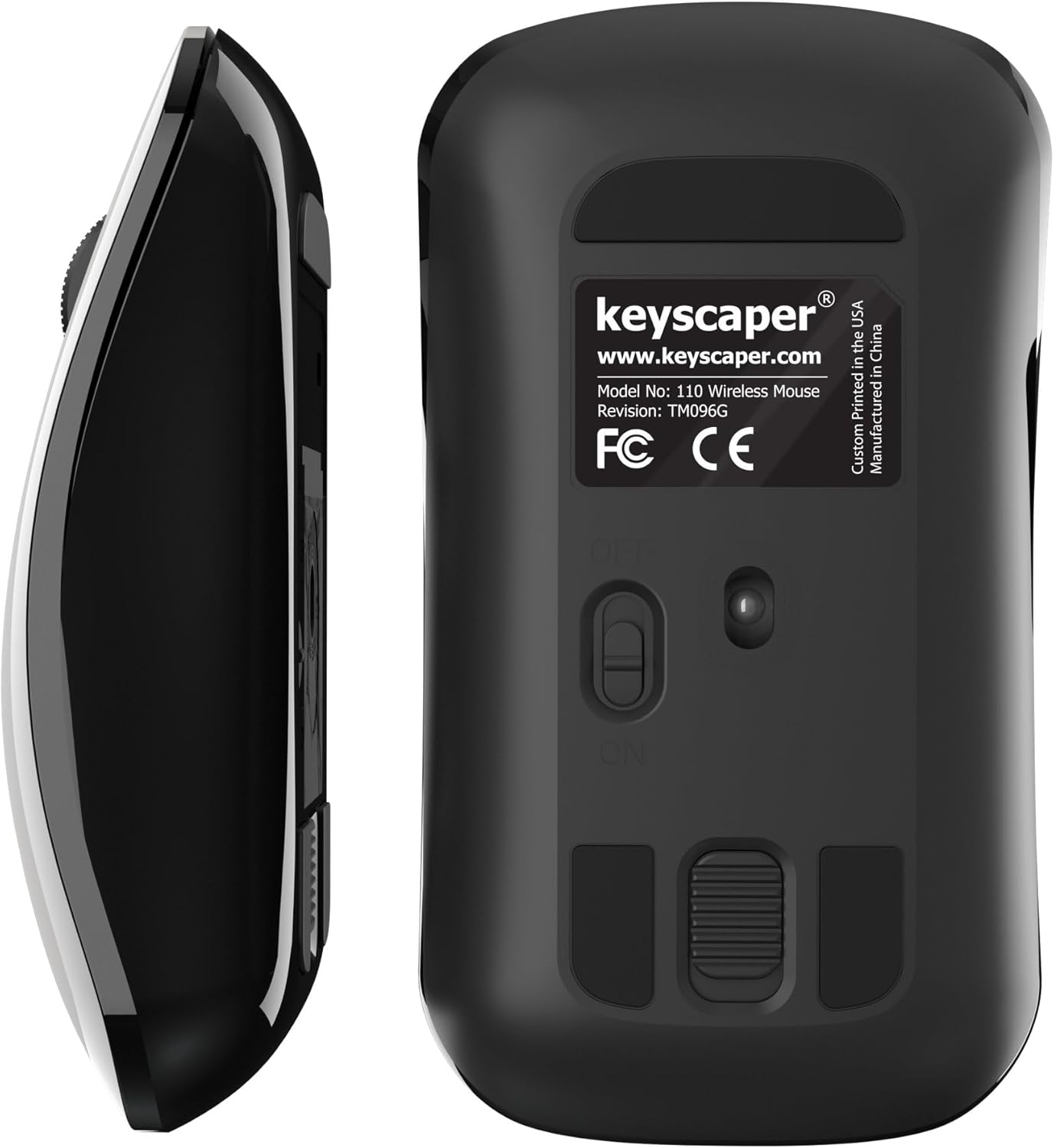
Figure 4: Underside of the mouse
3. Дастурҳои истифодабарӣ
3.1 Истифодаи асосӣ
- Клики чап: Press the left button for primary actions (selecting, opening).
- Клики рост: Press the right button for secondary actions (context menus).
- Чархи ҳаракат: Барои ҳаракат дар ҳуҷҷатҳо ё web саҳифаҳо. Барои функсияи клики миёна (масалан, кушодани пайвандҳо дар ҷадвалбандиҳои нав) чархи гардишро пахш кунед.
3.2 Функсияи хоби худкор
The mouse is equipped with an auto-sleep feature. If inactive for a period, it will enter a low-power sleep mode to save battery. To wake the mouse, simply move it or click any button.
4. Нигоҳдорӣ
4.1 Иваз кардани батарея
When the mouse performance degrades or it stops responding, it's time to replace the AAA batteries. Follow the steps in Section 2.2 for battery installation.
4.2 Тозакунӣ
Барои нигоҳ доштани кори беҳтарин, мунтазам муши худро тоза кунед:
- Ensure the mouse is turned OFF.
- Аз матои мулоим ва бе-лин сабук истифода баред гampened with water or a mild cleaning solution to wipe the exterior.
- Нагузоред, ки намӣ ба ҳама гуна сӯрохиҳо ворид шавад.
- Use a dry cotton swab to gently clean the optical sensor on the underside.
5. Баррасии мушкилот
5.1 Муш ҷавоб намедиҳад
- Боварӣ ҳосил кунед, ки муш фаъол аст.
- Батареяҳоро тафтиш кунед. Агар онҳо паст ё тамом шаванд, онҳоро иваз кунед.
- Verify that the USB nano-receiver is securely plugged into a working USB-A port on your computer. Try a different USB port if necessary.
- Move the mouse closer to the USB nano-receiver to rule out range issues.
- Компютери худро бозоғоз намоед.
5.2 Ҳаракати номунтазами курсор
- Clean the optical sensor on the underside of the mouse (refer to Section 4.2).
- Ensure you are using the mouse on a suitable surface. Highly reflective or uneven surfaces may cause issues. A mouse pad is recommended for best performance.
6. Мушаххасоти
- Рақами модел: 110лв
- Андозаҳои маҳсулот: 2 x 1 x 0.1 инч
- Вазни ашё: 4 унция
- Технологияи пайвастшавӣ: Radio Frequency (via USB nano-receiver)
- Технологияи муайянкунии ҳаракат: Оптикӣ
- Батареяҳо: 2 батареяи AAA (дохил)
- Ранги: Darth Vader (Color Block)
- Истеҳсолкунанда: Dongguan Togran Electronic Technology Co, Ltd.
7. Кафолат ва дастгирӣ
For warranty information or technical support, please refer to the official Keyscaper webсайт ё бо хидмати мизоҷони худ тамос гиред. Квитансияи хариди худро барои даъвоҳои кафолат нигоҳ доред.
This product is designed and printed by Keyscaper in Tualatin, Oregon, USA, and manufactured by Dongguan Togran Electronic Technology Co, Ltd.
