1. Маҳсулот ба охир расидview
This manual provides essential information for the operation and maintenance of your GHUST MR23GA Replacement Magic Voice Remote Control. This remote is designed as a replacement for various LG Smart TV models, offering convenient control without complex setup.

Image 1.1: The GHUST MR23GA Replacement Magic Voice Remote Control.
Хусусиятҳои асосӣ:
- Ивазкунии мустақим: Functions as a direct replacement for original LG Magic Remote models.
- Барномасозӣ лозим нест: Ready to use out of the box after battery insertion.
- Сохтмони устувор: Made of high-quality ABS material for enhanced durability.
- Тарҳрезии компакт: Small and ergonomic for comfortable grip.
- Voice Search Capability: Supports voice commands for easier navigation (functionality may vary based on TV model and original remote features).
- Dedicated Shortcut Buttons: Дастрасии зуд ба хидматҳои маъмули ҷараёнӣ ба монанди Netflix ва Prime Video.
2. Танзим ва насб
The MR23GA remote control is designed for immediate use with compatible LG Smart TVs. No complex programming or pairing procedures are required.
2.1. Насби батарея
- Сарпӯши қисмати батареяро дар қафои идоракунии дурдаст ҷойгир кунед.
- Сарпӯшро ба поён лағжонед ё қулфро пахш кунед, то қисмро кушоед.
- Insert two (2) AAA batteries (not included) into the compartment, ensuring the positive (+) and negative (-) terminals align correctly with the indicators inside.
- Сарпӯши қисмати батареяро бо лағжондан ба ҷои худ то он даме ки садои қаиқро баланд кунад, пӯшед.

Image 2.1: The remote control is designed for ease of use with no setup or programming required after battery installation.
Once batteries are installed, the remote is ready to operate your compatible LG Smart TV.
3. Дастурҳои истифодабарӣ
This section details the basic functions and operation of your MR23GA remote control.
3.1. Вазифаҳои асосӣ
- Тугмаи барқ (●): Барои фаъол ё хомӯш кардани телевизор пахш кунед.
- Тугмаҳои рақамӣ (0-9): Use to directly input channel numbers.
- Баланд/Поёни овоз (+/-): Adjust the TV's volume level.
- Channel Up/Down (▲/▼): Тағир додани каналҳои телевизионӣ.
- Тугмаи хомӯш кардан (🔇): Mute or unmute the TV's audio.
- Панели навигатсионӣ (боло, поён, чап, рост, хуб): Дар байни менюҳо ҳаракат кунед ва имконоти интихоб кунед.
- Back Button (↶): Бозгашт ба экран ё менюи қаблӣ.
- Home Button (🏠): Access the TV's Smart Home dashboard.

Image 3.1: The compact size and ergonomic design make the remote easy to hold and operate.
3.2. Назорати овоз
-ро пахш карда нигоҳ доред Тугмаи микрофон to activate voice control. Speak clearly into the remote to issue commands or search for content. Release the button when finished speaking. Note that voice control functionality may depend on your specific LG TV model and its original features.
3.3. Dedicated Shortcut Buttons
The remote features dedicated buttons for quick access to popular streaming applications:
- Тугмаи Netflix: Directly launch the Netflix application.
- Тугмаи Видео Prime: Directly launch the Amazon Prime Video application.
- Тугмаи Disney+: Directly launch the Disney+ application.
- LG Channels Button: Directly launch the LG Channels application.
- Sling Button: Directly launch the Sling TV application.
- Тугмаи Alexa: Activate Alexa voice assistant (functionality depends on TV model).

Image 3.2: Dedicated shortcut buttons provide quick access to your favorite applications.
3.4. Мутобиқат
This replacement remote control is compatible with a wide range of LG Smart TV models, including but not limited to:
- LG OLED Series: OLED42C3AUA, OLED42C3PUA, OLED48C3PUA, OLED55C3PUA, OLED65C3AUA, OLED77C3PUA, OLED83C3PUA, OLED55G3PUA, OLED65G3PUA, OLED77G3PUA, OLED83G3PUA, OLED55B3PUA, OLED65B3PUA, OLED77B3PUA
- LG QNED Series: 43QNED75URA, 50QNED75URA, 55QNED75URA, 65QNED75URA, 75QNED75URA, 50QNED80URA, 55QNED80URA, 65QNED80URA, 75QNED80URA, 86QNED80URA
- LG UR9000 Series: 43UR9000PUA, 50UR9000PUA, 55UR9000PUA, 65UR9000PUA, 75UR9000PUA
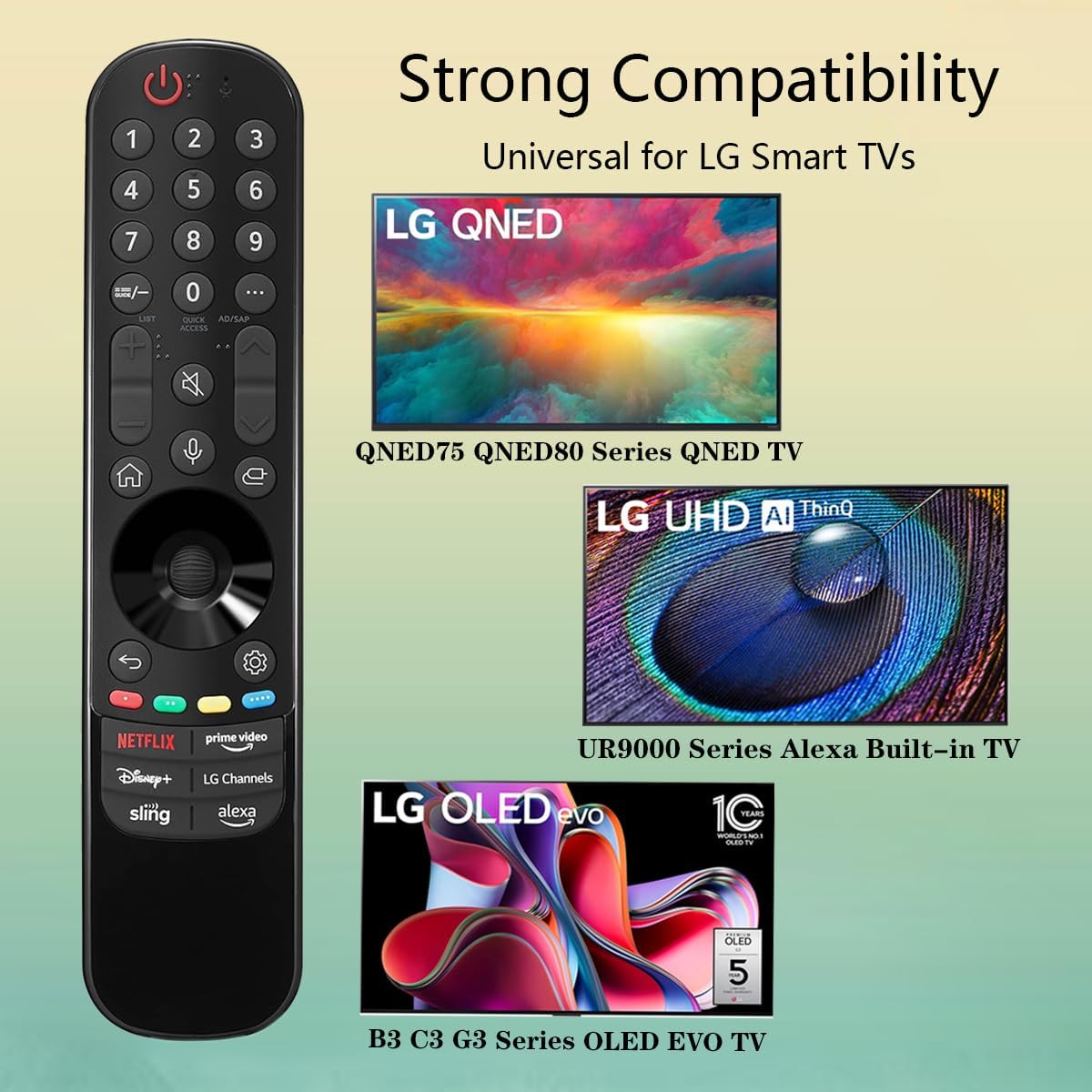
Image 3.3: The remote offers strong compatibility with various LG Smart TV series.
4. Нигоҳдорӣ
Proper care and maintenance will extend the lifespan of your remote control.
4.1. Тозакунӣ
- Use a soft, dry cloth to wipe the surface of the remote control.
- Барои лойҳои якрав, каме гampМатоъро бо об ё тозакунандаи нарм ва ғайриабразивӣ бишӯед. Тозакунандаро мустақиман ба пулти дурдаст пошед.
- Аз истифодаи маводи кимиёвии сахт, ҳалкунандаҳо ё маводҳои тозакунии абразивӣ худдорӣ кунед, зеро онҳо метавонанд ба қисматҳои дохилии пульт зарар расонанд.
4.2. Нигоҳубини батарея
- Replace batteries when the remote's responsiveness decreases or it stops functioning.
- Ҳамеша ҳарду батареяро якбора бо батареяҳои нав аз як навъ (AAA) иваз кунед.
- Агар пульти дурдаст муддати тӯлонӣ (масалан, як моҳ ё бештар) истифода нашавад, батареяҳоро хориҷ кунед, то аз ихроҷ ва эҳтимолан осеб дидани пульти дурдаст пешгирӣ карда шавад.
- Батареяҳои истифодашударо мувофиқи қоидаҳои маҳаллӣ партов кунед.
5. Баррасии мушкилот
Агар шумо бо идоракунии дурдасти худ бо мушкилот рӯ ба рӯ шавед, ба мушкилоти умумӣ ва роҳҳои ҳалли зерин муроҷиат кунед:
| Мушкилот | Сабаби эҳтимолӣ | Ҳалли |
|---|---|---|
| Пули дурдаст ҷавоб намедиҳад. | Батареяҳои мурда ё нодуруст гузошташуда. | Replace batteries with new AAA batteries, ensuring correct polarity (+/-). |
| Пульти дурдаст фосила-вақт кор мекунад. | Low battery power; obstruction between remote and TV; infrared sensor blocked on TV. | Replace batteries. Ensure a clear line of sight to the TV's infrared sensor. Remove any obstructions. |
| Voice control or pointer not working. | This replacement remote may not support all advanced features of the original LG Magic Remote, or your TV model does not fully support these features with a replacement remote. | Verify your TV model's compatibility with replacement remotes for advanced features. Basic functions should still operate. |
| Dedicated app buttons (e.g., Alexa, LG Channels) not working. | Functionality depends on TV model and specific app integration. | Some app buttons may not be universally compatible or require specific TV software versions. Verify if other buttons work. |
Агар пас аз кӯшиши ин ҳалли мушкилот мушкилот боқӣ монад, лутфан бо дастгирии муштариён тамос гиред.
6. Мушаххасоти
- Рақами модел: MR23GA
- Бренд: ГУСТ
- Андозаҳои маҳсулот: 7.3 x 1.6 x 1.2 инч
- Вазни ашё: 2.29 унция
- Манбаи нерӯ: 2 x батареяҳои AAA (дохил карда намешаванд)
- Ранги: Сиёҳ
- Мавод: ABS-и баландсифат
- Дастгоҳҳои мувофиқ: LG Smart Televisions (specific models listed in Section 3.4)
- Хусусияти махсус: Voice Search (functionality may vary)
7. Кафолат ва дастгирӣ
GHUST is committed to providing high-quality products and excellent customer service.
7.1. Хизматрасонии пас аз фурӯш
If you have any questions regarding the quality or functionality of your GHUST MR23GA remote control, please do not hesitate to contact our customer support team. We are dedicated to resolving any issues promptly and ensuring your satisfaction.
For support, please refer to the contact information provided with your purchase or on the official GHUST product page.


