1. Муқаддима
The Lepro WL1 AI Smart RGB Wall Lights offer a dynamic and personalized lighting experience for your home. Featuring LightBeats Music Sync, an AI Lighting Designer, and versatile control options via app and voice, these LED light bars allow you to transform any space with billions of potential lighting effects.
Хусусиятҳои асосӣ:
- Lepro LightGPM 4 - Personalized AI Lighting Designer: Adapts lighting to your preferences and prompts.
- Upgraded Voice Control: Control lights easily with voice commands via the Lepro+ app, Alexa, or Google Assistant.
- Photo-to-Light: Generate lighting designs by taking a photo of your room or uploading an image.
- Ҳамоҳангсозии мусиқии LightBeats: Synchronizes lighting with music rhythms for an immersive experience.
- Миллиардҳо саҳнаҳои аз ҷониби зеҳни сунъӣ тавлидшуда: Offers a vast array of lighting effects for various moods and activities.
- Идоракунии бефосилаи барнома: Manage multiple devices, adjust brightness, colors, and set timers via the "Lepro+" App (Wi-Fi & Bluetooth).
- Customizable Wall Layout: Includes 8 wall light segments and 4 corners for flexible design configurations.
2. Дар қуттӣ чӣ мавҷуд аст
The Lepro WL1 AI Smart RGB Wall Lights package includes the following components:
- 8 x Wall Light Segments
- 4 x Corner Connectors
- 1 х Назоратчи
- 1 x адаптери барқ
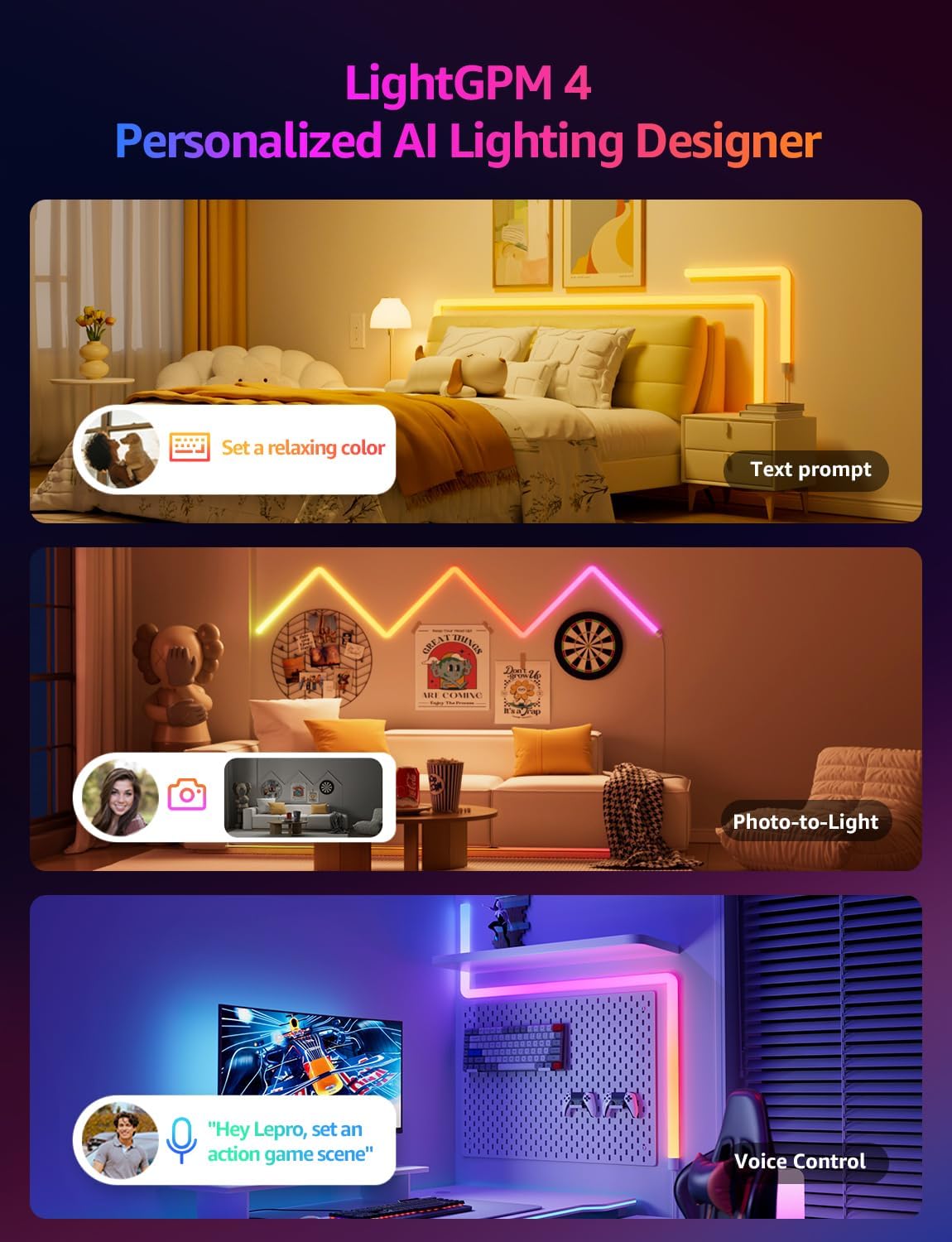
Image: The Lepro WL1 AI Smart RGB Wall Lights in a typical room setup, showcasinг) маҳсулот ва ҷузъҳои он.
3. Танзимот
3.1. Монтаж ва васлкунӣ
Follow these steps to assemble and mount your Lepro WL1 Wall Lights:
- Деворро тоза кунед: Ensure the wall surface is clean and dry for optimal adhesive performance.
- Қисмҳои пайвастшавӣ: Insert the connectors into the light segments, paying attention to the direction. Ensure a secure fit.
- Attach Mounting Plates: Secure the mounting plates to the back of the light segments.
- Тарҳбандии нақша: Before sticking, plan your desired light arrangement on the wall.
- Чароғҳои кӯҳӣ: Peel off the adhesive backing from the mounting plates and firmly press the light segments onto the wall. Begin with the power supply section and gradually install the full light.
- Пайваст кардани барқ: Plug the power adapter into the controller, then into a power outlet.
Video: Detailed instructions on how to install the Lepro Glide Wall Light WL1, covering assembly and mounting steps.

Image: Visual guide showing the five key steps for installing the Lepro WL1 Wall Lights, from cleaning the wall to linking with the app.
3.2. App Connection (Lepro+ App)
To unlock the full smart features of your Lepro WL1 Wall Lights, connect them to the Lepro+ App:
- Барномаро зеркашӣ кунед: Ҷустуҷӯ "Lepro+" on the App Store (iOS) or Google Play (Android) and install it.
- Бақайдгирии ҳисоб: Open the app and sign up for a new Lepro+ account or log in if you already have one.
- Bluetooth ва Wi-Fi-ро фаъол созед: Ensure your phone's Bluetooth is enabled and it is connected to a 2.4GHz Wi-Fi network (5GHz networks are not supported).
- Илова кардани дастгоҳ: In the Lepro+ App, tap the "+" icon or "Add Device" and follow the on-screen instructions to detect and connect your WL1 Wall Lights.
Video: A step-by-step guide on connecting your Lepro WL1 RGBIC Wall Lights to the Lepro+ App.

Image: Screenshot of the Lepro+ App interface, showing options for Bluetooth and Wi-Fi connection and various lighting controls.
3.3. Voice Assistant Integration (Alexa & Google Assistant)
Once connected to the Lepro+ App, you can link your lights with Amazon Alexa or Google Assistant for hands-free control:
- Open Lepro+ App: Navigate to the "Smart Integration" section in the app settings.
- Select Assistant: Amazon Alexa ё Google Assistant-ро интихоб кунед.
- Ҳисоби пайванд: Follow the prompts to link your Lepro+ account with your chosen voice assistant. This typically involves enabling the Lepro skill/action in the Alexa or Google Home app.
- Кашф кардани дастгоҳҳо: Once linked, ask your voice assistant to "discover devices" or manually add them through the assistant's app.
Exampфармонҳои овозӣ:
- "Alexa, turn on the wall lights."
- "Hey Google, change the wall lights to blue."
- "Alexa, dim the wall lights to 50%."

Image: Demonstrates hands-free voice control with Alexa and Google Assistant, alongside in-line box control and smart app control for the Lepro WL1 lights.
4. Дастурҳои истифодабарӣ
4.1. AI Lighting Designer (LightGPM)
The Lepro LightGPM 4 is an AI-powered lighting designer that learns your preferences and creates personalized lighting effects. Interact with it through:
- Text Prompts: Describe your desired mood or activity (e.g., "Set a relaxing color," "Ignite holiday vibes"). The AI will generate suitable lighting.
- Photo-to-Light: Upload a photo of your room, a movie poster, or a game character, and the AI will create a themed lighting design.
- Назорати овоз: Use the integrated voice assistant in the Lepro+ app to adjust brightness, change colors, or activate specific scenes.

Image: Illustrates the LightGPM 4 AI Lighting Designer, showing how text prompts, photo analysis, and voice control can generate personalized lighting scenes.

Image: Shows the simplicity of using AI voice control within the Lepro App to adjust lighting based on emotions, scenes, or direct instructions.
4.2 Ҳамоҳангсозии мусиқии LightBeats
Immerse yourself in dynamic lighting that responds to your music. The LightBeats feature analyzes audio rhythms and transforms your space into an energetic environment.
Video: Demonstrates the LightBeats Music Sync feature of the Lepro WL1 AI Generated Lighting RGBIC Wall Light, showing lights reacting to music.

Image: Shows the LightBeats Music Sync in action, with wall lights changing colors in rhythm with music, enhancing a social gathering.
4.3. Customization and Group Control
The Lepro+ App provides extensive control over your wall lights:
- Мутобиқсозии ранг: Choose from 16 million colors and tunable white light. Adjust brightness from 0-100%.
- Интихоби саҳна: Select from a variety of pre-set scenes or create your own custom scenes for different occasions.
- Функсияҳои таймер: Барои фурӯзон/хомӯш кардани чароғҳо ё иваз кардани режимҳо ба таври худкор ҷадвалҳоро муқаррар кунед.
- Назорати гурӯҳ: Manage multiple Lepro devices simultaneously for a unified lighting experience across different areas.

Image: The Lepro+ App interface displaying options for custom color selection, including a color wheel and brightness adjustment.

Image: An illustration of the group control feature within the Lepro+ App, showing how various Lepro lighting products can be managed together.
5. Мушаххасоти
| Хусусият | Тафсилот |
|---|---|
| Бренд | махав |
| Рақами модел | WL1 |
| Ранги | гуногунранг |
| Шакл | Призмаи росткунҷа |
| Материал | Пластмасса, поликарбонат (PC) |
| Навъи анҷом | Мат сиёҳ |
| Навъи манбаи нур | НН - НУРНИШОН |
| Манбаи нерӯ | Электри симдор |
| Ҷилдиtage | 120 вольт |
| Равшанӣ | 3000 люмен |
| Ватtage | 30 ватт |
| Навъи васлкунӣ | Монтажи девор |
| Хусусиятҳои лампаи | AI Music Sync, RGB, Voice Control, Wi-Fi & Bluetooth, LightBeats Music Sync |
| Шумораи манбаъҳои нур | 8 |
| Андозаҳои маҳсулот | 11.81"L x 1.38"W (per segment) |
| Вазни ашё | 3.25 фунт |
| Мутобиқати Smart Home | Amazon Alexa, Google Assistant |
6. Нигоҳдорӣ
To ensure the longevity and optimal performance of your Lepro WL1 Wall Lights, follow these maintenance guidelines:
- Тозакунӣ: Gently wipe the light segments with a soft, dry cloth. Avoid using abrasive cleaners or solvents that could damage the surface.
- Пеш аз тозакунӣ, барқро хомӯш кунед: Always unplug the power adapter before cleaning the lights.
- Аз таъсири об канорагирӣ кунед: These lights are designed for indoor use. Do not expose them to water or high humidity.
- Пайвастҳоро тафтиш кунед: Periodically check all physical connections between segments and to the power adapter to ensure they are secure.
7. Баррасии мушкилот
If you encounter issues with your Lepro WL1 Wall Lights, refer to the following common solutions:
| Мушкилот | Ҳалли |
|---|---|
| Чароғҳо фурӯзон намешаванд. |
|
| Lights are not connecting to the Lepro+ App. |
|
| Идоракунии овозӣ (Alexa/Google Assistant) кор намекунад. |
|
| Lights are flickering or displaying incorrect colors. |
|
7.1. How to Reset the Device
If you experience persistent issues, you may need to reset your Lepro WL1 Wall Lights:
- Locate the button on the in-line controller.
- Press and hold this button for approximately 5 seconds until the lights flash or change color, indicating a successful reset.
- After resetting, you will need to reconnect the device to the Lepro+ App.

Image: A visual representation of the reset process for the Lepro WL1 Wall Lights, showing the controller button being pressed.
8. Кафолат ва дастгирӣ
Lepro products are designed and manufactured to the highest quality standards. For information regarding warranty coverage, technical support, or customer service, please refer to the official Lepro webсайт ё бевосита бо дастгирии мизоҷони худ тамос гиред.
Дастгирии онлайн: Ташриф www.lepro.com барои Саволҳо, дастурҳо оид ба ҳалли мушкилот ва маълумоти тамос.
Дастгирии почтаи электронӣ: support@lepro.com
Дастгирии телефон: +1 (800) 555-0199


