1. Муқаддима
The ThermoPro TP60-3 is a digital wireless indoor/outdoor thermometer and hygrometer designed to monitor temperature and humidity levels in various environments. This device provides accurate readings for both indoor and outdoor conditions, featuring a long wireless range and the ability to connect with multiple remote sensors. It is suitable for use in homes, baby rooms, nurseries, cellars, basements, warehouses, and greenhouses to ensure optimal environmental control.
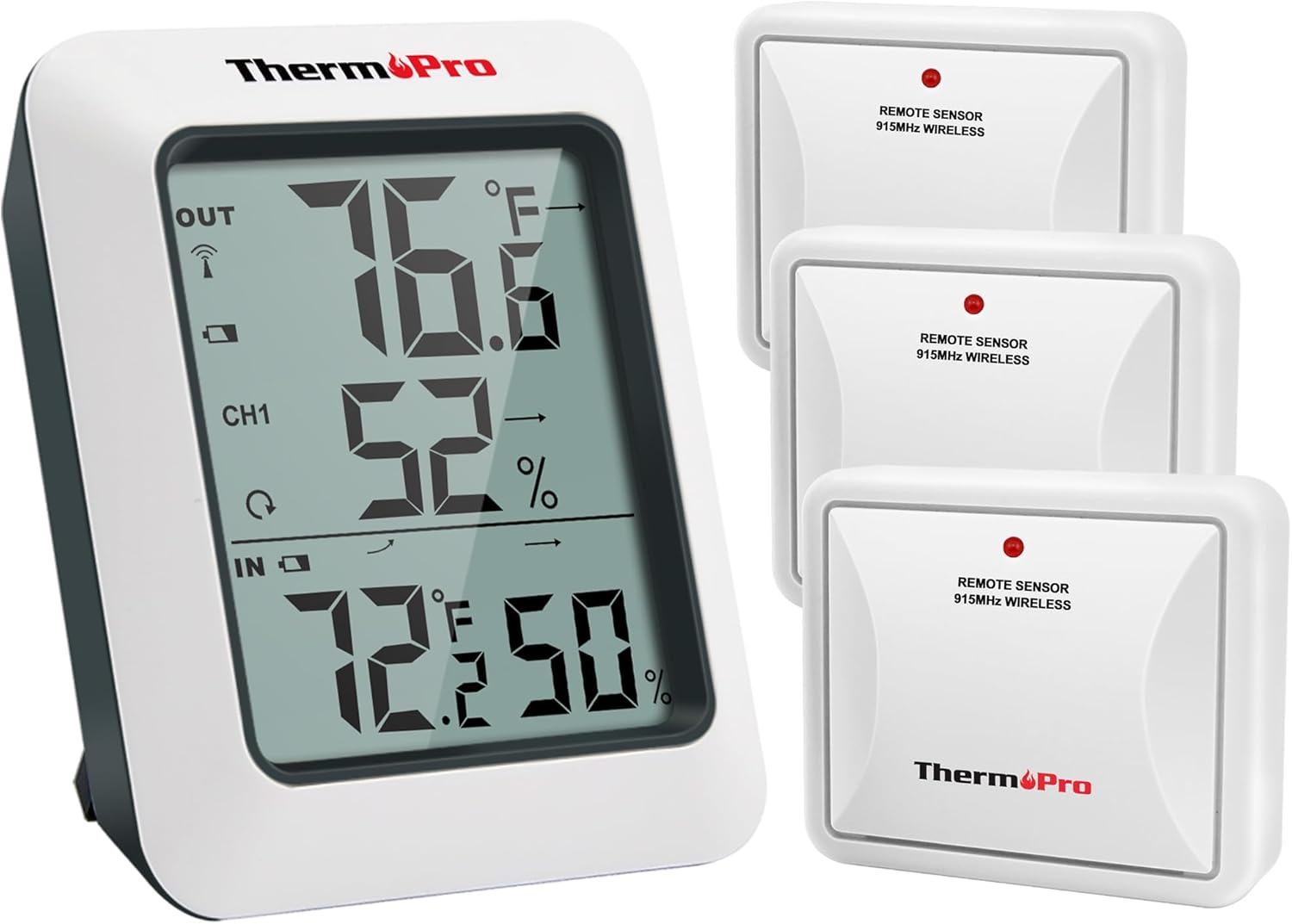
Image: The ThermoPro TP60-3 main display unit and three remote wireless sensors, illustrating the complete product package.
2. Дар қуттӣ чӣ мавҷуд аст
- 1 x Main Receiver Unit
- 3 x Remote Transmitter Sensors
- 8 x батареяҳои AAA
3. Маҳсулот ба охир расидview
3.1 Main Receiver Unit
The main receiver unit features a large, easy-to-read LCD screen that displays indoor and outdoor temperature and humidity percentages. It also shows temperature and humidity trend indicator arrows, and daily high/low information. The unit is designed for tabletop placement with a built-in stand or can be wall-mounted.

Image: Close-up of the main display unit showing outdoor temperature and humidity, channel indicator, and indoor temperature and humidity with trend arrows.
3.2 Remote Transmitter Sensors
The remote sensors transmit temperature and humidity data wirelessly to the main unit. Each sensor is designed for outdoor use and should be placed in a location protected from direct sunlight and rain. The system supports up to three remote sensors, allowing monitoring of different locations simultaneously.

Image: Diagram showing the main unit receiving data from three remote sensors placed in a bedroom, storage room, and garden, highlighting multi-location monitoring.
4. Танзимот
4.1 Насби батарея
- Open the battery compartment on the back of both the main receiver unit and each remote sensor.
- Insert the provided AAA Batteries, ensuring correct polarity (+/-).
- Қисмҳои батареяро бехатар пӯшед.
4.2 Synchronization Process
After installing batteries, the main unit and remote sensors should automatically synchronize. The RF signal icon on the upper left of the main unit's display will flash during synchronization. If connection is lost or batteries are replaced, follow these steps:
- Боварӣ ҳосил кунед, ки батареяҳо дар ҳарду дастгоҳ дуруст насб карда шудаанд.
- Press the TX button on the remote sensor(s) to re-establish connection.
4.3 Дастур оид ба ҷойгиркунӣ
- Воҳиди асосӣ: Place the main unit indoors on a tabletop using its built-in stand or mount it on a wall.
- Датчикҳои дурдаст:
- Place sensors in an open area, avoiding wall obstructions.
- Keep sensors away from routers and other electronic devices to prevent high-frequency signal interference.
- Avoid direct sunlight exposure, as this can lead to inaccurate temperature readings.
- Always place sensors upright to prevent rain from entering through vent holes.
- The wireless range is up to 500ft/150m in open areas.

Image: The main unit shown on a tabletop and a remote sensor mounted on an exterior wall, demonstrating flexible placement options.
5. Дастурҳои истифодабарӣ
5.1 Хусусиятҳои намоиш
- Ҳарорат ва намӣ дар беруни бино: Displayed at the top of the screen.
- Нишондиҳандаи канал: Shows which remote sensor's data is currently displayed (CH1, CH2, CH3).
- Ҳарорат ва намӣ дар дохили бино: Displayed at the bottom of the screen.
- Тирҳои тренд: Indicate whether temperature and humidity are rising, falling, or remaining stable.
- MAX/MIN Records: Shows the highest and lowest temperature and humidity readings recorded over the last 24 hours or all-time since the last reset.
5.2 Unit Selection (°F/°C)
To switch between Fahrenheit (°F) and Celsius (°C), press the °F/°C button located on the back of the main receiver unit.
5.3 Viewing MAX/MIN Records
Press the MAX/MIN button on the back of the main unit to cycle through the 24-hour and all-time high and low records for temperature and humidity. To clear the records, press and hold the CLEAR button.
5.4 Интихоби канал
If using multiple remote sensors, press the CHANNEL button on the back of the main unit to switch between the different sensor channels (CH1, CH2, CH3) and view their respective outdoor readings.
6. Нигоҳдорӣ
- Тозакунӣ: Бо нарм тоза кунед, гamp матоъ. Дар об нагардед.
- Иваз кардани батарея: Вақте ки дар экран нишондиҳандаи камии батарея пайдо мешавад, батареяҳоро иваз кунед. Поярияти дурустро таъмин кунед.
- Нигоҳдорӣ: Агар дастгоҳро муддати тӯлонӣ нигоҳ доред, барои пешгирӣ аз ихроҷи он батареяҳоро хориҷ кунед.
7. Баррасии мушкилот
- Намоиш нест/Батарея кам: Ҷойгиркунии батареяро тафтиш кунед ва агар лозим бошад, иваз кунед.
- No Remote Sensor Reading:
- Ensure remote sensor is within range (500ft/150m).
- Press the TX button on the remote sensor to re-sync.
- Барои дахолати дигар дастгоҳҳои электронӣ тафтиш кунед.
- Replace remote sensor batteries.
- Хонишҳои нодуруст:
- Ensure remote sensor is not in direct sunlight or exposed to rain.
- Verify proper placement away from heat sources or vents.
8. Мушаххасоти
| Бренд | ThermoPro |
| Номи модел | TP60S |
| Диапазони ҳарорати дарунӣ | -4°F то 158°F (-20°C то 70°C) |
| Диапазони ҳарорати беруна | -4°F то 158°F (-20°C то 70°C) |
| Диапазони намӣ | 10% то 99% |
| Диапазони бесим | Up to 500ft/150m (in open area) |
| Технологияи пайвастшавӣ | Radio Frequency (RF) - ASK 433Mhz |
| Манбаи нерӯ | Батарея (AAA) |
| Навъи намоиш | LCD рақамӣ |
| Материал | Пластмасса |
9. Кафолат ва дастгирӣ
For warranty information, technical support, or further assistance, please visit the official ThermoPro website or contact their customer service. Details can typically be found in the product packaging or on the manufacturer's webсайт.
Шумо метавонед боздид кунед Мағозаи ThermoPro барои маҳсулот ва маълумоти бештар.


