1. Муқаддима
This manual provides detailed instructions for the safe and efficient operation of your Xprinter XP-P323B Portable Thermal Printer. Please read this manual thoroughly before using the device to ensure proper functionality and to prevent damage. The XP-P323B is designed for printing receipts and labels, offering portability and high-speed capabilities for various business needs.
2. Маълумот оид ба бехатарӣ
- Принтерро дар зери об ё нами аз ҳад зиёд нагузоред.
- Avoid dropping the printer or subjecting it to strong impacts.
- Танҳо адаптери барқӣ ва лавозимоти мушаххасшударо истифода баред.
- Принтерро аз манбаъҳои гармӣ ва нури бевоситаи офтоб дур нигоҳ доред.
- Do not attempt to disassemble or repair the printer yourself. Contact qualified service personnel.
- Ҳангоми кор вентилятсияи дурустро таъмин кунед.
3. Мундариҷаи баста
Боварӣ ҳосил кунед, ки ҳама ашё дар баста мавҷуд аст:
- Xprinter XP-P323B Portable Thermal Printer
- Power Adapter (not explicitly listed but standard)
- USB Cable (not explicitly listed but standard)
- Sample Thermal Paper Roll (not explicitly listed but standard)
- Дастури корбар (ин ҳуҷҷат)
4. Маҳсулот ба охир расидview
The Xprinter XP-P323B is a compact and efficient thermal printer designed for various printing tasks. It supports NV logo download and picture printing (BMP format), along with concentration adjustment for print quality.
4.1. Printer Components

Расми 1: Пеш view of the Xprinter XP-P323B Portable Thermal Printer, showing the power button, display, and a sample label being printed.
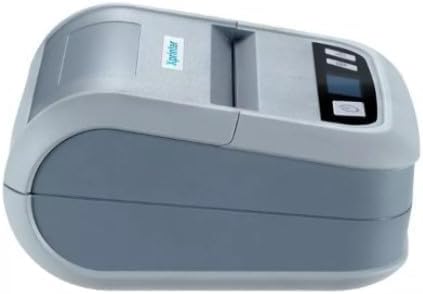
Расми 2: Тараф view of the Xprinter XP-P323B, highlighting its compact design and the Xprinter logo.
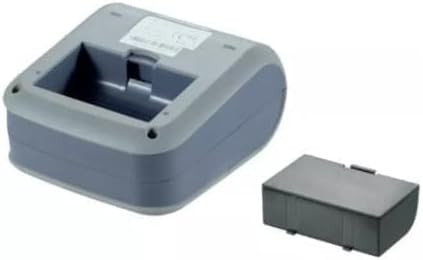
Расми 3: Поёни view of the Xprinter XP-P323B, showing the base and the removable battery compartment.
5. Танзимот
5.1. Пуркунии батарея
- Адаптери барқро ба порти пуркунии принтер пайваст кунед.
- Адаптери барқро ба васлаки деворӣ пайваст кунед.
- The charging indicator light will illuminate. Allow the printer to charge fully before first use.
5.2. Loading Thermal Paper/Labels
- Open the paper compartment cover by gently pushing the release latch.
- Insert the thermal paper roll with the printing surface facing the print head. Ensure the roll is seated correctly.
- Миқдори ками коғазро аз сари чопгар кашед.
- Сарпӯши қисмати коғазро маҳкам пӯшед, то он даме ки он ба ҷои худ лағжад.
5.3. Пайвастшавӣ ба дастгоҳ
The XP-P323B supports USB and Bluetooth connectivity.
5.3.1. Пайвастшавӣ USB
- Бо истифода аз сими USB-и додашуда принтерро ба компютери худ пайваст кунед.
- Install the necessary printer drivers (available from the Xprinter website or included software).
5.3.2. Bluetooth Connection (for Smartphones/iOS)
- Боварӣ ҳосил кунед, ки принтер фаъол аст.
- On your smartphone or iOS device, go to Bluetooth settings and enable Bluetooth.
- Ҷустуҷӯ available devices and select 'XP-P323B' (or similar name).
- Enter the pairing PIN if prompted (refer to printer documentation for default PIN, often '0000' or '1234').
- Once paired, you can use a compatible printing application to send print jobs.
6. Истифода бурдани принтер
6.1. Чопи асосӣ
- Ensure the printer is connected to your device and has paper loaded.
- Open the document or image you wish to print on your connected device.
- Select the print option within your application.
- Choose 'XP-P323B' as the printer.
- Adjust print settings as needed (e.g., paper size, print quality).
- Кори чопро оғоз кунед.
6.2. NV Logo and Picture Printing
The printer supports downloading and printing NV (Non-Volatile) logos and BMP format pictures. This functionality typically requires specific software or commands. Refer to the advanced programming guide or software documentation for detailed instructions on how to upload and print custom logos or images.
6.3. Adjusting Print Concentration
Print concentration can be adjusted to optimize print quality. This setting is usually accessible through the printer driver software on a computer or within the settings of a compatible mobile printing application. Consult your software's help section for specific steps.
7. Нигоҳдорӣ
7.1. Тоза кардани принтер
- берунӣ: берунии принтерро бо нарм пок кунед, гamp матоъ. Моддаҳои кимиёвии сахт ё тозакунандаи абразивиро истифода набаред.
- Сарвари чоп: The thermal print head should be cleaned periodically to ensure optimal print quality. Use a cotton swab lightly dampened with isopropyl alcohol. Gently wipe the print head surface. Allow it to dry completely before closing the cover and resuming operation.
- Роҳи коғазӣ: Бо истифода аз хасу нарм ё ҳавои фишурда ҳама гуна хок ё хошоки коғазро аз роҳи коғаз тоза кунед.
7.2. Нигоҳдорӣ
When not in use for extended periods, store the printer in a cool, dry place, away from direct sunlight and extreme temperatures. Remove the paper roll if storing for a very long time to prevent dust accumulation.
8. Баррасии мушкилот
| Мушкилот | Сабаби эҳтимолӣ | Ҳалли |
|---|---|---|
| Принтер фаъол нест | Low battery; Power adapter not connected; Faulty power adapter | Charge the battery; Ensure power adapter is securely connected; Try a different power outlet or adapter |
| Натиҷаи чоп нест | No paper; Paper loaded incorrectly; Printer not connected; Driver issue | Load paper correctly; Re-establish connection; Reinstall printer drivers |
| Сифати чопи паст | Dirty print head; Low print concentration; Low battery | Clean the print head; Adjust print concentration in software; Charge the battery |
| Пайвасти Bluetooth ноком шуд | Bluetooth off on device; Incorrect pairing PIN; Printer out of range | Enable Bluetooth; Re-enter correct PIN; Move device closer to printer |
9. Мушаххасоти
| Бренд | Xprinter |
| Рақами модел | XP-P323B |
| Андозаҳои ашё (D x W x H) | 15D x 7W x 10H сантиметр |
| Технологияи пайвастшавӣ | USB |
| Технологияи чопгар | Гармӣ |
| Хусусиятҳои махсус | Портатив |
| Ранги | Грей |
| Дастгоҳҳои мувофиқ | Смартфонҳо |
| Навъи назораткунанда | iOS |
| Андозаи максималии медиа | 4 x 6 дюйм |
| Матбуоти чопӣ | Тамғакоғазҳо |
| Андозаи коғаз | 4 x 6 дюйм |
| Натиҷаи чопгар | Монохромӣ |
| Maximum Print Speed (Black and White) | 40 mm/s (estimated from context) |
| Вазни ашё | 300 грамм |
10. Кафолат ва дастгирӣ
For warranty information and technical support, please refer to the warranty card included with your product or visit the official Xprinter webсайт. Квитансияи хариди худро ҳамчун далели харид барои даъвоҳои кафолат нигоҳ доред.


