1. Муқаддима
The Mastfuyi FY12DMM is a versatile 2-in-1 device combining a high-resolution thermal imager with a comprehensive digital multimeter. This instrument is designed for professionals and enthusiasts requiring precise measurements and visual thermal analysis in various fields, including electrical, mechanical, construction, and automotive diagnostics. This manual provides essential information for safe and effective operation.
2. Маълумот оид ба бехатарӣ
Always adhere to the following safety precautions to prevent personal injury or damage to the device.
- Пеш аз истифода ҳама дастурҳоро хонед ва бифаҳмед.
- Дастгоҳро истифода набаред, агар он осеб дида бошад ё дуруст кор намекунад.
- Ensure proper test lead connection before taking any measurements.
- Барои ягон функсия аз ҳадди аксар рейтингҳои вурудӣ зиёд набошед.
- Ҳангоми кор бо схемаҳои барқии ҷараёни барқӣ эҳтиёткор бошед.
- Дастгоҳро хушк ва тоза нигоҳ доред.
- Only use accessories and replacement parts specified by the manufacturer.
3. Мундариҷаи баста
Боварӣ ҳосил кунед, ки ҳама ашё дар баста мавҷуд аст:
- 1 x Mastfuyi FY12DMM Thermal Imager Multimeter
- 1 x кабели пуркунандаи барқ (USB Type-C)
- 1 x Қуттии интиқол
- 1 x Дастури корбар (ин ҳуҷҷат)
- Рақамҳои санҷишӣ (сурх ва сиёҳ)
Шарҳ: The flexible AC current clamp is not included in the standard package.

4. Дастгоҳ тамом шудview
The Mastfuyi FY12DMM integrates thermal imaging and digital multimeter functionalities into a single, portable unit. Its design focuses on ease of use and comprehensive diagnostic capabilities.

Ба ҷузъҳои асосӣ инҳо дохил мешаванд:
- 3.98-inch TFT LCD Touch Screen: A full-view display for clear visualization of thermal images, multimeter readings, and intuitive menu navigation.
- Thermal Imager Lens: The optical component responsible for capturing infrared radiation.
- Multimeter Input Jacks: Standard ports for connecting test leads for electrical measurements.
- Тугмаи барқ: Controls the device's power state.
- Navigation Wheel/Buttons: Provides alternative control for menu selection and parameter adjustments.
- Порти USB Type-C: Used for charging the internal battery and transferring data to a computer.

5. Танзимот
5.1 Пуркунии ибтидоӣ
Пеш аз истифодаи аввал, дастгоҳро пурра пур кунед.
- Connect the supplied USB Type-C charging cable to the device's charging port.
- Нӯги дигари кабелро ба адаптери стандартии барқии USB (дохил карда нашудааст) ё порти USB-и компютер пайваст кунед.
- The charging indicator will illuminate. Allow the device to charge until the indicator shows a full charge.

5.2 Фаъол кардан/хомӯш кардан
- To power on: Press and hold the power button until the screen illuminates.
- Хомӯш кардан: Тугмаи барқро пахш карда нигоҳ доред, то он даме ки дархости хомӯшкунӣ пайдо шавад, ва сипас тасдиқ кунед.
6. Operating the Thermal Imager
6.1 Basic Thermal Imaging
Upon powering on, the device typically defaults to thermal imaging mode, displaying a real-time thermal image with temperature readings.
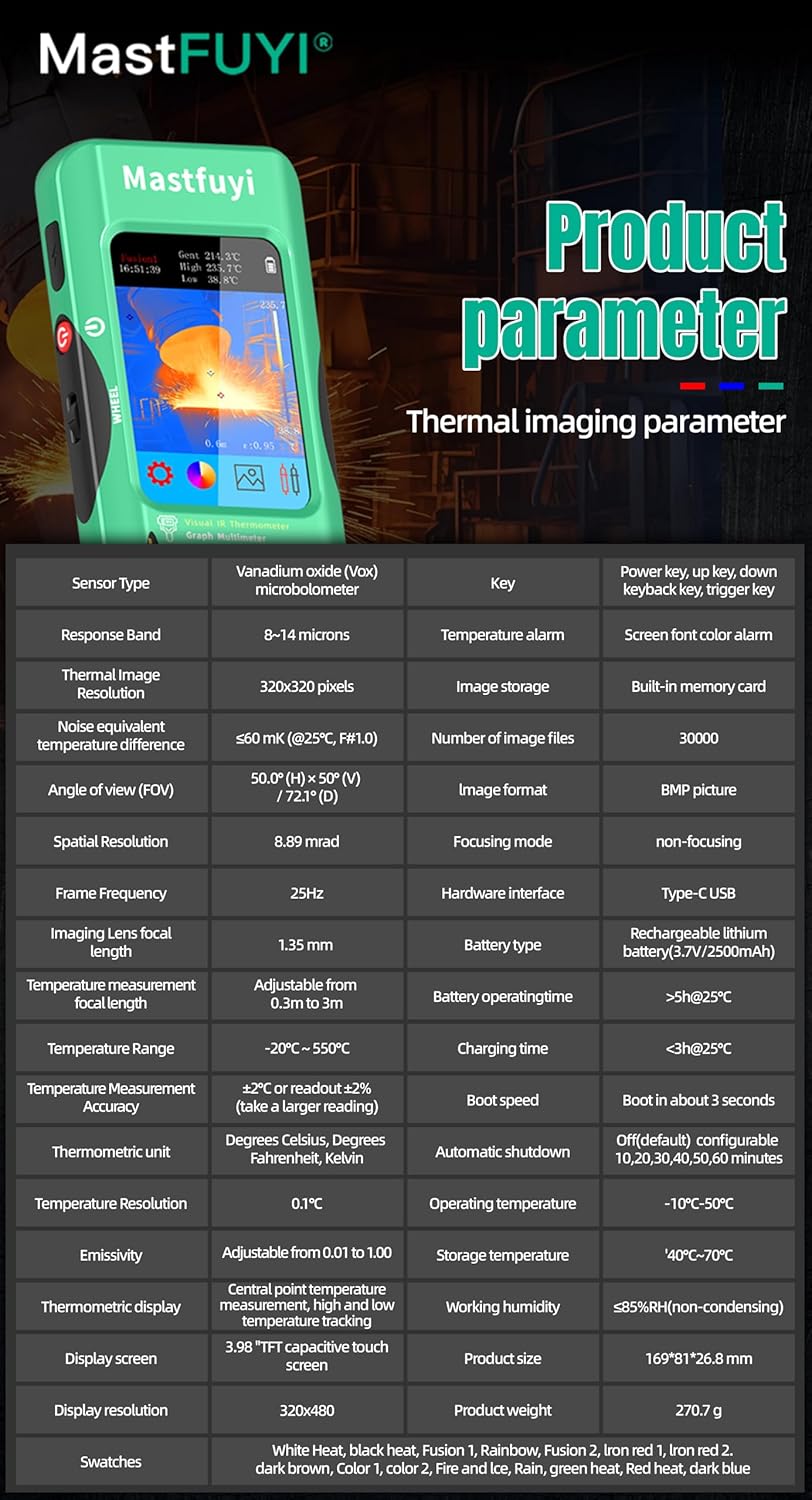
- Диапазони ҳарорат: Measures temperatures from -20℃ to 550℃ (-4℉ to 1022℉).
- Қарори IR: Features a 320 x 320 pixel infrared resolution for clear and detailed thermal images.
- Меъёри навсозӣ: Operates at 25Hz, providing a smooth, real-time thermal video feed.
- Ҳассосияти гармӣ (NETD): With a sensitivity of less than 60mk, the device can detect subtle temperature differences.
The device can perform microscopic detection at a component level, though a macro lens is not included as a standard accessory. If detailed close-up thermal imaging is required, a corresponding macro lens package would need to be acquired separately.

6.2 Thermal Palettes
The device offers 15 distinct thermal palettes to enhance the visualization of temperature differences. Selecting the appropriate palette can significantly improve the clarity of thermal patterns for specific applications.
- Access palette options via the touchscreen menu or navigation controls.
- Experiment with palettes like Iron Red, Rainbow, White Hot, and Black Hot to find the most suitable display for your inspection.
6.3 Танзими эмиссия
Accurate temperature measurements depend on correct emissivity settings. The emissivity value (adjustable from 0.01 to 1.0) should match the material surface being measured.
- Locate the emissivity setting in the thermal imaging menu.
- Consult standard emissivity tables for common materials or adjust the value to achieve the most accurate readings for your specific target.
6.4 Ҳушдор оид ба ҳарорати баланд ва паст
The intelligent alarm function allows you to set custom temperature thresholds. The device will trigger immediate audible and visual alerts if temperatures exceed or fall below these predefined safety ranges.
- Access the alarm settings through the thermal imaging interface.
- Configure the upper and lower temperature limits to suit your monitoring requirements.
7. Кори мултиметр
The FY12DMM includes a 20,000-count digital multimeter for precise electrical measurements.
7.1 Пайваст кардани рахҳои санҷишӣ
- Insert the red test lead into the "VΩmA" input jack.
- Сими санҷишии сиёҳро ба васлаки вурудии "COM" (умумӣ) ворид кунед.
- For AC current measurements with an optional clamp, refer to the clamp's instructions.
7.2 Функсияҳои андозагирӣ
Use the touchscreen or navigation to select the desired measurement function. The device supports auto-ranging for most functions.
- Ҷилди DCtage: То 1000 В.
- Ҷилди ACtage: То 750 В.
- Муқовимат: Up to 200MΩ.
- Иқтидори: Up to 99.999mF.
- Санҷиши диод: Checks diode functionality.
- Санҷиши давомнокӣ: Audible indication for continuity.
- Flexible AC Current: Up to 2000A (requires optional clamp).
- Ҳарорат: -20℃ to 1300℃ (-4℉ to 2372℉) using a K-type thermocouple (not included).
Хусусиятҳои дастгоҳ а Нигоҳ доред function to freeze the current reading and Диапазон measurement modes for manual range selection if desired.
8. Идоракунии маълумот
8.1 Нигоҳдории тасвир
The FY12DMM has a built-in memory card capable of storing up to 30,000 images in BMP format.
- To save a thermal image, press the designated capture button on the screen.
- Images are automatically saved to the internal memory.

8.2 Exporting Data
Stored images and recorded waveform data can be exported to a computer for further analysis.
- Connect the device to a computer using the USB Type-C cable.
- The device should appear as a removable storage device.
- Copy the desired BMP image files or data logs to your computer.
9. Нигоҳдорӣ
9.1 Тозакунӣ
- берунии дастгоҳро бо нарм пок кунед, гamp матоъ. Тозакунанда ё ҳалкунандаҳои абразивиро истифода набаред.
- Gently clean the thermal imager lens with a lens cleaning cloth.
- Пеш аз тоза кардан, боварӣ ҳосил кунед, ки дастгоҳ хомӯш карда шудааст ва аз ҳама гуна манбаи барқ қатъ карда шудааст.
9.2 Нигоҳубини батарея
- Барои нигоҳ доштани саломатии батарея, ҳатто агар дастгоҳ зуд-зуд истифода нашавад ҳам, батареяро мунтазам пур кунед.
- Avoid storing the device in extreme temperatures.
10. Баррасии мушкилот
| Мушкилот | Сабаби эҳтимолӣ | Ҳалли |
|---|---|---|
| Дастгоҳ фаъол нест. | Батареяи кам ё тамомшуда. | Charge the device fully using the supplied USB Type-C cable. |
| Хониши нодурусти ҳарорат. | Incorrect emissivity setting; dirty lens. | Adjust emissivity for the target material; clean the thermal imager lens. |
| Multimeter readings are unstable or incorrect. | Poor test lead connection; incorrect function selected. | Ensure test leads are securely connected; verify the correct measurement function is selected. |
| Cannot transfer data to computer. | Faulty USB cable; incorrect connection mode. | Try a different USB Type-C cable; ensure the device is properly connected and recognized by the computer. |
11. Мушаххасоти
11.1 Infrared Camera Specifications
| Хусусият | Мушаххасоти |
|---|---|
| Андозаи намоиш | 3.98 дюймаи TFT LCD |
| Қарори IR | 320 x 320 пиксел |
| Ҳалли экран | 320 x 480 пиксел |
| Кунҷи View (FOV) | 50.0°(H) x 50.0°(V) / 72.1°(D) |
| Ҳалли фазоӣ (IFOV) | 8.89мрад |
| Диапазони ҳарорат | -20℃ то 550℃ (-4℉ то 1022℉) |
| Ҳассосияти гармӣ/NETD | Less than 60mk |
| Меъёри навсозӣ | 25 Гц |
| Танзимоти масофа | 0.3 - 3 метр |
| Эмиссионӣ | 0.01 - 1.0 (adjustable) |
| Thermal Palettes | 15 |
| Number of Storage Images | 19,000 (internal memory) |
11.2 Хусусиятҳои мултиметри рақамӣ
| Хусусият | Диапазон | Резолюция | Дақиқӣ |
|---|---|---|---|
| Намоиши MAX | 20000 ҳисоб | ||
| Ҷилди DCtage | 20mV/200mV/2V/20V/200V/1000V | 0.001мВ то 0.1В | ±(0.05%+3) to ±(0.5%+3) |
| Ҷилди ACtage | 20mV/200mV/2V/20V/200V/750V | 0.001мВ то 0.1В | ±(0.1%+3) to ±(0.5%+3) |
| Flexible AC Current | 200А/2000А | 0.1А/1А | ±(1.0%+5) |
| Муқовимат | 200Ом то 200МОм | 0.01Ом то 0.01МОм | ±(0.2%+3) to ±(5%+5) |
| Иқтидори иқтидор | 999.99нФ то 99.999мФ | 0.01нФ то 0.001мФ | ±(2%+5) to ±(5%+20) |
| Ҳарорат | -20℃~1300℃/-4℉-2372℉ | 1 "/ 1" | ±(2%+5) |
| Диод | Бале | ||
| Давомнокӣ | Бале | ||

11.3 Мушаххасоти умумӣ
- Қувва: 2500mAh rechargeable battery (built-in)
- андоза: 169 x 81 x 26.8 мм
- Вазн: 270г
- Operating System Languages: English, Spanish, German, French, Italian, Japanese, Chinese (selectable)

12. Кафолат ва дастгирӣ
For warranty information and technical support, please refer to the warranty card included with your product or visit the official Mastfuyi webсайт.
Visit the Mastfuyi Store on Amazon барои бештар маҳсулот ва захираҳои дастгирӣ.


