Муқаддима
The Backbone One transforms your iPhone 15 Series or Android device into a powerful mobile gaming console. This accessory is designed to provide a seamless and enhanced gaming experience, supporting a wide range of games and streaming services that are compatible with controllers.
Хусусиятҳои асосӣ инҳоянд:
- Seamless Gaming: Easily connect your smartphone to transform it into a gaming console.
- Назорати такмилёфта: Features a reshaped D-pad and magnetic phone adapters for superior responsiveness and feel across various game genres.
- Organized Gaming Experience: The dedicated Backbone app integrates your content library and game streaming services for convenient access.
- Сабук ва сайёр: Designed for on-the-go gaming, weighing approximately 296 grams.
- Мутобиқати универсалӣ: Supports both iPhone 15 Series and Android devices with USB-C connectivity.
Оғози кор: Танзимот
Follow these steps to set up your Backbone One USB-C Mobile Gaming Accessory:
- Дастгоҳро кушоед: Carefully remove the Backbone One controller from its packaging. Ensure all components, including the magnetic adapters, are present.
- Attach Your Smartphone: Gently extend the Backbone One controller to fit your iPhone 15 Series or compatible Android device. The USB-C connector on the controller should align with your phone's USB-C port. Snap your phone into place. The magnetic adapters help secure the phone for an optimal fit.
- Download the Backbone App: For the best experience, download the official Backbone app from the Apple App Store or Google Play Store. The app organizes your games and streaming services.
- Пайвастагии ибтидоӣ: Once your phone is connected, the Backbone One should be automatically recognized. The app will guide you through any necessary firmware updates or initial setup procedures.
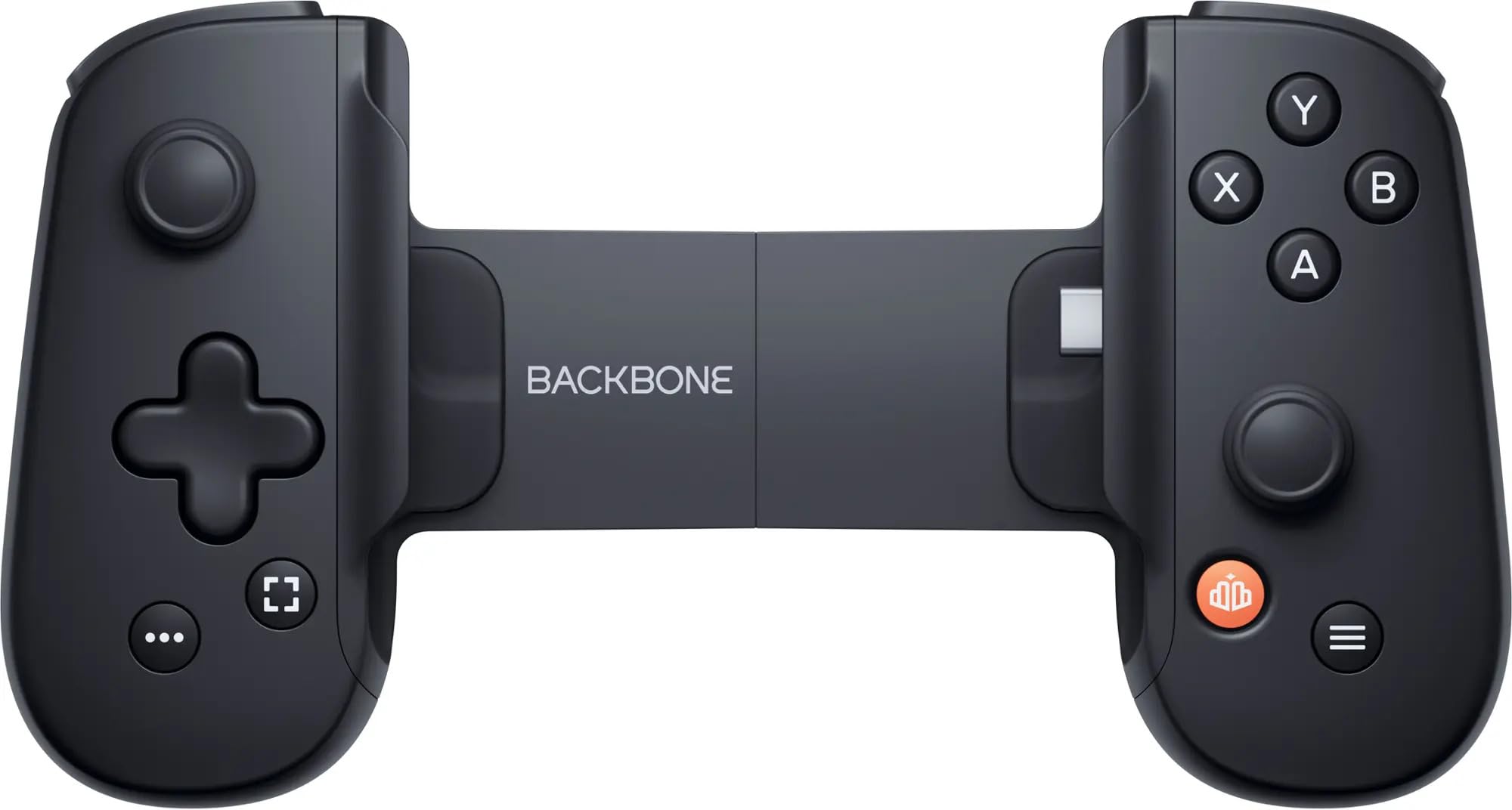
Image: A user engaged in mobile gaming with the Backbone One controller. The smartphone is securely attached to the controller, demonstrating its ergonomic design for comfortable play.
Дастурҳои амалиётӣ
Once your Backbone One is set up, you can begin playing games:
- Оғози бозиҳо: Open the Backbone app to browse and launch games from your library or supported streaming services. You can also launch controller-compatible games directly from your phone's home screen.
- Платформаҳои дастгирӣшаванда: The Backbone One is compatible with any game or service that supports controllers, including:
- Apple Arcade
- Google Play Store games with controller support
- Xbox Game Pass Ultimate
- Cloud streaming services (e.g., Xbox Cloud Gaming, GeForce NOW)
- Remote Play from your Xbox, PlayStation, or PC
- Тарҳбандии контроллер: Familiarize yourself with the standard controller button layout. The reshaped D-pad offers improved tactile feedback for precise movements.
- Пур кардан: The Backbone One draws minimal power from your phone. It also features a pass-through charging port, allowing you to charge your phone while playing.
- Гӯшаки гӯшмонак: Utilize the integrated 3.5mm headphone jack for an immersive audio experience without disturbing others.
Нигоҳубин ва нигоҳдорӣ
To ensure the longevity and optimal performance of your Backbone One, follow these care guidelines:
- Тозакунӣ: Use a soft, dry, lint-free cloth to clean the surface of the controller. Avoid abrasive cleaners, solvents, or aerosol sprays.
- Нигоҳдорӣ: When not in use, store the Backbone One in a cool, dry place, away from direct sunlight and extreme temperatures. Consider using a protective case for travel.
- Муносибат: Avoid dropping the device or subjecting it to strong impacts. Do not attempt to disassemble the controller, as this may void your warranty.
- Рутубат: Keep the controller away from water and other liquids. If it comes into contact with liquid, disconnect it immediately from your phone and allow it to dry completely before reuse.
Мушкилкушо
If you encounter issues with your Backbone One, try the following solutions:
- Назоратчӣ ҷавоб намедиҳад:
- Ensure your smartphone is securely connected to the USB-C port.
- Restart your smartphone and reconnect the Backbone One.
- Check if the Backbone app requires an update.
- Game Not Recognizing Controller:
- Verify that the game you are playing supports external controllers.
- Check the game's settings for controller input options.
- Ensure the Backbone app is running in the background.
- Phone Not Fitting Correctly:
- Ensure you are using the correct magnetic adapters for your specific phone model.
- Remove any bulky phone cases that might prevent a proper connection.
- Масъалаҳои аудио:
- Боварӣ ҳосил кунед, ки гӯшмонакҳо пурра ба ҷеки 3.5 мм пайваст карда шудаанд.
- Check your phone's audio settings.
Мушаххасоти маҳсулот
| Рақами модел | BB-51-PBR |
| Мутобиқати | iPhone 15 Series, Android devices with USB-C |
| Пайвастшавӣ | USB-C |
| Вазн | Тақрибан 10.6 унсия (296 грамм) |
| Истеҳсолкунанда | Backbone Labs, Inc. |
| Рӯзи нашр | 24 майи соли 2024 |
Маълумоти дастгирӣ
For further assistance, warranty information, or to access frequently asked questions, please visit the official Backbone support website. You can typically find detailed support resources and contact options there.
Manufacturer: Backbone Labs, Inc.
Note: Specific warranty terms and conditions may vary by region and retailer. Please refer to your purchase documentation for details.


