1. Муқаддима
The HIKMICRO ECO-V Handheld Thermography Camera is a versatile thermal imaging device designed for various professional applications. It offers thermal, bi-spectrum image fusion, and visible light modes to meet diverse business needs. This manual provides essential information for the safe and effective operation of your ECO-V camera.
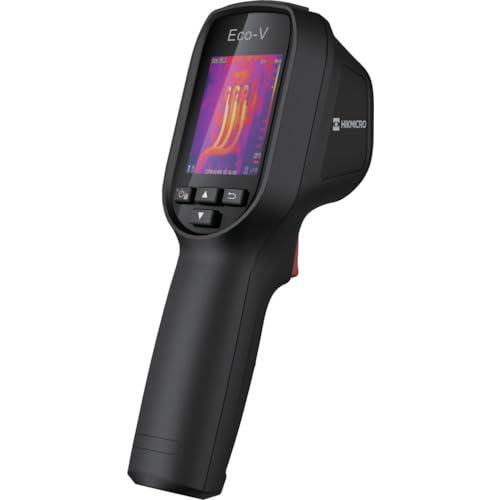
Figure 1: HIKMICRO ECO-V Handheld Thermography Camera
2. Маълумот оид ба бехатарӣ
Лутфан, пеш аз истифодаи ин маҳсулот, ҳамаи огоҳиҳо ва дастурҳои бехатариро хонед ва дарк кунед. Риоя накардани ин дастурҳо метавонад боиси зарбаи барқ, сӯхтор ё ҷароҳати ҷиддӣ гардад.
Чорабиниҳои умумии бехатарӣ
- Дастгоҳро дар фазои тарканда, масалан, дар ҳузури моеъҳои оташгиранда, газҳо ё чанг истифода набаред.
- Дастгоҳро аз об ва дигар моеъҳо дур нигоҳ доред.
- Барои кушодан ё тағир додани дастгоҳ кӯшиш накунед. Ҳама хидматрасониро ба кормандони соҳибихтисос муроҷиат кунед.
- Use only HIKMICRO-approved accessories.
- Avoid direct exposure of the thermal lens to strong light sources (e.g., sun, laser) as this may damage the detector.
Бехатарии батарея
- The device contains a built-in Lithium-ion battery. Do not expose the battery to excessive heat, direct sunlight, or fire.
- Do not puncture, open, or disassemble the battery.
- Charge the battery only with the provided USB cable and a compatible power adapter.
- Батареяҳоро мувофиқи қоидаҳои маҳаллӣ партов кунед.
3. Мундариҷаи баста
The HIKMICRO ECO-V package includes the following items:
- HIKMICRO Handheld Thermography Camera ECO-V
- Сими USB Type-C
- Quick Start Guide (not explicitly mentioned but standard)
- Calibration Certificate (not explicitly mentioned but standard)
Video 3.1: Unboxing the HIKMICRO M-Series (similar to ECO-V, showing typical package contents and device appearance).
4. Дастгоҳ тамом шудview
Familiarize yourself with the physical components and interface of your HIKMICRO ECO-V camera.
Намуди зоҳирӣ ва интерфейс
The ECO-V features a compact, ergonomic design for comfortable handheld use. Key components include the thermal lens, optical lens, laser indicator, white light, trigger button, navigation buttons, and a 2.4-inch display.
Video 4.1: This video demonstrates the physical appearance and interface of a HIKMICRO M-Series camera, which shares similar design elements and interface components with the ECO-V.
5. Танзимот
5.1 Пур кардани дастгоҳ
Before initial use, fully charge the device's built-in Lithium-ion battery.
- Connect the provided USB Type-C cable to the device's USB port.
- Connect the other end of the USB cable to a compatible power adapter (5V2A recommended) and plug it into a power outlet.
- The charging indicator will show red during charging and turn green when fully charged.
Video 5.1: This HIKMICRO ECO operation video demonstrates the charging process for the device.
5.2 Фаъол кардан/хомӯш кардан
To power on the device, press and hold the power button for more than 6 seconds. To power off, press and hold the power button again until the device shuts down.
Video 5.2: This HIKMICRO ECO operation video demonstrates how to power on the device.
6. Дастурҳои истифодабарӣ
This section covers the basic and advanced operational features of your ECO-V camera.
6.1 Image Capture and Display
To capture a thermal image, aim the camera at the target and press the trigger button. The captured image will be saved to the internal EMMC storage. To view saved images, navigate to the 'Albums' section in the menu.
Video 6.1: This HIKMICRO ECO operation video demonstrates image capture and viewing saved snapshots.
6.2 Воситаҳои андозагирӣ
The ECO-V provides various measurement tools to analyze thermal images:
- Hot Spot: Automatically identifies and displays the highest temperature point.
- Cold Spot: Automatically identifies and displays the lowest temperature point.
- Нуқтаи марказӣ: Displays the temperature at the center of the screen.
Video 6.2: This HIKMICRO ECO operation video demonstrates the use of measurement tools like hot, cold, and center spots.
6.3 SuperIR Image Enhancement
SuperIR technology enhances the thermal image resolution, providing more detail for analysis. You can enable or disable this feature in the settings menu.
Video 6.3: This HIKMICRO ECO operation video demonstrates how to enable and use the SuperIR image enhancement feature.
6.4 Усулҳои тасвир
The ECO-V supports multiple image modes for different inspection needs:
- Ҳарорат: Displays only the thermal image.
- Fusion: Blends the thermal and visible light images for enhanced detail.
- PIP (тасвир дар расм): Overlays a smaller thermal image on a visible light image.
- Оптикӣ: Танҳо тасвири нури намоёнро нишон медиҳад.
Video 6.4: This HIKMICRO B10S product video demonstrates switching between different image modes, including Thermal, Fusion, PIP, and Optical.
6.5 Parallax Correction
When using fusion modes, adjust the parallax correction based on the distance to the target to ensure accurate alignment between thermal and visible images.
Video 6.5: This HIKMICRO B10S product video demonstrates how to adjust parallax correction for accurate image fusion.
6.6 Palette Adjustment
Select from various color palettes (e.g., White Hot, Black Hot, Rainbow, Ironbow) to visualize temperature differences more effectively. This can be adjusted in the settings menu.
Video 6.6: This HIKMICRO B10S product video demonstrates how to adjust color palettes.
6.7 Emissivity and Distance Settings
For accurate temperature measurements, it is crucial to set the correct emissivity value for the target material and the distance to the target. Refer to the general emissivity reference table in the specifications section.
Video 6.7: This HIKMICRO ECO operation video demonstrates setting emissivity and distance for accurate temperature readings.
6.8 Нишондиҳандаи лазерӣ
The built-in laser pointer helps to precisely identify the measurement target. It can be enabled or disabled in the settings menu.
Video 6.8: This HIKMICRO ECO operation video demonstrates how to enable and use the laser pointer.
6.9 Ҳушдор оид ба ҳарорати баланд
Set a high temperature alarm threshold to be notified when temperatures exceed a predefined limit. This feature is useful for identifying potential overheating issues.
Video 6.9: This HIKMICRO B10S product video demonstrates how to set a high temperature alarm.
6.10 Hotspot Connection
The ECO-V can connect to a mobile device via Wi-Fi hotspot for live viewing and data transfer. Enable the Wi-Fi hotspot function in the device settings and connect your mobile device.
Video 6.10: This HIKMICRO M-Series video demonstrates how to establish a hotspot connection with a mobile device.
6.11 ХИКМИКРО Viewer App Connection
Download the HIKMICRO Viewer app on your mobile device to access live view, manage images and videos, and generate reports. Connect the device to your phone via Wi-Fi.
Video 6.11: This HIKMICRO Pocket series video demonstrates connecting the device to the HIKMICRO Viewer app for various functions.
7. Нигоҳдорӣ
7.1 Тозакунӣ
- Корпуси дастгоҳро бо матои нарм пок кунед,amp матоъ. Тозакунанда ё ҳалкунандаҳои абразивиро истифода набаред.
- Gently clean the lenses with a lens cleaning cloth. Avoid touching the lens surface with bare hands.
7.2 Нигоҳдорӣ
- Дастгоҳро дар ҷои хунук ва хушк, дур аз нури бевоситаи офтоб ва ҳарорати аз ҳад зиёд нигоҳ доред.
- Агар барои муддати тӯлонӣ нигоҳ дошта бошед, боварӣ ҳосил кунед, ки батарея қисман пур карда шудааст (тақрибан 50%) ва барои нигоҳ доштани саломатии батарея, онро ҳар чанд моҳ дубора пур кунед.
8. Баррасии мушкилот
If you encounter issues with your HIKMICRO ECO-V, refer to the following common problems and solutions:
| Мушкилот | Сабаби эҳтимолӣ | Ҳалли |
|---|---|---|
| Дастгоҳ фаъол нест | Батареяи кам; Мушкилоти дастгоҳ | Charge the battery; Contact support |
| Хонишҳои нодурусти ҳарорат | Incorrect emissivity/distance settings; Dirty lens | Adjust emissivity/distance; Clean the lens |
| Cannot connect to Wi-Fi hotspot | Incorrect password; Hotspot not enabled | Verify password; Enable hotspot in settings |
9. Мушаххасоти
Detailed technical specifications for the HIKMICRO ECO-V camera:
| Хусусият | Мушаххасоти |
|---|---|
| Модели | ЭКО-В |
| Measurement Temperature Range | -20°С то 550°С |
| Minimum Temperature Display | 0.1°С |
| Майдони View (FOV) | 50° × 50° |
| Ҳалли фазоӣ (IFOV) | 8.89 мрад |
| Диапазони ҳарорати корӣ | -10°С то 50°С |
| Диапазони ҳарорати нигоҳдорӣ | -40°С то 70°С |
| Андозаи намоиш | 2.4 инч |
| Манбаи нерӯ | Батареяи дарунсохташудаи литий-ион |
| Вақти кори батарея | 8 соат |
| Вай-фай | Дастрас нест |
| Сатҳи муҳофизат | IP54 |
| Интерфейс | USB Type-C |
| Pixel Pitch | 12 мкм |
| Measuring Wavelength | 7.5-14mm |
| NETD | < 40 мК (@ 25°C, F#=1.0) |
| Дарозии фокус | 1.35 мм |
| Диафрагма | F1.0 |
| Масофаи ҳадди аққал | 0.1м (0.33 фут) |
| Меъёри кадр | 25 Гц |
| Системаи Фокус | Бидуни таваҷҷӯҳ |
| ВАОи сабт | EMMC (4GB) |
| Иқтидори нигоҳдории тасвир | 30,000 тасвир |
| Тасвир File Формат | BMP (includes measurement data) |
| Ҳалли тасвири гармидиҳӣ | 96×96 (9,216 pixels) |
| Visible Image Resolution | 640×480 |
| Дақиқӣ | ±2°C or ±2% (whichever is greater), when ambient temperature is 15°C to 35°C and target temperature is 0°C or above. |
| Материалхо | Поликарбонат, қатрони ABS |
| Вазн | 360г |
General Emissivity Reference
| Материал | Эмиссионӣ |
|---|---|
| Пӯсти инсон | 0.98 |
| PCB | 0.91 |
| Бетони сементӣ | 0.95 |
| Керамика | 0.92 |
| Резин | 0.95 |
| Ранг | 0.93 |
| Вуд | 0.85 |
| Хишт | 0.96 |
| қум | 0.90 |
| Хок | 0.92 |
| Пахта | 0.98 |
| Картон | 0.90 |
| Когази сафед | 0.96 |
| Об | 0.96 |
10. Кафолат ва дастгирӣ
HIKMICRO products are covered by a limited warranty. For detailed warranty terms and conditions, please refer to the official HIKMICRO webсайт ё дистрибютори маҳаллии худ тамос гиред.
Дастгирии муштариён
If you require technical assistance, troubleshooting, or have questions about your ECO-V camera, please contact HIKMICRO customer support through their official webсайт ё маълумоти тамос, ки дар бастаи маҳсулоти шумо оварда шудааст.


