Дастури корбарии проектори мини BlitzWolf BW-VT2
Your comprehensive guide to setting up, operating, and maintaining your BlitzWolf BW-VT2 Mini Projector.
1. Маҳсулот ба охир расидview
1.1 Мундариҷаи баста
Лутфан тасдиқ кунед, ки ҳама ашё дар бастаи шумо мавҷуданд:
- BlitzWolf BW-VT2 Mini Projector
- Назорати дурдаст
- Адаптери барқ
- Кабели HDMI
- Дастури корбар (ин ҳуҷҷат)
1.2 Тарҳбандии дастгоҳ
Familiarize yourself with the various parts and ports of your projector.
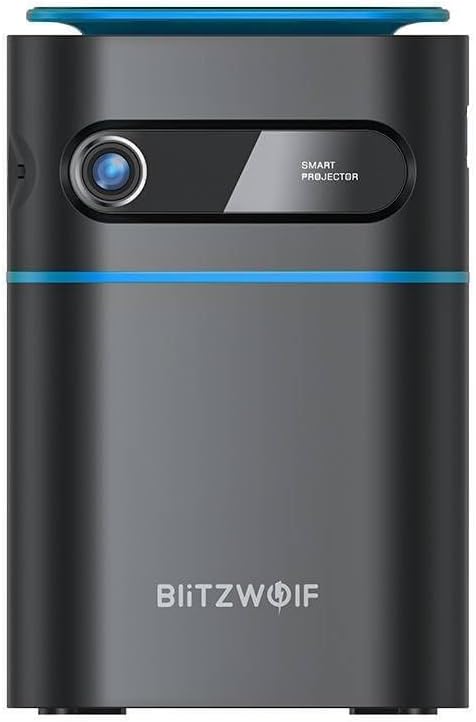
Расми 1.1: Пеш View. This image displays the front of the BlitzWolf BW-VT2 Mini Projector, highlighting the projection lens and the 'SMART PROJECTOR' branding.

Figure 1.2: Projector with Remote Control. This image shows the BlitzWolf BW-VT2 Mini Projector alongside its dedicated remote control, illustrating the compact size of both devices.
Расми 1.3: Қафо View. The rear of the projector is shown, featuring ventilation grilles and various input/output ports.

Расми 1.4: Тараф View. This image highlights the side of the projector where additional connectivity options such as USB and HDMI ports are located.

Расми 1.5: боло View. The top surface of the projector is visible, featuring the integrated touch control panel for direct interaction.
1.3 Портҳо ва идоракунӣ
- Порти HDMI: Connect to laptops, game consoles, Blu-ray players, etc.
- Порти USB: Барои бозикунии медиа дискҳои флеши USB-ро пайваст кунед.
- Audio Out (3.5mm) Port: Баландгӯякҳо ё гӯшмонакҳоро пайваст кунед.
- Порти DC IN: Адаптери барқро пайваст кунед.
- Тугмаи барқ: Проекторро фурӯзон/хомӯш мекунад.
- Чархи фокус: Возеҳи тасвирро танзим мекунад.
- Панели идоракунии ламс: Navigate menus and control playback directly on the device.
2. Дастури насб
2.1 Фаъолсозии барқ
- Адаптери барқро ба порти DC IN дар проектор пайваст кунед.
- Адаптери барқро ба васлаки деворӣ пайваст кунед.
- Press and hold the Power Button on the projector or the remote control until the device powers on.
2.2 Ҷойгиркунии ибтидоӣ
Барои оптималӣ viewing experience, consider the following:
- Проекторро дар сатҳи устувор ва ҳамвор ҷойгир кунед.
- Ensure there is adequate ventilation around the projector to prevent overheating.
- Position the projector perpendicular to the projection surface (wall or screen) for a rectangular image.
- Adjust the distance to achieve your desired screen size.
2.3 Танзими фокус
After powering on, adjust the focus to ensure a clear image:
- Rotate the focus wheel located near the lens until the projected image appears sharp and clear.
2.4 Насби идоракунии дурдаст
Insert batteries into the remote control before first use:
- Сарпӯши қисми батареяро дар пушти идоракунии пульт кушоед.
- Insert two AAA batteries (not included), ensuring correct polarity (+/-).
- Сарпӯши қисмати батареяро пӯшед.
3. Дастурҳои истифодабарӣ
3.1 Навигатсия
You can navigate the projector's interface using either the remote control or the touch control panel on top of the device.
- Назорати дурдаст: Use the directional buttons (up, down, left, right) to move through menus and the 'OK' button to select.
- Панели идоракунии ламс: Swipe and tap on the touch-sensitive surface to navigate.
3.2 Дастгоҳҳои пайвастшавӣ
The BW-VT2 supports various input sources:
- Вуруди HDMI: Connect your laptop, game console, or other HDMI-enabled devices using an HDMI cable. Select the HDMI input source from the projector's menu.
- Вуруди USB: Insert a USB flash drive into the USB port. The projector's media player will typically detect the drive automatically, allowing you to browse and play supported media files (videos, photos, music).
- Пайвастшавӣ Wi-Fi: Navigate to the 'Settings' menu, then 'Network' or 'Wi-Fi'. Select your Wi-Fi network and enter the password to connect the projector to the internet. This enables access to online streaming apps and updates.
3.3 Android OS Features
As an Android-powered projector, the BW-VT2 offers smart functionalities:
- Дастрасии барнома: Download and install various streaming apps (e.g., Netflix, YouTube) directly from the pre-installed app store or by sideloading APKs.
- Танзимот: Customize display settings, audio output, network configurations, and system preferences through the Android settings menu.
- Зеркашии экран: Utilize built-in screen mirroring features (e.g., Miracast, AirPlay compatible apps) to project content from your smartphone or tablet wirelessly.
3.4 Натиҷаи аудио
The projector has built-in speakers, but you can also connect external audio devices:
- Баромади аудио 3.5 мм: Connect headphones or external speakers via the 3.5mm audio jack for enhanced sound.
4. Нигоҳдорӣ
Нигоҳдории дуруст умри дароз ва кори оптималии проектори шуморо таъмин мекунад.
4.1 Тоза кардани линза
To maintain clear image quality, clean the projector lens regularly:
- Аз матои нарм ва бепахта, ки махсус барои линзаҳои оптикӣ тарҳрезӣ шудааст, истифода баред.
- Линзаро бо ҳаракатҳои даврӣ оҳиста пок кунед.
- Avoid using abrasive cleaners or excessive force, which can scratch the lens.
4.2 Вентилятсия
Ensure proper airflow to prevent overheating:
- Do not block the ventilation vents on the projector.
- Проекторро дар ҷои хуб вентилятсияшуда идора кунед.
- Periodically clean dust from the vents using a soft brush or compressed air.
4.3 Нигоҳдорӣ
When not in use, store your projector properly:
- Store the projector in a cool, dry place, away from direct sunlight and extreme temperatures.
- Use the original packaging or a protective case to prevent dust accumulation and physical damage.
5. Баррасии мушкилот
Барои масъалаҳои умумӣ ва роҳҳои ҳалли онҳо ба ин бахш муроҷиат кунед.
| Мушкилот | Сабаби эҳтимолӣ | Ҳалли |
|---|---|---|
| Проектор фаъол нест. | No power connection; faulty power adapter. | Ensure power adapter is securely connected to both projector and outlet. Try a different outlet. |
| Ягон тасвир пешбинӣ нашудааст. | Incorrect input source selected; loose HDMI/USB cable. | Verify the correct input source is selected in the menu. Check cable connections. |
| Тасвир хира аст. | Focus not adjusted; projector too close/far. | Rotate the focus wheel until the image is clear. Adjust projection distance if necessary. |
| Садо нест. | Volume too low; external audio device not connected properly. | Increase volume. Check connections to external speakers/headphones. Ensure audio output is set correctly in settings. |
| Масъалаҳои пайвасти Wi-Fi. | пароли нодуруст; мушкилоти роутер; дахолати сигнал. | Re-enter Wi-Fi password. Restart router. Move projector closer to router. |
| Правленияи дурдаст кор намекунад. | батареяҳои мурда; монеа; дурдаст ҷуфт карда нашудааст. | Replace batteries. Ensure no obstruction between remote and projector. |
6. Мушаххасоти техникӣ
Key specifications of the BlitzWolf BW-VT2 Mini Projector:
| Хусусият | Мушаххасоти |
|---|---|
| Бренд | Блиц Вулф |
| Рақами модел | BW-VT2EU |
| Ранги | Сиёҳ |
| Технологияи пайвастшавӣ | HDMI, USB, VGA, Wi-Fi |
| Ҳалли намоиш | 1920 x 1080 (HD Full) |
| Навъи намоиш | LCD, LED |
| Формаи форма | Портатив |
| Хусусиятҳои махсус | Portable, Android OS, Wi-Fi, HDMI, USB, VGA |
| Дастгоҳҳои мувофиқ | Laptops, Smartphones, Game Consoles, Blu-ray Players, Media Players, Wi-Fi enabled devices |
| Истифодаи тавсияшаванда | Кинотеатри хонагй |
7. Кафолат ва дастгирӣ
7.1 Кафолати истеҳсолкунанда
The BlitzWolf BW-VT2 Mini Projector comes with a Кафолати 2-солаи истеҳсолкунанда. Ин кафолат нуқсонҳои мавод ва коркардро ҳангоми истифодаи муқаррарӣ фаро мегирад. Лутфан далели хариди худро барои даъвоҳои кафолат нигоҳ доред.
7.2 Дастгирии муштариён
If you encounter issues not covered in the troubleshooting section or require further assistance, please contact BlitzWolf customer support. Refer to the product packaging or the official BlitzWolf webсайт барои маълумоти охирини тамос.


