1. Муқаддима ва зиёдаview
The Ditec RM-L 1370 is a universal replacement remote control designed for a wide range of Sony Bravia televisions. This remote offers direct compatibility with various Sony LCD, LED, UHD, OLED, and QLED 4K Ultra HD Smart Android TV models, eliminating the need for complex programming or pairing. It features dedicated hotkeys for popular streaming services like YouTube and Netflix for convenient access.

Image: The Ditec RM-L 1370 remote control, highlighting its compatibility as a single remote solution for Sony TVs.
2. Танзимот ва истифодаи аввала
This remote control is designed for immediate use without any setup or programming. Simply insert the required batteries, and it will be ready to operate your compatible Sony TV.
2.1 Насби батарея
- Қисмати батареяро дар қафои идоракунии дурдаст ҷойгир кунед.
- Сарпӯши қуттии батареяро лағжонда кушоед.
- Insert two (2) AAA batteries (not included), ensuring correct polarity (+ and - terminals).
- Сарпӯши қисмати батареяро бехатар пӯшед.

Тасвир: Қафо view of the remote control, illustrating the battery compartment location.
2.2 Истифодаи аввал
Once batteries are installed, point the remote control towards your Sony TV and press the Power button. The remote should operate your TV without any further configuration.
3. Дастурҳои истифодабарӣ
The Ditec RM-L 1370 remote control provides all standard functions for your Sony Bravia TV, along with convenient shortcut buttons.
3.1 Вазифаҳои асосӣ
- Тугмаи барқ: Телевизорро фурӯзон ё хомӯш мекунад.
- Тугмаҳои рақамӣ (0-9): Барои интихоби мустақими канал.
- Баланд/Поёни овоз: Овози телевизионро танзим мекунад.
- Канал боло/поён: Шабакаҳои телевизиониро иваз мекунад.
- Панели навигатсионӣ (боло/поён/чап/рост/дохил): Барои паймоиш ва интихоби меню.
- Тугмаи хонагӣ: Accesses the TV's Smart Home screen or main menu.
- Тугмаи бозгашт/бозгашт: Ба экран ё менюи қаблӣ бармегардад.
- Тугмаи Имконот: Имконоти ба контекст ҳассосро нишон медиҳад.
3.2 Хусусиятҳои махсус
- YouTube Hotkey: Directly launches the YouTube application.
- Netflix Hotkey: Directly launches the Netflix application.
The remote features an enhanced infrared sensor for a farther transmitting distance, allowing effective control up to 50 feet.

Image: The remote control demonstrating its farther distance sensor, capable of operating up to 50 feet.
4. Мутобиқат
The Ditec RM-L 1370 universal remote is compatible with a wide range of Sony Bravia LCD, LED, UHD, OLED, and QLED 4K Ultra HD Smart Android TVs. It is designed to replace many original Sony remote models, including but not limited to:
- RMT-TX100U, RMT-TX102U
- RMF-TX200U, RMF-TX201U, RMF-TX220U
- RMT-TX300U, RMF-TX310U
- RMT-TX500U, RMF-TX520U, RMF-TX600U
- And many other Sony TV remote models.
For a comprehensive list of compatible Sony TV remote models, please refer to the image below:
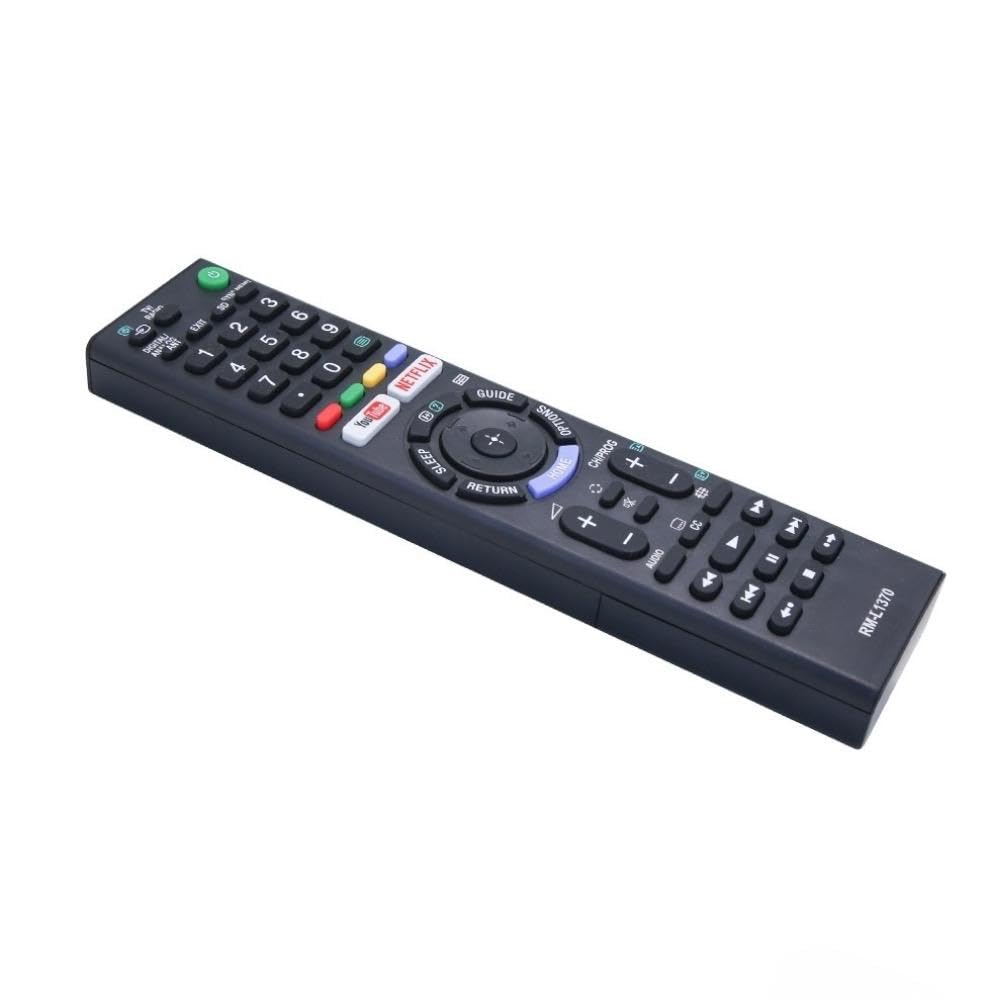
Image: A detailed list of Sony TV remote models that are compatible with the Ditec RM-L 1370.
It is recommended to compare the appearance of this remote with your original remote for visual confirmation of compatibility.
5. Нигоҳдорӣ
5.1 Иваз кардани батарея
When the remote control's performance degrades or it stops responding, replace the batteries with two new AAA alkaline batteries. Always replace both batteries at the same time. Do not mix old and new batteries or different types of batteries.
5.2 Тозакунӣ
To clean the remote control, use a soft, dry cloth. Do not use liquid cleaners, sprays, or abrasive materials, as these may damage the remote's surface or internal components.
6. Баррасии мушкилот
- Ҷавоб намедиҳад.
- Санҷед, ки батареяҳо бо қутбҳои дуруст дуруст гузошта шудаанд.
- Батареяҳои кӯҳнаро бо батареяҳои нав иваз кунед.
- Ensure there are no obstructions between the remote control and the TV's infrared receiver.
- Боварӣ ҳосил кунед, ки шумо дар доираи фаъолияти муассир қарор доред (то 50 фут).
- Тугмаҳои мушаххас кор намекунанд:
- Some advanced functions or TV-specific features might not be supported by a universal replacement remote.
- Ensure the TV is powered on and functioning correctly.
7. Мушаххасоти
| Хусусият | Тафсилот |
|---|---|
| Бренд | Ditec |
| Модели | RM-L 1370 |
| Дастгоҳҳои мувофиқ | Sony Bravia LCD, LED, UHD, OLED, QLED 4K Ultra HD Smart Android TVs |
| Навъи пайвасткунанда | Инфрасурх (IR) |
| Батареяҳо лозиманд | 2 x AAA (дохил карда нашудааст) |
| Хусусиятҳои махсус | Ergonomic design, YouTube & Netflix Hotkeys |
| Андозаҳои маҳсулот | 3 х 3 х 12 см |
| Вазни ашё | 80 гр |
| Кишвари аслӣ | Хитой |
8. Дастгирӣ
For assistance with compatibility or any questions regarding your Ditec RM-L 1370 remote control, you may contact support by sending a picture of your old remote or your device's brand name and model number to +91 9924350801. This will help in verifying compatibility or addressing specific queries.

Image: Information on how to contact support for compatibility checks or questions.


