1. Муқаддима
This manual provides essential information for the safe and efficient operation of your Hisense 85E63NT 85-inch 4K UHD Smart TV. Please read it thoroughly before using the television and retain it for future reference. Your Hisense TV features a 4K Ultra HD display, VIDAA U7 Smart TV platform, Dolby Vision, HDR10+, DTS Virtual:X audio, Game Mode Plus, and integrated voice control with Alexa and VIDAA Voice.
2. Дар қуттӣ чӣ мавҷуд аст
Carefully unpack your Hisense 85E63NT TV and ensure all items listed below are present and undamaged.
- Televisore (Television)
- Cavo di Alimentazione (Power Cable)
- Telecomando (Remote Control)
- Дастури корбар
- Batterie telecomando (Remote Control Batteries)
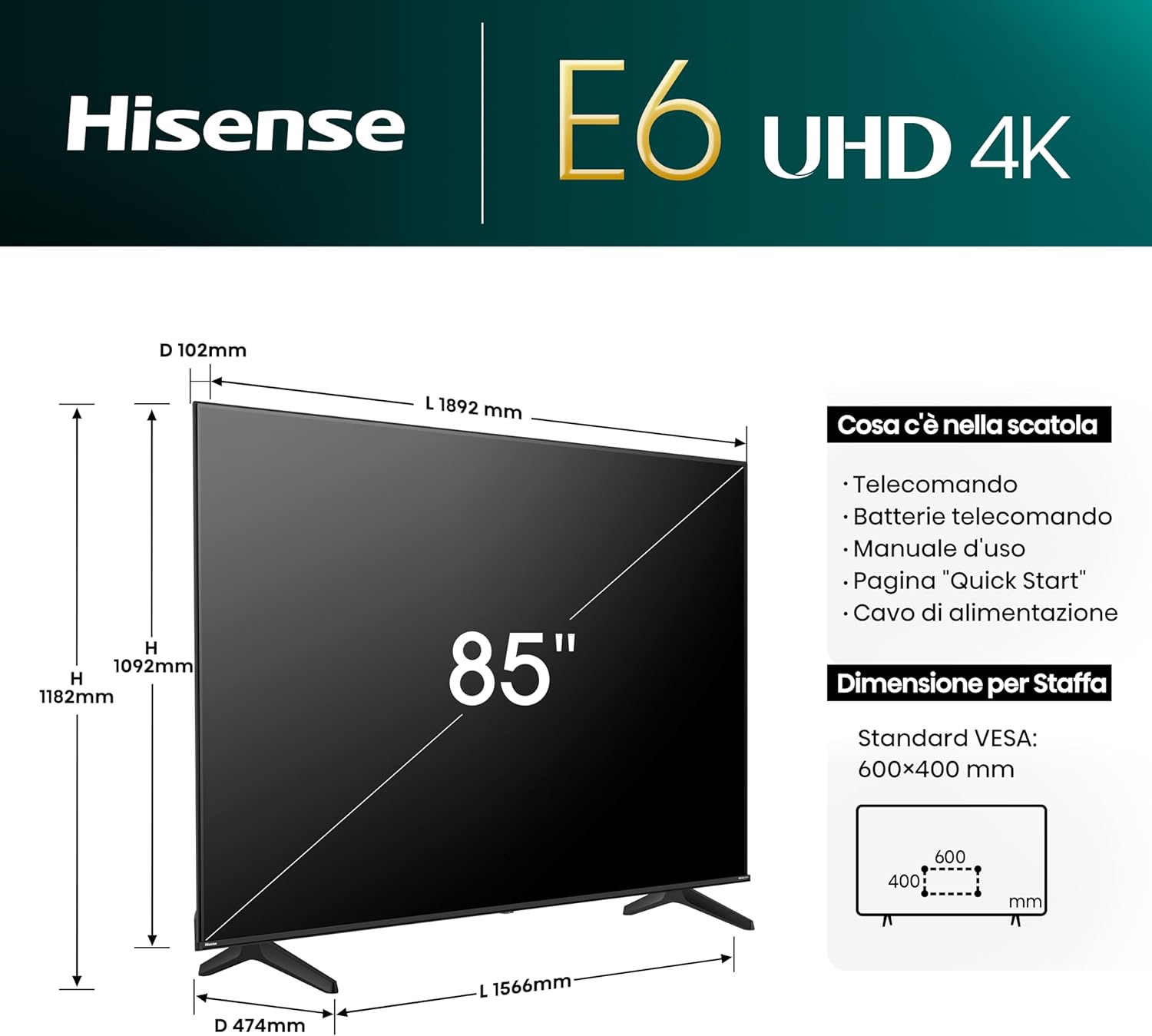
Image: The contents of the Hisense 85E63NT TV box are displayed, showing the television, remote control, power cable, and user manual. The image also illustrates the TV's dimensions (width, height, depth) and VESA mounting specifications.
3. Танзимот
3.1. Ҷойгиркунии стенд
Place the TV screen face down on a soft, flat surface to prevent damage. Attach the included stands to the designated slots on the bottom of the TV using the provided screws. Ensure the stands are securely fastened.
3.2. Насби девор
If you choose to wall mount your TV, use a VESA-compatible wall mount kit (not included). The Hisense 85E63NT supports a VESA standard of 600x400mm. Follow the instructions provided with your wall mount kit for proper installation. Always ensure the wall can support the weight of the TV.
3.3. Пайваст кардани дастгоҳҳои периферӣ
Connect your external devices to the appropriate ports on the back of the TV. Refer to the image below for port locations.
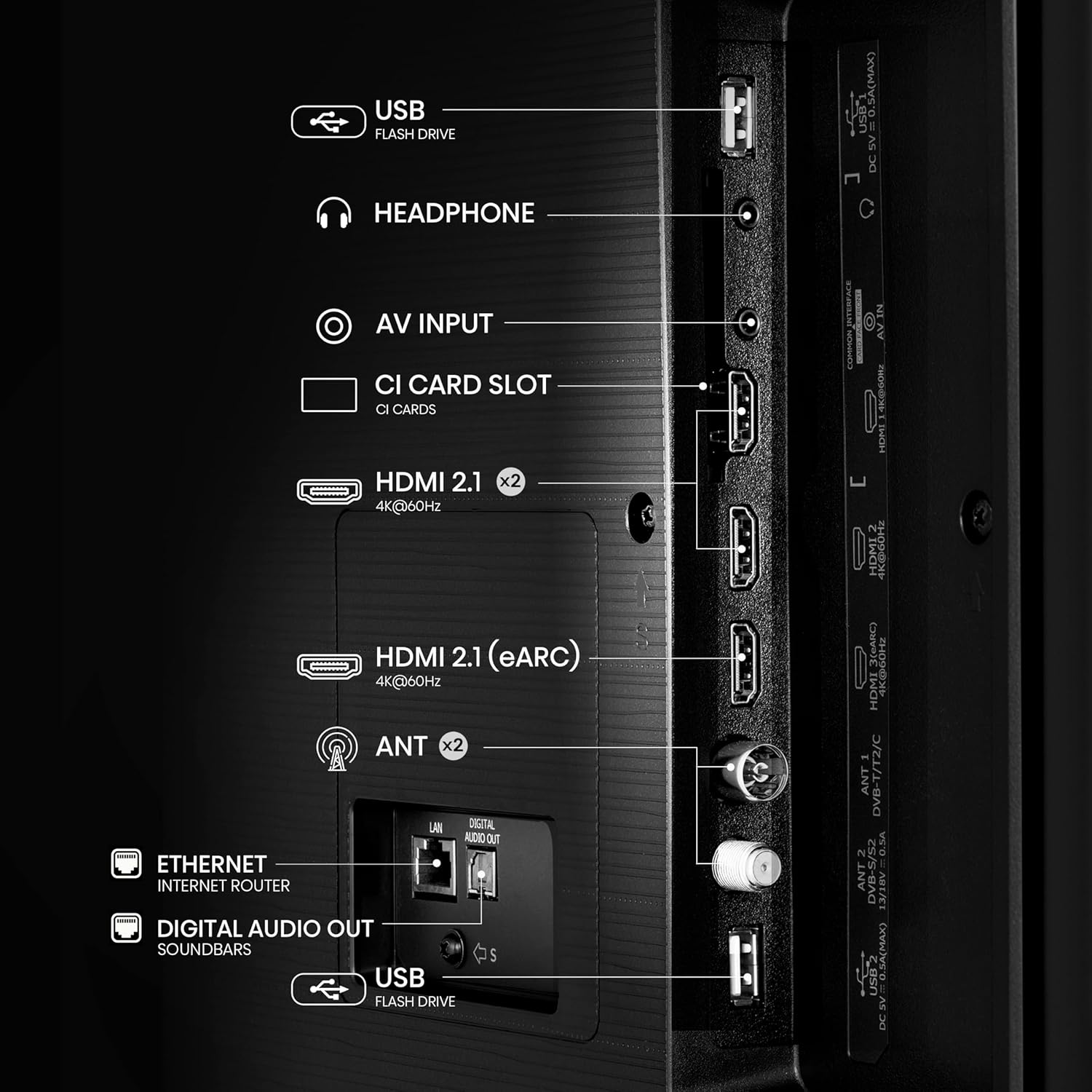
Тасвир: Муфассал view of the rear panel of the Hisense 85E63NT TV, highlighting the various connectivity options including USB, Headphone, AV Input, CI Card Slot, multiple HDMI 2.1 ports (one with eARC), Antenna inputs, Ethernet, and Digital Audio Out.
- HDMI 2.1 (x3): Connect Blu-ray players, game consoles, and other HDMI devices. One port supports eARC for enhanced audio return channel functionality. These ports also support ALLM (Auto Low Latency Mode) and VRR (Variable Refresh Rate) for gaming.
- USB: Барои бозикунии медиа дискҳои флеши USB-ро пайваст кунед.
- Ethernet (LAN): Барои пайвасти шабакаи симӣ.
- ANT (x2): Connect your terrestrial (DVB-T2) and satellite (DVB-S2) antennas.
- баромади аудио рақамӣ (оптикӣ): Барои пайваст шудан ба системаҳои аудиоии беруна.
- Гӯшмонак: Барои пайваст кардани гӯшмонакҳо.
- Вуруди AV: Барои пайваст кардани дастгоҳҳои кӯҳна бо истифода аз кабелҳои видео ва стерео аудио.
- Слоти корти CI: For inserting a Conditional Access Module (CAM) with a smart card for encrypted digital TV services.
3.4. Фаъолсозии ибтидоӣ
After connecting all necessary cables, plug the power cable into an electrical outlet. Press the power button on the remote control or on the TV. The TV will guide you through the initial setup process, including language selection, network connection, and channel scanning.
4. Истифода бурдани телевизор
4.1. Идоракунии дурдаст
The included remote control provides full functionality for your Hisense TV. It features dedicated buttons for popular streaming services and voice control capabilities.

Image: The Hisense remote control is shown, highlighting its layout with power, input, volume, channel, and navigation buttons. It also features one-touch access buttons for services like Disney+, YouTube, Prime Video, Netflix, and a dedicated voice control button with Alexa Built-in and VIDAA Voice logos.
- Тугмаи барқ: Телевизорро фурӯзон ё хомӯш мекунад.
- Тугмаи вуруд: Манбаи вурудро интихоб мекунад.
- Тугмаҳои паймоиш (боло/поён/чап/рост/OK): Менюҳоро паймоиш кунед ва имконоти интихоб кунед.
- Баланд/Поёни овоз: Овозро танзим мекунад.
- Канал боло/поён: Шабакаҳои телевизиониро иваз мекунад.
- One-Touch Access Buttons: Direct access to streaming applications like Netflix, Prime Video, YouTube, Disney+, etc.
- Тугмаи овозӣ: Activates Alexa Built-in or VIDAA Voice for voice commands.
4.2. VIDAA U7 Smart TV
Your Hisense TV runs on the VIDAA U7 operating system, providing a fast, intuitive, and secure smart TV experience. Access a wide range of international and local content, applications, and streaming services.

Image: The VIDAA Smart TV home screen is displayed, featuring a clean interface with icons for popular streaming applications such as Netflix, YouTube, Disney+, Prime Video, and more. The Hisense logo is prominent at the top.
4.3. Voice Control (Alexa Built-in & VIDAA Voice)
Control your TV and smart home devices using your voice. Press the voice button on your remote and speak commands to change channels, adjust volume, search for content, or interact with virtual assistants.

Image: A person is shown on a sofa, holding the Hisense remote and using voice commands. Speech bubbles indicate commands like "fast forward," "pause," and "volume down," demonstrating the voice control feature.
4.4. Picture Settings and Enhancements
Your Hisense TV offers advanced picture technologies for an optimized viewтаҷрибаи ғанӣ.
- Dolby Vision / HDR10+ / HLG: Supports multiple HDR formats for enhanced contrast, brightness, and color detail.
- Ранги дақиқ: Delivers a wider range of colors for a more vibrant and realistic picture.
- Баланд бардоштани сатҳи зеҳни сунъии 4K: Enhances lower-resolution content to near 4K quality, providing sharper details and improved clarity.
- Ҳаракати ҳамвор бо MEMC: Motion Estimation, Motion Compensation technology reduces motion blur and judder in fast-moving scenes, ensuring a fluid viewтаҷрибаи ғанӣ.
- Реҷаи филмсоз: Preserves the original aspect ratio, colors, and frame rates of content, allowing you to experience movies and TV shows as the director intended.
- Сенсори нури муҳити атроф: Automatically adjusts screen brightness based on the ambient light in your room for optimal viewing comfort day or night.

Image: A graphic illustrating key features of the Hisense E6 UHD 4K TV, including Precision Colour, Dolby Vision, VIDAA, 4K AI Upscaler, Smooth Motion with MEMC, and Game Mode Plus with VRR ALLM.
4.5. Танзимоти садо
Experience immersive audio with DTS Virtual:X technology, creating a multi-dimensional sound experience without additional speakers. You can also connect Bluetooth headphones for private listening.

Image: A Hisense TV screen displaying a concert scene, with text overlays highlighting "dts:X" and "Dolby Audio," indicating advanced sound technologies for an enhanced entertainment experience.
4.6. Хусусиятҳои бозӣ
The Hisense 85E63NT is equipped with features to enhance your gaming experience.
- Ҳолати бозӣ Plus: Combines a 60Hz panel with Variable Refresh Rate (VRR) and Auto Low Latency Mode (ALLM) to reduce input lag and screen tearing, providing a smoother and more responsive gaming experience.
- Бари бозӣ: Provides quick access to game-related settings and information during gameplay.

Image: A dynamic image of a spaceship game displayed on a Hisense TV, with text highlighting "Game Mode Plus" and "60Hz VRR ALLM," emphasizing the TV's features for a fluid gaming experience.
4.7. Connectivity and Screen Sharing
Connect your mobile devices and share content seamlessly.
- AirPlay2 + Android Screen Sharing: Wirelessly cast content from your Apple or Android devices directly to your TV.
- Wi-Fi ва Bluetooth: Built-in Wi-Fi for wireless internet access and Bluetooth for connecting wireless audio devices like headphones or soundbars.
5. Нигоҳдорӣ
5.1. Тоза кардани телевизор
Барои тоза кардани экран, онро бо матои мулоим ва бе пахта нарм тоза кунед. Барои аломатҳои якрав, каме гampen the cloth with water or a specialized screen cleaner. Never spray liquid directly onto the screen. For the TV body, use a soft, dry cloth. Avoid abrasive cleaners or solvents.
5.2. Навсозии нармафзор
Телевизиони шумо метавонад навсозиҳои нармафзорро барои беҳтар кардани кор ва илова кардани хусусиятҳои нав мунтазам қабул кунад. Барои гирифтани ин навсозиҳо, боварӣ ҳосил кунед, ки телевизиони шумо ба интернет пайваст аст. Шумо одатан метавонед навсозиҳоро дастӣ дар менюи танзимоти телевизор тафтиш кунед.
6. Баррасии мушкилот
Агар шумо бо телевизиони худ мушкилоте дошта бошед, ба роҳҳои ҳалли маъмулии зерин муроҷиат кунед:
- Не қудрат: Боварӣ ҳосил кунед, ки сими барқ ҳам ба телевизор ва ҳам ба васлаки деворӣ боэътимод пайваст карда шудааст. Санҷед, ки розетка кор мекунад ё не.
- Тасвир/садо нест: Verify that the correct input source is selected. Check all cable connections (HDMI, antenna, etc.). Try restarting the TV by unplugging it for a few minutes and then plugging it back in.
- Идоракунии дурдаст кор намекунад: Батареяҳои пулти дурдастро иваз кунед. Боварӣ ҳосил кунед, ки байни пулти дурдаст ва сенсори IR-и телевизор ягон монеа вуҷуд надорад.
- Масъалаҳои пайвастшавӣ ба шабака: For Wi-Fi, ensure your router is on and within range. For wired connections, check the Ethernet cable. Try restarting your router and modem.
- Сифати тасвири паст: Check the broadcast signal strength or the quality of the source content. Adjust picture settings (brightness, contrast, sharpness, color) in the TV menu.
If the problem persists, consult the full electronic user manual or contact Hisense customer support.
7. Мушаххасоти
Below are the key technical specifications for the Hisense 85E63NT 85-inch 4K UHD Smart TV.
| Хусусият | Мушаххасоти |
|---|---|
| Рақами модел | 85E63NT |
| Андозаи экран | 85 инч |
| Резолюция | 4K Ultra HD (3840x2160) |
| Технологияи намоиш | НН - НУРНИШОН |
| Меъёри навсозӣ | 60 Гц |
| Дастгирии HDR | Dolby Vision, HDR10+, HLG |
| Платформаи ТВ Smart | VIDAA U7 |
| Ёрдамчиёни овозӣ | Alexa Built-in, VIDAA Voice |
| Технологияи аудио | DTS виртуалӣ: X |
| Пайвастшавӣ | Wi-Fi, Bluetooth, Ethernet, 3x HDMI 2.1 (eARC, ALLM, VRR), USB |
| Танзимкунанда | DVB-T2/S2 HEVC 10 |
| Хусусиятҳои махсус | Game Mode Plus, AirPlay2 + Android Screen Sharing, Filmmaker Mode, Ambient Light Sensor, Precision Colour, 4K AI Upscaler, Smooth Motion with MEMC |
| Андозаҳо (бе стенд) | 10.2 х 189.2 х 109.2 см |
| Вазн | 53.4 кг |
| Мутобиқати VESA | 600х400мм |
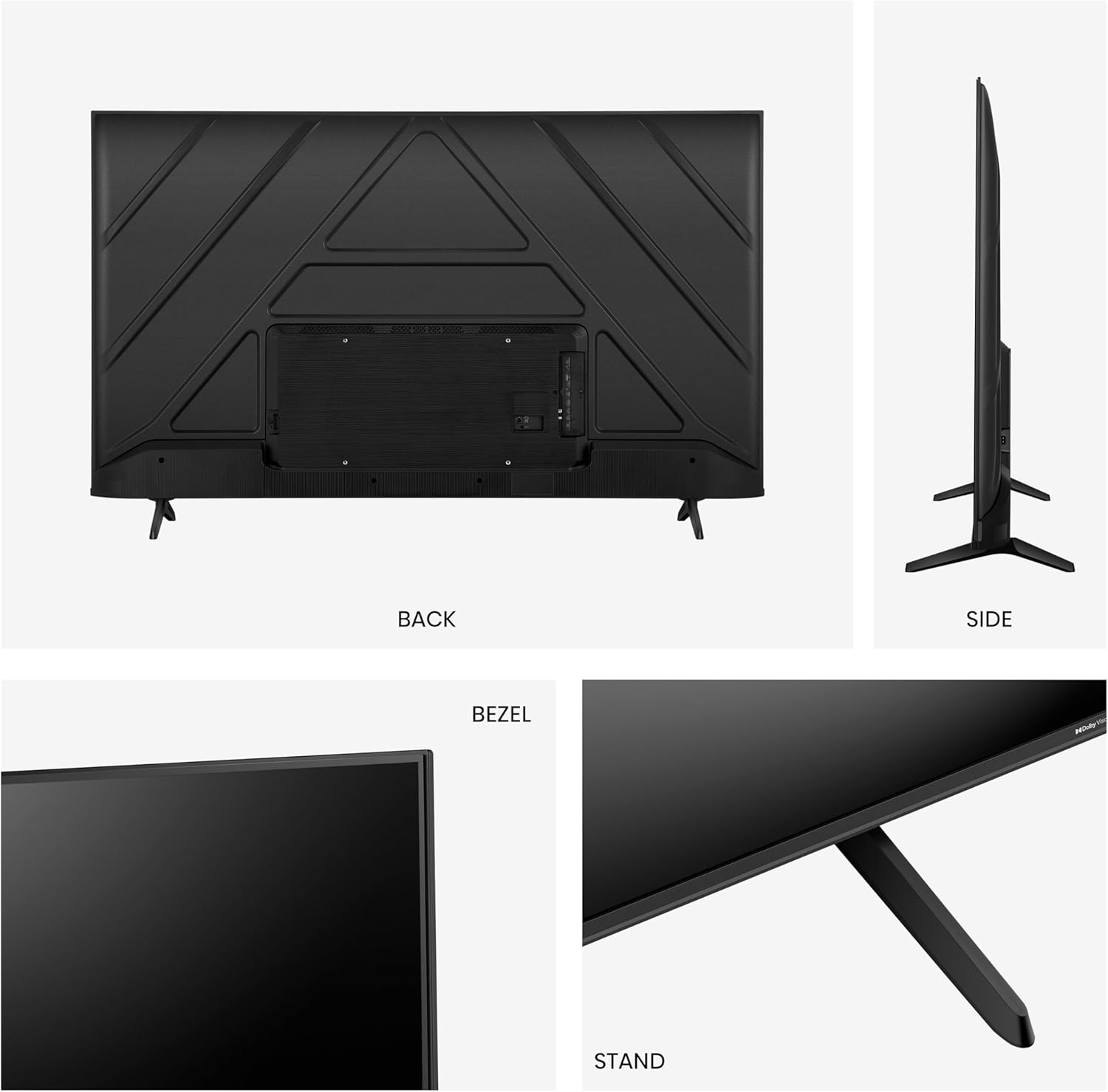
Image: A comparison table detailing specifications for Hisense E6N and E7N series TVs, including screen sizes, display technology (UHD 4K), refresh rate (60 Hz), color technology (Precision Colour), HDR support (Dolby Vision), gaming features (Game Mode Plus), voice assistants (Alexa Built-in/VIDAA VOICE), and connectivity (HDMI 2.1).
8. Кафолат ва дастгирӣ
For warranty information, technical support, or service inquiries, please refer to the warranty card included with your product or visit the official Hisense website for your region. You can also find additional support resources and frequently asked questions online.


