1. Муқаддима
Thank you for choosing the ASD Security Flood Light Camera Outdoor. This smart floodlight camera is designed to provide enhanced security and illumination for your outdoor spaces. Featuring a 180° motion sensor, adjustable light heads, and smart app control, it integrates seamlessly with your smart home ecosystem, including Alexa and Google Assistant. This manual provides essential information for safe installation, operation, and maintenance of your device.
2. Маълумоти муҳим оид ба бехатарӣ
Лутфан пеш аз насб ва истифода ҳама дастурҳоро бодиққат хонед. Ин дастурро барои истинод дар оянда нигоҳ доред.
- Бехатарии барқ: Монтажро бояд электромонтёри боихтисос ё шахсе, ки дар сохаи электрикй маълумот дорад, анчом дихад. Боварӣ ҳосил кунед, ки пеш аз насб ё хидматрасонӣ қувваи барқро дар сӯзандору хомӯш карда шудааст.
- Ҷилдиtage: This product is designed to operate on 120V circuits.
- Монтаж: Mount the fixture securely to a junction box. Ensure the mounting surface can support the weight of the fixture.
- Ҷойҳои тар: This product is Wet Locations rated (IP54), suitable for outdoor use. However, avoid submerging the unit in water.
- Гармӣ: Do not operate the fixture near flammable materials. Allow the fixture to cool before handling.
- Линзаи камера: Avoid touching the camera lens directly to prevent smudges or damage.
3. Мундариҷаи баста
Пеш аз оғози насбкунӣ тасдиқ кунед, ки ҳама ҷузъҳо мавҷуданд:
- ASD Security Flood Light Camera Outdoor (1 unit)
- Mounting Crossbar
- Виддаҳои васлкунӣ
- Чормағзҳои симӣ
- Дастгоҳи EVA
- Дастури корбар (ин ҳуҷҷат)
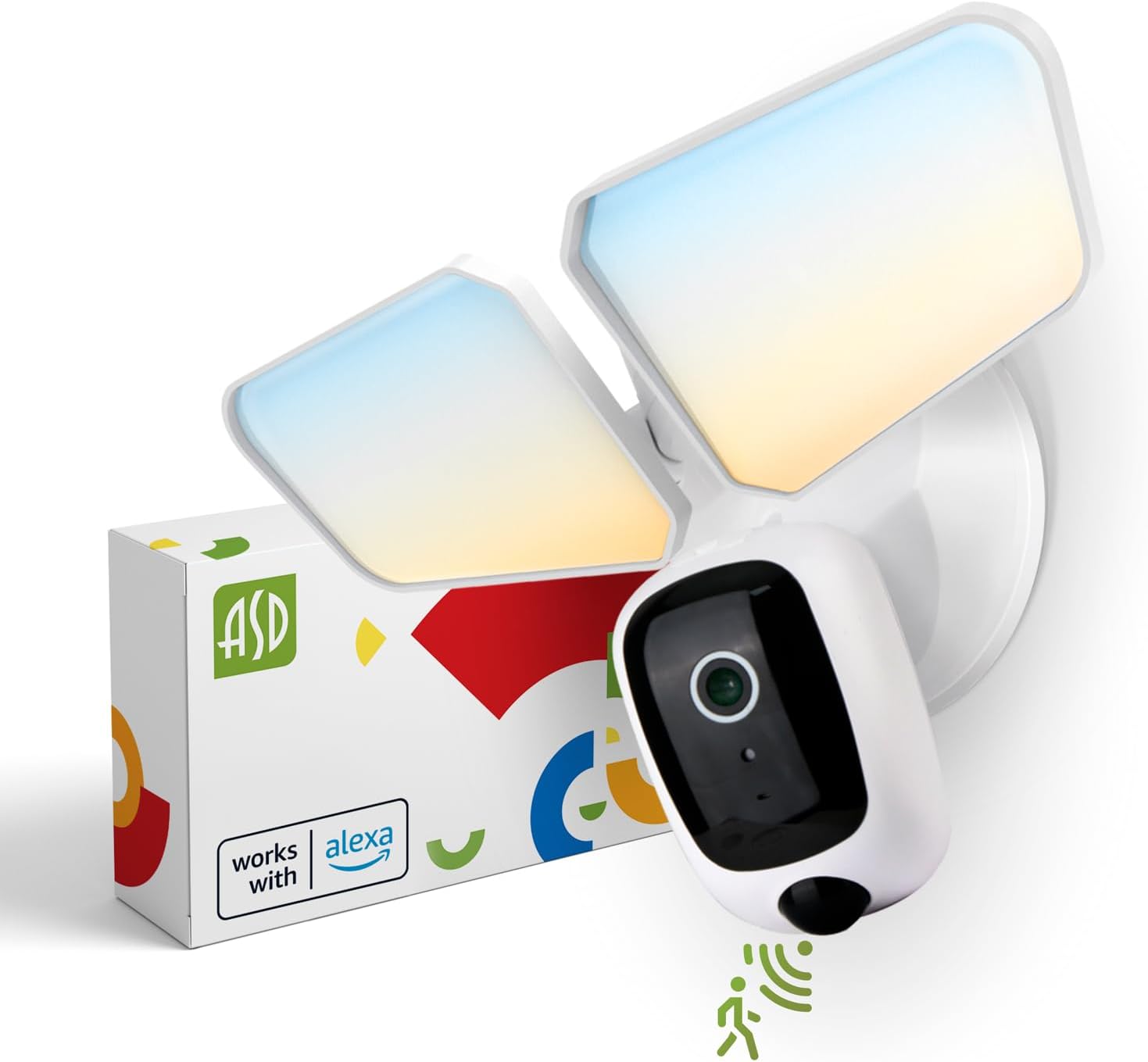
Image 1: ASD Security Flood Light Camera Outdoor and its packaging.
4. Хусусиятҳои маҳсулот
- Adjustable Light Heads: Side-to-side (150°) and up-and-down (180°) rotatable light heads for directional illumination.
- Integrated Smart Camera: Monitor, record, and engage in two-way audio communication.
- 180° Motion Sensor: Automatically activates light and camera recording upon motion detection.
- Фотоэлемент аз шом то субҳ: Automatically turns the light on at dusk and off at dawn.
- Color Selectable: Choose from 5 color temperatures: 2700K (Soft White), 3000K (Warm White), 3500K (Neutral White), 4000K (Cool White), or 5000K (Daylight).
- Интегратсияи Smart Home: Compatible with Amazon Alexa and Google Assistant for voice control.
- Назорати барнома: Идоракунии танзимот, view live feed, and receive motion-activated push notifications via the dedicated app.
- Имконоти нигаҳдорӣ: Records can be stored on a Micro SD card (not included) or in a Cloud service (subscription may be required).
- Сохтмони устувор: Made from Aluminum and Polycarbonate.
- Сертификатсияҳо: UL and DLC Premium certified, ensuring quality and safety.

Image 2: Key features of the ASD Security Flood Light Camera.
5. Мушаххасоти техникӣ
| Мушаххасоти | Тафсилот |
|---|---|
| Рақами модел | A-SFL-20WH-SC |
| Манбаи нерӯ | Ба сахтафзор |
| Ҷилдиtage | 120 вольт |
| Ватtage | 20 Ватт |
| Навъи манбаи нур | НН - НУРНИШОН |
| Ҳарорати ранг (CCT) | 2700K, 3000K, 3500K, 4000K, 5000K (Интихобшаванда) |
| Кунҷи муайянкунии сенсори ҳаракат | 180° |
| Масофаи муайянкунии сенсори ҳаракат | 16.4-32.9 фут (5-10 м) |
| Кунҷи шуоъ | 100° |
| Материал | Алюминий, поликарбонат |
| Андозаҳои маҳсулот | 10.24"L x 4.45"W x 7.68"H |
| Вазни ашё | 1.2 фунт |
| Истифодаи дарунӣ/берунӣ | Дар берун |
| Таснифи равшании минтақа | IP54 (Wet Locations Rated) |
| Протоколи пайвастшавӣ | Вай-фай |
| Навъи назораткунанда | Amazon Alexa, Google Assistant, App |
| Замони Умр | 145,000 соат |

Тасвири 3: Мушаххасоти муфассал ва андозаҳои маҳсулот.
6. Қадамҳои насб
Пеш аз оғоз кардан: Turn off power at the circuit breaker. Ensure you have the necessary tools (screwdriver, wire strippers, etc.).
- Таҷҳизотро омода кунед:
Attach the crossbar to the outlet box using two mounting screws. Remove the cover on the top of the camera. Insert a Micro SD card (sold separately) into the slot until it clicks. Place the cover back on. Change the position of the CCT switch on the housing to the desired color temperature (2700K, 3000K, 3500K, 4000K, or 5000K). - Mount and Wire:
Tear off the EVA pad adhesive and stick it on the rear cover (pay attention to the direction of the gap). Thread the fixture wire through the gasket. Connect the wires: Black to Black, White to White, and Green to Green (ground). Secure the connection with wire nuts. - Амнияти дастгоҳ:
Drive the bracket screw through the center hole of the fixture base to the crossbar and secure it by tightening.

Тасвири 4: Роҳнамои визуалӣ барои раванди насб.
7. Дастурҳои истифодабарӣ
7.1 Фаъолияти сенсори ҳаракат
The built-in 180° motion sensor detects movement within its range (16.4-32.9 ft or 5-10 m). When motion is detected, the floodlight will illuminate, and the camera will begin recording. You can adjust the sensitivity and duration settings via the ASD SMART app.

Image 5: The built-in motion sensor detects movement.
7.2 Dusk-to-Dawn Photocell
The integrated photocell automatically senses ambient light levels. It will turn the floodlight on when it gets dark and turn it off when daylight returns, ensuring efficient operation without manual intervention.

Image 6: Built-in dusk-to-dawn photocell for automatic operation.
7.3 Color Temperature Selection (CCT)
Before final installation, you can select your preferred color temperature using the switch located on the fixture's housing. Choose from 2700K (Soft White), 3000K (Warm White), 3500K (Neutral White), 4000K (Cool White), or 5000K (Daylight) to match your aesthetic and lighting needs.

Image 7: Selectable color temperature options.
8. App Control and Smart Integration
8.1 ASD SMART App Setup
To unlock the full potential of your floodlight camera, download and set up the ASD SMART app:
- -ро зеркашӣ кунед ASD SMART app аз Store App (iOS) ё Google Play Store (Android).
- Ба қайд гиред ё ба ҳисоби худ ворид шавед.
- Select "Add a device" and choose "Camera and lock".
- Follow the on-screen instructions to connect your device to your Wi-Fi network.
- Вақте ки дархост карда мешавад, рамзи QR-ро дар камераи худ скан кунед.
For a detailed guide, please refer to the full manual PDF: ASD Security Flood Light Camera Manual PDF
Барномаро зеркашӣ кунед:
- Дӯкони барномаҳои iOS: ASD SMART on App Store
- Android Google Play: ASD SMART on Google Play

Image 8: App control interface and smart assistant compatibility.
8.2 Remote Monitoring and Two-Way Audio
Through the ASD SMART app, you can:
- View live video feed from your camera anytime, anywhere.
- Engage in two-way audio communication with visitors or deter intruders.
- Receive instant motion-activated push notifications on your smartphone.
8.3 Recording Storage
Video recordings can be stored in two ways:
- Корти Micro SD: Корти Micro SD (то 128 ГБ, дохил карда нашудааст)-ро ба слоти махсус дар камера барои нигоҳдории маҳаллӣ гузоред.
- Хидмати абрӣ: Opt for a cloud storage subscription (available through the app) for secure, remote access to your recordings.

Image 9: Remote monitoring and recording storage options.
8.4 Интегратсияи Smart Assistant
Connect your ASD Security Flood Light Camera to Amazon Alexa or Google Assistant for convenient voice control. Follow the instructions within the ASD SMART app to link your accounts and enable features like turning the light on/off or viewing the camera feed on compatible smart displays.
9. Нигоҳдорӣ
- Тозакунӣ: Пеш аз тоза кардан, боварӣ ҳосил кунед, ки барқ хомӯш карда шудааст. Арматураро бо матои нарм пок кунед.amp матоъ. Тозакунанда ё ҳалкунандаҳои абразивиро истифода набаред.
- Нигоҳубини линза: Gently clean the camera lens with a microfiber cloth to maintain clear image quality.
- Санҷишҳои мунтазам: Periodically check for any loose connections or damage to the wiring and housing.
10. Баррасии мушкилот
| Мушкилот | Сабаби эҳтимолӣ | Ҳалли |
|---|---|---|
| Чароғ фурӯзон намешавад. | No power, faulty wiring, photocell issue, CCT switch not set. | Check circuit breaker. Verify wiring connections. Ensure photocell is not obstructed. Confirm CCT switch is set. |
| Сенсори ҳаракатро муайян намекунад. | Incorrect sensitivity settings, obstruction, improper installation height. | Adjust motion sensor sensitivity in the app. Clear any obstructions. Ensure installation height is appropriate (approx. 9.8 ft / 3 m). |
| Камера ба Wi-Fi пайваст нест. | Пароли нодурусти Wi-Fi, сигнали заиф, мушкилоти роутер. | Double-check Wi-Fi password. Move router closer or use a Wi-Fi extender. Restart router. Ensure 2.4GHz Wi-Fi network is used. |
| Сифати видео. | Dirty lens, poor Wi-Fi signal, low light conditions. | Clean camera lens. Improve Wi-Fi signal strength. Ensure adequate lighting. |
| Аудио дутарафа кор намекунад. | Мушкилоти микрофон/баландгӯяк, иҷозатномаҳои барнома. | Check app permissions for microphone. Ensure volume is up on your device. |
11. Маълумот дар бораи кафолат
ASD provides a Кафолати маҳдуди 5 сол for this Security Flood Light Camera. This warranty covers defects in materials and workmanship under normal use. Please retain your proof of purchase for warranty claims. For full warranty terms and conditions, please refer to the official ASD webсайт ё бо дастгирии мизоҷон тамос гиред.
12. Дастгирии муштариён
For additional assistance, technical support, or warranty inquiries, please visit the ASD Lighting Corporation website or refer to the comprehensive manual available online.
- ASD Lighting Corporation Store: Visit ASD Store on Amazon
- Full Product Manual (PDF): Дастури PDF-ро зеркашӣ кунед


