1. Муқаддима
This manual provides essential instructions for the safe and efficient use of your Trevi XR 8A44 DOUBLE Portable Speaker System. Please read this manual thoroughly before operating the device and retain it for future reference.
2. Маҳсулот ба охир расидview
The Trevi XR 8A44 DOUBLE is a versatile portable speaker system designed for high-quality audio playback. It features two independent, separable speaker units that can function together as a stereo pair or individually. Each unit delivers 10W of power, totaling 20W when combined. The system supports Bluetooth 5.3, Micro SD card playback, and AUX-IN connectivity. It is also IPX5 water resistant, making it suitable for various environments.
2.1 Хусусиятҳои асосӣ
- Separable wireless speaker design, forming two independent units.
- Total output power of 2 x 10W (20W combined).
- IPX5 water resistance for protection against water jets.
- Clear sound with 2 stereo speakers and 2 passive bass radiators.
- Volume, playback, and pause controls integrated.
- Wireless audio via Bluetooth v5.3.
- Two independent MP3 players for Micro SD card playback (one per unit).
- Two AUX-IN inputs for wired connections.
- Convenient carrying strap.
- Light disc illumination for visual effects.
- Нишондиҳандаи LED барои ҳолати пуркунии батарея.
- Rechargeable high-capacity lithium battery via TYPE-C port.
2.2 Мундариҷаи баста
- Trevi XR 8A44 DOUBLE Speaker Units (x2)
- Сими пуркунандаи барқ (USB Type-C)
- Дастури корбар (ин ҳуҷҷат)
- Шаҳодатномаи кафолат
2.3 Диаграммаи маҳсулот ва идоракунӣ
Refer to the images below for an understanding of the speaker's physical components and controls.


3. Танзимот
3.1 Пур кардани батарея
Before first use, fully charge both speaker units. Use the provided USB Type-C charging cable and connect it to a compatible USB power adapter (not included).
- Locate the Type-C charging port on each speaker unit.
- Connect the Type-C end of the cable to the speaker and the USB-A end to a power source.
- Нишондиҳандаи LED ҳолати барқро нишон медиҳад. Он одатан ҳангоми пур кардани барқ хомӯш мешавад ё рангашро тағир медиҳад.
Шарҳ: Барои истифодаи оптималии батарея, зуд-зуд холӣ кардани батареяро пешгирӣ кунед.
3.2 Фурӯзон/хомӯш кардан
To power on or off each speaker unit:
- Фаъол: Press and hold the Power button (usually integrated with the Play/Pause button) for a few seconds until you hear an audible prompt or see the light disc illuminate.
- Хомӯш: Тугмаи барқро бори дигар барои чанд сония пахш карда нигоҳ доред, то он даме ки баландгӯяк хомӯш шавад.
3.3 Separating and Connecting Speakers
The Trevi XR 8A44 DOUBLE consists of two units that can be magnetically connected or separated for different audio experiences.
- Барои ҷудо кардан: Gently pull the two speaker units apart. They are held together by magnets.
- Барои пайвастшавӣ: Align the magnetic ends of the two speaker units and push them together until they snap into place.

4. Дастурҳои истифодабарӣ
4.1 Bluetooth Pairing (Single Speaker Mode)
To connect a single speaker unit to your Bluetooth-enabled device:
- Ensure the speaker is powered on and not connected to another device. It should enter pairing mode automatically (indicated by a flashing LED or audible prompt).
- Дар дастгоҳи худ (смартфон, планшет ва ғайра) Bluetooth-ро фаъол созед ва дастгоҳҳои дастрасро ҷустуҷӯ кунед.
- Select "Trevi XR 8A44 DOUBLE" from the list of found devices.
- Once connected, the speaker will provide an audible confirmation, and the LED indicator will stabilize.
4.2 True Wireless Stereo (TWS) Pairing (Two Speaker Mode)
To use both speaker units together for a stereo experience:
- Ensure both speaker units are powered on and not connected to any Bluetooth device.
- On one of the speakers (this will be the primary unit), double-press the Power/Play/Pause button. The speakers will attempt to pair with each other.
- Once successfully paired, you will hear an audible confirmation. One speaker will act as the left channel and the other as the right.
- Now, on your Bluetooth-enabled device, search for "Trevi XR 8A44 DOUBLE" and connect. Only one entry will appear for the combined system.
Шарҳ: TWS pairing is typically automatic when speakers are separated and powered on, but manual initiation might be required if they don't connect automatically.
Бозикунии корти Micro SD 4.3
Each speaker unit has an independent Micro SD card slot for MP3 playback.
- Корти Micro SD-ро ворид кунед (бо аудиои MP3 пешакӣ бор карда шудааст) files) into the designated slot on the speaker unit.
- The speaker should automatically switch to Micro SD playback mode.
- Use the Play/Pause and Volume (+/-) buttons to control playback.
Шарҳ: If both speakers are in TWS mode, inserting a Micro SD card into one speaker will play audio only through that speaker, overriding the TWS Bluetooth connection for that unit. To use both speakers with Micro SD, each would need its own card and would play independently.
4.4 Пайвастшавӣ AUX-IN
For wired audio playback, use the AUX-IN port on each speaker unit.
- Connect one end of a 3.5mm audio cable (not included) to the AUX-IN port on the speaker.
- Connect the other end to the audio output of your device (e.g., MP3 player, laptop).
- The speaker should automatically switch to AUX-IN mode.
- Control volume from both the speaker and your connected device.
4.5 Volume and Playback Controls
The speaker units feature integrated controls:
- Бозӣ/Таваққуф: Short press the Power/Play/Pause button.
- Баланд бардоштани овоз: Тугмаи '+'-ро кӯтоҳ пахш кунед.
- Ҷилди поён: Тугмаи '-'-ро кӯтоҳ пахш кунед.
- Треки навбатӣ: Тугмаи '+'-ро дароз пахш кунед.
- Track гузашта: Тугмаи '-'-ро дароз пахш кунед.
4.6 Light Disc Illumination
The speaker units feature an illuminated light disc. The operation of the light disc may vary:
- Toggle Lights: A dedicated button (if present) or a long press of a specific control button (e.g., Play/Pause) might cycle through light modes or turn them on/off. Refer to the quick start guide included in your package for exact button functionality.
5. Нигоҳдорӣ
5.1 Тозакунӣ
- берунии спикерро бо нарм пок кунед, гamp матоъ.
- Тозакунакҳои абразивӣ, спирт ё ҳалкунандаҳои кимиёвиро истифода набаред.
- Пеш аз пур кардан ё пайваст кардани кабелҳо, боварӣ ҳосил кунед, ки ҳамаи портҳо хушк ҳастанд.
5.2 Муқовимат ба об (IPX5)
The Trevi XR 8A44 DOUBLE is rated IPX5 water resistant. This means it is protected against low-pressure water jets from any direction. It is не designed to be submerged in water.
- Do not submerge the speakers in water.
- Пеш аз дучор шудан бо об, боварӣ ҳосил кунед, ки сарпӯши порти пуркунӣ (агар мавҷуд бошад) маҳкам пӯшида шудааст.
- Dry the speakers thoroughly after exposure to water before charging.

5.3 Нигоҳубини батарея
- Батареяро, ҳатто агар истифода набошед, мунтазам пур кунед, то саломатии онро нигоҳ доред.
- Store the speakers in a cool, dry place away from direct sunlight and extreme temperatures.
- Do not attempt to replace the battery yourself. Contact qualified service personnel.
6. Баррасии мушкилот
| Мушкилот | Сабаби эҳтимолӣ | Ҳалли |
|---|---|---|
| Баландгӯяк фаъол нест. | Батарея холӣ шудааст. | Баландгӯякро бо истифода аз сими Type-C пурра пур кунед. |
| Тавассути Bluetooth пайваст карда намешавад. | Speaker is not in pairing mode; device Bluetooth is off; speaker is connected to another device. | Ensure speaker is in pairing mode (flashing LED). Turn off and on Bluetooth on your device. Disconnect from other devices. Try TWS pairing steps if using two speakers. |
| No sound from Micro SD card. | Корт дуруст гузошта нашудааст; дастгирӣ намешавад file format; card is empty or corrupted. | Re-insert Micro SD card. Ensure files are in MP3 format. Check card content on a computer. |
| Ҷуфти TWS ноком мешавад. | Speakers are too far apart; one speaker is already connected to a Bluetooth device. | Боварӣ ҳосил кунед, ки баландгӯякҳо ба якдигар наздиканд. Пеш аз оғози ҷуфткунии TWS, ҳарду баландгӯякро аз ҳама гуна дастгоҳҳои Bluetooth ҷудо кунед. |
| Таҳрифи садо ё паст будани садо. | Volume too low on speaker or source device; low battery; poor Bluetooth connection. | Increase volume on both speaker and source device. Charge the battery. Move source device closer to the speaker. |
7. Мушаххасоти
| Номи модел: | Trevi XR 8A44 DOUBLE |
| Бренд: | Треви |
| Қувваи баромад: | 2 x 10W (Ҳамагӣ 20W) |
| Пайвастшавӣ: | Bluetooth v5.3, Micro SD, AUX-IN (3.5mm) |
| Манбаи нерӯ: | Rechargeable Lithium Battery (via Type-C USB) |
| Муқовимат ба об: | IPX5 (Protected against water jets) |
| Ҳолати баромади аудио: | Stereo (when TWS paired) |
| Frequency Response (Lower Limit): | 100 Гц |
| Усули назорат: | Тугмаҳоро ламс кунед |
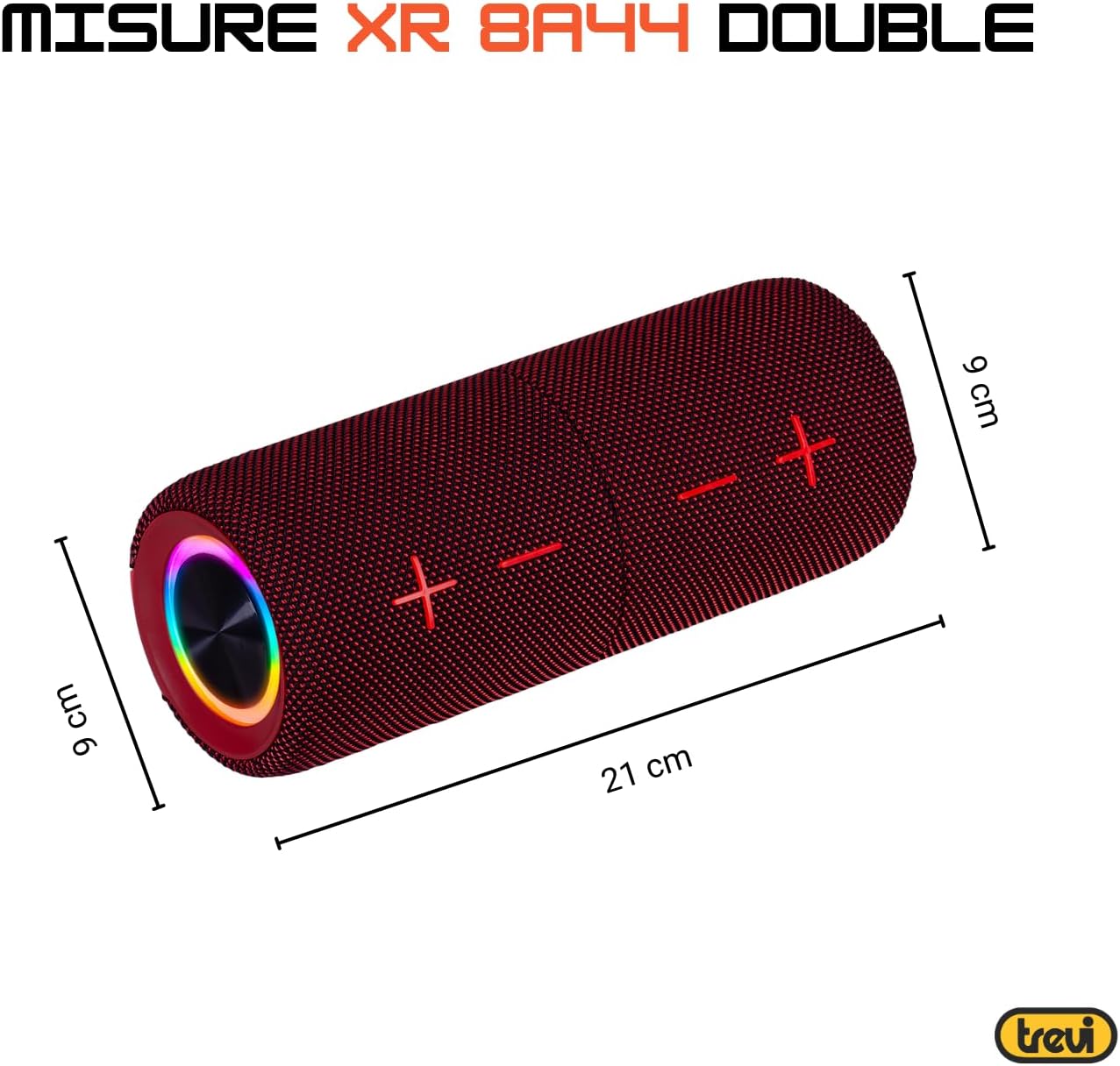
| Андозаҳо (ба як воҳид): | Approx. 8D x 21W x 8H cm (based on image: 21cm length, 9cm diameter) |
| Вазн (як воҳид): | Approx. 200 Grams |
| Мавод: | Синтетикӣ |
| Дастгоҳҳои мувофиқ: | Laptop, MP3 Player, Smartphone, Game Console, Tablet, TV |
| Компонентҳои дохилшуда: | Speakers, Charging Cable, User Manual, Warranty Certificate |
8. Кафолат ва дастгирӣ
8.1 Кафолати маҳдуд
Your Trevi XR 8A44 DOUBLE Portable Speaker System comes with a limited warranty. Please refer to the included warranty certificate for specific terms, conditions, and duration of coverage. Keep your proof of purchase for warranty claims.
8.2 Дастгирии муштариён
If you encounter any issues not covered in the troubleshooting section or require further assistance, please contact Trevi customer support. Contact information can typically be found on the official Trevi website or on the warranty certificate.
- Дастгирии онлайн: Visit the official Trevi website for FAQs, product registration, and support contact details.
- Почтаи электронӣ/Телефон: Refer to your warranty documentation for direct contact methods.


