1. Муқаддима
This user manual provides comprehensive instructions for the installation, operation, and maintenance of your VEKOOTO Digital Wireless Forklift Camera System. This system is designed to enhance safety and visibility during forklift operations by providing a clear, real-time view of the surrounding environment, particularly in blind spots. The kit includes a 7-inch IPS screen monitor, a waterproof night vision camera, and a magnetic 9600mA battery bank, all connected wirelessly for ease of installation and use.
2. Маҳсулот ба охир расидview
2.1 Хусусиятҳои асосӣ
- Magnetic Base Camera: Equipped with strong magnets for secure attachment to the forklift arm, allowing for flexible positioning.
- High-Capacity Battery Bank: A 9600mAh magnetic base rechargeable battery bank powers the camera, providing approximately 15-17 hours of continuous operation.
- 7-inch Monitor: The monitor features a 7-inch IPS screen for clear and vivid display, powered via a 12V DC cigarette lighter adapter.
- Digital Wireless Connection: Ensures a stable and interference-free connection between the monitor and camera, eliminating the need for complex wiring.
- IP69K Waterproof Camera: Designed to withstand harsh outdoor conditions, including heavy rain and dust.
- Қобилияти биниши шабона: Дар шароити равшании кам намоёнии равшанро таъмин мекунад.
- Намоиши экрани тақсимшуда: Supports multiple display modes, including full-screen and dual split-screen views, for enhanced situational awareness.
2.2 Components (What's in the Box)
The VEKOOTO Digital Wireless Forklift Camera System package includes the following items:
- 1x 7-inch Monitor
- 1x Forklift Camera with Magnetic Base
- 1x Power Bank 9600 mAh with Magnetic Base
- 1x Antenna (for monitor)
- 1x Mounting Bracket (for monitor)
- 1x Cigarette Lighter Charger with Dual USB Ports
- 1x Power Cable for Monitor
- 1x USB Charging Cable (for battery bank)

Image: All components included in the product package, laid out clearly.
3. Танзим ва насб
The VEKOOTO Digital Wireless Forklift Camera System is designed for easy installation, often achievable by a single person within approximately 15 minutes, thanks to its wireless design and magnetic components.
3.1 Насби камера
- Attach Battery Bank: Connect the forklift camera to the 9600mAh battery bank. Ensure a secure connection.
- Камераи насб: Utilize the magnetic base of the camera and battery bank to firmly attach them to the iron arm of the forklift. Position the camera to provide the desired front view, ensuring no obstructions.

Image: Illustration of the camera and battery bank setup, highlighting the magnetic attachment and power options for the monitor.
3.2 Насби монитор
- Кронштейн васлкунӣ: Secure the provided mounting bracket to a suitable location within the forklift cab, ensuring it does not obstruct the operator's view ё назорат.
- Монитори кӯҳӣ: Attach the 7-inch monitor to the mounting bracket. Adjust the angle for optimal viewing.
- Пайвасти барқ: Connect the monitor's power cable to the cigarette lighter charger. Insert the charger into the forklift's 12V DC cigarette lighter socket. Alternatively, the monitor can be hardwired if preferred (professional installation recommended for hardwiring).

Image: A visual representation of the camera system components installed on a forklift, illustrating the wireless connection and placement.
Once both the camera and monitor are powered on, they will automatically pair via the digital wireless signal. No manual pairing is typically required.
4. Дастурҳои истифодабарӣ
4.1 Фурӯзон/хомӯш кардан
- Монитор: The monitor powers on automatically when connected to a powered cigarette lighter socket. Press the power button on the monitor to manually turn it off or on.
- Камера: The camera is powered by the magnetic battery bank. Ensure the battery bank is charged and connected to the camera. The camera will power on when the battery bank is active.
4.2 Усулҳои намоиш
The 7-inch IPS monitor supports various display modes to suit operational needs:
- Тамомсафҳа View: Displays the feed from a single camera across the entire screen.
- Dual Split Screen View: Divides the screen to show feeds from two cameras simultaneously (if a second camera is connected).
Use the "MODE" button on the monitor to cycle through available display modes. The "CAM" button can be used to switch between individual camera views in full-screen mode.

Тасвир: Экрани монитор тақсимоти қисмро нишон медиҳад view, demonstrating its capability to display multiple camera feeds simultaneously.
4.3 Charging the Battery Bank
The 9600mAh battery bank can be recharged using the provided USB charging cable. Connect the USB cable to a standard USB power adapter (not included) or a USB port on the cigarette lighter charger. A full charge provides approximately 15-17 hours of camera operation.

Тасвир: Муфассал view of the portable battery source, highlighting its lithium electronic battery and charging specifications.
5. Нигоҳдорӣ
Proper maintenance ensures the longevity and optimal performance of your VEKOOTO camera system.
- Тозакунӣ: Линзаи камера ва экрани мониторро бо нарм мунтазам тоза кунед, гamp cloth. Avoid abrasive cleaners or solvents that could damage surfaces.
- Camera Waterproofing: The camera is IP69K rated for waterproofing. While designed for harsh conditions, avoid submerging it in water for extended periods. Ensure the charging port cover is securely closed when not charging.
- Нигоҳубини батарея: Recharge the battery bank regularly, even if not in constant use, to maintain battery health. Store in a cool, dry place.
- Санҷиши кабелӣ: Periodically inspect all cables and connections for signs of wear, fraying, or damage. Replace any damaged components immediately.

Image: The stainless steel camera demonstrating its IP69K waterproof rating, suitable for outdoor and challenging environments.
6. Баррасии мушкилот
If you encounter issues with your VEKOOTO Digital Wireless Forklift Camera System, refer to the following common problems and solutions:
| Мушкилот | Сабаби эҳтимолӣ | Ҳалли |
|---|---|---|
| Дар монитор тасвир нест |
|
|
| Тасвири милт-милт ё таҳрифшуда |
|
|
| Battery bank not charging |
|
|
If the problem persists after attempting these solutions, please contact VEKOOTO customer support for further assistance.
7. Мушаххасоти
| Хусусият | Тафсилот |
|---|---|
| Андозаи экрани монитор | 7 инч |
| Технологияи намоиш | LCD, IPS Full Screen |
| Қарори камера | 1080P HD Input Supported |
| Рейтинги камераи обногузар | IP69K |
| Иқтидори батарея | 9600mAh (for camera) |
| Battery Life (Camera) | тахминан. 15-17 соат |
| Диапазони бесим | Up to 50-100m (digital wireless) |
| Мониторинги вуруди барқ | 12 Volts (DC) via Cigarette Lighter Charger |
| Технологияи сенсорҳои оптикӣ | CMOS |
| Навъи линза | Кунҷи васеъ |
| Кунҷи воқеии View | 120 дараҷа |
| Андозаҳои маҳсулот | 8.1"L x 3"W x 6.1"H (Monitor) |
| Вазни ашё | 4.03 фунт (бастаи умумӣ) |
| Истеҳсолкунанда | ВЕКООТО |
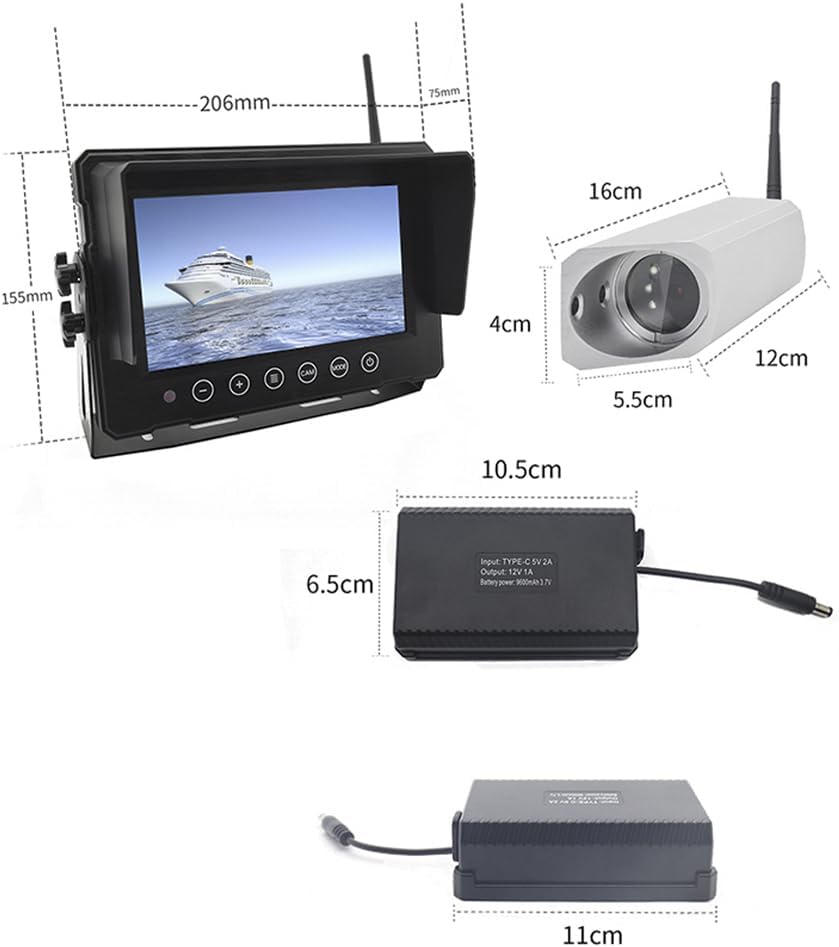
Image: Detailed dimensions of the monitor, camera, and battery bank for reference.
8. Кафолат ва дастгирӣ
VEKOOTO is committed to providing high-quality products and customer satisfaction. For specific warranty details, please refer to the warranty card included with your product or visit the official VEKOOTO website. For technical support, troubleshooting assistance, or any inquiries regarding your product, please contact VEKOOTO customer service through the contact information provided on the product packaging or the official brand store.
You can visit the VEKOOTO Store for more information: VEKOOTO Official Store


